
Introduction
This manual provides essential information for the safe and efficient operation of your Domo DO157A Tower Fan. Please read these instructions carefully before use and retain them for future reference.
The Domo DO157A is a versatile appliance combining the functions of an air cooler, fan, and humidifier, designed to enhance your indoor comfort.

Image: Front view of the Domo DO157A Tower Fan.
Safety Information
Always observe basic safety precautions when using electrical appliances to reduce the risk of fire, electric shock, and personal injury.
- Ensure the voltage indicated on the appliance corresponds to your local mains voltage before connecting.
- Do not immerse the appliance, plug, or cord in water or other liquids.
- Unplug from the outlet when not in use, before cleaning, or before moving the appliance.
- Keep the appliance out of reach of children.
- Do not operate any appliance with a damaged cord or plug, or after the appliance malfunctions or has been damaged in any manner.
- Refer to the official safety document for detailed safety guidelines: Safety Information (PDF).
Product Components
Familiarize yourself with the main parts of your Domo DO157A Tower Fan:
- Main Unit (Tower Fan)
- 7-Liter Water Tank
- Washable Filter System (Honeycomb Cooling Membrane)
- Remote Control
- Coolpack (for enhanced cooling)
- Control Panel with LED Display
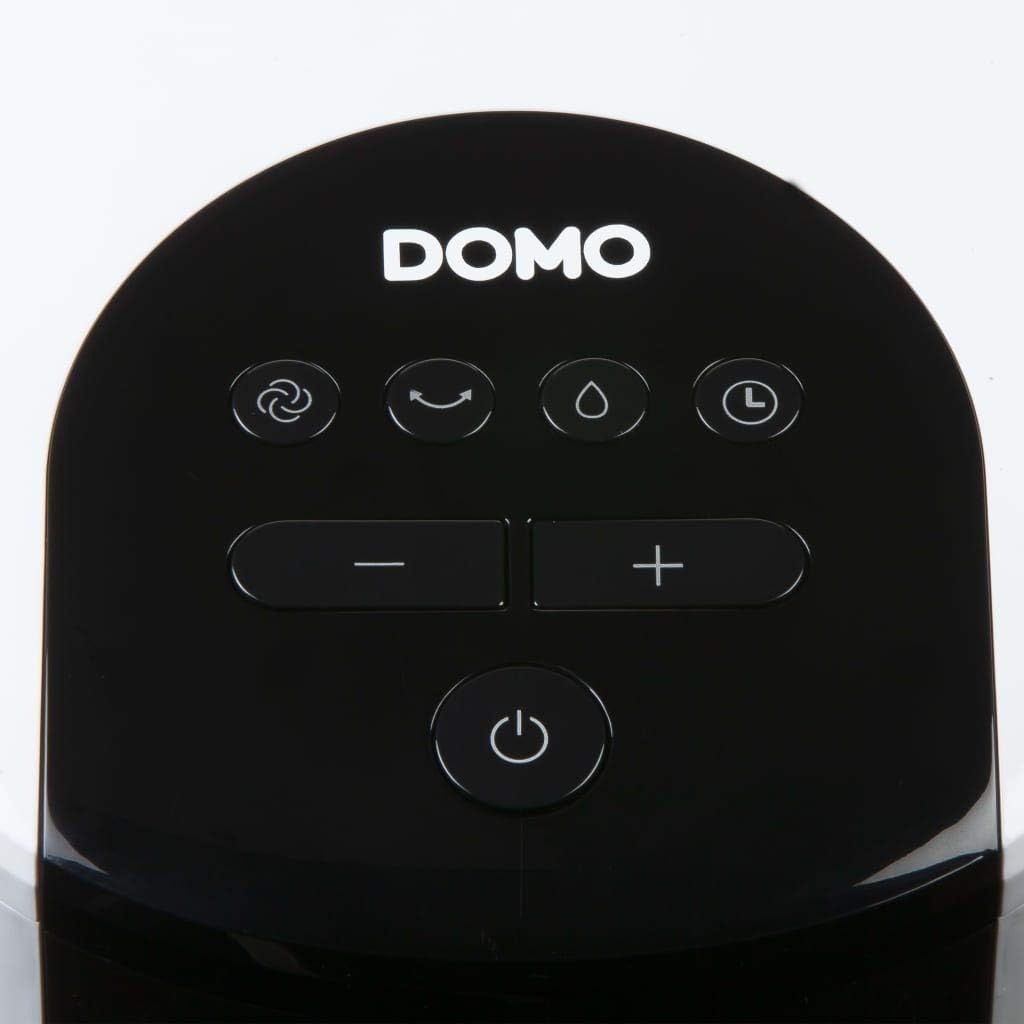
Image: View of the tower fan with the filter system removed, showing the honeycomb cooling membrane.
Setup
- Unpacking: Carefully remove the appliance from its packaging. Retain packaging for storage or disposal.
- Placement: Place the tower fan on a firm, level surface. Ensure there is adequate space around the unit for proper airflow.
- Water Tank Filling:
- Pull out the water tank from the bottom rear of the unit.
- Fill the 7-liter water tank with clean, cold water. For enhanced cooling, place the included Coolpack (after freezing) into the water tank.
- Ensure the water level does not exceed the maximum fill line.
- Slide the water tank back into the unit until it clicks into place.
- Power Connection: Plug the power cord into a suitable electrical outlet (230V).
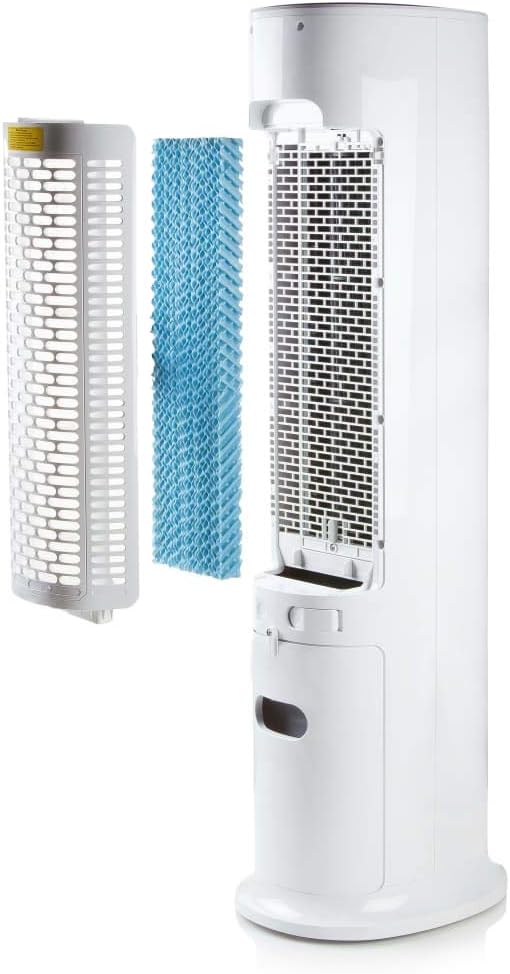
Image: Demonstrating the process of filling the water tank of the tower fan.
Operating Instructions
The Domo DO157A can be operated using the control panel on top of the unit or the included remote control.
Control Panel and Remote Control Functions

Image: Close-up view of the control panel on the top of the tower fan.
- Power Button (⏻): Turns the unit ON or OFF.
- Mode Button (☺): Cycles through 3 ventilation modes:
- Normal: Constant airflow at selected speed.
- Natural: Simulates natural breeze with varying fan speeds.
- Sleep: Reduces fan speed and noise for quiet operation during sleep.
- Speed Buttons (− / +): Adjusts fan speed (4 levels).
- Cooling/Humidifier Button (💧): Activates or deactivates the air cooling and humidifying function. This function requires water in the tank.
- Timer Button (⏱): Sets the operating timer for up to 10 hours. Each press adds 1 hour.
- Oscillation Button (↻): Activates or deactivates the oscillation function, allowing the fan to rotate and distribute air over a wider area.
Initial Operation
- Press the Power button to turn on the unit. The default mode is usually Normal.
- Use the Speed buttons to select your desired fan speed (1-4).
- To activate cooling/humidifying, press the Cooling/Humidifier button. Ensure the water tank is filled.
- Select a ventilation mode (Normal, Natural, Sleep) using the Mode button.
- Press the Oscillation button for wider air distribution.
- Set the timer if desired using the Timer button.

Image: The tower fan operating in a living room, illustrating the airflow direction.
Maintenance
Regular maintenance ensures optimal performance and extends the lifespan of your appliance.
Cleaning the Exterior
- Always unplug the unit before cleaning.
- Wipe the exterior surfaces with a soft, damp cloth. Do not use abrasive cleaners or solvents.
- Ensure no water enters the internal components.
Cleaning the Water Tank
- Remove the water tank from the unit.
- Empty any remaining water.
- Clean the tank with mild soap and water. Rinse thoroughly.
- Allow the tank to air dry completely before reinserting.
- Clean the water tank regularly, especially if using the humidifying function frequently, to prevent mold or mildew buildup.
Cleaning the Filter System
- The high-quality filter system is washable.
- Carefully remove the filter (honeycomb cooling membrane) from the unit as shown in the "Product Components" section.
- Rinse the filter under running water to remove dust and debris.
- Allow the filter to dry completely before reinserting it into the unit.
- Regular cleaning of the filter is recommended, especially for allergy sufferers, to maintain hygiene and efficiency.
Troubleshooting
If you encounter issues with your Domo DO157A, refer to the following common problems and solutions:
| Problem | Possible Cause | Solution |
|---|---|---|
| Unit does not turn on. | No power supply. | Check if the power cord is securely plugged into a working outlet. |
| No cooling effect. | Water tank is empty or cooling function is not activated. | Fill the water tank. Press the Cooling/Humidifier button to activate the function. Ensure Coolpack is frozen and placed in the tank if desired. |
| Weak airflow. | Fan speed is too low; air filter is dirty. | Increase the fan speed. Clean the air filter as per maintenance instructions. |
| Unpleasant odor. | Stagnant water in the tank or dirty filter. | Empty and clean the water tank. Clean the filter. Use fresh water. |
Specifications
| Feature | Detail |
|---|---|
| Brand | Domo |
| Model Name/Number | DO157A |
| Type | Tower Fan, Air Cooler, Humidifier |
| Material | Plastic |
| Mounting Type | Freestanding |
| Color | White |
| Airflow Capacity | 294.29 Cubic Feet per Minute (500 m³/h) |
| Control Type | Remote Control, On-unit Control Panel |
| Water Tank Capacity | 7 Liters |
| Recommended Floor Area | 25 Square Meters |
| Product Weight | 11.2 Kilograms |
| Wattage | 65 W |
| Noise Level | 40 Decibels |
| Number of Speeds | 4 |
| Voltage | 230 Volts |
| Dimensions (D x W x H) | 34 cm x 26 cm x 106.5 cm |
| Timer | Up to 10 hours |
| Ventilation Modes | Normal, Natural, Sleep |
| Special Features | Sleep mode, Washable filter system, Oscillation, Coolpack included |
Warranty and Support
For warranty information, please refer to the documentation provided with your purchase or contact Domo customer support. Keep your proof of purchase for warranty claims.
If you require further assistance or have questions not covered in this manual, please contact Domo customer service through their official website or the contact details provided with your product.


