
Listo 3380585002611
LISTO RC4875 TV Remote Control User Manual
Model: RC4875 (3380585002611)
Introduction
This manual provides comprehensive instructions for the setup, operation, and maintenance of your LISTO RC4875 TV Remote Control. Please read this manual carefully before using the device to ensure proper functionality and longevity.
Product Overview
The LISTO RC4875 is an infrared remote control designed for use with televisions. It features 25 buttons for comprehensive control of your TV functions.

Figure 1: Front view of the LISTO RC4875 TV remote control. This image displays the full layout of the 25 buttons, including numerical keys, channel and volume controls, navigation buttons, and colored function keys.
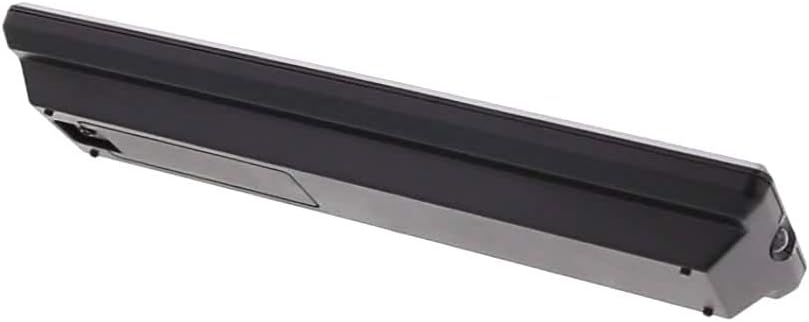
Figure 2: Side view of the LISTO RC4875 TV remote control. This image highlights the sleek profile of the remote and indicates the location of the battery compartment on the rear side.
Setup
1. Battery Installation
- Locate the battery compartment on the back of the remote control.
- Slide the battery cover downwards or in the direction indicated by an arrow to open it.
- Insert two new Alkaline batteries (not included), ensuring the positive (+) and negative (-) terminals align correctly with the markings inside the compartment.
- Close the battery cover by sliding it back into place until it clicks securely.
2. Initial Pairing (If Applicable)
The LISTO RC4875 remote control is designed to work with compatible televisions using infrared technology. In most cases, no special pairing is required. Simply point the remote at your TV and press a button. If the remote does not respond, ensure the batteries are correctly installed and the TV's infrared receiver is not obstructed.
Note: This remote is designed for a single device (television) and uses infrared connectivity. It does not support Bluetooth or Wi-Fi pairing.
Operating Instructions
To operate your television with the LISTO RC4875 remote control, ensure you have a clear line of sight between the remote's infrared emitter and your TV's infrared receiver.
Basic Functions:
- Power Button: Press to turn the TV on or off.
- Number Buttons (0-9): Use to directly enter channel numbers.
- Volume Up/Down (+V / -V): Adjust the sound volume.
- Channel Up/Down (+P / -P): Change TV channels sequentially.
- Mute Button: Mute or unmute the TV sound.
- Navigation Buttons (Up, Down, Left, Right, OK): Navigate through menus and confirm selections.
- Menu Button: Access the TV's main menu.
- Exit Button: Exit from menus or current screens.
- Source/Input Button: Switch between different input sources (HDMI, AV, etc.).
- Colored Buttons (Red, Green, Yellow, Blue): These buttons typically correspond to specific functions within TV menus or smart TV applications, as indicated on your TV screen.
Optimal Usage:
- Point the remote directly at the TV.
- Maintain a maximum distance of 10 meters (approximately 33 feet) from the TV for optimal performance.
- Avoid placing objects between the remote and the TV's infrared receiver.
Maintenance
Proper maintenance ensures the longevity and reliable operation of your remote control.
- Cleaning: Use a soft, dry cloth to wipe the surface of the remote control. Do not use liquid cleaners, abrasive pads, or chemical solvents, as these can damage the surface or internal components.
- Battery Replacement: Replace batteries when the remote's response becomes sluggish or stops working. Always replace both batteries at the same time with new Alkaline batteries.
- Storage: If the remote control will not be used for an extended period, remove the batteries to prevent leakage and potential damage to the remote. Store in a cool, dry place.
- Avoid Drops: Protect the remote from physical shocks and drops, which can damage internal circuitry.
Troubleshooting
If you encounter issues with your LISTO RC4875 remote control, refer to the following common problems and solutions:
| Problem | Possible Cause | Solution |
|---|---|---|
| Remote is not responding. | Dead or incorrectly inserted batteries. Obstruction between remote and TV. Remote is out of range. | Replace batteries with new Alkaline ones, ensuring correct polarity. Remove any obstructions. Move closer to the TV (within 10 meters). |
| Buttons are not working consistently. | Low battery power. Dirt or debris under buttons. | Replace batteries. Gently clean around the buttons with a dry cloth. |
| Remote only works sometimes. | Interference from other electronic devices or strong light sources. Weak infrared signal. | Ensure no strong light sources (like direct sunlight) are hitting the TV's IR receiver. Try moving the TV or remote to reduce interference. Replace batteries. |
| Remote does not control TV functions. | Remote is not compatible with the TV. | Verify that the remote control model RC4875 is compatible with your specific television model. This remote is designed for general TV use but specific TV models might require specific codes or programming (though this model is typically plug-and-play for compatible TVs). |
Specifications
| Feature | Detail |
|---|---|
| Brand | Listo |
| Model Number | RC4875 (3380585002611) |
| Color | Black |
| Connectivity Technology | Infrared (IR) |
| Compatible Devices | Television |
| Max Supported Devices | 1 |
| Number of Buttons | 25 |
| Controller Type | Button Control |
| Maximum Range | 10 Meters |
| Battery Type | Alkaline (not included) |
Warranty and Support
Information regarding specific warranty terms, availability of spare parts, or software updates for the LISTO RC4875 remote control is not provided in the available product data.
For further assistance or inquiries, please refer to the contact information provided by your retailer or the product manufacturer, Listo.
Related documents3380585002611


Ask a question about this manual
Ask about setup, troubleshooting, compatibility, parts, safety, or missing instructions. Manuals+ will review the question and use this page’s manual context to help answer it.