
Introduction
The XPG Summoner RGB Keyboard Series is a high-performance mechanical keyboard designed for gaming and everyday use. It features durable Cherry MX key switches, customizable RGB backlighting, and convenient media controls. This manual provides detailed instructions for setting up, operating, and maintaining your XPG Summoner keyboard.
Package Contents
- XPG Summoner RGB Keyboard
- Detachable Magnetic Wrist Rest
- Additional Keycaps (red, 8 pieces)
- Keycap Puller
- Quick Start Guide
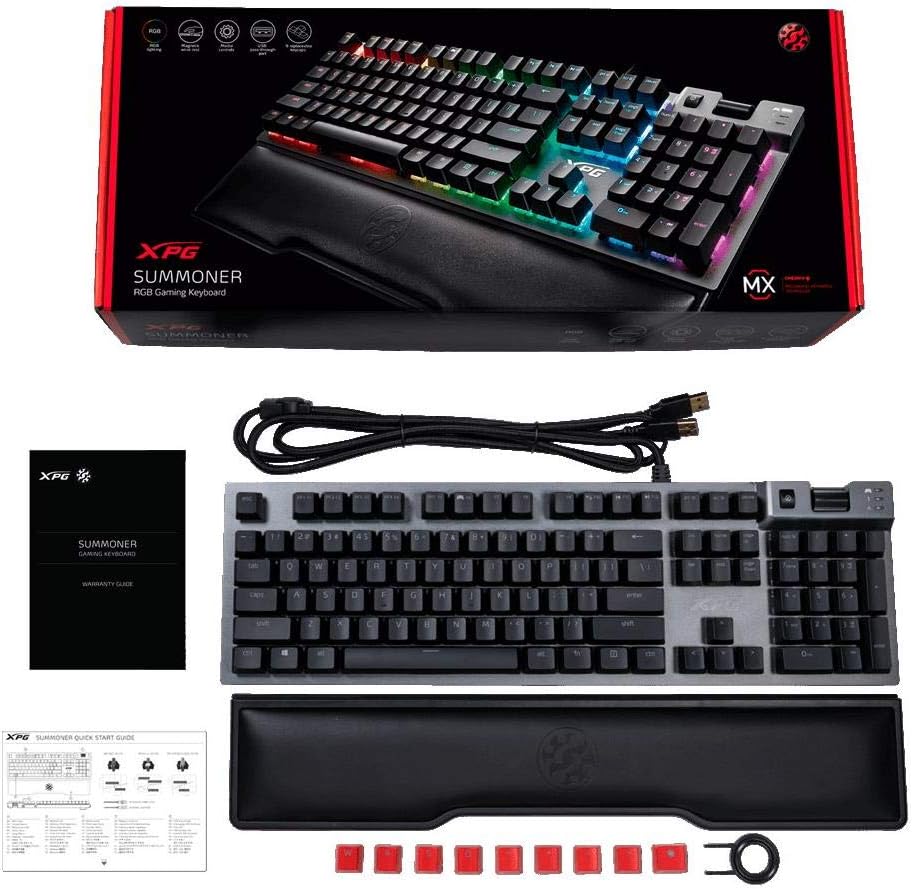
Image: Contents of the XPG Summoner RGB Keyboard package, showing the keyboard, detachable wrist rest, user manual, and a set of red replacement keycaps with a keycap puller.
Setup
- Connect the Keyboard: Plug the USB connector of the XPG Summoner keyboard into an available USB port on your computer. The keyboard is plug-and-play and should be recognized automatically by your operating system.
- Attach the Wrist Rest: Align the magnetic wrist rest with the front edge of the keyboard. The magnets will secure it in place, providing ergonomic support during use.
- Install XPG Prime Software (Optional): For advanced customization of macros, game profiles, and RGB lighting effects, download and install the XPG Prime software from the official XPG website.
- USB Passthrough: The keyboard features a convenient USB passthrough port. Connect USB drives or wireless dongles to this port for quick access.

Image: A close-up view of the XPG Summoner keyboard's side, highlighting the USB passthrough port for connecting additional devices.
Operating Instructions
Key Features and Functions
- Cherry MX Mechanical Switches: The keyboard is equipped with Cherry MX Blue mechanical switches, providing tactile feedback and an audible click for each keystroke.

Image: A detailed view of the XPG Summoner keyboard's keys, showcasing the Cherry MX Blue mechanical switches with their distinct blue backlighting.
- RGB Backlighting: The keyboard features per-key RGB backlighting with 7 preset modes. These modes can be customized further using the XPG Prime software.

Image: The XPG Summoner RGB Keyboard illuminated with a spectrum of colors, demonstrating its customizable backlighting capabilities.
- Media Control Wheel: An intuitive media control wheel allows for easy and quick volume adjustment.
- Macro Keys: Record complex sequences and assign them to designated macro keys for quick execution.
- 100% Anti-Ghosting: Ensures all key presses are registered accurately, even during rapid, simultaneous keystrokes.
Function Key Combinations (FN + Key)
| Combination | Function |
|---|---|
| FN + F1 | My Computer |
| FN + F2 | Search |
| FN + F3 | Calculator |
| FN + F4 | Media Player |
| FN + F5 | Previous Track |
| FN + F6 | Next Track |
| FN + F7 | Play/Pause |
| FN + F8 | Stop |
| FN + F9 | Mute |
| FN + F10 | Volume Down |
| FN + F11 | Volume Up |
| FN + F12 | Lock Keyboard |
| FN + Windows Key | Toggle Game Mode (disables Windows key) |
| FN + Insert | Toggle RGB Lighting Modes |
| FN + Up/Down Arrow | Adjust Brightness |
| FN + Left/Right Arrow | Adjust Lighting Speed/Direction |
Maintenance
- Cleaning: Regularly clean the keyboard with a soft, dry cloth. For deeper cleaning, use compressed air to remove dust and debris from between the keycaps. Avoid using harsh chemicals or abrasive materials.
- Keycap Removal: If necessary, use the provided keycap puller to carefully remove keycaps for cleaning or replacement. Pull straight up to avoid damaging the switch.
- Storage: When not in use for extended periods, store the keyboard in a clean, dry environment away from direct sunlight and extreme temperatures.
Troubleshooting
| Problem | Possible Solution |
|---|---|
| Keyboard not responding. |
|
| RGB lighting not working or incorrect. |
|
| Keys not registering or ghosting. |
|
| XPG Prime software issues. |
|
Specifications
- Model: SUMMONER4C-BKCWW
- Dimensions: 9 x 20 x 3 inches
- Weight: 3.44 pounds
- Key Switches: Cherry MX Blue Mechanical
- Backlighting: Per-Key RGB
- Connectivity: USB
- Features: Magnetic Wrist Rest, USB Passthrough, Media Control Wheel, 100% Anti-Ghosting
- Manufacturer: Adata
Warranty and Support
For warranty information and technical support, please visit the official XPG website or contact XPG customer service. Keep your purchase receipt for warranty claims.
Official XPG Website: www.xpg.com
Product Video
Video: An official product video showcasing the features and design of the XPG Summoner RGB Keyboard, including its Cherry MX switches, RGB lighting, and ergonomic wrist rest.