1. Introduction
The ORNO ZS-816 is a robust, waterproof code lock with an integrated card and key fob reader, designed for secure access control. Featuring EPROM memory for data retention and an IP68 rating for outdoor use, this device offers reliable security for various applications. This manual provides essential information for the proper installation, operation, and maintenance of your ZS-816 unit.

Image 1.1: The ORNO ZS-816 Code Lock with an example proximity card and key fob.
2. Safety Information
- Read all instructions carefully before installation and operation.
- Installation should be performed by a qualified professional to ensure proper functionality and safety.
- Disconnect power before performing any wiring or maintenance.
- Ensure all connections are secure and insulated to prevent short circuits.
- Do not expose the device to extreme temperatures or corrosive substances beyond its IP68 rating.
- Keep the device away from strong electromagnetic fields.
3. Package Contents
Please check the package for the following items:
- ORNO ZS-816 Code Lock Unit
- Mounting Screws and Wall Plugs
- User Manual (this document)
- Note: Proximity cards and key fobs are typically sold separately.
4. Product Features
- Built-in EPROM Memory: All codes and device parameters are securely stored, ensuring data retention even during power loss.
- Wide Range of Applications: Compatible with electromagnetic locks, access control systems, and other electrical devices or alarm systems.
- Illuminated Keyboard: The keypad is illuminated for easy use in low-light conditions and integrates well with modern aesthetics.
- Multiple Access Methods: Supports three ways to open the door: PIN code (up to 10,000 combinations), proximity card, or a combination of PIN and card for enhanced security.
- IP68 Waterproof Rating: Designed for both indoor and outdoor use, providing protection against dust and water ingress, even under challenging environmental conditions.
5. Setup
5.1. Installation
The ORNO ZS-816 is suitable for surface mounting on a wall or door frame. Due to its IP68 rating, it can be installed outdoors. Choose a location that is easily accessible and provides clear visibility for users.
- Mark the desired mounting position on the wall.
- Drill holes for mounting screws and for routing the wiring.
- Secure the mounting plate (if applicable) or the device directly to the wall using the provided screws.
- Route the necessary wiring through the wall and connect it to the device as described in the wiring section.
- Attach the main unit to the mounting plate or secure it directly, ensuring a tight seal for waterproof integrity.

Image 5.1: Example installation of the ORNO ZS-816 Code Lock next to a door.
5.2. Wiring Diagram
The ZS-816 requires a DC 12-24V power supply. Connect the wires according to the diagram below. It is crucial to ensure correct polarity and secure connections.
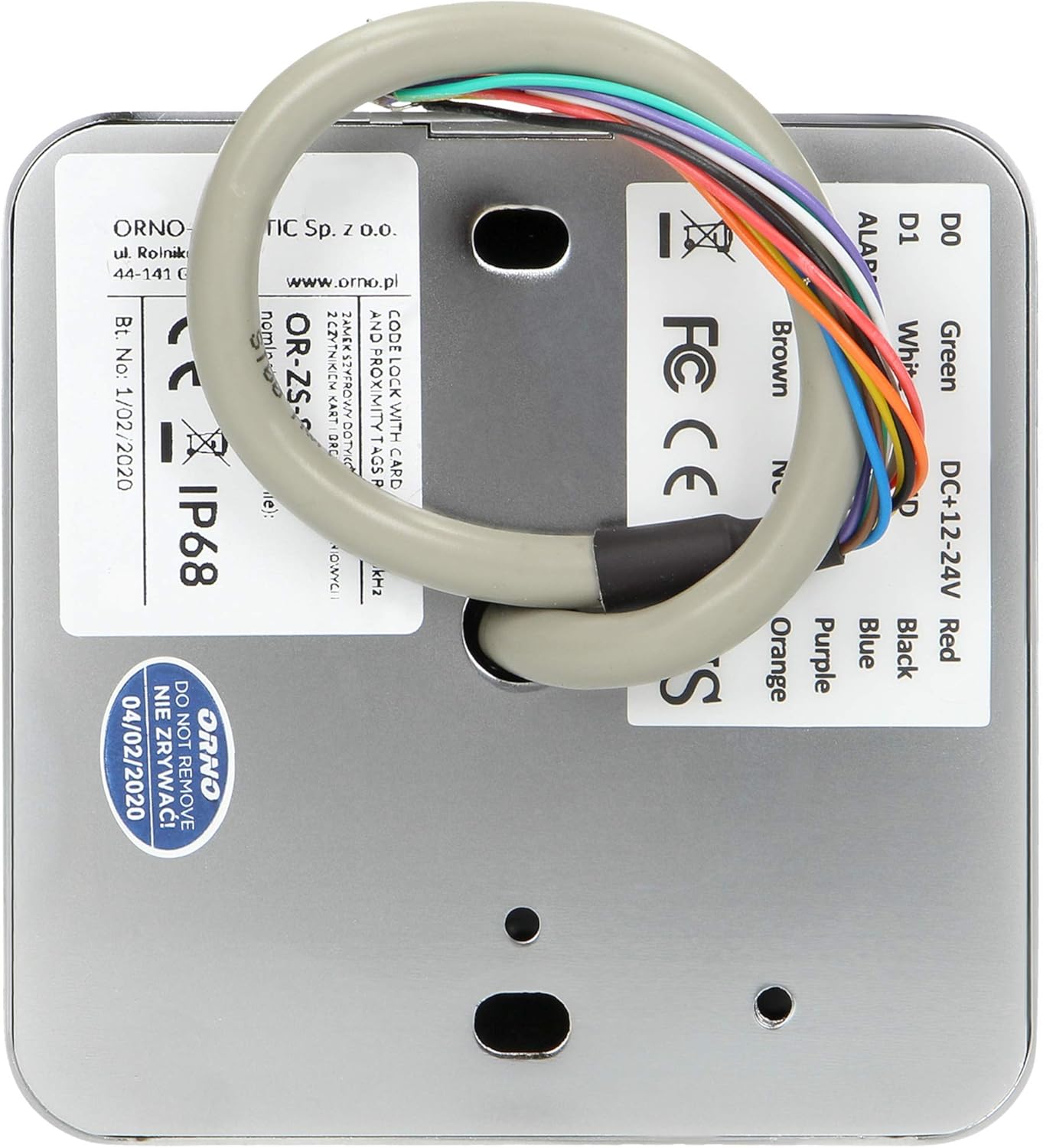
Image 5.2: Rear view of the ORNO ZS-816 showing the wiring harness and product labels.
| Wire Color | Function (Typical) |
|---|---|
| Red | DC Power Input (+) |
| Black | DC Power Input (-) / Ground |
| Green | Data 0 (D0) / Lock Output (NO) |
| White | Data 1 (D1) / Lock Output (NC) |
| Brown | Alarm Output |
| Blue | Common (COM) for Lock/Alarm |
| Purple | Door Sensor Input |
| Orange | Bell Output |
Important: Always refer to the detailed wiring diagram provided in the complete installation manual for your specific setup, as functions may vary slightly depending on the system integration.
6. Operating Instructions
The ORNO ZS-816 operates using a master code for programming and user codes/cards for daily access. The illuminated keyboard enhances usability.

Image 6.1: Detailed view of the ORNO ZS-816 illuminated keypad.
6.1. Default Settings
- Default Master Code: [Consult full manual for default master code, typically 123456 or 999999]
- Operating Mode: Single access (PIN or Card)
6.2. Programming Master Code
It is highly recommended to change the default master code immediately after installation.
- Enter the current Master Code.
- Press the programming key (e.g., '*').
- Enter the new Master Code (e.g., 6-8 digits).
- Re-enter the new Master Code to confirm.
- Press the programming key to exit.
6.3. Adding User Codes
- Enter the Master Code.
- Press the programming key.
- Select the 'Add User Code' option (e.g., by pressing '1').
- Enter a unique User ID (e.g., 001-999).
- Enter the desired User Code (e.g., 4-6 digits).
- Press the programming key to save. Repeat for additional users.
6.4. Adding User Cards/Fobs
- Enter the Master Code.
- Press the programming key.
- Select the 'Add User Card' option (e.g., by pressing '2').
- Present the proximity card or key fob to the reader. The device will register it.
- Press the programming key to save. Repeat for additional cards/fobs.
6.5. Deleting User Codes/Cards
- Enter the Master Code.
- Press the programming key.
- Select the 'Delete User' option (e.g., by pressing '3').
- Enter the User ID or present the card/fob to be deleted.
- Press the programming key to confirm deletion.
6.6. Accessing the Lock
- Using a PIN: Enter your User Code and press '#'.
- Using a Card/Fob: Present your proximity card or key fob to the reader.
- PIN + Card Mode: Present your card/fob, then enter your User Code and press '#'. (This mode must be enabled in programming).

Image 6.2: The ORNO ZS-816 Code Lock in use on an outdoor gate.
7. Maintenance
- Cleaning: Wipe the keypad and housing with a soft, damp cloth. Do not use abrasive cleaners or solvents.
- Inspection: Periodically check the wiring connections for any signs of wear or damage. Ensure the mounting screws are tight.
- Functionality Test: Regularly test all access methods (PIN, card) to ensure proper operation.
8. Troubleshooting
| Problem | Possible Cause | Solution |
|---|---|---|
| Device does not power on. | No power supply, incorrect wiring, faulty power adapter. | Check power connections and supply voltage (DC 12-24V). Verify wiring polarity. |
| Keypad does not respond. | Power issue, internal fault. | Ensure device is powered. If problem persists, contact support. |
| Invalid code/card error. | Incorrect code entered, card not programmed, card damaged. | Verify the code. Re-program the card or try a different card. Ensure correct operating mode (e.g., not in PIN+Card mode if only using PIN). |
| Lock does not open. | Incorrect wiring to lock, faulty lock, insufficient power to lock. | Check lock wiring and power supply to the lock. Test the lock independently if possible. |
| Cannot enter programming mode. | Incorrect Master Code, device already in programming mode. | Ensure correct Master Code is used. Wait a few seconds and try again if previous attempt failed. |
9. Specifications
| Feature | Detail |
|---|---|
| Model | ZS-816 |
| Brand | Orno |
| Material | Aluminum |
| Dimensions (L x W x H) | 3.23 x 5.04 x 1.1 inches (approx. 82 x 128 x 28 mm) |
| Item Weight | 14.8 ounces (approx. 0.42 kg) |
| Power Source | DC |
| Voltage | 12-24 Volts |
| Lock Type | Key Lock (refers to function, not physical key) |
| Special Features | Waterproof (IP68), Code Lock, Magnetic Card Reader, Key Fob Reader, EPROM Memory |
| Finish Type | Polished |
| Color | Black |
| Control Method | Keypad, Proximity Card/Fob |
10. Warranty and Support
ORNO products are designed for reliability and durability. For warranty information, technical support, or service inquiries, please refer to the warranty card included with your product or visit the official ORNO website. Keep your purchase receipt as proof of purchase.
For further assistance, please contact ORNO customer service directly.


