
Introduction
The Power Dynamics PPA30 is a versatile 30W 100V amplifier designed for small to medium-sized public address and background music applications. This amplifier features multiple input options including microphone inputs, stereo line inputs, Bluetooth connectivity for wireless streaming, and a built-in MP3 player with USB and SD card support. A remote control is included for convenient operation.
Safety Information
Please read these instructions carefully before using the device. Keep this manual for future reference. Always observe the following safety precautions:
- Do not expose the device to rain or moisture.
- Do not open the housing. There are no user-serviceable parts inside. Refer all servicing to qualified personnel.
- Ensure the power supply voltage matches the requirements specified on the device.
- Protect the power cord from being walked on or pinched.
- Disconnect the device from the mains during lightning storms or when unused for long periods.
- Place the device on a stable, level surface with adequate ventilation.
Package Contents
Please check that all items are present and in good condition upon opening the package:
- Power Dynamics PPA30 Amplifier
- Power Cable
- Remote Control
- User Manual
Product Overview
Front Panel
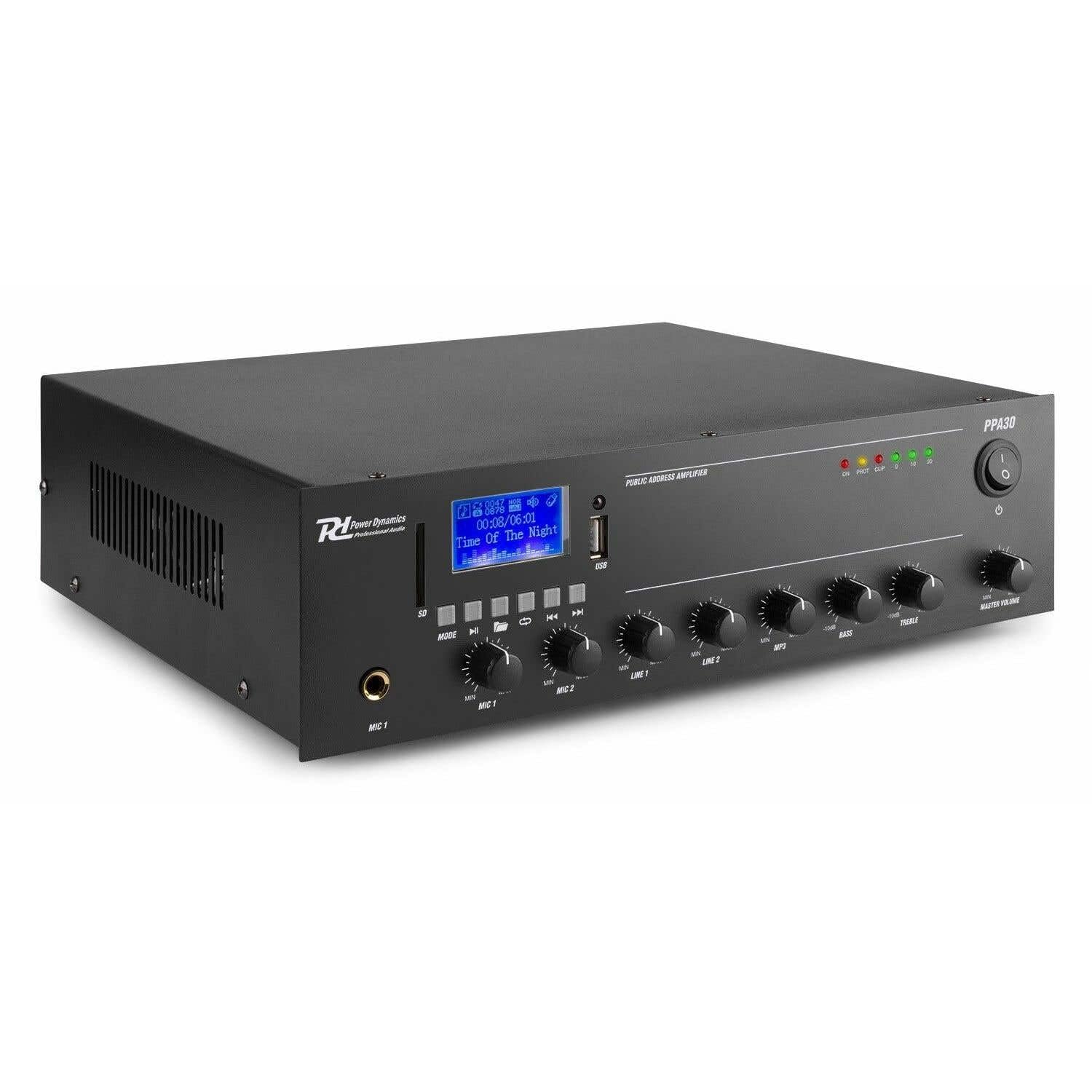
Figure 1: Front Panel Layout of the PPA30 Amplifier. This image displays the amplifier's front face, including the display screen, USB/SD card slots, control buttons for media playback, input volume controls for microphones and line inputs, bass and treble adjustments, and the master volume knob. The power switch and indicator lights are also visible.
The front panel provides access to all primary controls and indicators:
- Power Switch: Turns the amplifier on or off.
- Display Screen: Shows current mode, track information, and other status indicators.
- USB/SD Card Slots: For connecting USB drives or SD cards for MP3 playback.
- Mode Button: Switches between input sources (Bluetooth, USB, SD, Line 1, Line 2).
- Media Playback Controls: Play/Pause, Previous, Next, Repeat.
- MIC 1 & MIC 2 Inputs: 6.3mm jack inputs for microphones.
- MIC 1 & MIC 2 Volume Controls: Adjusts the volume for each microphone input.
- LINE 1 & LINE 2 Volume Controls: Adjusts the volume for line inputs.
- MP3 Volume Control: Adjusts the volume for USB/SD/Bluetooth playback.
- Bass & Treble Controls: Adjusts the low and high frequencies of the audio output.
- Master Volume: Controls the overall output volume of the amplifier.
- Indicator Lights: Power (ON), Protection (PROT), Clip, and Output Level (0, 10, 20).
Rear Panel

Figure 2: Rear Panel Connections of the PPA30 Amplifier. This image illustrates the back of the amplifier, detailing the AC power input, DC input, speaker output terminals (COM, 8Ω, 70V, 100V), and RCA line inputs (LINE OUT, LINE 1, LINE 2, MIC 2). Safety warnings and product information are also visible.
The rear panel houses the power input, speaker outputs, and additional audio inputs:
- AC Power Input: Connects to the main power supply.
- DC Input: Optional 12V DC power input.
- Speaker Output Terminals: Connections for 100V, 70V, and 8 Ohm speakers. Ensure correct impedance matching.
- LINE OUT: RCA output for connecting to another amplifier or recording device.
- LINE 1 & LINE 2 Inputs: RCA stereo inputs for external audio sources (e.g., CD player, mixer).
- MIC 2 Input: Additional 6.3mm jack input for a microphone.
Remote Control

Figure 3: Remote Control for the PPA30 Amplifier. This image shows the handheld remote control with buttons for power, mode selection, volume adjustment, track navigation, EQ settings, and direct number input for track selection.
The remote control allows for convenient operation from a distance. Functions include power on/off, mode selection, volume control, track navigation, and EQ settings.
Setup
- Placement: Position the amplifier on a flat, stable surface. Ensure adequate ventilation around the unit to prevent overheating.
- Speaker Connection: Connect your 100V, 70V, or 8 Ohm speakers to the appropriate terminals on the rear panel. Ensure correct polarity (+ to + and - to - or COM). For 100V/70V systems, ensure your speakers are compatible and correctly wired for constant voltage.
- Audio Source Connection:
- Microphones: Plug microphones into the MIC 1 or MIC 2 inputs on the front panel.
- Line Devices: Connect external audio sources (e.g., CD player, mixer) to the LINE 1 or LINE 2 RCA inputs on the rear panel.
- USB/SD Card: Insert a USB drive or SD card into the respective slot on the front panel for MP3 playback.
- Power Connection: Connect the supplied power cable to the AC power input on the rear panel and then to a suitable mains outlet.
- Initial Power On: Turn on the amplifier using the power switch on the front panel. The 'ON' indicator light should illuminate.
Operating Instructions
Selecting Input Source
Press the MODE button on the front panel or remote control to cycle through available input sources: Bluetooth, USB, SD, Line 1, Line 2.
Bluetooth Operation
- Select Bluetooth mode using the MODE button. The display will indicate Bluetooth mode.
- On your smartphone, tablet, or computer, enable Bluetooth and search for available devices.
- Select "PPA30" from the list of devices to pair. Once paired, you can stream audio wirelessly to the amplifier.
- Adjust the MP3 volume control on the front panel or the volume buttons on the remote control.
USB/SD Card Playback
- Insert a USB drive or SD card containing MP3 audio files into the corresponding slot.
- The amplifier should automatically switch to USB or SD mode and begin playback. If not, select the correct mode using the MODE button.
- Use the Play/Pause, Previous, Next, and Repeat buttons on the front panel or remote control to manage playback.
- Adjust the MP3 volume control.
Microphone Usage
- Connect your microphone(s) to the MIC 1 or MIC 2 inputs.
- Slowly increase the corresponding MIC 1 or MIC 2 volume control until the desired level is reached.
- Avoid setting the volume too high to prevent feedback or clipping (indicated by the 'CLIP' light).
Line Input Usage
- Connect your external audio source to the LINE 1 or LINE 2 RCA inputs.
- Select the appropriate line input using the MODE button.
- Adjust the corresponding LINE 1 or LINE 2 volume control.
Tone Control
Use the BASS and TREBLE knobs on the front panel to adjust the low and high frequencies of the overall audio output to suit your preference or room acoustics.
Master Volume
The MASTER VOLUME knob controls the overall output level of all active audio sources. Adjust this to achieve the desired listening volume.
Maintenance
- Cleaning: Use a soft, dry cloth to clean the exterior of the amplifier. Do not use abrasive cleaners or solvents.
- Ventilation: Ensure that the ventilation openings are not blocked to prevent overheating.
- Storage: If storing the unit for an extended period, disconnect it from power and store it in a cool, dry place.
Troubleshooting
| Problem | Possible Cause | Solution |
|---|---|---|
| No power | Power cable not connected; Power switch off; No power from outlet. | Check power cable connection; Turn power switch on; Test outlet with another device. |
| No sound output | Incorrect input selected; Volume too low; Speaker connections loose; Speakers faulty. | Select correct input (MODE button); Increase Master Volume and input specific volume; Check speaker wiring; Test with different speakers. |
| Distorted sound | Volume too high (clipping); Incorrect tone settings; Faulty audio source. | Reduce Master Volume or input volume until 'CLIP' light is off; Adjust Bass/Treble controls; Test with a different audio source. |
| Bluetooth not connecting | Bluetooth mode not selected; Device not in pairing mode; Interference. | Ensure amplifier is in Bluetooth mode; Make sure your device's Bluetooth is on and searching; Move closer to the amplifier; Restart both devices. |
| USB/SD playback issues | Incorrect file format; Corrupted files; USB/SD card not inserted correctly. | Ensure files are MP3 format; Try a different USB/SD card; Reinsert the card/drive. |
Specifications
| Feature | Specification |
|---|---|
| Brand | Power Dynamics |
| Model | PPA30 |
| Output Power | 30 Watts |
| Number of Channels | 2 |
| Voltage (AC) | 220-230 Volt (AC) |
| Item Dimensions (LxWxH) | 27 x 32 x 8.6 cm |
| Item Weight | 3.25 Kilograms |
| Mounting Type | Freestanding |
| Operating Temperature | Up to 40 Degrees Celsius |
| Certifications | CE, RoHS |
Warranty and Support
This product is covered by a standard manufacturer's warranty. Please refer to the warranty card included in your package for specific terms and conditions. For technical support, service, or warranty claims, please contact your retailer or the Power Dynamics customer service department. Keep your proof of purchase for warranty validation.
For more information, visit the official Power Dynamics website: www.power-dynamics.eu


