
POOLEX PC-SLP070N
POOLEX POOLSTAR Silverline Inverter 70 Heat Pump User Manual
Model: PC-SLP070N
1. Introduction
This manual provides essential information for the safe and efficient operation, installation, and maintenance of your POOLEX POOLSTAR Silverline Inverter 70 heat pump. Please read this manual thoroughly before installation and use, and keep it for future reference.
The Silverline Inverter 70 is designed to efficiently heat your pool, offering advanced Full Inverter technology for optimal performance and reduced energy consumption. It features a multi-frequency compressor and a variable fan, ensuring quiet operation and high heating capacity for pools up to 110 m³.
2. Safety Information
Always observe the following safety precautions to prevent injury and damage to the unit:
- Ensure the unit is installed by a qualified technician in accordance with local electrical and plumbing codes.
- Do not operate the unit if any part is damaged or if the power cord is frayed.
- Keep children and pets away from the unit during operation.
- Do not insert objects into the fan or ventilation openings.
- Disconnect power before performing any maintenance or repairs.
- Ensure proper ventilation around the unit to prevent overheating.
3. Product Overview
The POOLEX POOLSTAR Silverline Inverter 70 is a high-performance heat pump designed for efficient pool heating. Key components include the main unit, control panel, and various connection points.

Figure 3.1: Main unit of the POOLEX POOLSTAR Silverline Inverter 70 heat pump, showcasing its compact design and fan grille.
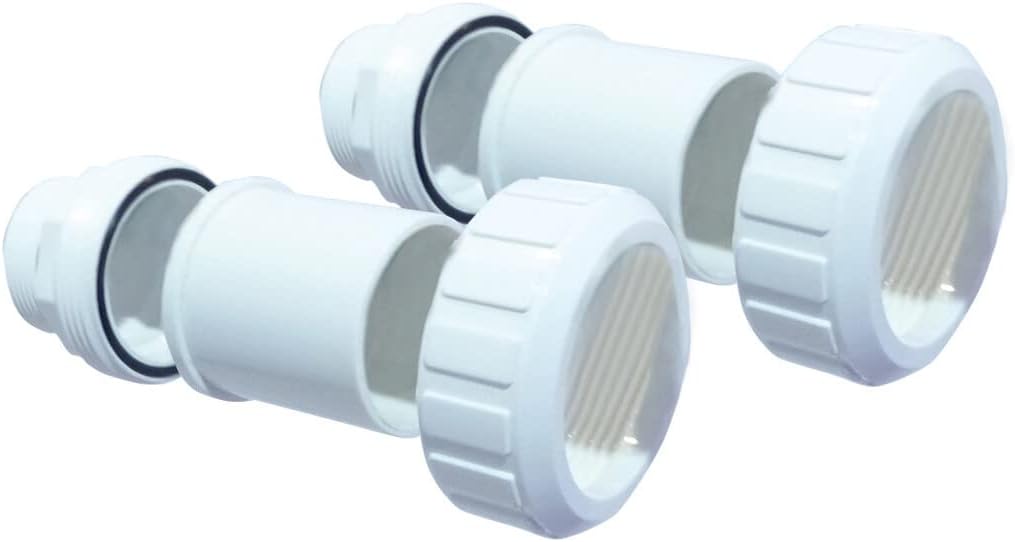
Figure 3.2: Essential pipe connectors used for plumbing the heat pump into the pool's filtration system.

Figure 3.3: Set of four rubber anti-vibration pads, designed to reduce noise and vibration during operation.

Figure 3.4: The control cable, used for connecting the heat pump to its control system or external devices.

Figure 3.5: A flexible pool hose, typically used for connecting the heat pump to the pool's water circulation system.

Figure 3.6: A protective cover, designed to shield the heat pump from environmental elements when not in use.
4. Setup and Installation
Proper installation is crucial for the performance and longevity of your heat pump. It should be installed outdoors, with adequate clearance for air circulation.
4.1 Site Selection
- Choose a well-ventilated area, away from direct sunlight and heat sources.
- Ensure a solid, level surface capable of supporting the unit's weight (25 kg).
- Maintain a minimum clearance of 50 cm around the unit for optimal airflow.
4.2 Plumbing Connections
- Install the heat pump after the pool filter and before any chemical feeders.
- Use appropriate PVC piping and unions (Figure 3.2) to connect the heat pump to your pool's circulation system.
- Ensure all connections are watertight to prevent leaks.
4.3 Electrical Connections
- Connect the heat pump to a dedicated electrical circuit with appropriate overcurrent protection.
- Ensure the power supply matches the unit's requirements (refer to specifications).
- All electrical work must be performed by a licensed electrician.
5. Operating Instructions
The Silverline Inverter 70 is designed for user-friendly operation. Familiarize yourself with the control panel and its functions.
5.1 Initial Startup
- Ensure the pool's filtration system is running and water is circulating through the heat pump.
- Turn on the power supply to the heat pump.
- The unit will perform a self-check.
5.2 Setting Desired Temperature
- Use the control panel to set your desired pool water temperature.
- The heat pump will automatically adjust its operation to reach and maintain this temperature.
5.3 Operating Modes
The unit typically features different operating modes (e.g., Heating, Cooling, Auto). Refer to the specific control panel interface for detailed mode selection and functionality.
6. Maintenance
Regular maintenance ensures optimal performance and extends the lifespan of your heat pump.
6.1 Routine Checks
- Inspect the unit regularly for any visible damage or obstructions.
- Ensure the fan is clear of debris.
- Check for proper water flow and pressure.
6.2 Cleaning
- Clean the exterior of the unit with a soft, damp cloth.
- Periodically clean the evaporator coils to ensure efficient heat exchange.
6.3 Winterization
Before winter or extended periods of non-use, drain all water from the heat pump and cover it with a protective cover (Figure 3.6) to prevent damage from freezing temperatures.
7. Troubleshooting
This section provides solutions to common issues you might encounter.
| Problem | Possible Cause | Solution |
|---|---|---|
| Unit not heating | Insufficient water flow; Low ambient temperature; Incorrect temperature setting. | Check pool pump and filter; Ensure ambient temperature is within operating range; Adjust temperature setting. |
| Unit not turning on | No power supply; Circuit breaker tripped. | Check power connection; Reset circuit breaker. |
| Unusual noise | Debris in fan; Loose components. | Inspect and clear fan; Tighten any loose parts. |
8. Specifications
Technical details for the POOLEX POOLSTAR Silverline Inverter 70 heat pump.
| Feature | Detail |
|---|---|
| Model Number | PC-SLP070N |
| Manufacturer | POOLSTAR |
| Dimensions (L x W x H) | 82.4 x 33.4 x 65.6 cm |
| Weight | 25 kg |
| Recommended Pool Volume | 30-45 m³ (up to 110 m³ compatible) |
| Technology | Full Inverter, Multi-frequency Compressor, WiFi |
| Heating Capacity | 7 kW |
| COP (26°C/26°C) | Up to 16 |
9. Warranty Information
POOLEX products are manufactured to high-quality standards. For specific warranty terms and conditions, please refer to the warranty card included with your product or visit the official POOLEX website. Keep your proof of purchase for warranty claims.
10. Support and Contact
For technical assistance, spare parts, or further inquiries, please contact POOLEX customer support. You may find updated manuals and support resources on the official POOLEX website: www.poolex.fr
When contacting support, please have your product model number (PC-SLP070N) and purchase date ready.
Related documentsPC-SLP070N


Ask a question about this manual
Ask about setup, troubleshooting, compatibility, parts, safety, or missing instructions. Manuals+ will review the question and use this page’s manual context to help answer it.