
POOLEX PC-SLP200N
POOLEX POOLSTAR Silverline Inverter 210 Heat Pump User Manual
Model: PC-SLP200N
Brand: POOLEX
1. Introduction
Thank you for choosing the POOLEX POOLSTAR Silverline Inverter 210 Heat Pump. This manual provides essential information for the safe and efficient installation, operation, and maintenance of your new pool heat pump. Designed for pools up to 110 m³, this unit features a multi-frequency compressor and variable fan for optimal performance and quiet operation, along with Wi-Fi connectivity for convenient control.
2. Safety Information
WARNING: Read all safety warnings and instructions carefully before installing or operating this appliance. Failure to follow these instructions may result in electric shock, fire, serious injury, or death.
- Ensure the heat pump is installed by a qualified technician in accordance with local electrical and plumbing codes.
- Always disconnect power to the unit before performing any maintenance or service.
- Do not operate the heat pump if any part is damaged or if the power cord is frayed.
- Keep children and pets away from the unit during operation.
- Ensure proper ventilation around the unit to prevent overheating.
- Do not block the air intake or exhaust vents.
- This appliance is designed for heating pool water only. Do not use for other purposes.
3. Package Contents
Verify that all items listed below are included in your package:
- POOLEX POOLSTAR Silverline Inverter 210 Heat Pump Unit
- Anti-vibration Support Kit (4 pieces)
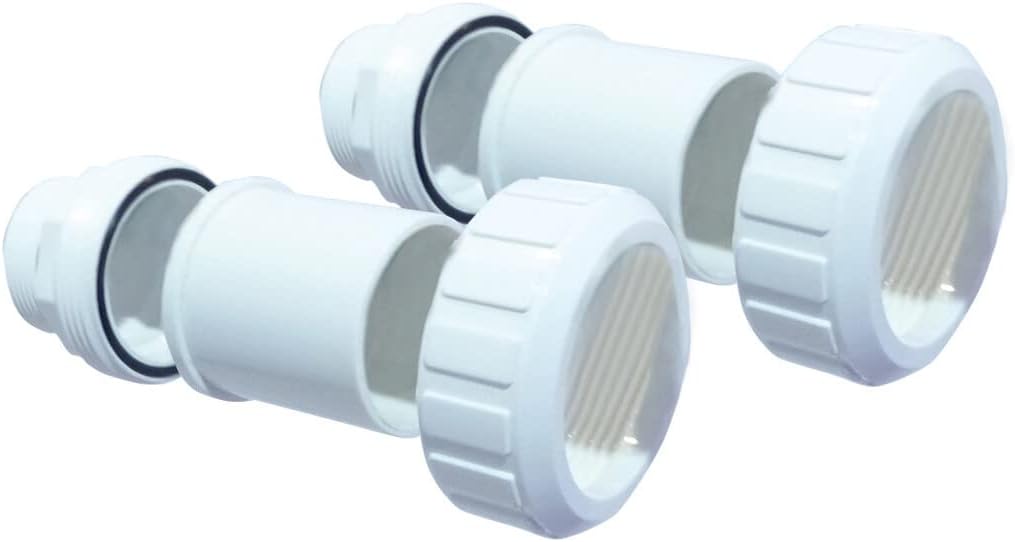
- PVC Connectors (Ø 50mm 1" ½)
- Condensate Drain Hose
- Wired Control Extension Cable (10m)
- User Manual and Documentation Folder
- Protective Cover (for storage/protection)

POOLEX Silverline Inverter 210 Heat Pump

Anti-vibration Supports

PVC Connectors

Condensate Drain Hose
Wired Control Extension Cable

Protective Cover

User Manual Folder
4. Setup
4.1. Placement
- Choose a well-ventilated outdoor location, away from direct sunlight and heat sources.
- Ensure sufficient clearance around the unit for proper airflow (refer to specific distances in the detailed manual).
- Place the unit on a solid, level surface. Use the provided anti-vibration supports to minimize noise and vibration.
4.2. Water Connections
- Connect the heat pump to your pool's filtration system using the supplied PVC connectors (Ø 50mm 1" ½).
- Ensure all connections are watertight to prevent leaks.
- Install the condensate drain hose to direct condensed water away from the unit's base.
4.3. Electrical Connections
- Electrical installation must be performed by a certified electrician.
- Ensure the power supply matches the specifications of the heat pump (refer to the rating label on the unit).
- Connect the wired control extension cable if you wish to relocate the LED control panel up to 10 meters away from the main unit.
5. Operating Instructions
5.1. Initial Start-up
- Ensure the pool pump is running and water is flowing through the heat pump.
- Turn on the power supply to the heat pump.
- The unit will perform a self-check.
5.2. Setting Temperature
- Use the LED control panel to set your desired pool water temperature.
- The heat pump will automatically adjust its operation to reach and maintain the set temperature.
5.3. Wi-Fi Connectivity
- Download the dedicated POOLEX application on your smartphone.
- Follow the in-app instructions to connect your heat pump to your home Wi-Fi network.
- Once connected, you can monitor and control your heat pump remotely from your smartphone.
6. Maintenance
6.1. Regular Cleaning
- Periodically clean the exterior of the unit with a soft, damp cloth.
- Ensure the air intake and exhaust grilles are free from debris (leaves, dirt, etc.).
6.2. Water Flow Check
- Regularly check the pool filter and pump to ensure adequate water flow to the heat pump. Reduced flow can impact performance.
6.3. Winterization
- Before freezing temperatures, drain all water from the heat pump and plumbing lines to prevent damage.
- Disconnect the power supply.
- Cover the unit with the provided protective cover for off-season storage.
7. Troubleshooting
If you encounter issues, refer to the table below for common problems and solutions. For complex issues, contact customer support.
| Problem | Possible Cause | Solution |
|---|---|---|
| Heat pump not turning on | No power supply; Circuit breaker tripped | Check power connection; Reset circuit breaker |
| Low heating performance | Insufficient water flow; Dirty coils; Ambient temperature too low | Check pool pump and filter; Clean unit coils; Operate within recommended temperature range |
| Unusual noise | Loose components; Debris in fan; Unit not level | Inspect for loose parts; Clear debris; Ensure unit is level and anti-vibration supports are used |
| Wi-Fi connection issues | Incorrect password; Router too far; App issues | Verify Wi-Fi password; Move router closer or use extender; Reinstall app |
8. Specifications
| Feature | Specification |
|---|---|
| Model Number | PC-SLP200N |
| Dimensions (L x W x H) | 110.4 x 33.4 x 75.6 cm |
| Weight | 25 kg |
| Recommended Pool Volume | 80 - 110 m³ |
| Compressor Type | Multi-frequency (Mitsubishi) |
| Heat Exchanger | Twisted Tech (Titanium coil) |
| Connectivity | Wi-Fi, Wired Control Panel (10m extension) |
| COP (26°C/26°C) | Up to 16 |
9. Warranty and Support
POOLEX is committed to your satisfaction. For warranty information, please refer to the documentation included with your product or visit the official POOLEX website. In case of technical issues or questions, please contact POOLEX customer service.
Please note that information regarding spare parts availability is not readily available. For any spare parts inquiries, please contact POOLEX customer support directly.
For further assistance, please visit: www.poolex.fr
Related documentsPC-SLP200N


Ask a question about this manual
Ask about setup, troubleshooting, compatibility, parts, safety, or missing instructions. Manuals+ will review the question and use this page’s manual context to help answer it.