
Introduction
This manual provides comprehensive instructions for the installation, operation, and maintenance of your Poolex PC-NAN heat pump. The Poolex Nano heat pump is specifically designed for small pools and offers efficient heating with a high Coefficient of Performance (COP) similar to larger heat pumps.
Safety Information
Please read all safety warnings and instructions carefully before installing and operating this appliance. Failure to follow these instructions may result in electric shock, fire, or serious injury.
- Always disconnect power before performing any maintenance or service.
- Ensure the electrical system is safe and properly grounded.
- Do not operate the unit if any part is damaged.
- Keep children and pets away from the unit during operation.
- Installation must be performed by a qualified professional in accordance with local regulations.
Setup
The Poolex PC-NAN heat pump is designed for easy installation.
Unpacking and Placement
Carefully remove the heat pump from its packaging. Ensure all components are present. Place the unit on a stable, level surface near your pool, allowing adequate air circulation around the unit.

Image: Front view of the Poolex PC-NAN heat pump, showing the fan grille, control panel, and water inlet/outlet connections.
Electrical Connection
Connect the heat pump to a conventional electrical socket. The unit comes with a 5-meter power cable equipped with 10mA differential protection for enhanced safety.

Image: Close-up of the 5-meter power cable with integrated differential protection.
Water Connections
Connect the heat pump to your pool's filtration system using the provided PVC connectors (Ø 32-38). Ensure all connections are secure and leak-free.
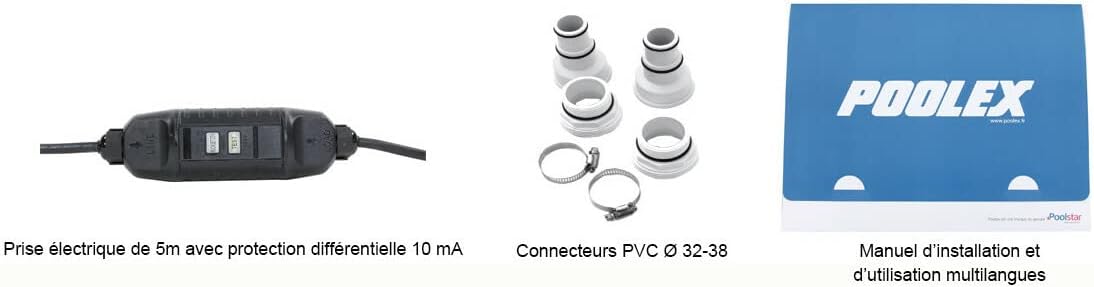
Image: A set of PVC connectors and clamps used for connecting the heat pump to the pool's water circulation system.

Image: An outdoor scene showing the Poolex PC-NAN heat pump connected to a small, above-ground wooden pool, demonstrating a typical setup.
Operating Instructions
Initial Start-up
Once all connections are secure and the pool's filtration system is running, plug in the heat pump. The unit will begin to heat the pool water.
Temperature Control
The heat pump is designed to efficiently raise your pool's temperature. Allow several hours for the water to reach the desired temperature, depending on the pool volume and initial water temperature.

Image: A graphic highlighting the 3000W heating capacity and 600W consumption of the Poolex PC-NAN heat pump, indicating its efficiency.
Economic and Quiet Operation
The Poolex PC-NAN is designed to be economical and quiet during operation, making it suitable for residential use.
Maintenance
Regular maintenance ensures optimal performance and longevity of your heat pump.
- Keep the area around the heat pump clear of debris to ensure proper airflow.
- Periodically clean the exterior of the unit with a soft, damp cloth.
- Inspect water connections for leaks and tighten if necessary.
- During winterization, follow specific instructions for draining and storing the unit to prevent frost damage.
Troubleshooting
Unit Not Turning On
- Check the power connection and ensure the plug is fully inserted into the socket.
- Verify that the differential protection on the power cable has not tripped. Reset if necessary.
- Ensure there is power to the electrical outlet.
Insufficient Heating
- Check if the pool's filtration system is running, as the heat pump requires water flow to operate.
- Verify that the ambient air temperature is within the operating range for the heat pump.
- Ensure the heat pump is appropriately sized for your pool volume.
Unusual Noises
- Check for any obstructions in the fan or around the unit.
- Ensure the unit is placed on a stable and level surface to minimize vibrations.
Specifications
| Feature | Specification |
|---|---|
| Model Number | PC-NAN020 |
| Size | 3000 Watts |
| Material Type | Steel |
| Outer Material | Plastic |
| Brand | POOLEX |
| Manufacturer | Poolstar |
| ASIN | B084MLDVVZ |
| First Available | 19. February 2020 |
Warranty and Support
For warranty information and technical support, please refer to the official POOLEX website or contact your local distributor. Keep your purchase receipt as proof of purchase.
A detailed installation and usage manual is included with your product to provide further guidance.