
1. Introduction
The Celly Pantone PTBS001L is a portable Bluetooth speaker designed for an optimal audio experience both indoors and outdoors. Featuring an elegant fabric-covered body and a 5W output, it delivers clear sound. This manual provides detailed instructions for setting up, operating, and maintaining your speaker.
Key features include:
- 8-Hour Battery Life: Enjoy extended playback on a single charge.
- 5W Audio Output: Provides maximum sound for various environments.
- Dual Connectivity: Connect via Bluetooth 5.0 or the included 3.5mm auxiliary cable.
- Portable Design: Compact and stylish, making it easy to carry.
2. Safety Information
Please read all safety instructions before using this product. Failure to follow these instructions may result in electric shock, fire, or other hazards.
- Do not expose the speaker to extreme temperatures, direct sunlight, or high humidity.
- Do not immerse the speaker in water or other liquids.
- Avoid dropping or subjecting the speaker to strong impacts.
- Do not attempt to disassemble, repair, or modify the speaker. This will void the warranty.
- Use only the provided charging cable or a certified equivalent.
- Keep out of reach of children.
- Dispose of the product responsibly according to local regulations.
3. Package Contents
Ensure all items are present in the package:
- Celly Pantone PTBS001L Bluetooth Speaker
- USB Charging Cable
- 3.5mm Auxiliary (AUX) Cable
- User Manual (this document)
4. Product Overview
The Celly Pantone PTBS001L speaker features a minimalist design with intuitive controls. Familiarize yourself with the speaker's components and controls before use.

Figure 1: Front view of the Celly Pantone PTBS001L Bluetooth Speaker. The speaker has a cylindrical shape, covered in a cyan fabric, with a white base featuring the 'PANTONE' logo. The top cap is also cyan.
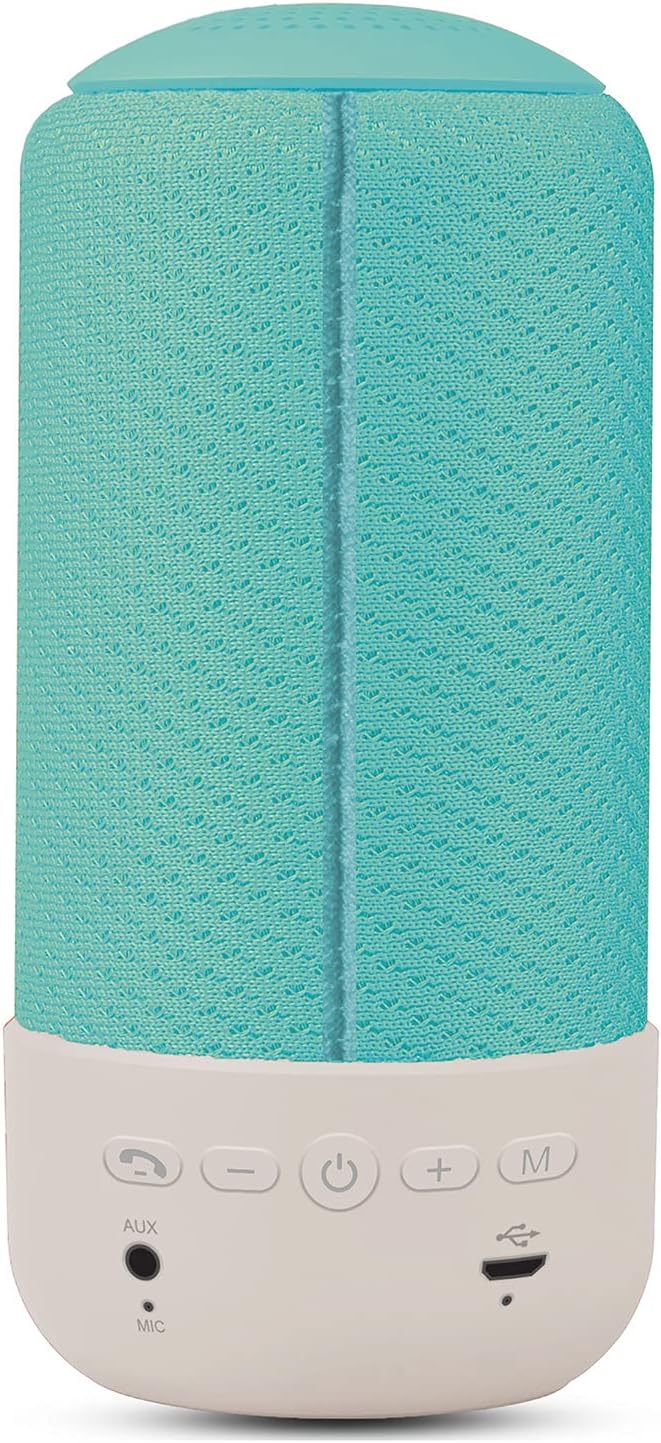
Figure 2: Rear view of the Celly Pantone PTBS001L Bluetooth Speaker. This image highlights the control panel located on the white base. From left to right, the buttons are: Call/Play/Pause, Volume Down (-), Power On/Off, Volume Up (+), and Mode (M). Below these buttons are the AUX input, Microphone (MIC), and Micro USB charging port.
Controls and Ports:
- Call / Play / Pause Button: Answer/end calls, play/pause music.
- Volume Down (-) Button: Decrease volume. Press and hold for previous track.
- Power Button (⏻): Power on/off the speaker.
- Volume Up (+) Button: Increase volume. Press and hold for next track.
- Mode (M) Button: Switch between Bluetooth and AUX modes.
- AUX Input: 3.5mm jack for wired audio connection.
- MIC: Built-in microphone for hands-free calls.
- Micro USB Charging Port: For charging the speaker's internal battery.
5. Setup
5.1 Initial Charging
Before first use, fully charge the speaker. Connect the Micro USB charging cable to the speaker's charging port and the other end to a USB power adapter (not included) or a computer's USB port. The charging indicator light will illuminate during charging and turn off once fully charged. A full charge takes approximately 2 hours.
5.2 Powering On/Off
- To Power On: Press and hold the Power button (⏻) for a few seconds until you hear an audible prompt or see an indicator light.
- To Power Off: Press and hold the Power button (⏻) for a few seconds until you hear an audible prompt or the indicator light turns off.
5.3 Bluetooth Pairing
After powering on, the speaker will automatically enter Bluetooth pairing mode if no device is connected. An indicator light will flash, and you may hear an audible prompt.
- Ensure the speaker is powered on and in Bluetooth pairing mode.
- On your mobile device (smartphone, tablet, etc.), enable Bluetooth.
- Search for available Bluetooth devices. The speaker will appear as "PTBS001L" or similar.
- Select the speaker from the list to connect. Once connected, you will hear a confirmation sound, and the indicator light will stop flashing.
- If prompted for a password, enter "0000".
The speaker will automatically attempt to reconnect to the last paired device when powered on, if that device is within range and has Bluetooth enabled.
6. Operating Instructions
6.1 Bluetooth Playback
- Once paired, open your music application on your device and start playback.
- Play/Pause: Press the Call/Play/Pause button once.
- Next Track: Press and hold the Volume Up (+) button.
- Previous Track: Press and hold the Volume Down (-) button.
6.2 AUX Mode Playback
For devices without Bluetooth, or if you prefer a wired connection:
- Connect one end of the 3.5mm AUX cable to the AUX input port on the speaker.
- Connect the other end of the AUX cable to the headphone jack of your audio device.
- Press the Mode (M) button on the speaker to switch to AUX mode. You will hear an audible prompt.
- Start playback from your audio device. Volume can be controlled via the speaker or your device. Track control buttons on the speaker may not function in AUX mode.
6.3 Call Function
When connected via Bluetooth, the speaker supports hands-free calling.
- Answer Call: Press the Call/Play/Pause button once when an incoming call rings.
- End Call: Press the Call/Play/Pause button once during a call.
- Reject Call: Press and hold the Call/Play/Pause button for 2 seconds when an incoming call rings.
- Redial Last Number: Double-press the Call/Play/Pause button.
6.4 Volume Control
- Increase Volume: Press the Volume Up (+) button.
- Decrease Volume: Press the Volume Down (-) button.
7. Charging the Speaker
The speaker is powered by an internal rechargeable battery. When the battery is low, you may hear an audible warning, and the indicator light may flash.
- Connect the Micro USB charging cable to the speaker's charging port.
- Connect the other end of the cable to a USB power source (e.g., wall adapter, computer USB port).
- The charging indicator light will be active during charging.
- Charging typically takes less than 2 hours for a full charge.
- A fully charged speaker provides approximately 8 hours of playback time.
8. Maintenance
8.1 Cleaning
- Wipe the speaker with a soft, dry, lint-free cloth.
- Do not use abrasive cleaners, alcohol, or chemical solvents, as these may damage the surface.
8.2 Storage
- Store the speaker in a cool, dry place away from direct sunlight and extreme temperatures.
- If storing for an extended period, charge the battery every few months to maintain its lifespan.
9. Troubleshooting
| Problem | Possible Cause | Solution |
|---|---|---|
| Speaker does not power on. | Battery is depleted. | Charge the speaker for at least 30 minutes. |
| No sound from the speaker. | Volume is too low; Device not connected; Incorrect mode. | Increase speaker and device volume; Ensure Bluetooth is paired or AUX cable is connected; Press 'M' button to switch modes. |
| Cannot pair via Bluetooth. | Speaker not in pairing mode; Device Bluetooth off; Too far from device. | Ensure speaker is on and flashing (pairing mode); Turn on Bluetooth on your device; Move speaker closer to your device (within 10m). |
| Poor sound quality. | Low battery; Device too far; Interference. | Charge the speaker; Move device closer; Avoid obstacles between speaker and device. |
10. Specifications
| Feature | Specification |
|---|---|
| Model Name | PTBS001L |
| Brand | Pantone (by Celly) |
| Connectivity Technology | Bluetooth, Auxiliary (3.5mm Jack) |
| Bluetooth Version | 5.0 |
| Working Distance | Up to 10 meters (33 feet) |
| Speaker Output Power | 5 Watts |
| Speaker Specifications | 52mm - 4 Ohm |
| Frequency Range | 60Hz - 20KHz |
| Distortion | <3% |
| Battery Capacity | 1200mAh |
| Charging Time | Less than 2 hours |
| Playing Time | More than 8 hours |
| Special Features | Bluetooth, Portable, Hands-free Call Function |
| Dimensions (L x W x H) | 7 x 7 x 15 cm (2.76 x 2.76 x 5.91 inches) |
| Weight | 340 grams (0.75 lbs) |
| Color | Cyan |
11. Warranty and Support
This product is covered by a standard manufacturer's warranty. Please refer to the warranty card included with your purchase or visit the official Celly website for detailed warranty terms and conditions.
For technical support, troubleshooting assistance, or warranty claims, please contact Celly customer service through their official website or the contact information provided in your product packaging.


