Introduction
Welcome to the user manual for your new Techmade Man TM-W007-NBW Watch. This guide provides detailed instructions on how to set up, operate, and maintain your device, ensuring you get the most out of its features. Please read this manual carefully before using your watch.

Figure 1: Techmade Man TM-W007-NBW Watch
This image displays the Techmade Man TM-W007-NBW watch from a front perspective, highlighting its sleek design, black strap, and clear watch face with analog time display and a digital date indicator.
Setup Guide
1. Initial Charging
Before first use, fully charge your Techmade TM-W007-NBW watch.
- Connect the charging cable to the charging port on the back of the watch.
- Plug the USB end of the cable into a compatible USB power adapter (not included) or a computer's USB port.
- The watch display will indicate charging status. Allow approximately 2 hours for a full charge.
2. Pairing with Your Smartphone
To unlock the full potential of your watch, pair it with your smartphone using the dedicated Techmade application.
- Download the official Techmade app from your smartphone's app store (Google Play Store for Android, Apple App Store for iOS). Search for "Techmade Watch" or refer to the QR code in the quick start guide.
- Ensure Bluetooth is enabled on your smartphone.
- Open the Techmade app and follow the on-screen instructions to create an account or log in.
- In the app, select "Add Device" or "Pair New Watch".
- Select "TM-W007-NBW" from the list of available devices.
- Confirm the pairing request on both your watch and smartphone.
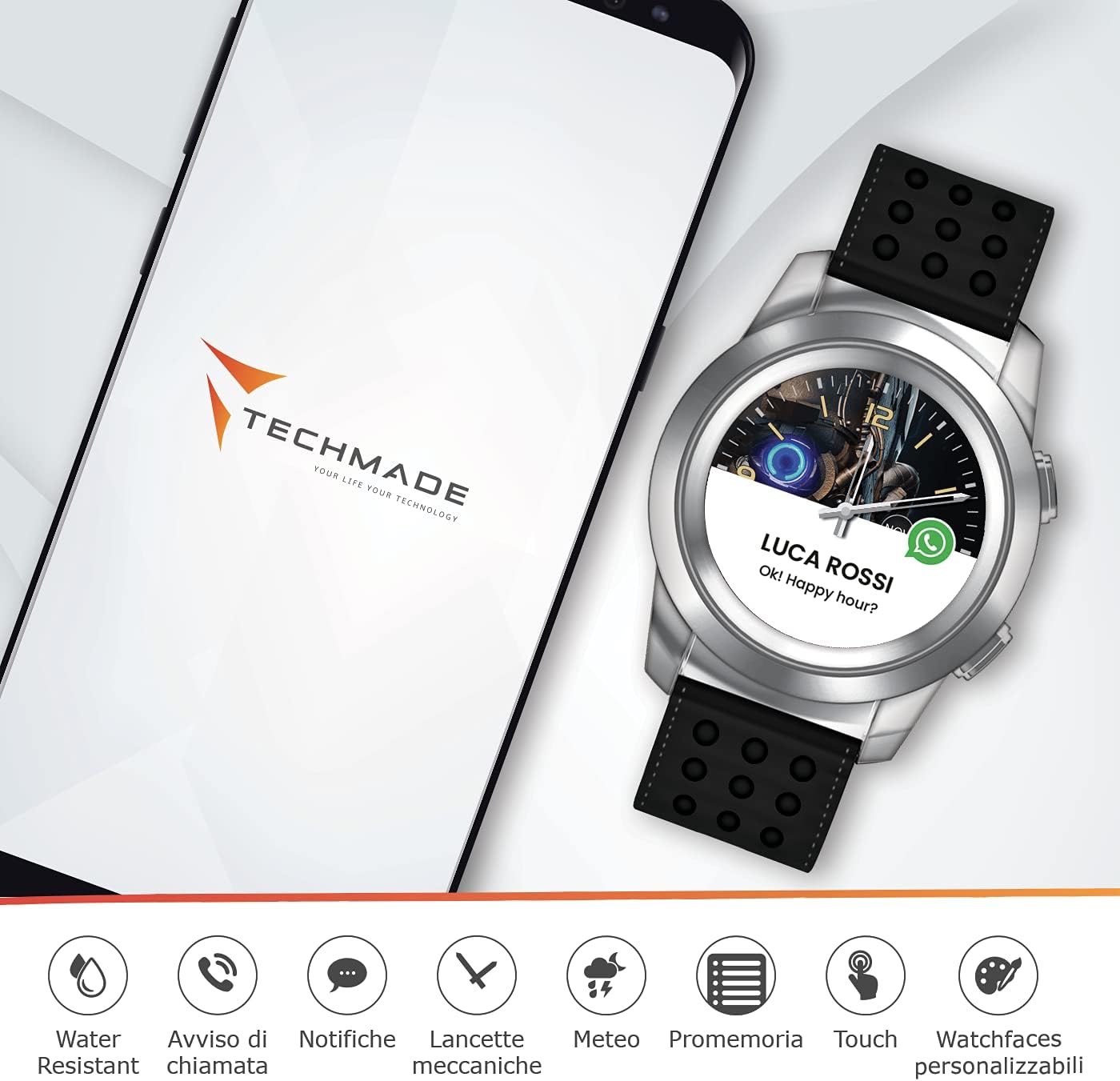
Figure 2: Watch and Smartphone App Integration
This image illustrates the Techmade watch positioned beside a smartphone, with the phone screen displaying the Techmade application. The watch face shows a notification, demonstrating the seamless connectivity and notification features between the watch and the mobile app.
Operating Instructions
Basic Navigation
The TM-W007-NBW watch features both mechanical hands for timekeeping and a touch-sensitive display for smart functions.
- Crown/Buttons: Use the physical crown and buttons on the side of the watch to navigate menus, select options, or return to the home screen.
- Touch Display: Swipe left/right or up/down on the watch face to access different features and notifications. Tap to select.
Key Features
- Notifications: Receive call notifications, messages, and app alerts directly on your watch.
- Weather: View current weather conditions and forecasts.
- Reminders: Set and receive reminders for important events or tasks.
- Customizable Watch Faces: Personalize your watch's appearance by choosing from a variety of pre-installed watch faces or creating your own through the app.
- Water Resistance: The watch is designed with water resistance for daily use. Avoid prolonged submersion or hot water.
Changing Watch Faces
You can easily change the watch face to match your style or mood.
- On your watch, long-press the current watch face or navigate to the "Watch Faces" section via the menu.
- Swipe through the available watch faces and tap to select your preferred one.
- Alternatively, open the Techmade app on your smartphone, go to the "Watch Faces" section, and browse or customize new designs. Sync the selected watch face to your device.

Figure 3: Customizable Watch Faces
This image shows a smartphone displaying a gallery of customizable watch faces within the Techmade app, alongside the actual watch showcasing one of these personalized designs. This highlights the extensive customization options available to users.
Maintenance
Cleaning Your Watch
Regular cleaning helps maintain the appearance and functionality of your watch.
- Wipe the watch case and strap with a soft, lint-free cloth.
- For stubborn dirt, slightly dampen the cloth with water. Avoid using harsh chemicals, abrasive materials, or solvents.
- Ensure the watch is completely dry before charging or prolonged use.
Water Resistance
The TM-W007-NBW watch is water-resistant. This means it can withstand splashes, rain, and brief immersion in shallow water.
- Do not use the watch for swimming, diving, or in hot showers/saunas, as steam and hot water can compromise the seals.
- Avoid pressing buttons underwater.
- If the watch gets wet, dry it thoroughly with a soft cloth before charging or using the touch screen.
Battery Care
To prolong battery life:
- Avoid extreme temperatures.
- Charge the watch regularly, but avoid leaving it fully discharged for extended periods.
- If storing the watch for a long time, charge it to about 50% before storage.
Troubleshooting
| Problem | Possible Solution |
|---|---|
| Watch does not turn on. | Ensure the watch is fully charged. Connect it to the charger for at least 30 minutes. |
| Cannot pair with smartphone. |
|
| Notifications are not received. |
|
| Screen is unresponsive. | Restart the watch. If the issue persists, ensure the screen is clean and dry. |
Factory Reset
If you encounter persistent issues, a factory reset may resolve them. This will erase all data on your watch and restore it to its original settings.
- Navigate to "Settings" on your watch.
- Look for "System" or "About" and then select "Reset" or "Factory Reset".
- Confirm your choice. The watch will restart.
Specifications
| Feature | Detail |
|---|---|
| Model Name | TM-W007-NBW |
| Brand | Techmade |
| Item Weight | 100 g |
| ASIN | B084KJ6HJT |
| Manufacturer Reference | TM-W007-NBW |
| First Available Date | 11 Feb. 2020 |
Warranty and Support
Your Techmade Man TM-W007-NBW Watch comes with a manufacturer's warranty. Please refer to the warranty card included in your product packaging for specific terms and conditions, including warranty duration and coverage.
For technical support, troubleshooting assistance, or warranty claims, please contact Techmade customer service through their official website or the contact information provided in your product documentation.
Online Resources: For the latest updates, FAQs, and additional support, visit the official Techmade website.