
Introduction
This manual provides detailed instructions for the proper setup, operation, and maintenance of your GUESS Men's Analog Quartz Watch, Model GW0050G3. Please read this manual thoroughly to ensure optimal performance and longevity of your timepiece. Keep this manual for future reference.
Product Overview
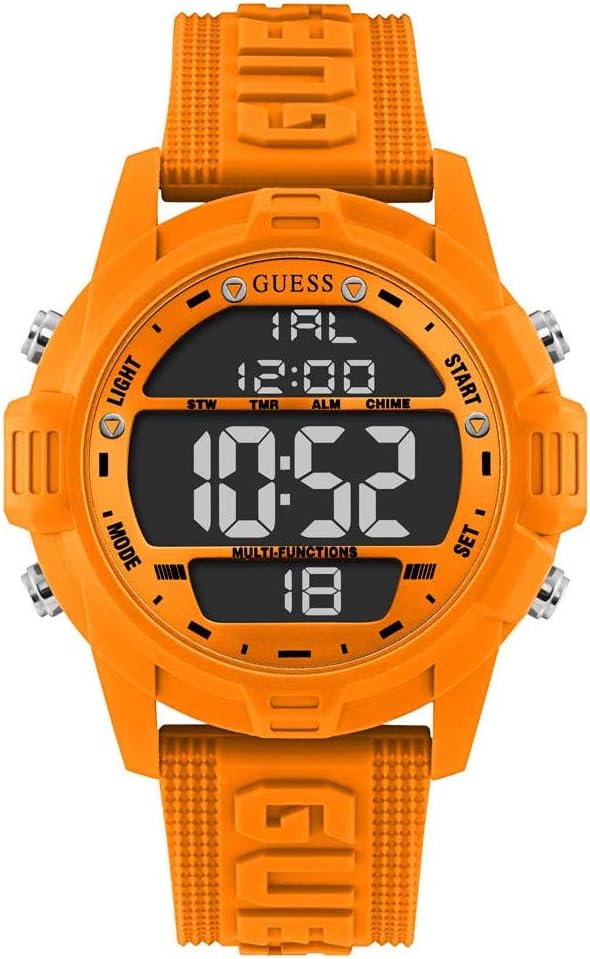
Image 1: Front view of the GUESS GW0050G3 watch. It features a round orange silicone case and strap, with a black digital display showing time, date, and other functions. Four silver buttons are visible on the sides, labeled LIGHT, MODE, START, and SET.
Key Features:
- Case: Round orange silicone over steel construction.
- Strap: Orange iconic logo silicone strap with a secure buckle closure.
- Display: Black digital display.
- Functions: Includes digital time display, day, date, month, 1/100 second chronograph, and alarm.
Watch Components:
Your GW0050G3 watch features four primary control buttons:
- LIGHT Button: Activates the backlight for visibility in low-light conditions.
- MODE Button: Cycles through different display modes (Time, Chronograph, Alarm, Timer).
- START Button: Used to start/stop functions in chronograph mode or adjust settings.
- SET Button: Used to enter setting modes and confirm selections.
Setup
Initial Power-On:
Your watch comes with a Lithium Metal battery pre-installed. It should be ready for immediate use. If the display is blank, press any button to activate it. If it remains blank, the battery may need replacement (refer to the Maintenance section).
Setting Time and Date:
- Press the MODE button repeatedly until the time setting mode is displayed (usually indicated by flashing digits).
- Press the SET button to select the digit or setting you wish to adjust (e.g., hours, minutes, 12/24-hour format).
- Use the START button to increase the value of the selected digit. Hold the START button for faster adjustment.
- Continue pressing SET to move to the next setting (minutes, year, month, day). Adjust each using the START button.
- Once all settings are correct, press the MODE button to exit the setting mode and return to the normal time display.
Operating Instructions
Using the Chronograph (Stopwatch):
- Press the MODE button until "STW" (Stopwatch) is displayed.
- Press the START button to begin timing.
- Press the START button again to pause the timing.
- To resume, press START. To reset the stopwatch to zero, press the SET button while the stopwatch is paused.
- Press the MODE button to exit stopwatch mode.
Setting the Alarm:
- Press the MODE button until "ALM" (Alarm) is displayed.
- Press the SET button to enter alarm setting mode. The hour digits will flash.
- Use the START button to adjust the hour.
- Press SET to move to the minute digits and adjust using the START button.
- Press SET again to toggle the alarm ON/OFF (usually indicated by an alarm icon). Use START to switch.
- Press the MODE button to exit alarm setting mode.
Using the Backlight:
Press the LIGHT button to illuminate the display for a few seconds. This feature is useful in dark environments.
Maintenance
Cleaning Your Watch:
Wipe the watch case and strap regularly with a soft, dry cloth. For silicone parts, a slightly damp cloth with mild soap can be used, followed by thorough drying. Avoid using harsh chemicals or abrasive materials, as these can damage the finish.
Water Resistance:
While your watch is designed for daily wear, it is important to understand its water resistance rating. Avoid prolonged exposure to water, hot water, or steam. Do not operate buttons while the watch is submerged in water.
Battery Replacement:
The watch uses a Lithium Metal battery. When the display becomes dim or functions become erratic, it may be time to replace the battery. Battery replacement should ideally be performed by a qualified watch technician to ensure proper sealing and water resistance integrity.


Image 2: Left: Rear view of the orange silicone strap with a silver buckle. Right: Side profile of the watch, highlighting the orange silicone case and the silver control buttons.
Troubleshooting
- Display is blank or dim: The battery may be low or depleted. Consider professional battery replacement.
- Time is incorrect: Re-enter the time setting mode and adjust the time and date as per the "Setting Time and Date" instructions.
- Buttons are unresponsive: Ensure the watch is not in a locked mode (if applicable, though not specified for this model). If issues persist, a battery reset or professional inspection may be required.
Specifications
| Feature | Detail |
|---|---|
| Model Number | GW0050G3 |
| Brand | GUESS |
| Movement | Quartz |
| Display Type | Digital |
| Case Material | Silicone over Steel |
| Strap Material | Silicone |
| Strap Length | 190mm |
| Dial Color | Black (Digital) |
| Battery Type | 1 Lithium Metal battery (included) |
| Product Dimensions | 8 x 9 x 9 cm |
| Item Weight | 250 g |
Warranty and Support
For information regarding the warranty period and terms for your GUESS watch, please refer to the warranty card included with your purchase or visit the official GUESS website. For technical support or service inquiries, please contact GUESS customer service directly.
You can often find additional support resources and contact information on the official GUESS website.


