
1. Introduction
Thank you for choosing the hOmelabs Portable Air Conditioner. This manual provides important information for the proper operation, maintenance, and troubleshooting of your new appliance. Please read this manual thoroughly before using the air conditioner and keep it for future reference.

Image: The hOmelabs Portable Air Conditioner unit with its remote control, showcasing its sleek design.
2. Key Features
- Powerful Cooling: 12000 BTU (New DOE 7200 BTU) capacity, ideal for rooms up to 450 sq. ft.
- Quiet Operation: Designed for minimal noise, allowing for undisturbed sleep, work, or relaxation.
- Portability: Equipped with smooth-gliding wheels for easy movement between rooms.
- Automatic Vertical Swing: Ensures even distribution of cool air throughout the room.
- Multi-functional: Features Auto, Cool, Dehumidify, and Fan modes for versatile climate control.
- Washable Filter: Reusable filter with an indicator light for convenient cleaning and optimal performance.
- Remote Control: Full-feature remote for convenient adjustment of settings from a distance.
- Timer & Sleep Mode: Programmable timer and sleep mode for energy efficiency and personalized comfort.

Image: The top control panel of the unit, highlighting the Eco Sleep Mode and various function buttons.

Image: The top vent of the air conditioner with arrows illustrating the automatic wind swing function.
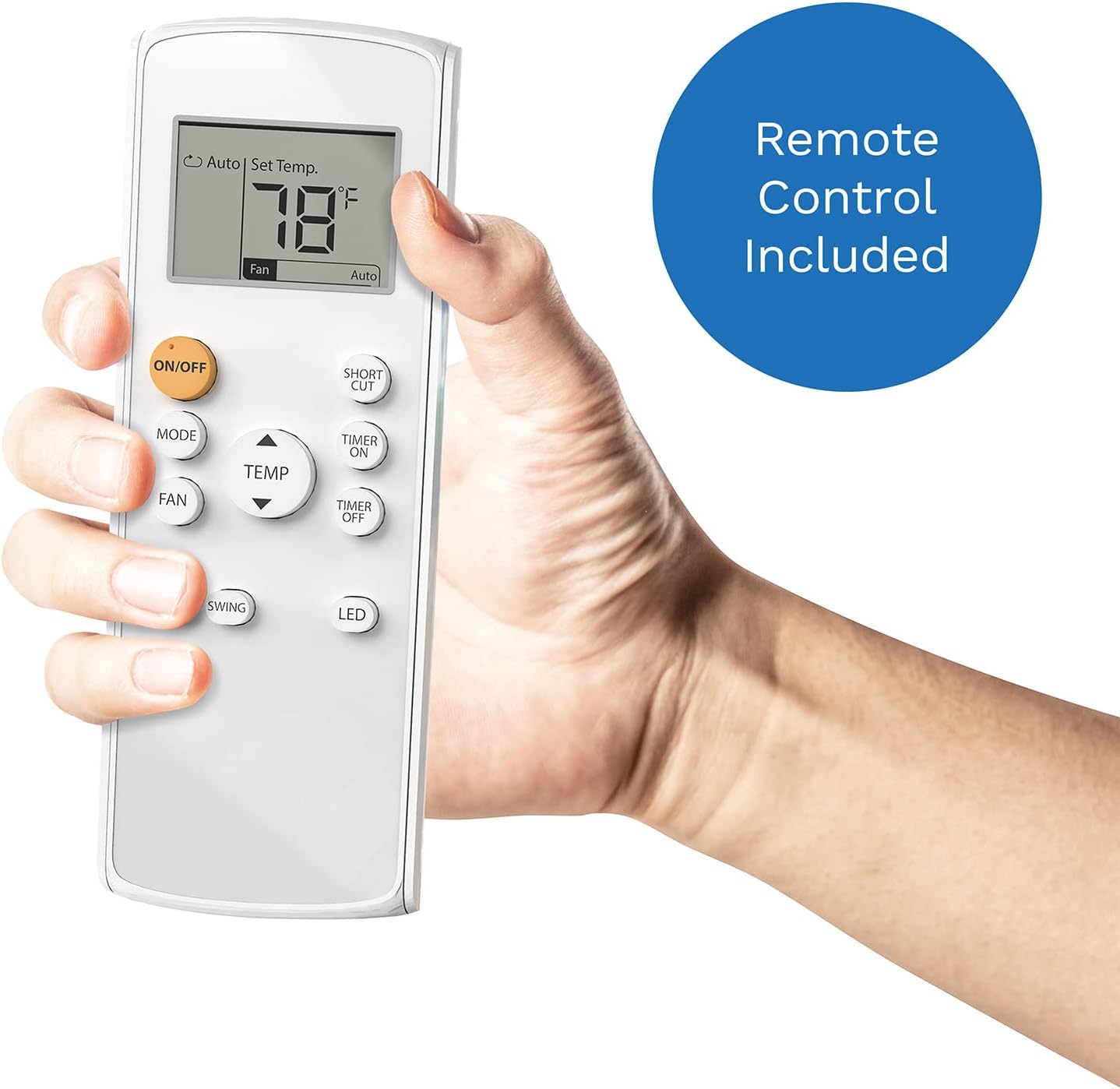
Image: A hand holding the remote control for the hOmelabs Portable Air Conditioner, showing its various buttons and display.
3. Setup
Setting up your hOmelabs Portable Air Conditioner is quick and easy. Follow these steps for optimal performance:
- Unpack: Carefully remove the unit and all accessories from the packaging.
- Positioning: Place the air conditioner on a flat, stable surface near a window. Ensure there is at least 20 inches of space around the unit for proper airflow.
- Install Window Kit: Assemble the window slider kit and install it into your horizontal window opening.
- Connect Exhaust Hose: Attach the exhaust hose to the unit and then to the window slide adapter. Ensure a secure connection to prevent air leakage.
- Power On: Plug the grounded power cord into a suitable electrical outlet.

Image: The hOmelabs Portable Air Conditioner set up next to a window with the exhaust hose connected, demonstrating ease of installation.
4. Operating Instructions
Your portable air conditioner offers various modes and settings for customized comfort. Use the control panel on the unit or the remote control to operate.
Control Panel & Remote Functions:
- ON/OFF: Press to turn the unit on or off.
- MODE: Cycle through cooling, fan, and dehumidify modes.
- TEMP +/-: Adjust the desired temperature.
- FAN: Select fan speed (Low, Medium, High).
- SWING: Activate or deactivate the automatic vertical air swing.
- TIMER: Set a timer for automatic on/off operation.
- SLEEP: Engages a quieter, energy-saving mode for nighttime use.
5. Maintenance
Regular maintenance ensures the longevity and efficiency of your air conditioner.
Filter Cleaning:
The unit features a washable filter. A filter indicator light will illuminate when cleaning is needed. Clean the filter once every few weeks, or more frequently depending on usage and air quality.
- Remove Filter: Gently pull out the filter from its designated slot.
- Wash: Rinse the filter under running water (preferably warm, soapy water) to remove dust and debris.
- Dry: Allow the filter to air dry completely before reinserting it into the unit. Do not use direct heat to dry.
- Reset Filter Indicator: After cleaning and reinserting the filter, press and hold the 'SLEEP' button for 3 seconds to reset the filter indicator light.

Image: A hand demonstrating the removal of the washable filter from the side of the air conditioner unit.

Image: Hands washing the removable air filter under running water in a sink.
6. Troubleshooting
If you encounter issues with your air conditioner, refer to the following common problems and solutions:
| Problem | Possible Cause | Solution |
|---|---|---|
| Unit does not turn on | No power; Power cord unplugged; Circuit breaker tripped | Check power outlet; Ensure cord is securely plugged in; Reset circuit breaker |
| Unit not cooling effectively | Dirty air filter; Exhaust hose not properly installed; Room size too large; Doors/windows open | Clean air filter; Secure exhaust hose; Ensure room is within specified area; Close all doors and windows |
| Unit is noisy | Unit not on a flat surface; Obstruction in fan/vent | Place on a level surface; Check for and remove any obstructions |
| Water leakage | Drain plug not secured; Drain hose clogged | Ensure drain plug is tightly closed; Clear any blockages in the drain hose |
If the problem persists after attempting these solutions, please contact hOmelabs Customer Support.
7. Specifications
| Feature | Detail |
|---|---|
| Brand Name | hOmeLabs |
| Model Info | HME020379N |
| Item Weight | 82.7 pounds |
| Product Dimensions | 14.84 x 17.91 x 30.71 inches |
| Cooling Capacity | 12000 British Thermal Units (New DOE 7200 BTU) |
| Floor Area Coverage | Up to 450 Square Feet |
| Installation Type | Window (with included kit) |
| Form Factor | Portable |
| Special Features | Easy to Install, Portable with Caster Wheels, Full-Feature Remote Control, Timer, Auto-Swing Function, Auto, Cool, Dehumidify & Fan Modes |
| Color | White |
| Control Console | Remote |
| Voltage | 115 Volts |
| Wattage | 710 watts |
| Filter Type | Washable |
| Refrigerant | R 410A |

Image: The air conditioner unit with its key dimensions (30.7 in height, 17.9 in depth, 15 in width) and 7,200 BTU capacity labeled.

Image: A graphic illustrating the cooling capacities: 8,600 BTU for 450-600 sq ft and 7,200 BTU for 300-450 sq ft.
8. What's in the Box
- 12,000 BTU Portable Air Conditioner (new CEC 8,000 BTU)
- Window Sliders and Adapters
- Exhaust Hose
- Adhesive Foam Window Seals
- Optional Drain Hose
- Window Security Bracket
- Remote Control with Batteries Included
- Removable Washable Filter
- Grounded Power Cord
- Registration Card & User Manual
9. Official Product Videos
No official product videos from the seller are available for embedding at this time.
10. Warranty and Support
For warranty information or technical support, please refer to the Registration Card included in your package or visit the official hOmeLabs website. You can also find additional support resources and contact information via the hOmeLabs Store on Amazon.