
Introduction
This manual provides essential information for the safe and effective operation, setup, and maintenance of your Dremel 4300-DR-RT Rotary Tool. Please read these instructions carefully before using the tool.
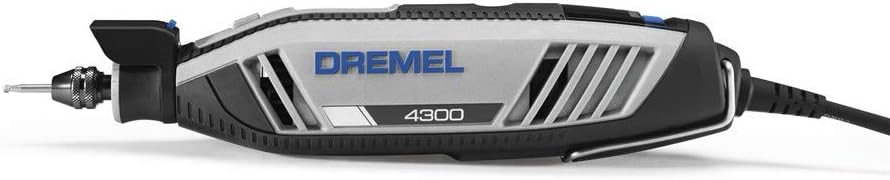
Image: The Dremel 4300-DR-RT Rotary Tool, showcasing its ergonomic design and integrated chuck.
Safety Information
Always wear appropriate personal protective equipment, such as safety glasses, gloves, and hearing protection, when operating the rotary tool. Ensure your work area is well-lit and clear of obstructions. Disconnect the tool from the power source before changing accessories or performing maintenance.
- Read all instructions before use.
- Keep hands and loose clothing away from rotating parts.
- Secure workpiece before operating.
- Do not operate in damp or wet conditions.
- Use only Dremel-approved accessories.
Setup and Assembly
Accessory Installation (Three-Jaw Chuck)
The Dremel 4300-DR-RT features a tool-less, glue-less three-jaw chuck for quick accessory changes.
- Ensure the tool is unplugged from the power source.
- Press the shaft lock button to secure the shaft.
- Rotate the chuck counter-clockwise to open the jaws.
- Insert the accessory shank fully into the chuck.
- Rotate the chuck clockwise to tighten the jaws securely around the accessory. Release the shaft lock button.
Adjusting the Pivot Light
The integrated pivot light can be rotated to direct illumination precisely where needed on your workpiece, improving visibility and accuracy. Simply adjust the light housing to the desired angle.
Operating Instructions
Power On/Off and Speed Control
The tool features a separate on/off switch and a variable speed control dial.
- To turn on: Slide the ON/OFF switch to the 'ON' position.
- To adjust speed: Rotate the variable speed dial to select the desired RPM. The tool provides electronic feedback for consistent performance under load.
- To turn off: Slide the ON/OFF switch to the 'OFF' position.
Ergonomic Grip
The slim, ergonomic body design offers a comfortable 360-degree grip zone, allowing for greater ease of use and control during various applications.
Typical Applications
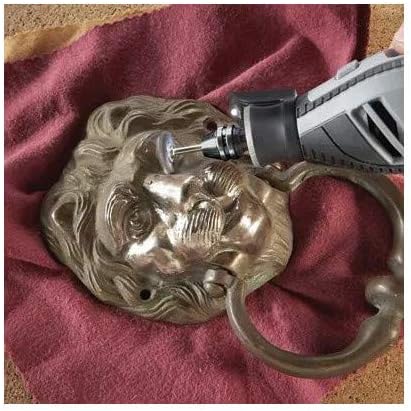
Image: Polishing a metal object. The Dremel 4300-DR-RT can be used for restoring shine to various materials.

Image: Carving intricate designs into wood. The tool's precision allows for detailed work.

Image: Engraving a design onto a glass surface. Ideal for personalizing items.

Image: Routing a groove in wood. The Dremel 4300-DR-RT can be used with routing attachments for precise cuts.

Image: Sanding and shaping a wooden piece. The tool is effective for fine finishing and material removal.
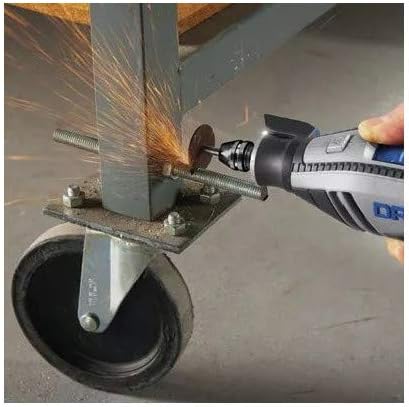
Image: Cutting a metal bolt. With appropriate cutting wheels, the Dremel 4300-DR-RT can cut various metals.
Maintenance
Motor Brush Replacement
The Dremel 4300-DR-RT features replaceable motor brushes, which contribute to extending the tool's lifespan. Refer to the full service manual for detailed instructions on how to inspect and replace motor brushes. This procedure typically involves removing brush caps and inserting new brushes.
Airflow System Cleaning
The redesigned airflow system helps the tool run cool and smooth. Regularly inspect the air vents for dust and debris accumulation. Use compressed air to clear any blockages, ensuring optimal cooling and performance.
General Cleaning
After each use, wipe down the tool's exterior with a clean, dry cloth. Do not use harsh chemicals or abrasive cleaners.
Troubleshooting
If you encounter issues with your Dremel 4300-DR-RT, consider the following basic troubleshooting steps:
- Tool Not Starting: Ensure the power cord is securely plugged into a functional outlet and the ON/OFF switch is in the 'ON' position.
- Loss of Power/Stalling: Check that the accessory is properly secured in the chuck. Reduce pressure on the workpiece. Ensure the speed setting is appropriate for the task.
- Excessive Heat: Verify that the air vents are clear of debris. Allow the tool to cool down if it feels excessively hot.
- Unusual Noise/Vibration: Disconnect power and inspect the accessory for damage or improper installation. Ensure the chuck is tightened correctly.
For persistent issues, contact Dremel customer support or an authorized service center.
Specifications
| Feature | Detail |
|---|---|
| Brand | Dremel |
| Model Number | 4300-DR-RT |
| Special Feature | Variable Speed |
| Item Weight | 4.75 Pounds |
| Maximum Rotational Speed | 3450 RPM |
| Product Dimensions (L x W x H) | 16 x 11.6 x 4.4 inches |
| UPC | 080596040475 |
| Manufacturer | Dremel |
Note: Specifications are subject to change without notice.
Warranty and Support
Warranty Information
This Dremel 4300-DR-RT is a renewed product and is backed by a 90-day warranty from the date of purchase. This warranty covers defects in materials and workmanship under normal use. Please retain your proof of purchase for warranty claims.
Customer Support
For technical assistance, warranty service, or questions regarding your Dremel tool, please contact Dremel customer support through their official website or the retailer from whom the product was purchased.


