
1. Product Overview
The Genie Chain Glide Connect Essentials Smart Garage Door Opener (Model 2033-LO) provides reliable and secure operation for residential sectional garage doors. This unit features a durable chain drive system, integrated smart home connectivity, and energy-efficient LED lighting. It is designed for ease of installation and seamless integration into modern smart home ecosystems.

Image Description: A wide shot of a garage interior and exterior, showing a Genie garage door opener installed. Various circular insets highlight family members engaging in activities like working on a bike, using a remote in a car, and carrying groceries, illustrating the opener's role in daily life.
Key Features:
- Durable Chain Drive: Heavy-duty chain drive system for long-lasting, reliable operation.
- Integrated Aladdin Connect Wi-Fi: Allows remote access and monitoring via smartphone.
- Smart Home Compatibility: Works with Alexa, Google Assistant, SmartThings, and Amazon Key In-Garage Delivery.
- GenieSense DC Motor: Provides powerful and smooth operation for doors up to 7 feet high and 500 lbs.
- LED Lighting: Includes two radio frequency friendly, shatter-resistant LED bulbs.
- Easy Installation: Features a 5-piece rail system and interactive 3D instructions via the BILT app.
- Safety Features: Equipped with Safe-T-Beam sensors and Intellicode rolling code technology.
2. Setup and Installation
The Genie Chain Glide Connect Essentials garage door opener is designed for straightforward installation. For the most comprehensive and interactive guidance, it is highly recommended to use the BILT 3D App.
2.1. BILT 3D Interactive Instructions
The BILT app provides step-by-step 3D instructions that allow you to tap, zoom, and rotate views for clear assembly and installation guidance. This can significantly simplify the setup process.

Image Description: An image displaying a QR code and logos for the App Store and Google Play, encouraging users to download the BILT app for easy 3D instructions. The text "Scan for easy 3D instructions" is prominently featured.
Download the BILT app for interactive 3D instructions: https://biltapp.link/QzAK
Video Description: This video provides a detailed overview of the 3D BILT app, demonstrating how it offers interactive, step-by-step installation instructions for Genie chain or belt drive garage door openers. It shows how users can rotate, zoom, and tap on parts for more information, making the installation process clearer and more accessible.
2.2. Rail System Assembly
The opener features a strong 5-piece rail system that snaps together without the need for additional hardware. This design simplifies the assembly process.

Image Description: A man on a ladder is shown installing the rail system of a Genie garage door opener in a garage. The image highlights the ease of assembly for the 5-piece rail system.
2.3. Supported Door Configurations
This opener is designed for residential sectional garage doors. Ensure your garage door meets the following criteria:
- Maximum weight: 500 lbs
- Maximum height: 7 ft (an extension kit, sold separately, is required for 8 ft high doors)
The opener supports various door styles including pan style, single wide, non-insulated, double wide (with or without windows), and double wide (with or without insulation) doors.

Image Description: A diagram illustrating acceptable and unacceptable garage door configurations for the Genie opener. It specifies that residential sectional doors up to 500 lbs and 7 ft in height are supported, while high lift, vertical lift, doors larger than 8 ft, and one-piece doors are not.
3. Operating Instructions
3.1. Remote Control
The opener comes with one 3-button pre-programmed remote control, ready for immediate use after installation. This remote utilizes Intellicode rolling code technology for enhanced security, preventing unauthorized access.

Image Description: A close-up of a Genie 3-button remote control, highlighting its design and functionality for operating the garage door opener.
3.2. Wall Console
A wall console is included, featuring an independent light button and a vacation lock for added security. The vacation lock disables all remote controls for extended periods of absence.
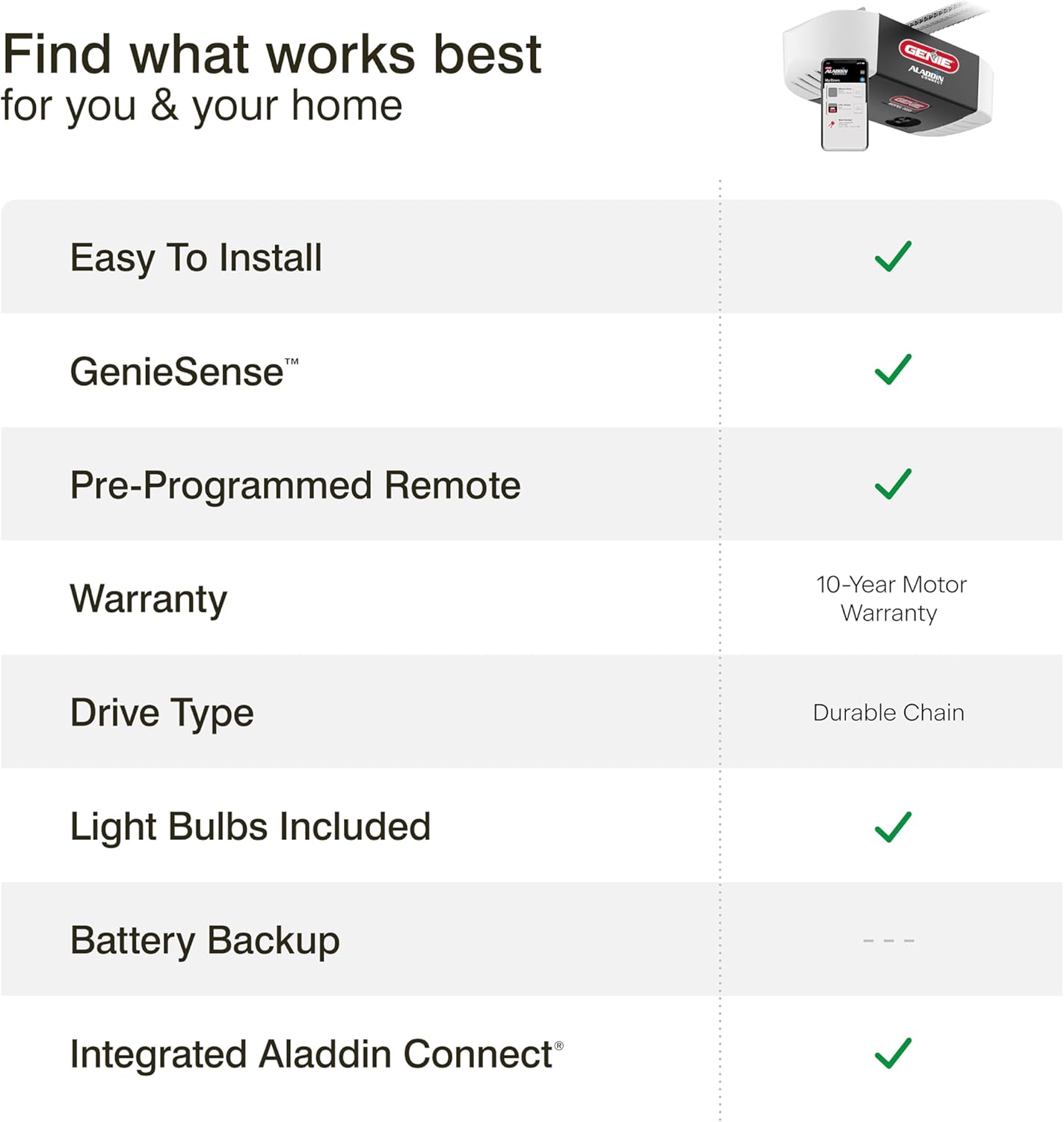
Image Description: A Genie multi-function wall console mounted on a wall, showing buttons for door operation, light control, and a vacation lock feature.
3.3. Safe-T-Beam Sensors
For safety, the system includes Safe-T-Beam sensors that project an infrared beam across the garage door opening. If the beam is interrupted while the door is closing, the door will automatically reverse to prevent accidents.

Image Description: A pair of Genie Safe-T-Beam sensors, typically installed near the bottom of the garage door tracks, designed to detect obstructions.
4. Smart Features and Connectivity
The Genie Chain Glide Connect Essentials opener integrates Aladdin Connect Wi-Fi technology, allowing you to control and monitor your garage door from anywhere using your smartphone.
Video Description: This video showcases the smart home integration capabilities of Genie garage door openers, emphasizing how they connect with various smart platforms. It highlights the convenience of controlling and monitoring your garage door remotely, making it a seamless part of your connected home.
4.1. Aladdin Connect App
The free Aladdin Connect smartphone app allows you to:
- Open and close your garage door remotely.
- Receive real-time notifications if the door is opened, closed, or left open for an extended period.
- Set up virtual keys for individual users, granting specific access times.
- Create custom rules, such as automatically closing the door after a set time or within a specific time range.

Image Description: A person in the passenger seat of a car is shown using the Aladdin Connect app on a smartphone to control the garage door, demonstrating remote access capabilities.

Image Description: A close-up of a smartphone screen displaying a real-time notification from the Aladdin Connect app, indicating that "Garage Door 1 is open by Olivia."
Video Description: This video demonstrates the functionality of the Aladdin Connect smart garage door app, showing how users can open and close their garage door remotely, receive alerts, and manage access. It highlights the app's user-friendly interface and its practical benefits for home security and convenience.
4.2. Smart Home Integrations
The Aladdin Connect system is compatible with popular smart home platforms, allowing your garage door to be part of your integrated smart home experience:
- Amazon Alexa
- Google Assistant
- Samsung SmartThings
- Yonomi App
- Control4
- Amazon Key In-Garage Delivery

Image Description: A visual representation of the Genie garage door opener's integration with a smart home system, showing compatibility with devices like Ring, Alexa, and smart displays. The image emphasizes seamless connectivity within a smart home ecosystem.

Image Description: An Amazon delivery driver is shown placing packages inside a garage with the door open, illustrating the Amazon Key In-Garage Delivery feature enabled by the smart garage door opener.
5. Maintenance
5.1. Chain Drive System
The heavy-duty chain drive system is designed for long-lasting performance with minimal maintenance under normal operating conditions. Regular visual inspection of the chain for any signs of wear or damage is recommended.
Video Description: This video provides an overview of Genie's chain-driven garage door openers, highlighting their durability and reliability. It showcases the robust chain mechanism and the smooth operation it provides for various garage door sizes.
5.2. LED Light Bulbs
The opener includes two Genie LED light bulbs specifically designed for garage door openers. These bulbs are radio frequency friendly to prevent interference with remote controls and are shatter-resistant for durability in a garage environment.

Image Description: A hand is shown screwing a Genie LED light bulb into the garage door opener unit, illustrating the easy installation of the included bulbs.
6. Troubleshooting
If you encounter any issues with your Genie Chain Glide Connect Essentials garage door opener, please refer to the detailed troubleshooting section in the full product manual or contact Genie customer support for assistance. Common issues often relate to sensor alignment, remote programming, or Wi-Fi connectivity.
7. Specifications
| Feature | Detail |
|---|---|
| Model Number | 2033-LO |
| Drive Type | Chain Drive |
| Motor Type | DC Motor with GenieSense Technology |
| Max Door Height | 7 ft (8 ft with extension kit - sold separately) |
| Max Door Weight | 500 lbs |
| Smart Home Integration | Aladdin Connect Wi-Fi, Alexa, Google Assistant, SmartThings, Yonomi, Control4, Amazon Key |
| Included Components | Smart Chain Drive Opener, Integrated Aladdin Connect, One 3-Button Preprogrammed Remote, Wall Console with vacation lock and light control, Safe-T-Beam sensors, 2 Genie LED Radio Frequency Friendly LED Bulbs, Easy to Follow Instructions |
| Power Source | AC |
| Item Weight | 29 pounds |
| Product Dimensions | 28 x 8.5 x 12 inches |
| UPC | 050049022013 |
8. Warranty and Support
8.1. Warranty Information
The Genie Chain Glide Connect Essentials Smart Garage Door Opener comes with a limited warranty:
- Motor & Gearbox: 10 Years
- Chain: 5 Years
- Parts & Accessories: 1 Year
8.2. Customer Support
For technical assistance, troubleshooting, or warranty claims, please contact Genie customer support. Refer to the packaging or the official Genie website for the most current contact information.

