
1. Introduction
The BlissLights Sky Lite LED Laser Star Projector transforms any room into a mesmerizing celestial experience. It projects a field of drifting blue stars against a transforming blue nebula cloud, creating a relaxing and immersive atmosphere. This manual provides essential information for setting up, operating, maintaining, and troubleshooting your Sky Lite projector.
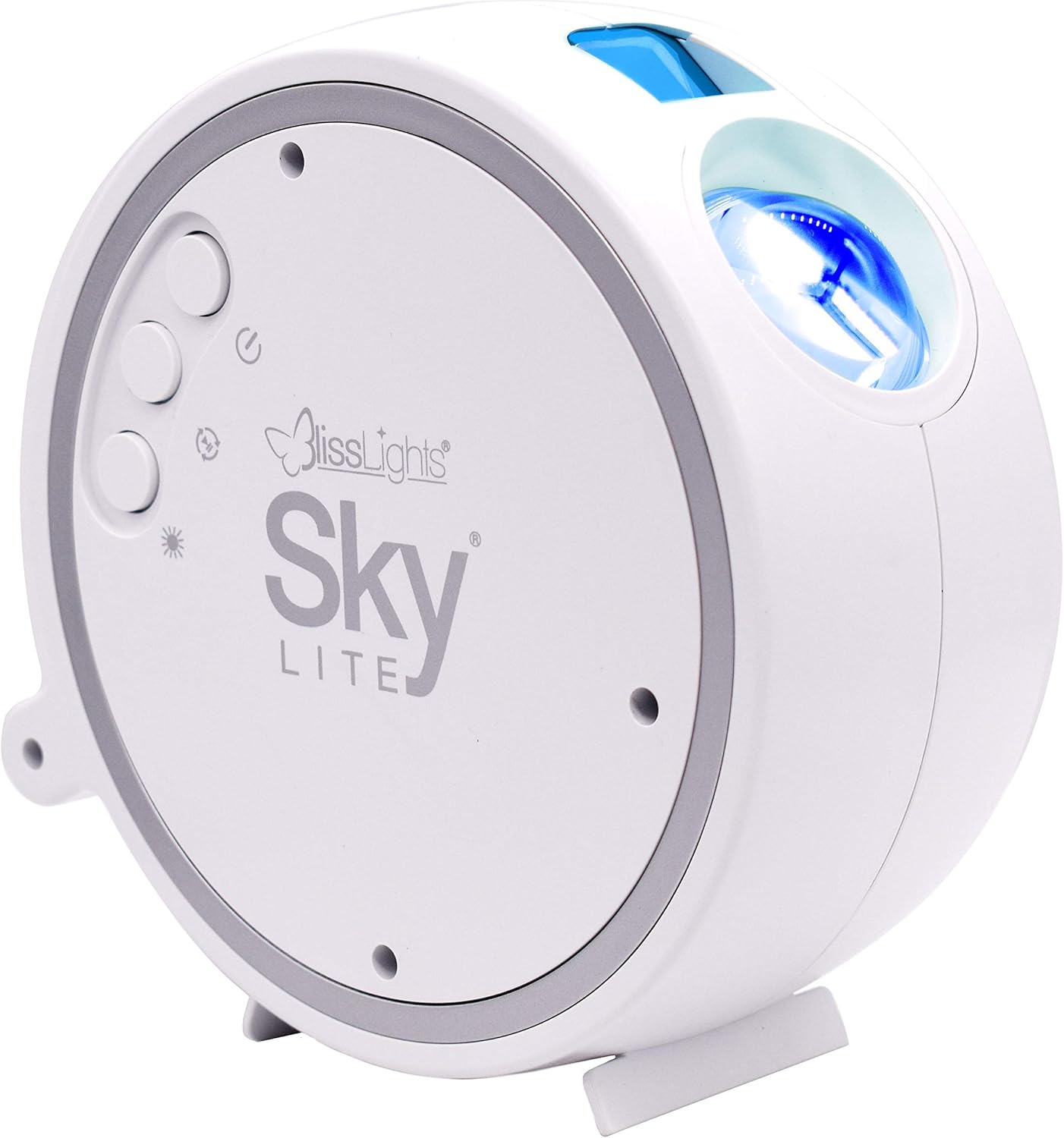
2. Product Features
- Dynamic Star Projection: Instantly projects a field of drifting blue stars.
- Nebula Cloud Effect: Features a transforming blue nebula cloud for an otherworldly visual experience.
- Advanced Technology: Incorporates a direct diode Laser, precision glass optics, and holographic technologies.
- Soothing Ambiance: Creates a relaxing environment suitable for various settings including bedrooms, gaming stations, and meditation spaces.
- User-Friendly Controls: Simple button controls allow for cycling through light effects, adjusting brightness, and controlling rotation.
- Automatic Timer: Equipped with a 6-hour auto timer for convenience.
3. Setup
3.1 Unboxing
Carefully remove all components from the packaging. Ensure the following items are present:
- BlissLights Sky Lite Projector
- Power Adapter
- User Manual (this document)
3.2 Placement
For optimal projection, place the Sky Lite on a flat, stable surface. The projector can be angled to direct the light effects onto a ceiling or wall. Consider placing it in a corner or against a wall to maximize the spread of the projection.


3.3 Power Connection
Connect the provided power adapter to the DC input port on the Sky Lite projector. Plug the other end of the adapter into a standard electrical outlet (AC 120V).
4. Operating Instructions
The Sky Lite features intuitive button controls for easy operation.
4.1 Powering On/Off
- Press the Power Button (circular button with a vertical line and circle) once to turn the unit ON.
- Press the Power Button again to turn the unit OFF.
4.2 Button Functions
The Sky Lite has three main control buttons:
- Power Button: Controls power ON/OFF.
- Star Button: Cycles through different star brightness levels (Off, Low, Medium, High).
- Nebula Button: Cycles through different nebula effects (Off, Static, Rotating).
4.3 Automatic Timer
The Sky Lite is equipped with a 6-hour automatic timer. After 6 hours of continuous operation, the device will automatically shut off to conserve energy and ensure longevity.
5. Maintenance
5.1 Cleaning
To maintain the clarity and performance of your Sky Lite projector:
- Ensure the device is unplugged before cleaning.
- Use a soft, dry, lint-free cloth to wipe the exterior of the projector.
- For the projection lens, gently wipe with a microfiber cloth. Avoid using abrasive cleaners or solvents, as they may damage the lens or finish.
5.2 Storage
When not in use for extended periods, store the Sky Lite in a cool, dry place, away from direct sunlight and extreme temperatures. Keep it in its original packaging or a protective case to prevent dust accumulation and damage.
6. Troubleshooting
If you encounter issues with your Sky Lite, refer to the table below for common problems and solutions.
| Problem | Possible Cause | Solution |
|---|---|---|
| No light projection | Not powered on; loose connection; faulty adapter. | Ensure power adapter is securely plugged in. Press the Power Button. Try a different outlet. |
| Stars not moving/Nebula static | Rotation feature is off. | Press the Nebula Button to cycle through rotation modes. |
| Dim projection | Low brightness setting; dirty lens. | Press the Star Button to increase brightness. Clean the projection lens with a soft cloth. Ensure room is dark. |
| Device shuts off unexpectedly | Automatic timer activated. | This is normal operation due to the 6-hour auto timer. Turn the unit back on if desired. |
7. Technical Specifications
| Specification | Detail |
|---|---|
| Model Number | 900-00047_A |
| Color | Blue/Blue - White Housing |
| Shape | Star |
| Material | Glass |
| Finish Type | Laser |
| Light Source Type | LED |
| Power Source | Corded Electric |
| Voltage | 120 Volts (AC) |
| Item Weight | 1.65 Pounds |
| Product Dimensions | 5.91"L x 2.95"W x 5.91"H |
| Special Features | 6 Hour Auto Timer |
8. Warranty Information
The BlissLights Sky Lite is covered by a manufacturer's warranty. Please refer to the official BlissLights website or contact customer support for detailed warranty terms and conditions.
9. Support & Contact
For further assistance, product registration, or to view the full user guide, please visit the official BlissLights website or contact their customer support team.
- Official Website: BlissLights Store on Amazon
- Full User Guide (PDF): Download PDF Manual


