
CHiQ FBM260L
Contents
CHiQ FBM260L Combined Refrigerator User Manual
Model: FBM260L
1. Introduction and Safety Information
This manual provides essential information for the safe and efficient operation of your CHiQ FBM260L Combined Refrigerator. Please read it thoroughly before installation and use, and keep it for future reference.
Product Overview
The CHiQ FBM260L is a 262-liter combined refrigerator, featuring a 187-liter refrigerator compartment and a 75-liter Low Frost freezer compartment. It is designed with electronic controls, five temperature modes, and an energy-efficient LED lamp. Its quiet operation at 39dB ensures minimal disturbance.


Important Safety Instructions
- Ensure the appliance is properly grounded before use.
- Do not damage the refrigerant circuit.
- Do not use electrical appliances inside the food storage compartments unless they are of the type recommended by the manufacturer.
- Keep ventilation openings clear of obstruction.
- Unplug the appliance before cleaning or maintenance.
2. Setup and Installation
Unpacking and Placement
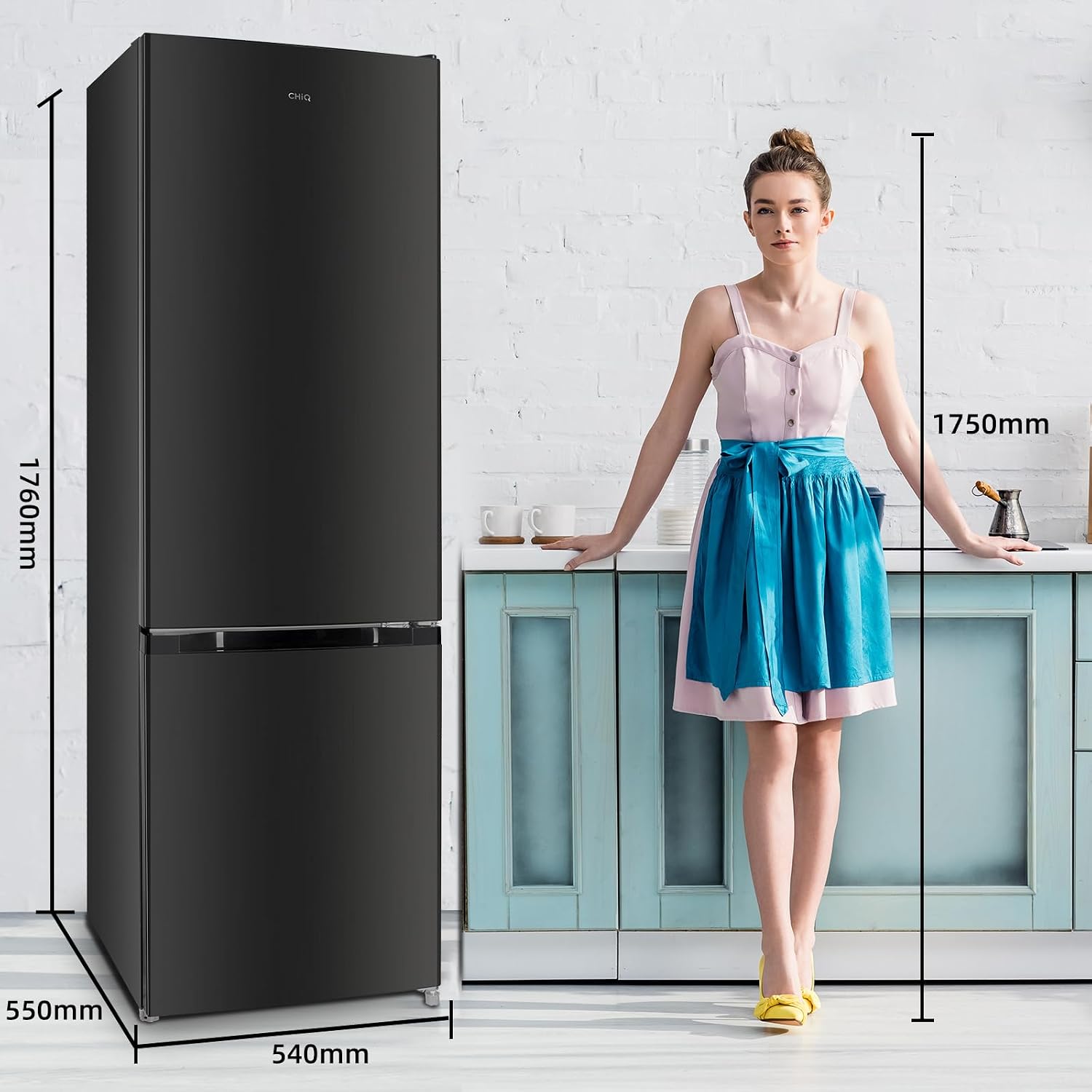
Carefully unpack the refrigerator and remove all packaging materials. Place the appliance on a firm, level surface, ensuring there is adequate space around it for proper ventilation. Avoid placing it near heat sources like ovens or direct sunlight.

Door Reversibility
The doors of the CHiQ FBM260L are reversible, allowing you to change the opening direction to suit your kitchen layout. Refer to the detailed instructions in the included printed manual for the step-by-step process of reversing the doors.

Initial Power-On
After installation, allow the refrigerator to stand upright for at least 2-4 hours before plugging it in. Upon first power-on, it is normal for the sides of the appliance to feel slightly warm. This is part of the normal operation as the cooling system stabilizes. Allow the refrigerator to run for several hours, preferably overnight, before loading it with food.
3. Operating Instructions
Electronic Control Panel
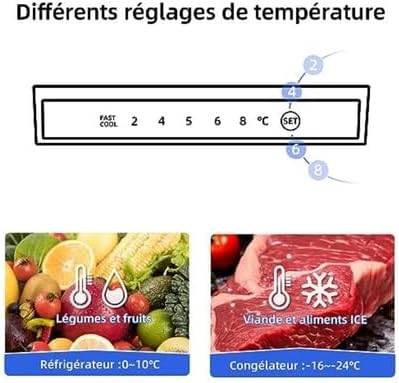
Your CHiQ FBM260L refrigerator features an intuitive electronic control panel, allowing you to easily set and adjust temperatures. There are 5 available temperature modes to meet various storage needs for fresh and frozen foods.
Temperature Settings
Use the 'SET' button on the control panel to cycle through the available temperature settings. The recommended temperature for the refrigerator compartment is between 0-10°C, and for the freezer compartment, between -16°C and -24°C. The 'FAST COOL' function can be activated for rapid cooling of newly added items.
Internal Storage and Features
The refrigerator offers a spacious 187-liter capacity with adjustable shelves and ample door storage, providing flexible organization for your groceries. The 75-liter Low Frost freezer compartment includes deep XL drawers for convenient storage of frozen items.


LED Lighting
The refrigerator is equipped with an energy-saving LED lamp that illuminates the interior, providing clear visibility of your food items while consuming less power and offering a longer lifespan compared to traditional bulbs.

4. Maintenance and Care
Cleaning
Regular cleaning of your refrigerator helps maintain hygiene and efficiency. Unplug the appliance before cleaning. Use a soft cloth and a mild detergent solution to clean the interior and exterior surfaces. Avoid abrasive cleaners or sharp objects that could damage the surfaces.
Defrosting
The refrigerator compartment features an automatic defrosting system. The freezer compartment utilizes a Low Frost design, which significantly reduces ice build-up compared to conventional freezers. However, periodic manual defrosting of the freezer will still be necessary to ensure optimal performance and energy efficiency. Defrost when the ice layer reaches approximately 3-5 mm thickness.
5. Troubleshooting Guide
Before contacting customer service, please refer to the following common issues and their potential solutions:
| Problem | Possible Cause | Solution |
|---|---|---|
| Appliance does not operate | No power supply; power cord not plugged in. | Check power connection and wall socket. |
| Refrigerator not cooling sufficiently | Temperature setting too high; door not closed properly; excessive food load; poor ventilation. | Adjust temperature setting; ensure door is sealed; do not overload; ensure proper air circulation around the unit. |
| Excessive ice build-up in freezer | Door left open too long; frequent opening; high humidity. | Minimize door openings; ensure door seals are clean and intact; perform manual defrosting as needed. |
| Unusual noise | Appliance not level; objects vibrating against the unit; normal compressor operation. | Adjust leveling feet; ensure nothing is touching the back or sides; some sounds (gurgling, humming) are normal. |

6. Product Specifications
| Feature | Specification |
|---|---|
| Model Number | FBM260L |
| Dimensions (W x D x H) | 54 cm x 55 cm x 176 cm |
| Weight | 49 kg |
| Total Capacity | 262 Liters |
| Refrigerator Capacity | 187 Liters |
| Freezer Capacity | 75 Liters |
| Energy Efficiency Class | E |
| Noise Level | 39 dB |
| Defrosting System | Automatic (Refrigerator), Low Frost (Freezer) |
| Number of Doors | 2 |
| Installation Type | Freestanding |
| Country of Origin | China |
7. Warranty and Support
Warranty Information
CHiQ offers a 12-year warranty on the compressor of this refrigerator. Additionally, a general 2-year warranty applies to all other product components (3 years for purchases made in Spain). Please retain your proof of purchase for warranty claims.
Returns Policy
Products are returnable within 14 days of receipt if you change your mind. For defective or damaged products, please consult the specific return policy provided at the time of purchase or on the retailer's website.
Customer Support
For any inquiries, technical assistance, or service requests, please contact CHiQ's specialized customer support. An online direct line managed by professional staff is available during weekdays. You may also refer to the CHiQ brand store for additional resources and contact details.
Documents and downloads
Ask a question about this manual
Ask about setup, troubleshooting, compatibility, parts, safety, or missing instructions. Manuals+ will review the question and use this page’s manual context to help answer it.