1. Introduction
Thank you for purchasing the Akai ABTS-S2 BK Bluetooth Radio Alarm Clock. This manual provides essential information for the safe and efficient operation of your device. Please read it thoroughly before use and retain it for future reference.
2. Safety Information
- Do not expose the device to rain, moisture, or extreme temperatures.
- Avoid placing the device near heat sources or in direct sunlight.
- Do not disassemble or modify the device. Refer all servicing to qualified personnel.
- Ensure proper ventilation around the device.
- Use only the specified power adapter and battery type.
3. Package Contents
Please check that the following items are included in your package:
- Akai ABTS-S2 BK Bluetooth Radio Alarm Clock
- USB Charging Cable
- User Manual
- Lithium-ion Battery (pre-installed or separate)
4. Product Overview
Familiarize yourself with the components and features of your Akai ABTS-S2 BK.

Figure 4.1: Front view of the Akai ABTS-S2 BK Bluetooth Radio Alarm Clock, displaying time (06:37), temperature (20°C), and humidity (65%).

Figure 4.2: Side view with dimensions: 14cm length, 5cm depth, 8cm height.

Figure 4.3: Rear panel showing connectivity options: USB port, Micro SD card slot, AUX input, and an extendable FM antenna.
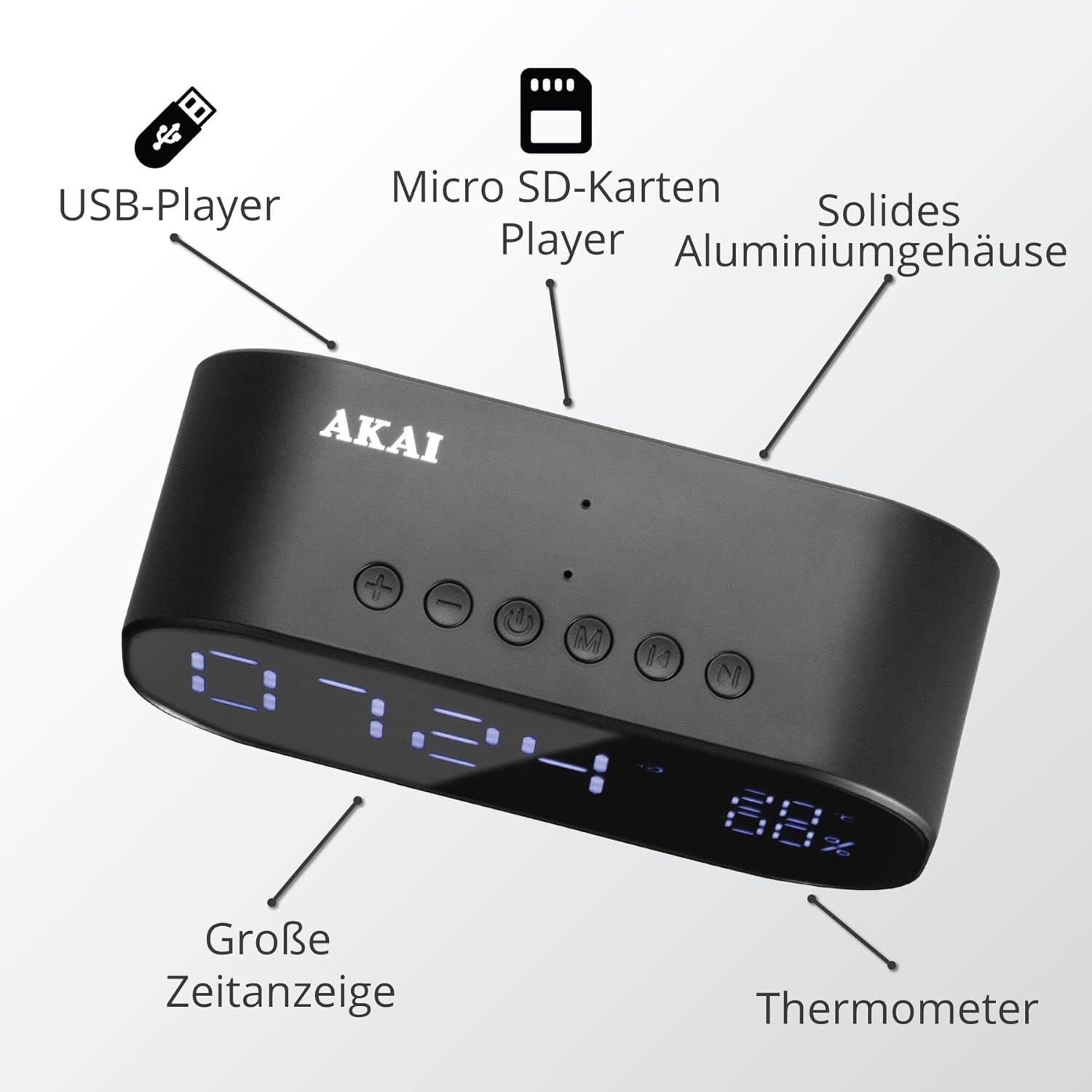
Figure 4.4: Top view highlighting control buttons: Volume Down (-), Volume Up (+), Power/Mode (circle with line), Menu (M), and Next/Tune (N). Features include USB Player, Micro SD Card Player, Large Time Display, and Thermometer.
Controls and Ports:
- Power/Mode Button: Press and hold to power on/off. Press briefly to switch between modes (Bluetooth, FM Radio, USB, Micro SD, AUX).
- Volume Up (+) / Volume Down (-) Buttons: Adjust volume.
- Menu (M) Button: Access menu options or settings.
- Next/Tune (N) Button: Skip tracks, tune radio stations, or navigate menu options.
- USB Port: For USB flash drive playback.
- Micro SD Card Slot: For Micro SD card playback.
- AUX Input: For connecting external audio devices via a 3.5mm audio cable.
- FM Antenna: Extend for better FM radio reception.
5. Setup
5.1 Powering On
- Ensure the internal Lithium-ion battery is charged. Connect the device to a USB power source using the provided USB charging cable if needed.
- Press and hold the Power/Mode button (circle with line) on the top panel for a few seconds until the display illuminates.
5.2 Setting the Time and Date
Specific steps for setting time and date may vary. Generally:
- Press the Menu (M) button to enter the settings menu.
- Use the Next/Tune (N) or Volume buttons to navigate to 'Time Set' or 'Clock'.
- Press the Menu (M) button to confirm your selection.
- Adjust hours, minutes, and date using the Next/Tune (N) or Volume buttons. Press Menu (M) to confirm each setting.
- Exit the menu once all settings are complete.
6. Operating Instructions
6.1 Mode Selection
Press the Power/Mode button briefly to cycle through available modes: Bluetooth, FM Radio, USB, Micro SD, AUX.
6.2 Bluetooth Mode
- Switch the device to Bluetooth mode. The display will show 'BT' or a Bluetooth icon, indicating it's ready for pairing.
- On your smartphone or other Bluetooth-enabled device, enable Bluetooth and search for available devices.
- Select 'AKAI ABTS-S2 BK' from the list.
- Once paired, the device will emit a confirmation sound, and you can play audio from your connected device.
6.3 FM Radio Mode
- Switch the device to FM Radio mode. Extend the FM antenna for optimal reception.
- Press and hold the Next/Tune (N) button to automatically scan and save available FM stations.
- Press the Next/Tune (N) button briefly to switch between saved stations.
6.4 USB/Micro SD Playback
- Insert a USB flash drive into the USB port or a Micro SD card into the Micro SD card slot.
- Switch the device to USB or Micro SD mode. Playback should begin automatically.
- Use the Next/Tune (N) buttons to skip tracks.
6.5 AUX Mode
- Connect an external audio device (e.g., MP3 player) to the AUX input using a 3.5mm audio cable (not included).
- Switch the device to AUX mode.
- Control playback from your external audio device.
6.6 Alarm Setting
To set an alarm:
- Press the Menu (M) button to enter the settings menu.
- Navigate to 'Alarm Set' or 'Alarm'.
- Adjust the alarm time and select the alarm source (e.g., buzzer, FM radio).
- Confirm your settings.
6.7 Display Brightness
The device features an LED display. Brightness adjustment may be available through the Menu (M) button or a dedicated button. Refer to the on-screen prompts.
7. Maintenance
7.1 Cleaning
- Wipe the device with a soft, dry cloth.
- Do not use abrasive cleaners, waxes, or solvents.
7.2 Storage
When not in use for extended periods, store the device in a cool, dry place away from direct sunlight and extreme temperatures.
8. Troubleshooting
| Problem | Possible Cause | Solution |
|---|---|---|
| No power/Device does not turn on | Battery is depleted; Power adapter not connected | Charge the battery; Ensure power adapter is securely connected. |
| No sound | Volume is too low; Incorrect mode selected; Device not paired (Bluetooth) | Increase volume; Select correct mode; Re-pair Bluetooth device. |
| Poor FM radio reception | Antenna not extended; Weak signal | Fully extend the FM antenna; Try repositioning the device. |
| Bluetooth pairing fails | Device too far; Bluetooth not enabled on source device; Incorrect device selected | Ensure devices are within range; Enable Bluetooth on source device; Select 'AKAI ABTS-S2 BK'. |
9. Specifications
- Brand: AKAI
- Model Number: ABTS-S2 BK
- Dimensions (L x W x H): 14 x 3.81 x 7.5 cm (5.51 x 1.5 x 2.95 inches)
- Weight: 800 grams (1.76 lbs)
- Material: Acrylonitrile Butadiene Styrene (ABS)
- Features: FM Radio, Bluetooth, USB Player, Micro SD Card Player, AUX Input, Digital Display, Thermometer
- Power Source: Battery Powered (1 Lithium-ion battery included)
- Display Type: Digital
10. Warranty and Support
For warranty information and customer support, please refer to the documentation provided at the time of purchase or contact your retailer. Keep your proof of purchase for any warranty claims.


