
Introduction
This manual provides essential instructions for the safe and efficient operation, maintenance, and troubleshooting of your FlowZone Series 2 Pro-Series Battery Charger. This charger is specifically designed for FlowZone 18V/5.2Ah lithium-ion batteries, commonly used with FlowZone Pro-Series battery-powered sprayers. Please read this manual thoroughly before using the charger to ensure proper function and to prevent damage or injury.
Safety Information
Always observe the following safety precautions to reduce the risk of electric shock, fire, or serious injury:
- Read all instructions before using the charger.
- Do not expose the charger to rain or wet conditions. Water entering the charger will increase the risk of electric shock.
- Use this charger only with FlowZone 18V/5.2Ah lithium-ion batteries. Attempting to charge other battery types may cause personal injury and damage.
- Do not attempt to disassemble, repair, or modify the charger. Contact authorized service personnel for any repairs.
- Keep the charger out of reach of children and untrained persons.
- Unplug the charger from the power outlet when not in use or before cleaning.
- Ensure adequate ventilation during charging. Do not cover the charger.
- Do not operate the charger if the cord or plug is damaged.
Package Contents
Verify that all items are present upon unpacking:
- FlowZone Series 2 Pro-Series Battery Charger (21V/2.5Ah)
- User Manual
Product Overview
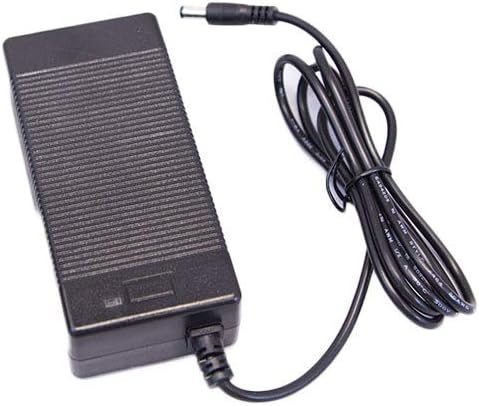
Image: A black rectangular battery charger with a ribbed surface, featuring an attached power cord ending in a barrel connector.
Setup
Follow these steps to prepare your charger for use:
- Unpack the charger and inspect it for any signs of damage. Do not use if damaged.
- Place the charger on a stable, dry, and well-ventilated surface, away from direct sunlight or heat sources.
- Plug the charger's power cord into a standard electrical outlet (100-240VAC, 50-60Hz).
Operating Instructions
To charge your FlowZone 18V/5.2Ah lithium-ion battery:
- Ensure the battery is clean and dry before connecting it to the charger.
- Connect the charger's barrel connector to the charging port on your FlowZone 18V/5.2Ah lithium-ion battery.
- The LED indicator on the charger will illuminate to show the charging status.
- A fully discharged 18V/5.2Ah battery will typically reach a full charge in approximately 1 hour.
- Once the battery is fully charged, disconnect the charger from the battery, then unplug the charger from the power outlet.
LED Indicator Status
- Solid Red: The battery is currently charging.
- Solid Green: The battery is fully charged.
- Flashing Red: Indicates an error condition. This could mean the battery is too hot or too cold, or there is a fault with the battery or charger. Allow the battery to reach room temperature before attempting to charge again.
Maintenance
Proper maintenance ensures the longevity and performance of your charger:
- Cleaning: Regularly clean the charger with a dry, soft cloth. Do not use abrasive cleaners, solvents, or immerse the charger in water.
- Storage: Store the charger in a dry, indoor location, away from extreme temperatures and direct sunlight.
- Inspection: Periodically inspect the power cord and connector for any signs of damage. If damage is found, discontinue use and contact customer support.
- Avoid dropping the charger or subjecting it to strong impacts.
Troubleshooting
Refer to the table below for common issues and their solutions:
| Issue | Possible Cause | Solution |
|---|---|---|
| Charger LED not lighting up. | No power to the charger. | Ensure the charger is properly plugged into a working electrical outlet. |
| Battery not charging. | Battery not properly connected; battery too hot/cold; faulty battery. | Ensure the battery is securely connected. Check the LED status for error codes. Allow the battery to reach room temperature (20-25°C / 68-77°F). If the issue persists, the battery may be faulty. |
| Charging takes longer than expected. | Battery deeply discharged; environmental factors. | A deeply discharged battery may take slightly longer. Ensure the charger is in a well-ventilated area and not exposed to extreme temperatures. |
Specifications
| Feature | Detail |
|---|---|
| Brand | FlowZone |
| Model | Series 2 Pro-Series Battery Charger |
| Input Voltage | 100-240VAC, 50-60Hz |
| Output Voltage | 21V |
| Output Current | 2.5A (for 21V/2.5Ah charger rating) |
| Charging Time | Approx. 1 hour for 18V/5.2Ah battery |
| Compatible Batteries | FlowZone 18V/5.2Ah Lithium-Ion (FZAAEM-AMZ) |
| Package Dimensions | 10 x 5 x 5 inches |
| Item Weight | 12.8 ounces |
| Manufacturer | Wessol |
Warranty and Support
This FlowZone Series 2 Pro-Series Battery Charger is covered by the manufacturer's warranty. For specific warranty details, please refer to the warranty card included with your product or visit the official FlowZone website. If you encounter any issues or require technical assistance, please contact FlowZone customer support. Ensure you have your product model and purchase information available when contacting support.