1. Introduction
This manual provides essential information for the installation, operation, and maintenance of the Lenel LNL-3300 Intelligent System Controller (ISC) EP2500. Please read this manual thoroughly before attempting to install or operate the device to ensure proper functionality and safety.
2. Product Overview
The Lenel LNL-3300 Intelligent System Controller (ISC) is a core component designed for advanced access control applications within the OnGuard system. It serves as the primary access control engine, providing robust power and functionality for managing security operations. The ISC facilitates communication between the host computer and various access control modules, ensuring efficient and reliable system performance.
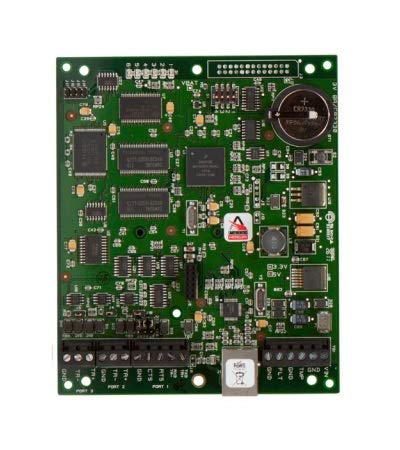
Image 1: Front view of the Lenel LNL-3300 Intelligent System Controller.
3. Key Features
The LNL-3300 ISC offers a range of features designed for high-performance access control:
- High-Speed Ethernet Connectivity: On-board 10/100Base-T upstream port provides significantly higher throughput compared to serial-to-Ethernet converters. Supports both DHCP and fixed IP addressing.
- DNS Device Naming: Supports DNS device naming through extended DHCP commands.
- Dual Path Communication: Enables host communication via on-board Ethernet TCP/IP, direct wire (RS-485, 2-wire multidrop capable), or dial-up connections.
- Non-Volatile Flash Memory: Equipped with 15 MB of available on-board, non-volatile flash memory for data storage.
- Battery-Backed Event Storage: Provides battery-backed, non-volatile storage for up to 50,000 events, ensuring data integrity during power interruptions.
- Large Cardholder Capacity: Capable of storing up to 500,000 cardholders in non-volatile flash memory, with support for selective download for larger databases.
- Module Support: Two downstream RS-485 2-wire ports support up to 64 devices (e.g., 64 doors) using various combinations of LNL-1100, LNL-1200, LNL-1300, LNL-1320, LNL-500B, and LNL-500W modules.
4. Setup and Installation
Proper installation is crucial for the reliable operation of the LNL-3300 ISC. This section outlines general setup considerations.
4.1. Mounting
Mount the LNL-3300 in a secure, dry location, away from direct sunlight, extreme temperatures, and sources of electromagnetic interference. Ensure adequate ventilation around the unit.
4.2. Power Connection
Connect the LNL-3300 to a stable power source as specified in the technical specifications. Ensure that the power supply meets the required voltage and current ratings to prevent damage to the unit.
4.3. Network and Communication Connections
The LNL-3300 supports multiple communication paths:
- Primary Ethernet Port: Connect an Ethernet cable to the 10/100Base-T port for high-speed communication with the host computer. Configure IP settings (DHCP or fixed IP) as required by your network infrastructure.
- Secondary Communication Port: This port can be configured for RS-485 (2-wire multidrop), dial-up, or an Ethernet daughterboard connection. Connect the appropriate cable based on your system design.
- Downstream RS-485 Ports: Use these two ports to connect to various Lenel modules (e.g., LNL-1100, LNL-1200, LNL-1300, LNL-1320, LNL-500B, LNL-500W). Ensure correct wiring and termination for RS-485 networks. Up to 64 devices can be connected across these two ports.
4.4. Initial Configuration
After physical installation and power-up, the LNL-3300 will require configuration through the OnGuard system software. Refer to the OnGuard system documentation for detailed instructions on device discovery, IP configuration, and module assignment.
5. Operating Instructions
The LNL-3300 ISC operates as an integral part of the Lenel OnGuard access control system. Direct user interaction with the LNL-3300 hardware is minimal, as its primary function is to process and manage access control data and commands from the host system.
5.1. System Integration
Once installed and configured, the LNL-3300 continuously communicates with the OnGuard host software. It receives configuration updates, cardholder data, and access privileges, and transmits event data (e.g., card reads, door alarms) back to the host.
5.2. Access Control Processing
The ISC processes access requests from connected card readers and other modules. It verifies cardholder credentials against its stored database and makes access decisions locally, even if communication with the host is temporarily interrupted. This ensures continuous security operation.
5.3. Event Logging
All access control events and system status changes are logged in the LNL-3300's non-volatile memory. These events are then transmitted to the OnGuard host for historical reporting and real-time monitoring.
5.4. Firmware Updates
Firmware updates for the LNL-3300 are typically performed through the OnGuard system software. Follow the instructions provided with the firmware update package and the OnGuard documentation to ensure a successful update process.
6. Maintenance
Regular maintenance helps ensure the longevity and optimal performance of your LNL-3300 ISC.
- Environmental Checks: Periodically inspect the installation environment to ensure it remains within specified temperature and humidity ranges. Verify that ventilation openings are clear of obstructions.
- Cable Connections: Check all cable connections (power, Ethernet, RS-485) for secure fit and signs of damage. Loose connections can lead to intermittent operation.
- Battery Backup: The LNL-3300 features battery-backed memory. While the battery is designed for long life, it should be part of a periodic system health check. Consult a qualified technician for battery replacement if necessary.
- Software Updates: Keep the OnGuard system software and LNL-3300 firmware updated to the latest versions to benefit from performance improvements and security enhancements.
- Cleaning: If necessary, gently clean the exterior of the unit with a soft, dry cloth. Do not use liquid cleaners or solvents.
7. Troubleshooting
This section provides guidance for common issues you might encounter with the LNL-3300 ISC.
7.1. No Power Indication
- Check Power Supply: Verify that the power supply is connected correctly and providing the specified voltage.
- Power Cable: Ensure the power cable is securely plugged into both the LNL-3300 and the power outlet.
7.2. Communication Issues with Host
- Ethernet Connection: Check the Ethernet cable and network connectivity. Verify IP address settings (DHCP or static) and ensure the LNL-3300 is reachable on the network.
- RS-485/Dial-up: For secondary communication paths, verify cable integrity, proper termination, and correct configuration settings.
- OnGuard Software: Ensure the OnGuard host software is running and configured to communicate with the LNL-3300. Check for any error messages within the software.
7.3. Modules Not Responding
- RS-485 Wiring: Verify the RS-485 wiring to the downstream modules. Ensure correct polarity and proper termination resistors are in place.
- Module Power: Confirm that the connected modules are receiving power.
- Module Addressing: Ensure that each module has a unique address and is correctly configured within the OnGuard system.
If issues persist after attempting these troubleshooting steps, contact technical support or a qualified service technician.
8. Specifications
The following table details the technical specifications for the Lenel LNL-3300 Intelligent System Controller:
| Specification | Value |
|---|---|
| Model Number | LNL-3300 |
| Manufacturer | MERCURY |
| Package Dimensions | 9.5 x 7.5 x 2 inches |
| Item Weight | 6.5 ounces |
| Memory Storage Capacity | 15 MB (non-volatile flash) |
| Event Storage | 50,000 events (battery-backed) |
| Cardholder Capacity | Up to 500,000 |
| Connectivity Technology | Ethernet (10/100Base-T), RS-485 (2-wire multidrop), Dial-up |
| Downstream Device Support | Up to 64 modules (e.g., LNL-1100, LNL-1200, LNL-1300, LNL-1320, LNL-500B, LNL-500W) |
9. Warranty and Support
For warranty information regarding your Lenel LNL-3300 Intelligent System Controller, please refer to the documentation provided at the time of purchase or contact your authorized Lenel reseller. Warranty terms and conditions may vary based on region and purchase agreement.
For technical support, assistance with installation, configuration, or troubleshooting beyond the scope of this manual, please contact your authorized Lenel system integrator or Lenel technical support directly. Ensure you have your product model number and any relevant system details available when seeking support.


