
1. Introduction
The JOYO R16 Vocal Lab is a powerful and compact vocal effects pedal designed to enhance live performances and studio recordings. It integrates advanced vocal harmony generation with high-quality reverb effects, offering a comprehensive solution for vocalists. This manual provides detailed instructions on setting up, operating, and maintaining your R16 Vocal Lab pedal to ensure optimal performance and longevity.
2. Key Features
- 9-position vocal harmony selection for rich vocal layering.
- 3 vocal reverb positions: Small, Medium, and Large, for diverse ambient effects.
- 12 available keys with a Major/Minor toggle switch for precise harmony tuning.
- Selectable 48V Phantom Power ON/OFF for condenser microphones.
- Independent footswitches for Harmony and Reverb activation, ideal for live use.
- Microphone gain control with an integrated LED overload indicator (Green: Clean, Yellow: Warning, Red: Distortion).
- XLR inputs and outputs for professional audio connectivity.
- 1/4-inch instrument input for applying reverb effects to other instruments.
- Auxiliary input for connecting external audio sources like phones or MP3 players.
- "Center Silencer" function for karaoke-style vocal removal from auxiliary audio.
3. Setup Guide
Follow these steps to set up your JOYO R16 Vocal Lab pedal:
- Power Connection: Connect a standard 9V DC power adapter (not included) to the DC 9V input jack on the rear of the pedal. Ensure the power supply meets the pedal's specifications (9V DC, 100mA minimum, center negative).
- Microphone Connection: Connect your microphone to the "MIC IN" XLR input on the side of the pedal. If using a condenser microphone requiring phantom power, ensure the 48V Phantom Power switch is set to ON. For dynamic microphones, set it to OFF.
- Output Connection: Connect the "MIC OUT" XLR output to your mixer, audio interface, or PA system.
- Instrument Connection (Optional): If you wish to apply reverb effects to an instrument, connect your instrument (e.g., guitar, keyboard) to the "INST. IN" 1/4-inch jack on the rear.
- Auxiliary Input (Optional): For playing along with backing tracks or karaoke, connect your phone, tablet, or MP3 player to the "AUX IN" 3.5mm jack on the rear.
- Headphone Connection (Optional): For monitoring, connect headphones to the "PHONES" 3.5mm jack on the rear.
- Ground Lift Switch: If you experience hum or noise, try toggling the "GND LIFT" switch on the side of the pedal.

Figure 1: Rear view of the JOYO R16 Vocal Lab pedal, highlighting the DC 9V power input, instrument input (INST. IN), auxiliary input (AUX IN), headphone output (PHONES), and Center Silencer switch.
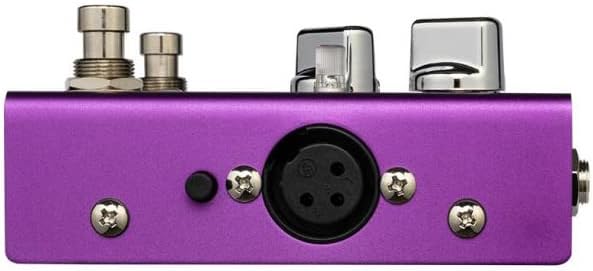
Figure 2: Side view of the JOYO R16 Vocal Lab pedal, showing the XLR output (MIC OUT) and the Ground Lift switch.

Figure 3: Opposite side view of the JOYO R16 Vocal Lab pedal, showing the XLR input (MIC IN) and the 48V Phantom Power switch.
4. Operating Instructions
Familiarize yourself with the controls and functions of the R16 Vocal Lab:

Figure 4: Top view of the JOYO R16 Vocal Lab pedal, illustrating the layout of all control knobs, switches, and footswitches.
- GAIN Control: Adjusts the input sensitivity for your microphone. The LED indicator next to it shows signal level: Green (clean signal), Yellow (warning, approaching clipping), Red (clipping/distortion, reduce gain).
- HARMONY Knob: Selects one of the 9 available vocal harmony types. Rotate the knob to cycle through the options.
- REVERB Knob: Selects one of the 3 reverb types: Small, Medium, or Large.
- KEY SELECT Knob: Sets the musical key for the harmony effect. There are 12 keys available.
- MAJOR/MINOR Toggle: Switches between major and minor scales for the selected key, allowing for precise harmonic alignment.
- DRY/MIX Knob: Adjusts the blend between your dry (unaffected) vocal signal and the processed (harmony/reverb) signal.
- HARMONY Footswitch: Toggles the vocal harmony effect ON or OFF.
- REVERB Footswitch: Toggles the vocal reverb effect ON or OFF.
- CENTER SILENCER Switch: When using the AUX IN, this switch attempts to reduce or remove the lead vocal from the incoming audio, creating a karaoke-like track.
5. Maintenance
To ensure the longevity and proper functioning of your JOYO R16 Vocal Lab pedal, follow these maintenance guidelines:
- Cleaning: Use a soft, dry cloth to clean the pedal's exterior. Avoid using abrasive cleaners, solvents, or waxes, as they can damage the finish and internal components.
- Storage: Store the pedal in a cool, dry place away from direct sunlight, extreme temperatures, and high humidity. When not in use for extended periods, disconnect the power supply.
- Handling: Handle the pedal with care. Avoid dropping it or subjecting it to strong impacts, which can damage internal circuitry or external controls.
- Power Supply: Always use a compatible 9V DC, center negative power supply. Using an incorrect power supply can damage the unit and void the warranty.
6. Troubleshooting
If you encounter issues with your JOYO R16 Vocal Lab, refer to the following common troubleshooting steps:
- No Sound Output:
- Check all cable connections (microphone in, XLR out, power).
- Ensure the power supply is correctly connected and providing power.
- Verify that the microphone gain is set appropriately and the LED is not red (indicating clipping).
- Check the volume levels on your mixer or PA system.
- Ensure the HARMONY and REVERB footswitches are engaged if you expect effects.
- Distorted Sound:
- Reduce the microphone GAIN control if the LED indicator is red.
- Check if your microphone's output level is too high for the pedal's input.
- Ensure the 48V Phantom Power is correctly set for your microphone type.
- Hum or Noise:
- Toggle the "GND LIFT" switch on the side of the pedal.
- Ensure all cables are in good condition and properly shielded.
- Try using a different power outlet or a dedicated power supply for audio equipment.
- Harmony Not Working Correctly:
- Ensure the HARMONY footswitch is engaged.
- Verify the KEY SELECT and MAJOR/MINOR settings match the song's key.
- Check the DRY/MIX knob to ensure the harmony effect is audible.
If these steps do not resolve the issue, please contact JOYO customer support for further assistance.
7. Specifications
| Feature | Specification |
|---|---|
| Model Number | JOYO-R16 |
| Dimensions (L x W x H) | 10 x 6.8 x 4.8 cm (3.94 x 2.68 x 1.89 inches) |
| Weight | 490 g (1.08 lbs) |
| Color | Purple |
| Power Supply | 9V DC (Center Negative) |
| Voltage | 9 Volts |
| Current Draw | 100 mA |
| Hardware Interface | 1/4 inch Audio, XLR |
| Signal Format | Analog |
| Controls | Knobs, Toggle Switches, Footswitches |
| Manufacturer | JOYO |
| Country of Origin | China |
8. Warranty and Support
JOYO products are manufactured to high-quality standards. For information regarding warranty coverage, technical support, or service, please refer to the warranty card included with your product or visit the official JOYO website. Keep your purchase receipt as proof of purchase for any warranty claims.
For additional resources and product information, you may visit the JOYO Brand Store on Amazon.


