Introduction
Welcome to the world of Disney's Frozen 2 with your new Olaf Interactive Figure. This manual provides comprehensive instructions for setting up, operating, maintaining, and troubleshooting your interactive toy. Designed to bring the magic of Arendelle to life, Olaf interacts with you and other compatible Frozen 2 Interactive Adventure figures (sold separately), offering a unique and engaging play experience.
Important Safety Information
WARNING: CHOKING HAZARD - Small Parts. Not for children under 3 years.
- Always supervise children during play.
- Do not attempt to disassemble or modify the figure.
- Keep batteries away from small children. If swallowed, seek immediate medical attention.
- Dispose of batteries properly according to local regulations.
What's in the Box
- 1 x Disney Frozen 2 Olaf Interactive Figure
- 2 x AAA Batteries (pre-installed or included)
Setup
Battery Installation
Your Olaf Interactive Figure requires 2 AAA batteries. These may be pre-installed. If not, or if replacement is needed:
- Locate the battery compartment on the back or bottom of the figure.
- Using a small Phillips head screwdriver, unscrew the battery compartment cover.
- Insert 2 new AAA batteries, ensuring the correct polarity (+/-) as indicated inside the compartment.
- Replace the cover and secure it with the screw.
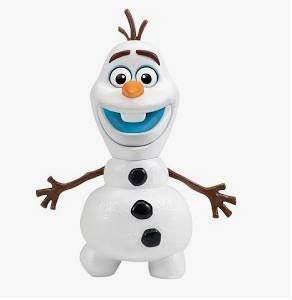
Image: The Disney Frozen 2 Olaf Interactive Figure. Olaf is a white snowman with stick arms, three black buttons, and a carrot nose. He has a wide, happy smile showing his two front teeth, and expressive eyes.
Powering On/Off
Locate the ON/OFF switch, usually on the back or bottom of the figure. Slide the switch to the 'ON' position to activate Olaf. Slide to 'OFF' when not in use to conserve battery life.
Operating Instructions
Interacting with Olaf
Olaf is designed to respond to various actions and interact with other figures:
- Activate Phrases: Gently press Olaf's stomach or raise one of his arms to hear him speak various phrases from Frozen 2. His eyes and mouth will move, and his head will turn as he talks.
- Singing: Raise Olaf's other arm to hear him sing his song, "When I'm Older."
- Interactive Play with Other Figures: For the full interactive experience, place Olaf near other Disney Frozen 2 Interactive Adventure figures (Anna and Elsa, sold separately). The figures will recognize each other using IR technology and engage in conversations, play charades, and even sing "Some Things Never Change" together. Ensure figures are facing each other for optimal interaction.
If Olaf falls over, he may utter different phrases and will continue talking until he is picked up and placed upright.
Maintenance
- Cleaning: Wipe the figure with a soft, dry cloth. Do not use harsh chemicals or abrasive cleaners. Do not immerse in water.
- Storage: Store the figure in a cool, dry place away from direct sunlight and extreme temperatures.
- Battery Care: Remove batteries if the figure will not be used for an extended period to prevent leakage.
Troubleshooting
| Problem | Possible Cause / Solution |
|---|---|
| Olaf is not responding. |
|
| Olaf is not interacting with other figures. |
|
| Sound is distorted or low. |
|
| Olaf falls over easily. |
|
Specifications
| Feature | Detail |
|---|---|
| Product Dimensions | 2.5 x 2.5 x 6.75 inches |
| Item Weight | 8.6 ounces |
| Model Number | 75023 |
| Manufacturer Recommended Age | 36 months - 12 years |
| Batteries | 2 AAA batteries required (included) |
| Manufacturer | Playmates Toys |
| Release Date | February 11, 2020 |
Warranty and Support
For warranty information or technical support, please refer to the packaging or contact Playmates Toys customer service directly. Contact details are typically available on the product packaging or their official website.
For additional product information or to explore other Disney products, visit the Disney Store on Amazon.