
General Pump 98210600
General Pump Interpump Pressure Washer Oil Filler Dipstick Cap
Model: 98210600
Brand: General Pump
1. Introduction
This manual provides essential information for the proper use and maintenance of your General Pump 98210600 Oil Filler Dipstick Cap. This component is an Original Equipment Manufacturer (OEM) replacement part designed for specific General Pump Interpump series pressure washers.
Understanding the function and correct installation of this dipstick is crucial for ensuring the longevity and optimal performance of your pressure washer pump.
2. Product Overview and Features
The General Pump 98210600 Oil Filler Dipstick Cap serves as both an oil filler cap and a dipstick for accurate oil level measurement in compatible pressure washer pumps. It is a vital component for proper lubrication and protection of internal pump mechanisms.
Key Features:
- Dimensions: Approximately 92 millimeters in length.
- Identification: Features a distinctive yellow top with the word "OIL" raised for easy identification.
- Quality: Genuine General Pump OEM replacement part, ensuring precise fit and reliable performance.
- Weight: Lightweight design, weighing approximately 0.32 ounces.
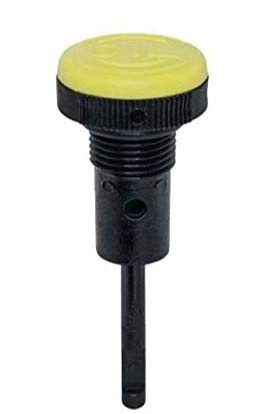
Figure 2.1: Front view of the General Pump 98210600 Oil Filler Dipstick Cap. This image displays the overall design, including the black dipstick shaft and the yellow cap.

Figure 2.2: Angled view of the dipstick, clearly showing the yellow cap with the embossed "OIL" lettering, which aids in quick identification.
3. Compatibility
This General Pump 98210600 Oil Filler Dipstick Cap is specifically engineered for use with the following General Pump Interpump Series pumps:
- TS Series Pumps
- TSF Series Pumps
- TSP Series Pumps
- T5050 Series Pumps
Always verify your pump's model number to ensure proper fit and function before installation.

Figure 3.1: Interpump Group branding, indicating the manufacturer of the compatible pump series.
4. Installation and Setup
The 98210600 Oil Filler Dipstick Cap is designed for straightforward replacement. Follow these steps for proper installation:
- Preparation: Ensure your pressure washer is completely turned off, unplugged (if electric), and has cooled down sufficiently before beginning any work.
- Locate Old Dipstick: Identify the existing oil filler cap/dipstick on your pressure washer pump.
- Remove Old Dipstick: Carefully unscrew the old dipstick by turning it counter-clockwise. Remove it completely from the oil filler opening.
- Insert New Dipstick: Take the new General Pump 98210600 Oil Filler Dipstick Cap. Align its threads with the oil filler opening on the pump.
- Secure Dipstick: Screw the new dipstick clockwise into the opening. Tighten it firmly by hand until it is snug. Do not overtighten, as this can damage the threads or the dipstick itself.
Proper installation ensures a sealed oil reservoir and accurate oil level readings.
5. Operation (Checking Oil Level)
Regularly checking the oil level is critical for the proper lubrication and extended lifespan of your pressure washer pump. Follow these steps to accurately check the oil level:
- Position Pressure Washer: Place the pressure washer on a level surface to ensure an accurate oil level reading.
- Engine/Motor Off: Ensure the pressure washer's engine or motor is completely off and has had time to cool down.
- Remove Dipstick: Unscrew the 98210600 dipstick by turning it counter-clockwise and pull it out.
- Clean Dipstick: Wipe the dipstick clean with a lint-free cloth.
- Reinsert for Reading: Reinsert the dipstick fully into the oil filler opening. For most General Pump models, you should insert it until it seats, but do not screw it back in for the initial reading.
- Check Oil Level: Remove the dipstick again and observe the oil level. The oil should be between the minimum and maximum marks (if present on the dipstick or pump housing) or at the indicated full level. Refer to your pressure washer pump's specific manual for exact oil level indicators.
- Add Oil (If Necessary): If the oil level is low, slowly add the recommended type and amount of pump oil. Add small amounts at a time and recheck the level frequently until it reaches the correct mark.
- Secure Dipstick: Once the oil level is correct, reinsert the dipstick and screw it firmly back into place.
6. Maintenance
The 98210600 Oil Filler Dipstick Cap requires minimal maintenance, but periodic inspection is recommended to ensure its integrity and proper function:
- Visual Inspection: Regularly inspect the dipstick for any signs of physical damage, such as cracks in the plastic, bending of the shaft, or wear on the threads.
- O-Ring Check: If your dipstick includes an O-ring (typically at the base of the cap), ensure it is intact, pliable, and free from cracks or deterioration. A damaged O-ring can lead to oil leaks or contamination.
- Cleanliness: Keep the dipstick clean. Before reinserting it after checking the oil, wipe off any dirt or debris to prevent contaminants from entering the pump's oil reservoir.
- Cap Integrity: Ensure the yellow cap with the "OIL" marking is securely attached and not loose, which could affect the seal.
Replace the dipstick if any significant damage or wear is observed to maintain proper sealing and accurate oil level readings.
7. Troubleshooting
While the 98210600 Oil Filler Dipstick Cap is a simple component, issues can arise. Here are some common concerns and their resolutions:
- Dipstick Does Not Fit or Thread Properly:
- Incorrect Model: Double-check that you have the correct General Pump 98210600 model for your specific pressure washer pump (TS, TSF, TSP, or T5050 Series).
- Damaged Threads: Inspect the threads on both the dipstick and the pump's oil filler opening for any damage, cross-threading, or debris. Clean the threads if necessary.
- Inconsistent or Inaccurate Oil Level Reading:
- Uneven Surface: Ensure the pressure washer is placed on a completely level surface when checking the oil.
- Improper Cleaning: Make sure the dipstick is thoroughly wiped clean before reinserting it for a reading.
- Incorrect Insertion: Ensure the dipstick is inserted fully into the opening as per the "Operation" section (e.g., not screwed in for the reading if your pump requires a simple insertion).
- Oil Viscosity/Type: Verify that the correct type and viscosity of oil are being used in the pump, as incorrect oil can affect readings or pump performance.
- Oil Leakage Around Dipstick:
- Loose Dipstick: Ensure the dipstick is screwed in firmly.
- Damaged O-Ring/Seal: Inspect the O-ring or sealing washer (if present) on the dipstick for cracks, tears, or compression set. Replace the dipstick if the seal is compromised.
- Overfilled Oil: An overfilled oil reservoir can cause pressure buildup and lead to leaks. Ensure the oil level is correct.
If issues persist after troubleshooting, consult a qualified service technician or contact General Pump customer support.
8. Specifications
| Attribute | Detail |
|---|---|
| Model Number | 98210600 |
| Product Type | Oil Filler Dipstick Cap |
| Brand | General Pump |
| Compatibility | General Pump TS, TSF, TSP, and T5050 Series Pumps |
| Product Dimensions | 2 x 0.25 x 0.25 inches (approx. 92 mm length) |
| Weight | 0.32 ounces |
| UPC | 762040885817 |
| ASIN | B0848XTHC2 |
| GTIN | 762040885817 |
9. Warranty and Support
For specific warranty information regarding your General Pump 98210600 Oil Filler Dipstick Cap, please refer to the documentation that came with your original pressure washer pump or contact General Pump directly. Warranty terms for replacement parts may vary.
If you require technical assistance, have questions about compatibility, or need to report a defect, please reach out to General Pump customer service. Contact information can typically be found on the official General Pump website or through your product retailer.
It is recommended to have your product model number (98210600) and the model of your pressure washer pump readily available when contacting support.
Related documents98210600


Ask a question about this manual
Ask about setup, troubleshooting, compatibility, parts, safety, or missing instructions. Manuals+ will review the question and use this page’s manual context to help answer it.