
Decathlon 2537965
Contents
Decathlon Newfeel 500 Body Digital Weight Scale User Manual
Model: 2537965
Introduction
This manual provides essential information for the safe and effective use of your Decathlon Newfeel 500 Body Digital Weight Scale. Please read it thoroughly before first use and retain it for future reference.
The Newfeel 500 Body Digital Weight Scale is designed to provide accurate weight measurements and a visual indication of body fat level. It features a sleek glass top, high-precision sensors, and a bright LCD display for easy readability.
Product Overview
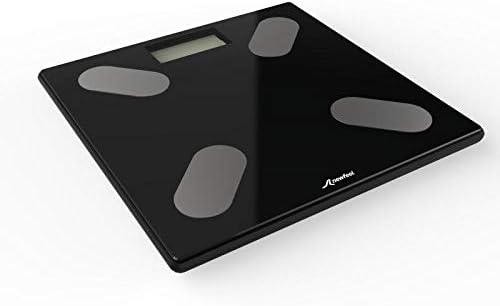
Figure 1: Angled view of the Decathlon Newfeel 500 Body Digital Weight Scale. It is black with a glass surface, featuring a digital display and four grey oval pads for foot placement.

Figure 2: Top-down view of the scale displaying "62.5" kg. The scale is black with four white/grey oval pads.
The Newfeel 500 scale allows for the configuration of up to 8 user profiles, enabling multiple individuals to track their progress. Its compact size ensures it fits seamlessly into various home environments.
Setup
1. Unpacking
Carefully remove the scale from its packaging. Inspect the scale for any signs of damage. If damaged, do not use and contact customer support.
2. Battery Installation
The scale requires batteries for operation. Locate the battery compartment on the underside of the scale.
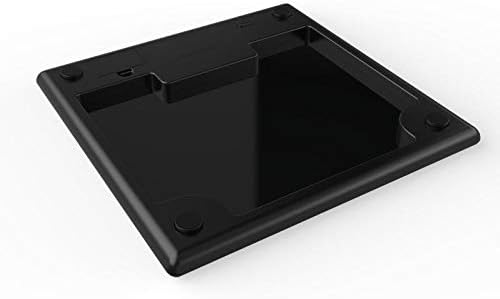
Figure 3: Underside of the scale, showing the battery compartment and non-slip feet.
- Open the battery compartment cover.
- Insert the required batteries, ensuring correct polarity (+/-).
- Close the battery compartment cover securely.
3. Initial Placement
Place the scale on a hard, flat, and stable surface. Uneven surfaces or soft carpets may affect accuracy.
Operating Instructions
1. Taking a Weight Measurement
- Gently tap the center of the scale with your foot to activate it. The display will show "0.0" or "CAL".
- Once "0.0" is displayed, step onto the scale with bare feet, standing still and centered on the pads.
- Your weight will be displayed and then flash, indicating the measurement is complete.
- The scale will automatically turn off after a few seconds of inactivity.
2. User Profile Configuration (for Body Fat Indication)
The scale supports up to 8 user profiles to provide a visual indicator of your body fat level compared to an ideal level. Refer to the full product manual (if available) or the manufacturer's website for detailed instructions on setting up user profiles.
Generally, this involves inputting personal data such as age, gender, and height, which the scale uses for its body fat estimation algorithm.
Maintenance
1. Cleaning
- Clean the scale surface with a soft, damp cloth.
- Do not use abrasive cleaners or immerse the scale in water.
- Ensure the scale is dry before storage or next use.
2. Storage
Store the scale in a cool, dry place, away from direct sunlight and extreme temperatures.
3. Battery Replacement
If the display shows a low battery indicator or becomes dim, replace the batteries promptly. Use the same type and number of batteries as originally installed.
Troubleshooting
| Problem | Possible Cause | Solution |
|---|---|---|
| Scale does not turn on. | Dead or incorrectly installed batteries. | Check battery polarity; replace batteries. |
| Inaccurate readings. | Scale on uneven surface; scale moved; calibration needed. | Place on a hard, flat surface. Recalibrate by stepping on and off the scale quickly. |
| Display shows "Lo" or "Err". | Low battery; overload; measurement error. | Replace batteries; ensure weight is within scale's capacity; re-attempt measurement. |
If you encounter issues not listed here, please contact Decathlon customer support.
Specifications
- Model: 2537965
- Product Dimensions: 33 x 32.8 x 3.5 cm
- Item Weight: 2.02 kg
- Material Type: Stainless Steel, Glass, Acrylonitrile Butadiene Styrene
- Display Type: LCD
- Batteries Required: Yes
- Country of Origin: France
- Color: Black
- Special Feature: Bodyweight measurement, 8 user profiles
Warranty and Support
For warranty information and customer support, please refer to the official Decathlon website or contact their customer service directly. Keep your proof of purchase for warranty claims.
Decathlon Official Website: www.decathlon.com.au
Ask a question about this manual
Ask about setup, troubleshooting, compatibility, parts, safety, or missing instructions. Manuals+ will review the question and use this page’s manual context to help answer it.