1. Introduction
This manual provides comprehensive instructions for the installation, operation, and maintenance of your SCS Sentinel PVF0037 Wired Video Intercom System. This system is designed to enhance security by allowing you to identify visitors and control access to your property. It features a 7-inch indoor monitor and a robust outdoor street plate with integrated RFID access.
2. Safety Information
- Read all instructions carefully before installation and use.
- Ensure all electrical connections are made by a qualified professional and comply with local electrical codes.
- Disconnect power before performing any installation or maintenance.
- Do not expose the indoor monitor to moisture or extreme temperatures.
- The outdoor street plate is designed to be weather-resistant, but avoid direct high-pressure water jets.
- Keep children away from the system during installation.
3. Package Contents
Verify that all components listed below are present in your package:
- 1 x Outdoor Street Plate (Door Station)
- 1 x 7-inch Indoor Monitor
- 5 x RFID Badges (3 user badges, 1 deletion badge, 1 add badge)
- 1 x Wall Mount Bracket
- 1 x Power Adapter
- Mounting Screws and Plugs
- User Manual (this document)

Image 3.1: Retail packaging of the SCS Sentinel PVF0037 Video Intercom System, showing the indoor monitor, outdoor unit, and RFID badges.
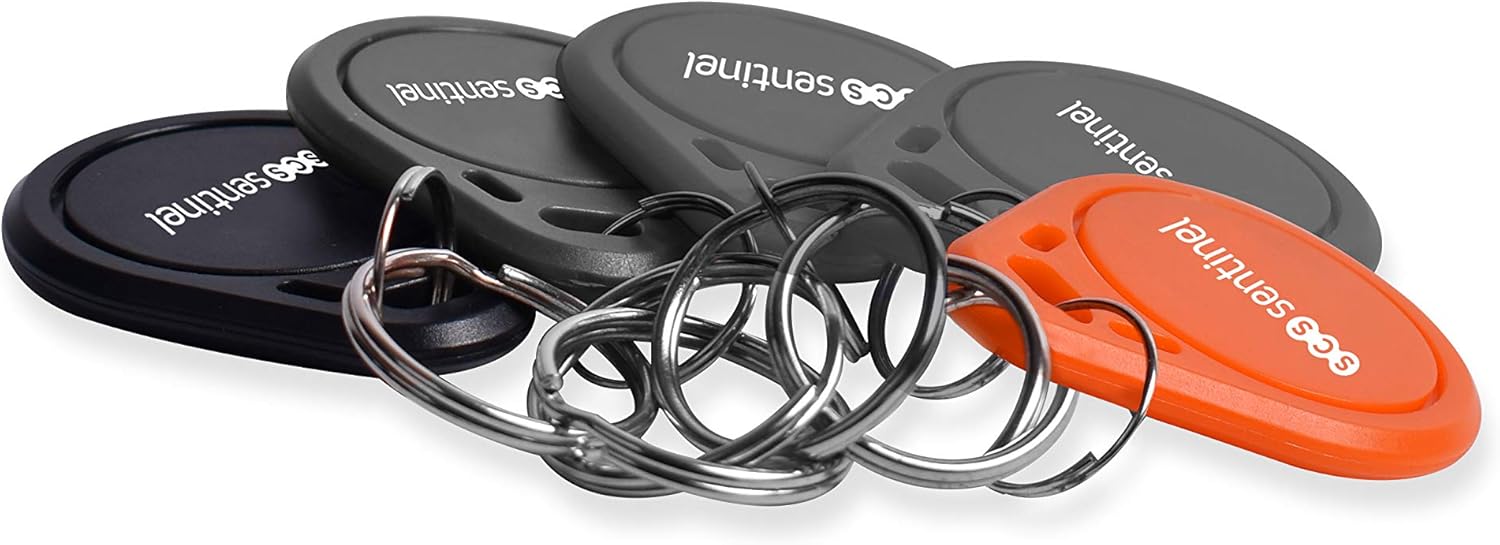
Image 3.2: A set of SCS Sentinel RFID badges, including grey user badges, a black deletion badge, and an orange add badge.
4. Setup and Installation
4.1. Installation Overview
The SCS Sentinel PVF0037 system uses a wired connection between the outdoor street plate and the indoor monitor. The wiring is simplified with a non-polarity connection, making installation more straightforward. Ensure you have the necessary wiring (not included) and tools before beginning.
4.2. Mounting the Outdoor Street Plate
- Choose a suitable location near your entrance, at an appropriate height for viewing visitors.
- Mark the drilling points using the outdoor unit or its mounting bracket as a template.
- Drill holes and insert wall plugs.
- Secure the outdoor street plate to the wall using the provided screws. Ensure the unit is level.

Image 4.1: The outdoor street plate of the SCS Sentinel PVF0037 video intercom, showing the camera, speaker, microphone, and RFID reader. A hand is shown presenting an RFID badge to the reader.
4.3. Mounting the Indoor Monitor
- Select a convenient indoor location for the 7-inch monitor, preferably near a power outlet.
- Attach the wall mount bracket to the wall using screws and plugs.
- Connect the necessary wiring from the outdoor unit and any optional gate/door release mechanisms to the monitor.
- Mount the indoor monitor onto the bracket.
4.4. Wiring Connections
Connect the outdoor street plate to the indoor monitor using a 2-wire cable. The system features non-polarity wiring, simplifying the connection process. Refer to the wiring diagram in the included physical manual for detailed connections, especially for optional door/gate release mechanisms.
4.5. Power Connection
Plug the provided power adapter into the indoor monitor and then into a standard electrical outlet. The system will power on automatically.
4.6. RFID Badge Programming
The system includes 5 RFID badges: 3 user badges (grey), 1 deletion badge (black), and 1 add badge (orange). Follow these general steps to program user badges:
- To add a user badge: Present the orange "Add" badge to the RFID reader on the outdoor unit. The system will enter programming mode. Then, present each grey user badge you wish to add. Present the orange "Add" badge again to exit programming mode.
- To delete a user badge: Present the black "Deletion" badge to the RFID reader. The system will enter deletion mode. Present the specific grey user badge you wish to remove. Present the black "Deletion" badge again to exit deletion mode.
- To delete all user badges: Present the black "Deletion" badge twice in quick succession.
Note: The orange and black badges are for programming only and do not grant access.
5. Operating Instructions
5.1. Receiving a Call
When a visitor presses the call button on the outdoor street plate, the indoor monitor will chime (one of 10 selectable melodies) and display the visitor's image. The monitor features sensitive touch keys for interaction.
5.2. Two-Way Communication
To speak with the visitor, press the talk button on the indoor monitor. Press it again to end the conversation. The system supports hands-free audio and video communication.
5.3. Door/Gate Release
If connected to an electric door strike or gate opener, press the designated unlock button on the indoor monitor to grant access to your visitor. The system supports both door and gate opening functions.
5.4. Using RFID for Access
For authorized users, simply present a programmed grey RFID user badge to the RFID reader on the outdoor street plate. The door or gate will unlock automatically for a short period, allowing entry.
5.5. Monitoring Function
You can manually activate the outdoor camera view from the indoor monitor at any time to see what is happening outside, even without a visitor pressing the doorbell.
6. Maintenance
- Cleaning: Use a soft, dry cloth to clean the indoor monitor and outdoor street plate. Do not use abrasive cleaners or solvents.
- Outdoor Unit: Periodically check the outdoor unit for any obstructions to the camera or microphone. Ensure the nameplate is clean and legible.
- Wiring: Inspect visible wiring periodically for any signs of wear or damage.
- RFID Badges: Keep RFID badges clean and dry. Avoid bending or damaging them.
7. Troubleshooting
| Problem | Possible Cause | Solution |
|---|---|---|
| No image or sound on indoor monitor. | No power; loose wiring connection. | Check power adapter connection. Verify all wiring between outdoor unit and monitor is secure. |
| Low chime volume. | Volume setting is too low. | Adjust the chime volume setting on the indoor monitor. |
| RFID badge not granting access. | Badge not programmed; badge damaged; incorrect badge presented. | Ensure the badge is correctly programmed using the "Add" badge. Try another programmed badge. Inspect the badge for damage. |
| Door/gate not opening. | Incorrect wiring to door/gate release; faulty door strike/gate opener. | Verify wiring to the door/gate release mechanism. Test the door strike/gate opener independently if possible. |
| Tactile keys on monitor unresponsive. | Temporary software glitch; dirty screen. | Restart the monitor by disconnecting and reconnecting power. Clean the screen with a soft, dry cloth. |
8. Specifications
- Model Number: PVF0037
- Brand: SCS Sentinel
- Screen Size: 7 inches
- Display Type: Color
- Technology: Audio + Video
- Installation Type: Wired (2-wire, non-polarity)
- RFID Reader: Integrated, 125 kHz frequency
- RFID Badges: 3 user, 1 deletion, 1 add
- Melodies: 10 selectable chime melodies
- Door/Gate Opening: Yes
- Backlit Nameplate: Yes (on outdoor unit)
- Product Dimensions: 2.1 x 21.4 x 11.9 cm (approximate, for main unit)
- Product Weight: 1.14 kg
9. Warranty and Support
SCS Sentinel products are designed for reliability and ease of use. This product typically comes with a 2-year warranty. For specific warranty terms and conditions, please refer to the documentation included with your purchase or visit the official SCS Sentinel website.
For technical assistance, installation support, or any questions regarding your SCS Sentinel PVF0037 Video Intercom System, please contact SCS Sentinel technical support. Support is available in France.
Official Website for Support: http://scs-laboutique.com/


