
Introduction
Thank you for choosing the Joyroom JR-TL1 True Wireless Stereo Sound Earbuds. This manual provides detailed instructions for the proper use, setup, and maintenance of your earbuds. Please read this manual thoroughly before use to ensure optimal performance and longevity of your device.

Image: The Joyroom JR-TL1 True Wireless Earbuds, featuring two black earbuds and their matching black charging case with a lanyard.

Image: The retail packaging for the Joyroom JR-TL1 earbuds, displaying product features and specifications.
Product Features
- Binaural High-Definition Calls: Experience clear voice transmission during calls.
- Ergonomic Design: Ensures comfortable and stable wear.
- Independent Earbud Use: Left and right earbuds can be used separately.
- Automatic Connection: Earbuds connect automatically upon removal from the charging case.
- Fingerprint Touch Control: Convenient control of music and calls.
- IPX7 Waterproof: Provides protection against water immersion.
- Bluetooth 5.0: For faster and more stable wireless transmission.
- Portable Lanyard: Integrated lanyard for easy carrying.
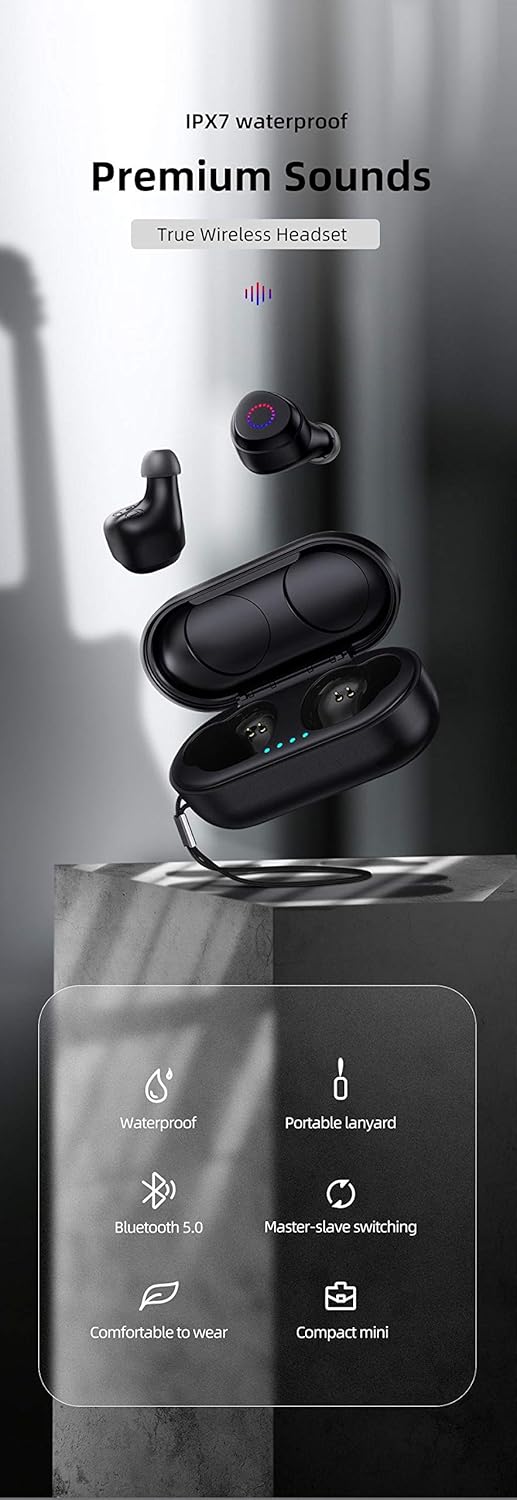
Image: An infographic highlighting key features of the Joyroom JR-TL1 earbuds, including IPX7 waterproofing, Bluetooth 5.0, portable lanyard, master-slave switching, comfortable wear, and compact size.
Setup Guide
1. Initial Charging
Before first use, fully charge the earbuds and the charging case. Connect the charging case to a 5V-1A power source using a compatible charging cable. The charging time is approximately 1.5 hours.

Image: The Joyroom JR-TL1 earbuds and charging case, illustrating the battery life with a green indicator bar on the charging case.
2. Pairing with a Device
- Open the charging case and remove both earbuds. They will automatically power on and enter pairing mode.
- On your device (smartphone, tablet, etc.), enable Bluetooth.
- Search for available Bluetooth devices and select "JR-TL1" from the list.
- Once connected, a voice prompt will confirm successful pairing.
The earbuds feature Bluetooth 5.0 for a faster and more stable connection. After initial pairing, they will automatically connect to the last paired device when removed from the case.
3. Wearing the Earbuds
Insert the earbuds into your ears and adjust them for a comfortable and secure fit. The ergonomic design ensures stability, especially during physical activity.
Operating Instructions
Power On/Off
- Power On: Remove the earbuds from the charging case. They will power on automatically.
- Power Off: Place the earbuds back into the charging case. They will power off automatically and begin charging. If disconnected from a device for 5 minutes, the earbuds will automatically shut down.
Touch Controls
The Joyroom JR-TL1 earbuds feature fingerprint touch control for various functions:
- Play/Pause: Single tap on either earbud.
- Next Track: Double tap the right earbud.
- Previous Track: Double tap the left earbud.
- Answer/End Call: Single tap on either earbud during an incoming call.
- Reject Call: Press and hold either earbud for 2 seconds during an incoming call.
- Activate Voice Assistant: Triple tap on either earbud.
Independent Earbud Use
Both the left and right earbuds can be used independently. Simply remove one earbud from the charging case, and it will connect to your device. The other earbud can remain in the case or be used separately with another device if desired.
Waterproof Functionality
The earbuds are IPX7 waterproof, providing protection against temporary immersion in water. This makes them suitable for use during workouts or in light rain. Avoid prolonged submersion or exposure to high-pressure water.
Maintenance
Cleaning
Regularly clean your earbuds and charging case to maintain optimal performance and hygiene. Use a soft, dry, lint-free cloth. Do not use abrasive cleaners or solvents. For ear tips, remove them and clean with a mild soap solution, then rinse and dry thoroughly before reattaching.
Storage
When not in use, store the earbuds in their charging case to protect them from dust, damage, and to keep them charged. Store the case in a cool, dry place away from direct sunlight and extreme temperatures.

Image: The Joyroom JR-TL1 charging case, showcasing its compact size and integrated lanyard for easy portability.
Battery Life
The earbuds provide approximately 6 hours of music/talk time on a single charge. The charging case extends the total usage time. The standby time is about 120 hours. To preserve battery life, ensure the earbuds are placed in the charging case when not in use, as they will automatically shut down after 5 minutes of disconnection.
Troubleshooting
- Earbuds not pairing: Ensure both earbuds are fully charged. Place them back in the case, close it, then open it again and remove them to re-enter pairing mode. Check your device's Bluetooth settings and try reconnecting.
- Only one earbud working: Place both earbuds back into the charging case, close the lid, then open it and remove them simultaneously. This should re-sync them.
- No sound: Check the volume level on both your device and the earbuds. Ensure the earbuds are properly connected to your device.
- Charging issues: Verify that the charging cable and power adapter are working correctly. Ensure the charging contacts on the earbuds and inside the case are clean and free of debris.
- Poor call quality: Ensure the earbuds are within range of your device. Avoid environments with strong electromagnetic interference.
Specifications
| Model Number | JR-TL1 |
| Brand | Joyroom |
| Connectivity Technology | Wireless (Bluetooth 5.0) |
| Ear Placement | In Ear |
| Form Factor | In Ear |
| Waterproof Rating | IPX7 |
| Music/Talk Time | 6 hours |
| Charging Time | 1.5 hours |
| Standby Time | Approximately 120 hours |
| Automatic Shutdown | After 5 minutes of disconnection |
| Charging Input | 5V-1A |
| Sensitivity | 87+/-3dB |
| Frequency Response | 2.401GHz - 2.482GHz (20000 Hz max) |
| Microphone Sensitivity | -42db+/-3db |
| Impedance | 22 Ohm +/-8% (1KHz) |
| Maximum Power | 5.6mW |
| Noise Control | Active Noise Cancellation |
| Headphone Jack | No Jack |
| Batteries | 1 Lithium Ion battery (included) |
| Product Dimensions | 19.2 x 16.4 x 3 cm |
| Product Weight | 37 g |
Warranty and Support
Specific warranty information for the Joyroom JR-TL1 earbuds is not provided in this manual. Please refer to the warranty card included with your product or contact Joyroom customer support for details regarding warranty coverage and service.
For technical support or further inquiries, please visit the official Joyroom website or contact their customer service department through the contact information provided on the product packaging or their website.