
Sanus VXT7-B2
Sanus 65-140" Tilt Wall Mount (VXT7-B2)
Instruction Manual
Product Overview
The Sanus VXT7-B2 is a premium tilt wall mount designed for televisions ranging from 65 to 140 inches. It provides a secure and stable mounting solution, allowing for optimal viewing angles by offering a tilt feature to reduce glare. This mount is engineered for durability and ease of installation, making it suitable for both AV enthusiasts and professional installers.
Key features include:
- Designed for 65-140" televisions.
- Tilt functionality for glare reduction and improved viewing.
- Robust alloy steel construction for secure support.
- Easy installation process.
Setup and Installation
Proper installation is crucial for the safety and performance of your Sanus wall mount. Please read all instructions carefully before beginning. It is recommended to have a second person assist with the installation of large televisions.
Required Tools (Not Included):
- Stud finder
- Drill with appropriate drill bits
- Level
- Phillips head screwdriver
- Tape measure
- Pencil
Installation Steps:
- Locate Wall Studs: Use a stud finder to locate and mark the center of two adjacent wooden studs in your desired mounting location. Ensure the studs are strong enough to support the weight of your TV and the mount.
- Position Wall Plate: Hold the wall plate against the wall, aligning it with your marked stud centers. Use a level to ensure it is perfectly horizontal. Mark the drilling locations through the holes on the wall plate.
- Drill Pilot Holes: Drill pilot holes at the marked locations. The size of the drill bit will depend on the type of wall and the lag bolts provided. Refer to the included hardware guide for specific recommendations.
- Attach Wall Plate: Secure the wall plate to the wall using the provided lag bolts and washers. Tighten all bolts firmly, but do not overtighten.
- Attach TV Brackets: Attach the vertical TV brackets to the back of your television using the appropriate screws and spacers from the hardware kit. Ensure the brackets are centered and securely fastened to the VESA mounting holes on your TV.
- Mount TV to Wall Plate: With assistance, carefully lift the television and hook the TV brackets onto the wall plate. Ensure both brackets are securely seated on the wall plate's rails.
- Secure TV: Engage the safety locking mechanisms on the TV brackets to prevent accidental dislodgement. These mechanisms typically involve tightening screws or engaging latches at the bottom of the brackets.
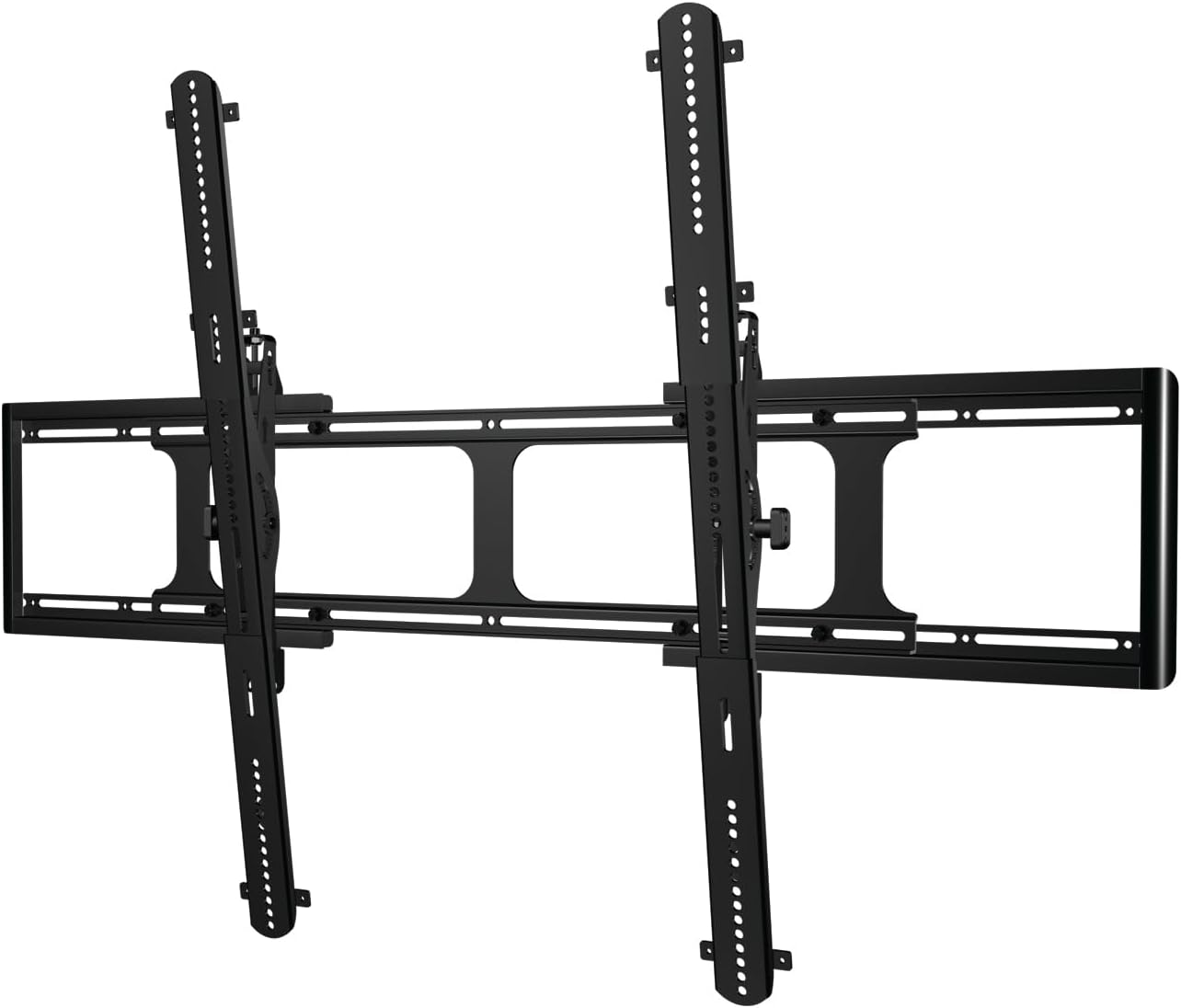
Image: Sanus VXT7-B2 Tilt Wall Mount components. This image shows the main components of the Sanus VXT7-B2 Tilt Wall Mount, including the wall plate and the two vertical TV brackets.

Image: Front view of the Sanus VXT7-B2 Tilt Wall Mount. A clear front view of the Sanus VXT7-B2 Tilt Wall Mount, highlighting its robust frame and attachment points for the television.
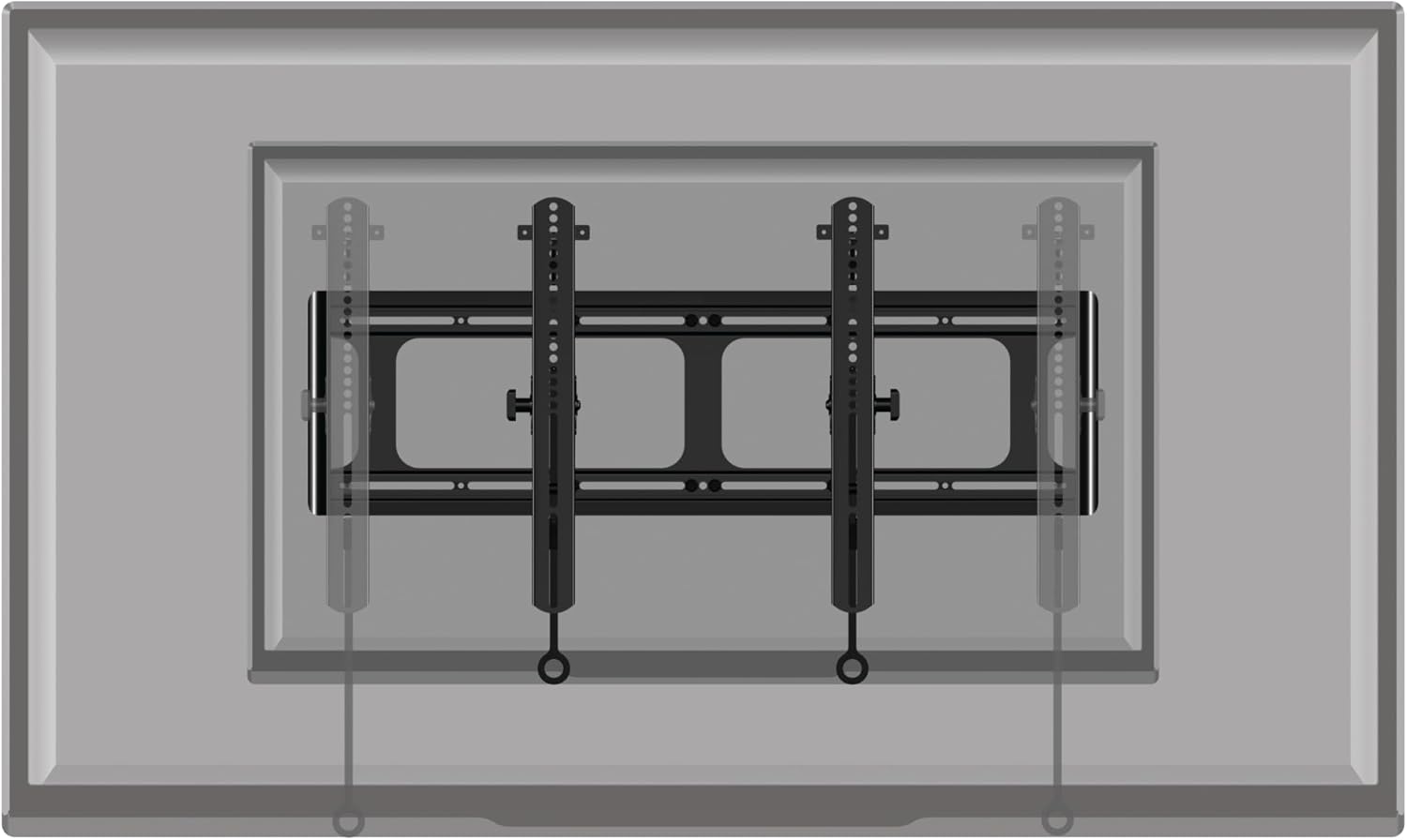
Image: Sanus VXT7-B2 Tilt Wall Mount installed behind a television. This illustration demonstrates how the Sanus VXT7-B2 Tilt Wall Mount appears when installed, with the television mounted over it, showing the hidden bracket system.
Operating Instructions
The Sanus VXT7-B2 mount allows for easy tilting of your television to achieve the optimal viewing angle and reduce glare from lights or windows.
Adjusting Tilt:
- This mount features a smooth tilt mechanism. To adjust the tilt, gently push or pull the bottom of your television forward or backward.
- The mount is designed to hold the TV securely at your desired tilt angle, up to a maximum of 10 degrees.
- Ensure that no cables are pinched or strained during adjustment.

Image: Living room with a television mounted on a wall using a Sanus mount. This image shows a television elegantly mounted on a living room wall, demonstrating the sleek profile achieved with the Sanus wall mount.
Maintenance
Regular maintenance will help ensure the longevity and safe operation of your Sanus wall mount.
- Cleaning: Dust the mount periodically with a soft, dry cloth. For stubborn marks, a slightly damp cloth can be used, followed by drying. Avoid abrasive cleaners or solvents.
- Check Connections: Annually, or if you notice any movement, re-check all mounting screws and bolts for tightness. Ensure the TV brackets are still securely locked onto the wall plate.
- Cable Management: Periodically inspect cables routed through or around the mount to ensure they are not pinched, frayed, or under excessive tension.
Troubleshooting
If you encounter any issues with your Sanus wall mount, please refer to the following common solutions:
| Problem | Possible Cause | Solution |
|---|---|---|
| TV is not level. | Wall plate not level during installation; TV brackets not adjusted correctly. | Check the level of the wall plate. Some mounts allow for post-installation leveling adjustments on the TV brackets. Consult the detailed installation guide for your specific model. |
| TV feels loose or wobbly. | Mounting screws are loose; TV not properly seated on the wall plate; incorrect hardware used. | Immediately remove the TV. Re-tighten all wall plate and TV bracket screws. Ensure the TV is fully engaged with the wall plate's locking mechanisms. Verify correct hardware was used for your TV and wall type. |
| Difficulty tilting the TV. | Tilt mechanism is too tight; cables are obstructing movement. | Check for any adjustment knobs or screws on the tilt mechanism that might need loosening. Ensure cables are not caught or preventing movement. |
If you are unable to resolve an issue, please contact Sanus customer support.
Specifications
| Feature | Detail |
|---|---|
| Brand | Sanus |
| Model Number | VXT7-B2 |
| Mounting Type | Wall Mount |
| Movement Type | Articulating (Tilt) |
| Material | Alloy Steel |
| Color | Black |
| Minimum Compatible TV Size | 65 Inches |
| Maximum Compatible TV Size | 140 Inches |
| Maximum Tilt Angle | 10 Degrees |
| Item Weight | 10.56 pounds |
| Product Dimensions | 1 x 1 x 1 inches (Packaging dimensions, actual mount dimensions may vary) |
| UPC | 793795534040 |
Warranty and Support
Sanus products are designed and engineered in the U.S. and are backed by a commitment to quality.
Warranty Information:
This product comes with a Limited Warranty. For specific details regarding the terms and conditions of your warranty, please refer to the warranty card included with your product or visit the official Sanus website.
Customer Support:
Sanus offers 7 day-a-week U.S.-based expert customer care to assist you with any questions or issues regarding your product.
For support, please visit the Official Sanus Store on Amazon or refer to the contact information provided in your product packaging.
Related documentsVXT7-B2


Ask a question about this manual
Ask about setup, troubleshooting, compatibility, parts, safety, or missing instructions. Manuals+ will review the question and use this page’s manual context to help answer it.