
Introduction
The iProtec Slim RC 500 Lumen Pocket Light is a versatile and compact illumination tool designed for various applications. This rechargeable flashlight delivers 500 lumens of intense bright light, featuring full dimming capabilities and Power Memory Recall for user convenience. Its robust construction from anodized aircraft-grade aluminum ensures durability, making it water and impact-resistant. The design incorporates practical features such as a pocket clip, a collapsible hanging hook, and a powerful magnetic base, enabling hands-free operation in diverse environments. The device also includes a battery charging indicator and a lock-out mode to prevent accidental activation, ensuring reliable performance.
Product Features
- High Brightness Output: Delivers 500 lumens of intense light.
- Rechargeable Design: Equipped with a rechargeable battery and Micro USB charging cable.
- Full Dimming: Allows adjustment of light intensity to suit various needs.
- Power Memory Recall: Remembers the last used brightness setting.
- Multi-functional Mounting: Features a strong magnetic base, a collapsible hanging hook, and a durable pocket clip for hands-free use.
- Durable Construction: Made from anodized aircraft-grade aluminum, providing water and impact resistance.
- Battery Indicator: Integrated indicator shows battery charging status.
- Lock-out Mode: Prevents accidental operation and conserves battery life.
- Compact and Ergonomic: Thin and easy to handle for portability.

Figure 1: Front view of the iProtec Slim RC 500 Lumen Pocket Light, showcasing its compact design and branding.
Package Contents
Upon opening the package, please ensure all the following items are present and in good condition:
- iProtec Slim RC 500 Lumen Pocket Light
- Micro USB Charging Cable
- Lithium Polymer Battery (pre-installed)
Setup
Initial Charging
- Locate the Micro USB charging port on the side of the flashlight. It is typically covered by a protective rubber flap.
- Gently lift the rubber flap to expose the charging port.
- Connect the smaller end of the included Micro USB charging cable to the flashlight's charging port.
- Connect the larger USB end of the cable to a standard USB power source (e.g., computer USB port, wall adapter, power bank).
- The battery charging indicator light will illuminate to show charging status. Refer to the operating section for indicator light behavior.
- Allow the flashlight to charge fully before first use. Charging time may vary depending on the power source and remaining battery level.

Figure 2: The Micro USB charging port, typically protected by a rubber cover, for recharging the device.
Operating Instructions
Power On/Off and Brightness Adjustment
- Power On: Press the power button once to turn the flashlight on. It will activate at the last used brightness setting due to Power Memory Recall.
- Brightness Adjustment (Dimming): While the light is on, press and hold the power button. The brightness will gradually cycle from high to low, then low to high. Release the button at your desired brightness level.
- Power Off: Press the power button once more to turn the flashlight off.
Lock-out Mode
To prevent accidental activation and conserve battery during transport or storage:
- Activate Lock-out: With the light off, press and hold the power button for approximately 5 seconds until the light flashes twice. The flashlight is now in lock-out mode.
- Deactivate Lock-out: Press and hold the power button for approximately 5 seconds until the light flashes twice. The flashlight will then turn on at its last used setting.
Using the Integrated Features
- Magnetic Base: The powerful magnetic base allows the flashlight to be securely attached to any ferrous metal surface for hands-free illumination.
- Pocket Clip: Use the integrated pocket clip to attach the flashlight to a belt, pocket, or strap for easy access and carrying.
- Collapsible Hanging Hook: Extend the collapsible hook from the top of the flashlight to hang it from various objects, providing overhead or directional lighting.

Figure 3: The versatile hanging hook and pocket clip for hands-free operation.
Maintenance
Cleaning
- Wipe the exterior of the flashlight with a soft, damp cloth.
- Do not use abrasive cleaners or solvents, as these may damage the finish or internal components.
- Ensure the USB charging port cover is securely closed after charging to maintain water resistance.
Battery Care
- To prolong battery life, recharge the flashlight regularly, especially if it has been stored for an extended period.
- Avoid fully depleting the battery frequently.
- Store the flashlight in a cool, dry place when not in use.
Troubleshooting
| Problem | Possible Cause | Solution |
|---|---|---|
| Flashlight does not turn on. | Battery is depleted. Lock-out mode is active. | Recharge the battery fully. Deactivate lock-out mode by pressing and holding the power button for 5 seconds. |
| Light output is dim or inconsistent. | Low battery charge. Dimming function is active. Automatic thermal regulation. | Recharge the battery. Adjust brightness by pressing and holding the power button. The flashlight may automatically reduce brightness to prevent overheating during prolonged high-power use. This is normal operation. |
| Flashlight does not charge. | Charging cable or power source issue. Charging port obstruction. | Ensure the USB cable is properly connected and the power source is functional. Try a different cable or power source. Check the charging port for debris and clean gently if necessary. |
Specifications
| Feature | Detail |
|---|---|
| Model | Slim RC 500 Lumen |
| Brand | iProtec |
| Light Output | 500 Lumens |
| Power Source | Rechargeable Lithium Polymer Battery |
| Charging Port | Micro USB |
| Material | Anodized Aircraft-Grade Aluminum |
| Special Features | Impact Resistant, Water Resistant, Full Dimming, Power Memory Recall, Magnetic Base, Collapsible Hook, Pocket Clip, Lock-out Mode |
| Dimensions (L x W x D) | 4.1 in x 1.77 in x 1.25 in (10.4 cm x 4.5 cm x 3.2 cm) |
| Weight | 0.25 lbs (113 grams) |
| Color | Black (other colors may be available) |
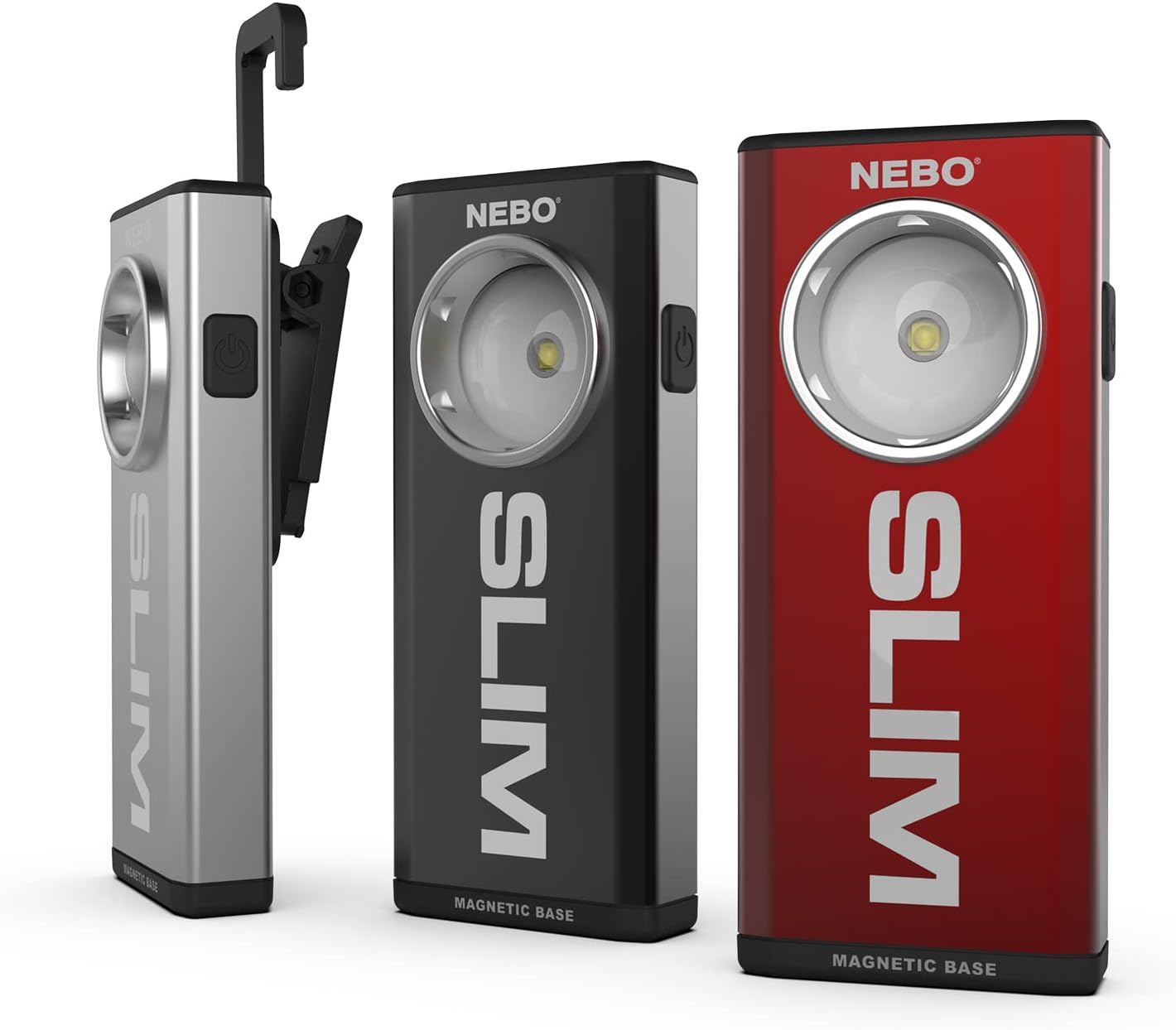
Figure 4: The iProtec Slim RC Pocket Light is available in multiple colors.
Warranty and Support
For detailed warranty information, please refer to the documentation included with your product packaging or visit the official iProtec website. Warranty terms and conditions may vary by region and product. For technical support, troubleshooting assistance beyond this manual, or to inquire about replacement parts, please contact iProtec customer service through their official channels.
Note: Keep your purchase receipt as proof of purchase for warranty claims.