
Introduction
This instruction manual provides essential information for the safe and effective use of your Beurer Infrared Thermometer FT80. Please read these instructions carefully before first use and keep them for future reference. The Beurer FT80 is designed for non-contact measurement of body temperature on the forehead.
Product Overview
The Beurer FT80 Infrared Thermometer allows for precise, non-contact temperature measurement. Its ergonomic design ensures comfortable handling.
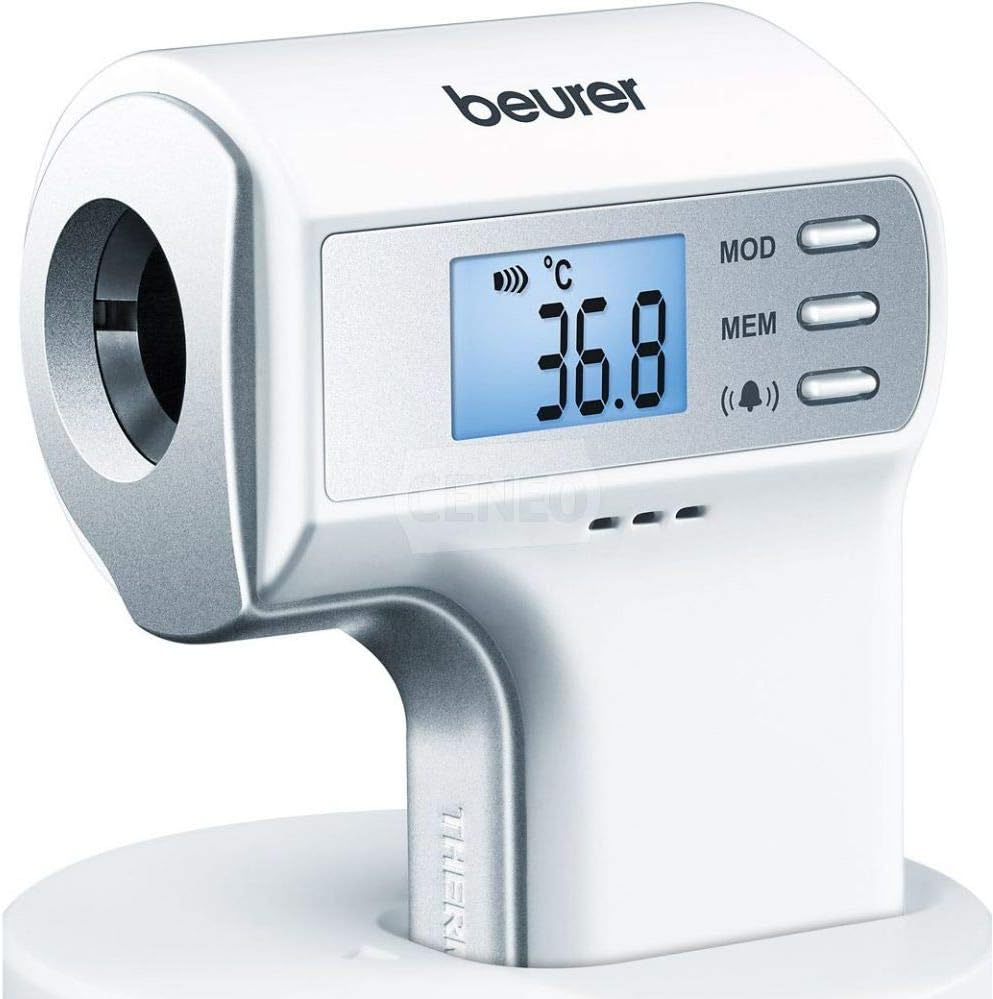
Image: Beurer Infrared Thermometer FT80. The device is white with silver accents, featuring a digital display showing "36.8 °C", an infrared sensor at the front, and three control buttons labeled "MOD", "MEM", and a speaker icon for sound control on the right side of the display. The thermometer is shown resting on a white base.
Setup
1. Battery Installation
The Beurer FT80 is powered by batteries. Ensure correct polarity when inserting batteries.
- Locate the battery compartment cover, typically on the back or bottom of the device.
- Open the battery compartment.
- Insert the required batteries (e.g., 2x AAA) according to the polarity markings (+/-).
- Close the battery compartment cover securely.
2. Initial Power-On
After battery installation, the device should power on automatically or by pressing the power button. The display will show a self-test sequence before entering measurement mode.
Operating Instructions
1. Taking a Measurement
The Beurer FT80 uses infrared technology for non-contact measurement.
- Ensure the thermometer is clean and free from obstructions.
- Point the infrared sensor towards the center of the forehead, maintaining a distance of a few centimeters (e.g., 2-3 cm).
- Press the measurement button (often the main power button or a dedicated scan button).
- Hold the device steady until a beep sounds, indicating the measurement is complete.
- The temperature reading will be displayed on the screen.
2. Display Interpretation
- Temperature Reading: The large digits indicate the measured temperature (e.g., 36.8 °C).
- Unit Indicator: Displays the unit of measurement, typically °C (Celsius) or °F (Fahrenheit).
- Battery Indicator: Shows the current battery level.
- Sound Indicator: A speaker icon indicates if the sound function is active.
3. Mode Selection (MOD Button)
Press the MOD button to cycle through different measurement modes, if available (e.g., body temperature, object temperature, room temperature). Refer to the display for the active mode.
4. Memory Function (MEM Button)
Press the MEM button to recall previous temperature readings stored in the device's memory. Repeated presses will cycle through stored measurements.
5. Sound On/Off
Press the button with the speaker icon to toggle the sound (beeps) on or off. This is useful for silent measurements.
Maintenance
1. Cleaning
To ensure accurate readings and hygiene, clean the thermometer regularly.
- Wipe the device with a soft, slightly damp cloth.
- For disinfection, use an alcohol swab (70% isopropyl alcohol) on the sensor and housing.
- Do not immerse the thermometer in water or any cleaning solutions.
- Ensure the sensor lens is clean and free from dirt or scratches, as this can affect accuracy.
2. Storage
Store the thermometer in a cool, dry place, away from direct sunlight and extreme temperatures. Keep it out of reach of children.
3. Battery Replacement
When the low battery indicator appears on the display, replace all batteries with new ones of the same type. Follow the battery installation steps outlined in the Setup section.
Troubleshooting
| Problem | Possible Cause | Solution |
|---|---|---|
| Device does not turn on. | Dead or incorrectly inserted batteries. | Check battery polarity or replace batteries. |
| Inaccurate readings. | Dirty sensor lens, incorrect measurement distance, or environmental factors. | Clean the sensor lens. Ensure correct distance from forehead. Avoid drafts or extreme temperatures during measurement. |
| "Lo" or "Hi" displayed. | Temperature is outside the measurable range. | Ensure the measurement is taken correctly on the forehead. If measuring an object, ensure it is within the device's specified range. |
| Error message (e.g., "Err"). | System malfunction or measurement error. | Turn the device off and on again. If the error persists, contact customer support. |
Specifications
- Model: FT80
- Measurement Method: Infrared, Non-Contact
- Measurement Site: Forehead
- Display Type: Digital
- Power Source: Battery Powered
- Material: Plastic
- Special Features: Non-Contact
- Product Care: Wipe Clean
- Manufacturer: Beurer
- Dimensions: 26.4 x 15.4 x 5.6 cm (Package Dimensions)
- Weight: 260 g (Package Weight)
- ASIN: B08451GFBD
Warranty
The Beurer FT80 Infrared Thermometer comes with a manufacturer's warranty. Please refer to the warranty card included with your product for specific terms, conditions, and duration. Keep your proof of purchase for warranty claims.
Customer Support
For technical assistance, troubleshooting beyond this manual, or warranty inquiries, please contact Beurer customer service. You can find contact information on the official Beurer website or on the product packaging.
Official Beurer Website: www.beurer.com


