
1. Introduction
This manual provides essential information for the proper installation, operation, and maintenance of your KabelDirekt Cat 7 Ethernet Cable. Designed for high-speed network connections, this 15-meter cable (Model 1196) ensures reliable data transmission for various applications.

Image 1.1: The KabelDirekt Cat 7 Ethernet Cable featuring two RJ45 connectors.
The KabelDirekt Cat 7 Ethernet Cable is engineered for performance, supporting data transfer rates up to 10 Gigabits per second (10Gbps). Its triple shielding (SF/FTP) minimizes interference, making it suitable for demanding network environments.

Image 1.2: Detailed view of the Cat 7 cable's internal structure, highlighting its shielding and specifications like 10Gbps, AWG 28, and 600MHz.
2. Setup and Connection
Connecting your KabelDirekt Cat 7 Ethernet Cable is a straightforward process. Ensure all devices are powered off before making connections, then power them on after the cable is securely attached.
2.1 Connecting to a Router or Switch
Insert one end of the Ethernet cable into an available LAN port on your router or network switch. The RJ45 connector should click into place, indicating a secure connection.

Image 2.1: Connecting the Ethernet cable to a network router.
2.2 Connecting to a Computer (PC/Laptop)
Connect the other end of the Ethernet cable to the RJ45 port on your desktop computer or laptop. This provides a stable wired network connection.
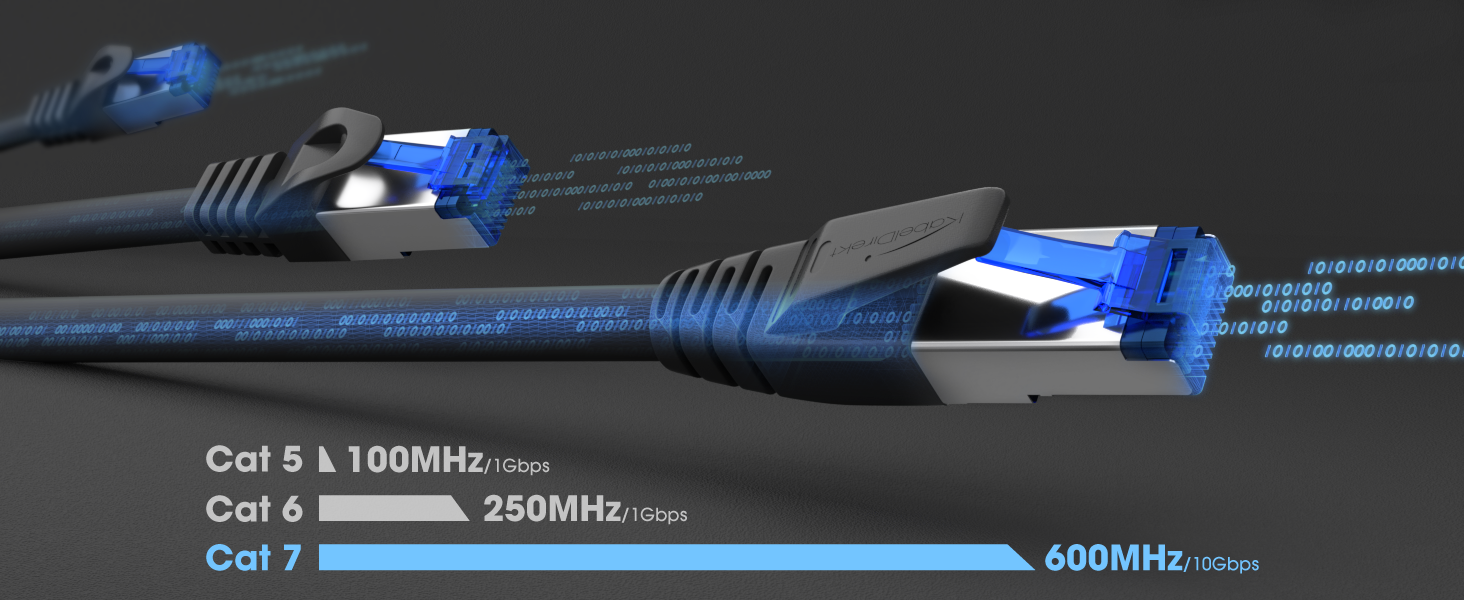
Image 2.2: The Ethernet cable providing a wired connection to a desktop computer.

Image 2.3: A laptop connected to a network via the Ethernet cable and a docking station.
2.3 Connecting to a Smart TV or Game Console
For optimal streaming and gaming performance, connect your smart TV or game console (e.g., PS4, PS5, Xbox Series X/S) directly to your network using the Ethernet cable.

Image 2.4: The Ethernet cable providing a stable connection to a smart television.
2.4 Server and Patch Panel Connections
The Cat 7 cable is also suitable for professional network installations, including servers and patch panels, ensuring high-speed and reliable data flow.

Image 2.5: Multiple Ethernet cables connected to a server rack for high-performance networking.
3. Operation and Performance
Once connected, the KabelDirekt Cat 7 Ethernet Cable operates automatically, providing a high-speed wired network connection. No additional configuration is typically required for the cable itself.
3.1 Data Transfer Speed
This Cat 7 cable supports data transfer rates up to 10 Gigabits per second (10Gbps) and a bandwidth of 600 MHz, significantly outperforming older cable categories like Cat 5 and Cat 6 for compatible devices and networks.

Image 3.1: Visual comparison of Cat 5, Cat 6, and Cat 7 Ethernet cable performance, showing Cat 7's superior speed and bandwidth.
3.2 Interference Protection
The SF/FTP triple shielding provides excellent protection against electromagnetic interference (EMI) and crosstalk, ensuring a stable and reliable connection even in environments with multiple electronic devices.
4. Maintenance
The KabelDirekt Cat 7 Ethernet Cable requires minimal maintenance to ensure its longevity and performance.
- Storage: Store the cable in a cool, dry place away from direct sunlight and extreme temperatures.
- Handling: Avoid sharp bends or kinks in the cable, as this can damage the internal conductors and shielding. The cable features bend protection, but excessive force should still be avoided.
- Cleaning: If necessary, gently wipe the cable and connectors with a dry, soft cloth. Do not use liquid cleaners or abrasive materials.
- Inspection: Periodically inspect the cable and connectors for any signs of damage, such as frayed insulation or bent pins. Replace the cable if damage is observed.
5. Troubleshooting
If you experience issues with your network connection, consider the following troubleshooting steps:
- No Network Connection:
- Ensure both ends of the Ethernet cable are securely plugged into their respective ports. Listen for a click when inserting the RJ45 connector.
- Check the network status lights on your router/switch and your device (if available). If lights are off, there might be an issue with the port or the cable.
- Try connecting a different, known-working Ethernet cable to rule out a faulty cable.
- Restart your router/modem and the connected device.
- Slow Network Speed:
- Verify that your network adapter and router/switch support 10 Gigabit speeds to fully utilize the Cat 7 cable's capabilities.
- Ensure your internet service provider (ISP) plan offers the speeds you expect.
- Check for other devices on your network consuming significant bandwidth.
- Confirm that the cable is not damaged or kinked, which could degrade performance.
- Intermittent Connection:
- Check for loose connections at both ends of the cable.
- Ensure the cable is not running near strong sources of electromagnetic interference (e.g., power lines, large motors). The SF/FTP shielding helps, but extreme interference can still affect performance.
- Test with another cable if possible.
6. Specifications
| Feature | Detail |
|---|---|
| Brand | KabelDirekt |
| Model Number | 1196 |
| ASIN | B0843S5P4C |
| Cable Type | Ethernet (Cat 7) |
| Length | 15 meters |
| Color | Black |
| Data Transfer Rate | Up to 10 Gigabits per second (10Gbps) |
| Bandwidth | 600 MHz |
| Shielding | SF/FTP (Triple Shielded) |
| Connector Type | RJ45 |
| Connector Gender | Male to Male |
| Special Feature | High Speed, Bend Protection |
| Compatible Devices | Routers, modems, splitters, TVs, laptops, PCs, network cards, Macs, PoE devices, printers, patch panels, switches, Xbox Series X/S, Xbox One, PS4, PS5, game consoles, hubs, motherboards |
| Product Dimensions | 17.1 x 9.8 x 4.1 cm; 464 grams |
| Country of Origin | China |
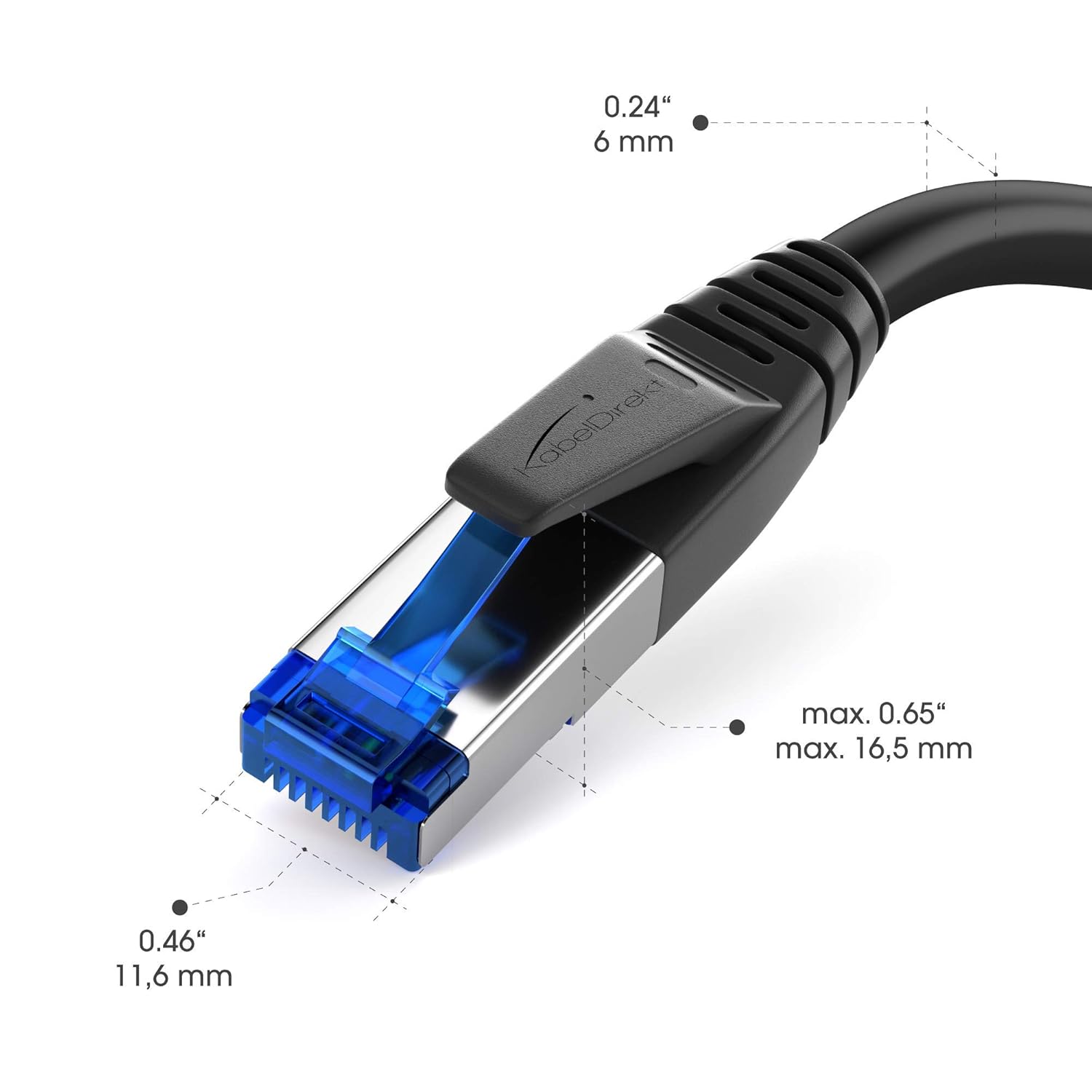
Image 6.1: Dimensions of the RJ45 connector for the KabelDirekt Cat 7 Ethernet Cable.
7. Warranty and Support
7.1 Manufacturer's Warranty
The KabelDirekt Cat 7 Ethernet Cable comes with a 36-month manufacturer's warranty. This warranty covers defects in materials and workmanship under normal use. For warranty claims, please retain your proof of purchase.
7.2 Contact Support
For technical assistance, warranty claims, or any questions regarding your KabelDirekt product, please contact KabelDirekt customer support. Refer to the product packaging or the official KabelDirekt website for the most current contact information.