Product Overview
The realme XT is a feature-rich smartphone designed for a comprehensive mobile experience. It boasts a flagship-level 64MP Quad Camera system, an In-Display Fingerprint Scanner for secure unlocking, and is powered by the Snapdragon 712 AIE processor for enhanced performance. The device also supports VOOC Flash Charge 3.0 for rapid battery replenishment and incorporates a multi-layered cooling system for sustained performance during intensive use.

Image: Front and back view of the Realme XT in Pearl White.
What's in the Box
- Realme XT Smartphone
- Phone Case
- USB-C Cable
- Charging Adapter
- SIM Ejector Tool
- Pre-applied Screen Protector
- 64GB SD Card (Bundle specific)
Setup
SIM Card Installation
- Locate the SIM card tray on the side of the device.
- Insert the SIM ejector tool into the small hole next to the tray and press firmly until the tray pops out.
- Place your Nano-SIM card(s) and/or microSD card (if applicable) into the designated slots on the tray. Ensure the gold contacts face downwards.
- Carefully push the tray back into the slot until it is flush with the device.
Initial Power On
Press and hold the Power button on the side of the phone until the realme logo appears on the screen. Follow the on-screen prompts to complete the initial setup, including language selection, Wi-Fi connection, and Google account sign-in.
In-Display Fingerprint Scanner Setup
To enhance security, set up the In-Display Fingerprint Scanner:
- Navigate to Settings > Fingerprint, Face & Password > Fingerprint.
- Follow the on-screen instructions to register your fingerprint. Ensure your finger covers the entire sensor area for accurate recognition.
Operating Instructions
Display Features
The Realme XT features a 6.4-inch Super AMOLED dew-drop fullscreen display with a 2340x1080 pixel resolution. It offers vibrant colors and deep blacks. The display also includes a Night mode for eye care, reducing blue light emission during evening use.
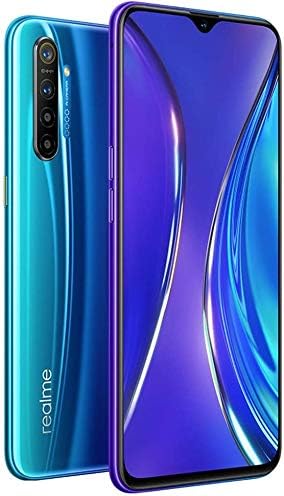
Image: Side view of the Realme XT highlighting its display.
Performance
Powered by the Snapdragon 712 AIE processor, the Realme XT delivers a 10% overall performance improvement over its predecessor. This chipset, combined with 8GB of RAM, ensures smooth multitasking, responsive app usage, and enhanced efficiency in speech recognition and image processing.
Camera Usage
The Realme XT is equipped with a versatile 64MP Quad Camera system:
- 64MP Primary Camera: Utilizes an ultra-high-resolution sensor with Tetracell and 3D HDR technology for crystal clear photos in various conditions.
- Ultra Wide-Angle Lens: For capturing broader scenes.
- Macro Lens: For detailed close-up shots.
- Depth Sensor: For enhanced portrait mode effects.
The front camera features a 32MP sensor for high-quality selfies. To access camera modes, open the Camera app and swipe left or right to select Photo, Video, Portrait, Night, or 64MP mode.

Image: Rear view of the Realme XT, showcasing its quad-camera module.
Battery and Charging
The device features a 4000mAh battery with 20W VOOC Flash Charge 3.0 support. This technology allows for a full charge in approximately 80 minutes. Even during continuous gaming, the phone can recharge by 51% in an hour, significantly faster than standard charging. The AI cooling system helps maintain optimal temperature during charging and heavy use.
Connectivity
The Realme XT supports Dual SIM GSM Unlocked functionality with US + Global 4G LTE connectivity. It also includes Wi-Fi, Bluetooth, and GPS capabilities. Note that this model does not support 5G connectivity.
Maintenance
General Care
To ensure the longevity of your Realme XT, avoid exposing it to extreme temperatures, direct sunlight for prolonged periods, or liquids. Use a soft, dry cloth for cleaning the screen and body. The included phone case provides additional protection against drops and scratches.
Software Updates
Regularly check for software updates to ensure optimal performance, security, and access to new features. Go to Settings > Software Update to check for and install available updates.
Troubleshooting
| Issue | Possible Solution |
|---|---|
| Phone not powering on | Ensure the battery is charged. Connect to the charger for at least 10 minutes before attempting to power on. |
| Slow performance | Close unused apps, clear cache, or restart the device. Check for software updates. |
| Camera focus issues | Ensure the lens is clean. Tap on the screen to manually focus. Avoid using 64MP mode in low light or for fast-moving subjects if focus is critical. |
| Battery draining quickly | Reduce screen brightness, disable unused connectivity features (Wi-Fi, Bluetooth, GPS), or limit background app activity. Use auto-refresh rate mode for display. |
Specifications
- Product Dimensions: 15.99 x 8.99 x 1 inches
- Item Weight: 1.15 pounds
- Item Model Number: RMX1921
- Batteries: 1 Lithium Ion batteries required. (included)
- OS: Android 9.0
- RAM: 8 GB
- Wireless Communication Technologies: Cellular
- Connectivity Technologies: Wi-Fi
- GPS: True
- Display Technology: AMOLED
- Human Interface Input: Touchscreen
- Scanner Resolution: 2340 x 1080
- Other Camera Features: Rear, Front
- Audio Jack: 3.5 mm
- Form Factor: Smartphone
- Color: Pearl White (Bundle specific)
- Battery Power Rating: 2 Milliampere Hour (mAh)
- Manufacturer: Realme
- Memory Storage Capacity: 128 GB
- Standing Screen Display Size: 6.4 Inches
- CPU Model: Snapdragon S4
- CPU Speed: 2.3 GHz
- Wireless Carrier: Unlocked
Warranty and Support
For warranty information and customer support, please refer to the official realme website or contact their customer service directly. Keep your proof of purchase for any warranty claims.


