
Compustar CS905-AS
Compustar CS905-AS User Manual
All-in-One 4 Button 1 Way Alarm & Remote Start System
Introduction
This manual provides detailed instructions for the installation, operation, and maintenance of your Compustar CS905-AS All-in-One 4 Button 1 Way Alarm & Remote Start System. Please read this manual thoroughly before using your system to ensure proper function and to maximize your product experience.

Figure 1: Compustar CS905-AS 4-Button Remote Controls
Key Features
- Easy-to-Use Remote Start: Start your vehicle remotely to pre-heat or pre-cool the interior.
- Intelligent Security Sensors: Equipped with sensors to detect intrusions and impacts.
- Car Alarm Siren: Includes a 105+dB piezo speaker for audible alerts.
- 1500-ft Max Range: Provides extended range for remote operations.
- Keyless Entry: Conveniently lock and unlock your vehicle.
- Blade-Ready: Compatible with Blade bypass modules for enhanced integration.
Setup and Installation
The Compustar CS905-AS system requires professional installation. It is recommended to have the system installed by an authorized Compustar dealer to ensure proper functionality and to maintain your vehicle's warranty. The system includes a CM900 control module and a Blade-AL bypass module for vehicle integration.
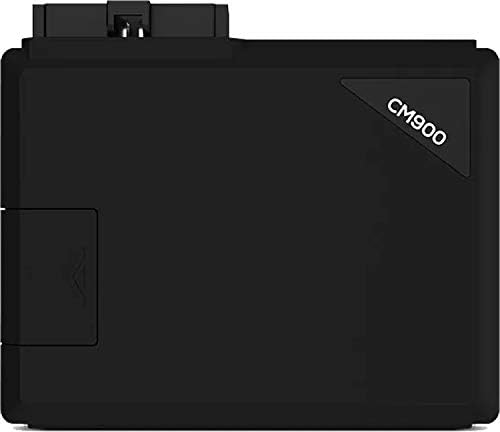
Figure 2: Compustar CM900 Control Module
For installers, programming the Blade bypass module is a critical step. The following video demonstrates the flashing process for the Idatalink BLADE module:
Video 1: Idatalink BLADE Remote Start/Security Bypass Module Flashing. This video provides a guide for flashing and updating the Blade module for Compustar systems.
Operating Instructions
Your Compustar CS905-AS system comes with a 4-button remote control for various functions. The buttons are typically located on the side of the remote.

Figure 3: Compustar 4-Button Remote Control
Remote Functions:
- Lock: Press the lock button once to arm the alarm and lock the doors.
- Unlock: Press the unlock button once to disarm the alarm and unlock the doors.
- Remote Start: Press and hold the remote start button (often indicated by a star or engine icon) for approximately 3 seconds to start your vehicle. The remote will confirm the command.
- Trunk Release: Press and hold the trunk release button (often indicated by a trunk icon) for approximately 3 seconds to open the trunk.
For a visual guide on basic remote operation, refer to the following videos:
Video 2: Compustar Prime T9 Operation. This video demonstrates the basic lock, unlock, trunk, and remote start functions of a Compustar remote.
Video 3: Compustar 2WQ9R-FM 2-Way Remote Operation. This video illustrates the operation of a 2-way Compustar remote, including locking, unlocking, and remote starting.
Enjoy the comfort of a pre-conditioned vehicle with remote start. The system allows you to set your desired temperature before entering the vehicle.
Video 4: Warm Up & Cool Down w/Compustar Long-Range Remote Starters. This video highlights the convenience of remote starting to achieve comfortable cabin temperatures in various weather conditions.
Maintenance
To ensure the longevity and optimal performance of your Compustar CS905-AS system, follow these maintenance guidelines:
- Remote Battery: The remote uses a Lithium-Ion Polymer battery. Replace the battery when the remote's display indicates low power or when its range decreases significantly.
- Remote Care: Avoid exposing the remote to extreme temperatures, direct sunlight for extended periods, or moisture. Clean the remote with a soft, dry cloth.
- System Inspection: Periodically check the wiring and connections of the main control module (CM900) for any signs of wear or damage. This should ideally be done by a professional installer.
Troubleshooting
If you experience issues with your Compustar CS905-AS system, consider the following common troubleshooting steps:
- Remote Not Responding: Check the remote's battery level. If low, replace the battery. Ensure you are within the system's operating range (up to 1500 feet).
- Vehicle Not Remote Starting: Ensure all doors, hood, and trunk are securely closed. The vehicle must be in park (for automatic transmissions). Check if the vehicle's battery is charged.
- Alarm Triggering Randomly: This could indicate a sensitive shock sensor. Consult your installer to adjust the sensor's sensitivity.
- Difficulty with Keyless Entry: Verify the remote's battery. If the issue persists, the remote may need to be reprogrammed by an authorized dealer.
If these steps do not resolve the issue, please contact an authorized Compustar dealer for assistance.
Specifications
| Feature | Specification |
|---|---|
| Brand | Compustar |
| Model Name | CS905-AS |
| Model Number | CS905-AS |
| Maximum Range | 1500 Feet |
| Button Quantity | 4 |
| Controller Type | Button Control |
| Battery Type | Lithium-Ion Polymer |
| Connectivity Technology | Radio Frequency |
| UPC | 829543013588 |
Warranty Information
The Compustar CS905-AS system comes with a 1-Year Manufacturer Warranty. Please retain your proof of purchase for any warranty claims. For specific details regarding warranty coverage and terms, refer to the documentation provided with your product or contact Compustar customer support.
Support
For technical support, product inquiries, or to locate an authorized dealer, please visit the official Compustar website or contact their customer service. Professional installation and servicing by authorized dealers are highly recommended for all Compustar products.
Related documentsCS905-AS


Ask a question about this manual
Ask about setup, troubleshooting, compatibility, parts, safety, or missing instructions. Manuals+ will review the question and use this page’s manual context to help answer it.