1. Introduction and Overview
The Beurer BM 51 EasyClip Upper Arm Blood Pressure Monitor is designed for fully automatic blood pressure and pulse measurement on the upper arm. This device simplifies regular blood pressure monitoring with its innovative EasyClip cuff and inflation technology, ensuring efficient and comfortable measurements.
Key features include a risk indicator, arrhythmia detection, and an extra-large, illuminated display for easy readability. It also offers two user memories, each capable of storing 100 measured values, and calculates the average of stored readings.
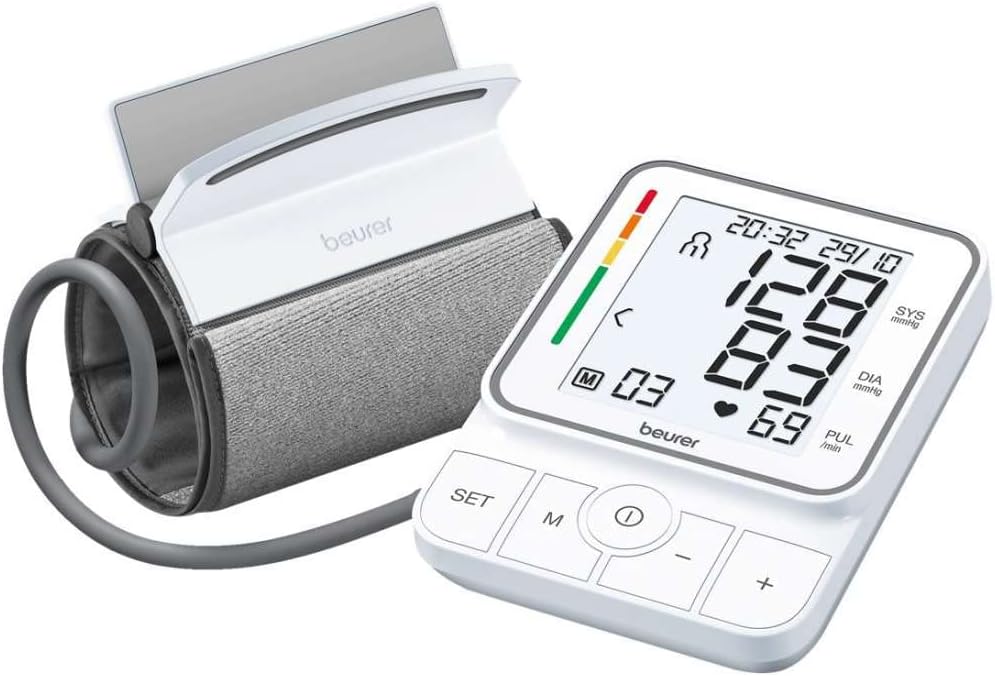
Image: The Beurer BM 51 EasyClip Blood Pressure Monitor, showing the main unit and the EasyClip cuff.
2. Safety Information
Important Safety Notes:
- Individuals with pacemakers or other electrical implants must consult a physician before using this device.
- Using the blood pressure monitor outside the home or under the influence of movement (e.g., while traveling in a car, ambulance, or helicopter, or during physical activities like exercise) may impair measurement accuracy and lead to errors.
- Cardiovascular diseases can lead to incorrect measurements or reduced measurement accuracy.
- Do not use the device simultaneously with other electrical medical devices (ME devices). This may lead to malfunction of the monitor and/or inaccurate display.
- Do not use the device outside the specified storage and operating conditions. This may lead to incorrect measurement results.
Blood pressure is the force exerted by the bloodstream on the arterial walls. Arterial blood pressure constantly changes throughout the cardiac cycle. Blood pressure is always given as two values: the higher pressure in the cycle is called systolic blood pressure, occurring when the heart muscle contracts and pushes blood into the vessels. The lower limit is diastolic blood pressure, which occurs when the heart muscle fully expands again and fills with blood.
Blood pressure fluctuations are normal. Even with repeated measurements, there can be significant differences between measured values. Single or irregular measurements do not provide reliable information about actual blood pressure. A reliable assessment can only be made if you measure regularly under similar conditions.
3. Product Components
The Beurer BM 51 EasyClip Blood Pressure Monitor package typically includes:
- Beurer BM 51 Blood Pressure Monitor Unit
- EasyClip Upper Arm Cuff (fits arm circumferences from 22 to 42 cm)
- Storage Bag
- 4 x 1.5V AA Batteries (included)
- User Manual
4. Setup
4.1. Battery Installation
Before first use, install the included 4 x 1.5V AA batteries into the battery compartment located on the underside of the device. Ensure correct polarity as indicated inside the compartment.
4.2. Attaching the EasyClip Cuff
The EasyClip cuff is designed for easy one-handed application. Follow these steps:
- Connect the cuff tube securely to the air socket on the side of the main unit.
- Place your upper arm through the open cuff.
- Position the cuff so that the bottom edge is approximately 2-3 cm above your elbow. The air tube should run along the inside of your arm.
- Close the EasyClip mechanism and secure the cuff snugly with the Velcro strap. It should be tight enough that two fingers can fit underneath.

Image: Step-by-step guide on how to correctly apply the EasyClip cuff to the upper arm for measurement.

Image: A user applying the EasyClip cuff to their upper arm, showing the ease of one-handed setup.
5. Operating Instructions
5.1. Taking a Measurement
To ensure accurate readings, sit comfortably with your back supported and feet flat on the floor. Rest your arm on a table so the cuff is at heart level. Avoid talking or moving during the measurement.
- Press the START/STOP button (usually the central round button) to turn on the device.
- The device will automatically begin inflation and measurement using its inflation technology, which takes readings even while the cuff is inflating for a faster, more comfortable experience.
- Once the measurement is complete, the systolic pressure, diastolic pressure, and pulse rate will be displayed on the XL screen.
- The measurement will be automatically stored in the selected user memory.
- Press the START/STOP button again to turn off the device, or it will automatically shut off after a period of inactivity.
5.2. User Memory and Average Readings
The device features two user memories (M1 and M2), each capable of storing 100 measurements. You can select the desired user memory before taking a measurement using the 'SET' button or dedicated user selection buttons.
The monitor can also display the average of all stored measurements, as well as morning and evening averages for the last seven days. Refer to the detailed user manual for instructions on accessing and viewing these averages.

Image: The illuminated XL display of the Beurer BM 51, showing systolic, diastolic, pulse readings, and user interface elements.
6. Understanding Blood Pressure Readings
Your blood pressure monitor displays two main values:
- Systolic Pressure (SYS): The higher number, representing the pressure in your arteries when your heart beats.
- Diastolic Pressure (DIA): The lower number, representing the pressure in your arteries between beats, when your heart rests.
- Pulse Rate (PUL/min): The number of heartbeats per minute.
The device also features a color-coded risk indicator on the left side of the display, which classifies your measurement results according to WHO (World Health Organization) guidelines. This indicator helps you quickly assess your blood pressure level:
- Green: Normal blood pressure.
- Yellow/Orange: Elevated blood pressure, consult a physician.
- Red: Severe hypertension, seek immediate medical attention.
Additionally, the BM 51 includes arrhythmia detection, which identifies and alerts you to potential disturbances in heart rhythm. If this indicator appears frequently, consult your doctor.

Image: A chart illustrating blood pressure ranges and their classification according to WHO guidelines (1999).
7. Maintenance
7.1. Cleaning
Clean the device and cuff with a slightly damp cloth. Do not use abrasive cleaners or immerse the device in water. Ensure no liquid enters the main unit.
7.2. Storage
Store the blood pressure monitor in its provided storage bag in a cool, dry place, away from direct sunlight and extreme temperatures. If the device will not be used for an extended period, remove the batteries to prevent leakage.
8. Troubleshooting
If you encounter issues with your Beurer BM 51, consider the following common solutions:
- Inaccurate Readings: Ensure the cuff is applied correctly and snugly, at heart level. Avoid movement or talking during measurement. Check battery levels.
- Device Not Turning On: Check if the batteries are inserted correctly and are not depleted. Replace batteries if necessary.
- Cuff Not Inflating: Ensure the cuff tube is securely connected to the main unit. Check for any kinks or damage in the air tube.
- Error Messages: Refer to the full user manual for specific error codes and their meanings. Often, error messages indicate incorrect cuff application or movement during measurement.
If problems persist, contact customer support.
9. Specifications
| Specification | Detail |
|---|---|
| Product Name | Blood Pressure Monitor |
| Brand | Beurer |
| Model Name | BM 51 |
| Item Model Number | 65204 |
| Age Range Description | Adult |
| Cuff Size | 22 - 42 cm (Upper Arm) |
| Power Source | Battery Powered (4 AA batteries included) |
| Display Type | XL, Illuminated |
| Memory | 2 users x 100 measurements each |
| Product Dimensions | 13.8 x 10.3 x 4.4 cm |
| Product Weight | 570 grams |
| Languages (Manual) | Spanish, German, Italian, Swedish, Dutch, Polish, French |
10. Warranty and Support
10.1. Warranty Information
EgyServ offers a one-year service warranty on most Beurer products. However, for Beurer blood pressure monitors, a 3-year service warranty is provided. Please retain your purchase invoice as proof of purchase for warranty claims.
10.2. Product Registration
You can activate your product registration by entering the required data and uploading your invoice on the activation page at egyservshop.com.
10.3. Contact Support
For technical support, service, or warranty inquiries, you may contact Beurer's authorized service centers:
- Cairo Branch: 26 Mohamed Mokalled St., off El Nahas St., 8th District, Nasr City, 1st Floor. Mobile: 01000777453
- Alexandria Branch: 40 Tutankhamun St., Smouha, 2nd Floor. Mobile: 01000777452


