
Introduction
Thank you for choosing the Zero Tolerance Shape Shifter Inflatable Vibrating Plug. This innovative device is designed for enhanced personal experience, featuring an anally insertable inflatable shaft and multiple vibration functions. Please read this manual thoroughly before first use to ensure safe and optimal operation.
Important Safety Information
- For adult use only.
- Clean the device thoroughly before and after each use with a toy cleaner and warm water.
- Use only water-based lubricants with this product. Oil-based lubricants may damage the silicone material.
- Do not over-inflate the device. Stop inflation if discomfort occurs.
- If you experience any pain or discomfort, discontinue use immediately.
- Keep out of reach of children.
- Do not immerse the remote control in water.
Product Overview
The Zero Tolerance Shape Shifter is an inflatable and vibrating plug designed for comfort and versatility. It features a soft silicone body and is controlled by a wireless remote.

Image 1: The Zero Tolerance Shape Shifter device, showing its ergonomic shape and power button at the base.
Key Features:
- Super comfortable inflatable plug.
- Provides a "full" sensation.
- Vibrating functions with multiple patterns and intensities.
- Helps with dimensional access or anxiety.
- Powerful suction cup for hands-free use.
- Convenient remote control for inflation and vibration.

Image 2: The Zero Tolerance Shape Shifter device alongside its wireless remote control, illustrating the complete product package.
Setup
1. Charging the Device
Before first use, fully charge the Shape Shifter device. Locate the charging port, typically at the base of the device. Connect the provided USB charging cable to the device and a suitable USB power source. The indicator light will show charging status (e.g., blinking while charging, solid when fully charged). A full charge may take approximately 2-3 hours.
2. Initial Cleaning
Wash the device thoroughly with a specialized toy cleaner or mild soap and warm water. Rinse completely and allow to air dry before use.
3. Remote Control Preparation
Ensure the remote control has power. If it uses batteries, insert them according to the polarity markings. If rechargeable, ensure it is charged.
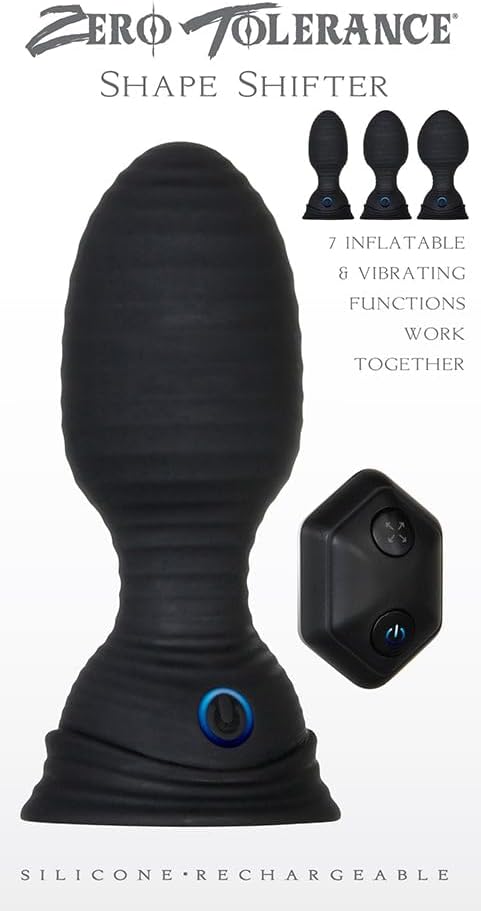
Image 3: Close-up of the remote control, showing the power and inflation/vibration control buttons.
Operation
1. Powering On/Off
- Device: Press and hold the power button located at the base of the plug until the indicator light illuminates. Press and hold again to turn off.
- Remote Control: Press and hold the power button on the remote until its indicator light illuminates. Press and hold again to turn off.
2. Using the Inflation Function
Once the device is inserted and powered on, use the inflation buttons on the remote control (often marked with arrows or a pump icon) to gradually inflate the shaft. Press the 'inflate' button to increase size and the 'deflate' button to reduce it. Do not over-inflate; stop if any discomfort is felt.
3. Using the Vibration Function
The Shape Shifter offers up to seven vibration speeds and patterns. Use the vibration control button(s) on the remote to cycle through the different modes and intensities. Short presses typically change the pattern or intensity, while a long press might turn vibration off or on.

Image 4: Detailed view of the remote control, highlighting the power button and the inflation/deflation controls.
4. Hands-Free Use (Suction Cup)
The base of the device features a powerful suction cup. To use hands-free, ensure the surface is clean, smooth, and flat. Press the suction cup firmly onto the surface to create a vacuum seal.
Maintenance
Cleaning
Always clean your Zero Tolerance Shape Shifter before and after each use. Wash with a dedicated toy cleaner or mild antibacterial soap and warm water. Rinse thoroughly to remove all soap residue. Do not use harsh chemicals, alcohol, or petroleum-based cleaners, as these can damage the silicone.
Storage
Store the device in a clean, dry, and dust-free environment, away from direct sunlight and extreme temperatures. Keep it separate from other toys made of different materials to prevent material degradation or reactions.
Troubleshooting
| Problem | Possible Cause | Solution |
|---|---|---|
| Device does not turn on. | Low battery. | Charge the device fully. |
| Vibration/Inflation not working. | Remote control battery low or not paired. | Ensure remote is charged/has fresh batteries. Re-pair if necessary (refer to product packaging for specific pairing instructions). |
| Device not inflating. | Air pump malfunction or blockage. | Ensure no debris is blocking the inflation mechanism. If problem persists, contact customer support. |
| Suction cup not adhering. | Surface is not clean, smooth, or flat. | Clean the surface and ensure it is completely smooth and dry. |
Specifications
- Product Name: Zero Tolerance Shape Shifter
- Model Number: 840456
- Brand: Evolved Novelties
- Material: Silicone
- Functions: Inflatable, Vibrating (7 speeds/patterns)
- Control: Wireless Remote Control
- Power Source: Rechargeable
- UPC: 844477015446
- Package Dimensions: 19.2 x 12.9 x 6.7 cm
- Item Weight: 267 grams
Warranty and Support
For warranty information, technical support, or any inquiries regarding your Zero Tolerance Shape Shifter, please refer to the contact information provided with your product packaging or visit the official Evolved Novelties website. Please retain your proof of purchase for warranty claims.
