
1. Introduction
The Roland RD-88 Professional Stage Piano brings the acclaimed RD sound and playability into a lighter, more accessible, and affordable instrument. Designed for both studio and live performance, it offers a rich array of features for musicians.
Key features include a lightweight and compact design for easy transport, an Ivory Feel piano-touch keyboard (PHA-4) for world-class playability, and new SuperNATURAL pianos and electric pianos based on the renowned RD series. It also provides three zones with external control and Apple MainStage integration, along with a room-filling, onboard speaker system.

2. Setup
2.1 Unpacking and Initial Placement
Carefully remove the RD-88 from its packaging. Due to its lightweight and compact design, it is easy to transport and set up in various environments, from home studios to performance stages. Ensure placement on a stable, flat surface or a compatible keyboard stand.

2.2 Connections
The RD-88 offers a comprehensive set of connectivity options for various applications:
- Power: Connect the included AC adaptor to the DC IN jack.
- Audio Output: Use Stereo 1/4-inch phone type jacks for connecting to external amplifiers, mixers, or audio interfaces.
- Headphones: A 1/4-inch (6.35mm) Stereo Jack is provided for private practice.
- Pedals: Connect sustain pedals (1/4-inch phone type) and expression pedals (TRS phone type) for enhanced control.
- MIDI: Utilize the MIDI OUT jack for connecting to other MIDI devices.
- USB: USB Type A and USB Type B ports allow for connection to computers for MIDI data transfer and audio streaming.

3. Operating the RD-88
3.1 Sound Selection and Exploration
The RD-88 features a wide variety of sounds, including new SuperNATURAL pianos and electric pianos, as well as organs, strings, and more. Navigate through the sound categories using the intuitive controls and the clear LED screen. The screen provides easy readability, especially when browsing through menus and sound presets.
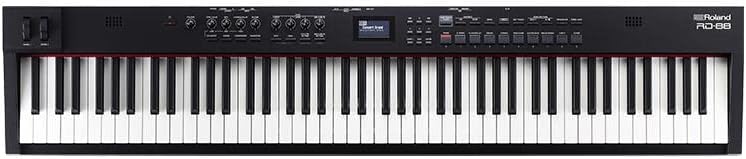
3.2 Keyboard Feel and Expression
Experience world-class playability with the PHA-4 keyboard, featuring an Ivory Feel piano-touch. This semi-weighted key action provides a realistic and responsive playing experience. Utilize the pitch bend and modulation wheels for expressive control over your sounds.
3.3 Onboard Speaker System
The integrated room-filling speaker system allows for immediate practice and performance without the need for external amplification. This feature is particularly convenient for home use or small gatherings.
3.4 MIDI Control and External Integration
The RD-88 functions as a versatile MIDI controller, offering comprehensive MIDI control capabilities. It also supports seamless integration with software like Apple MainStage, allowing for expanded sound libraries and performance setups.
4. Maintenance
To ensure the longevity and optimal performance of your Roland RD-88, follow these maintenance guidelines:
- Cleaning: Wipe the surface with a soft, dry cloth. For stubborn dirt, use a slightly damp cloth and then dry thoroughly. Avoid abrasive cleaners or solvents.
- Storage: Store the instrument in a cool, dry place away from direct sunlight, extreme temperatures, and high humidity.
- Handling: Always handle the keyboard with care. Avoid dropping it or subjecting it to strong impacts.
5. Troubleshooting
If you encounter issues with your Roland RD-88, consider the following common troubleshooting steps:
- No Power: Ensure the AC adaptor is securely connected to both the instrument and a working power outlet. Verify the power switch is in the 'ON' position.
- No Sound: Check the volume knob. Ensure headphones are properly connected or external speakers/amplifiers are turned on and connected correctly. Verify the correct sound is selected.
- Keys Not Responding: If specific keys are not responding, ensure no debris is lodged between them. If the issue persists, contact customer support.
- MIDI/USB Issues: Confirm all cables are securely connected. Check your computer's device manager or MIDI settings to ensure the RD-88 is recognized.
For more complex issues, refer to the official user manual or contact Roland customer support.
6. Specifications
| Feature | Specification |
|---|---|
| Model Name | RD-88 |
| Brand | Roland |
| Number of Keys | 88 |
| Keyboard Type | Ivory Feel Piano-Touch (PHA-4 Standard Keyboard) |
| Sound Engine | SuperNATURAL Piano, SuperNATURAL Electric Piano, and ZEN-Core |
| Built-in Speakers | Yes |
| Connectivity Technology | Interface |
| Connector Types | Stereo 1/4-inch phone type, 1/4-inch phone type, Stereo miniature phone type, TRS phone type, MIDI OUT jack, USB Type A, USB Type B, DC IN jack |
| Power Source | AC adaptor |
| Dimensions (L x W x H) | 54.33 x 15.75 x 11.42 inches |
| Item Weight | 0.01 Ounces (Note: This weight seems incorrect, likely a data entry error. Actual weight is typically around 29.8 lbs / 13.5 kg) |
| Supported Software | Apple MainStage |
| UPC | 761294514931 |
7. Warranty and Support
For detailed warranty information and comprehensive support, please refer to the official user manual provided by Roland. You can download the PDF version of the user manual from the following link:
Download Roland RD-88 User Manual (PDF)
Additionally, Roland offers exclusive benefits for RD-88 owners, including three months of free piano lessons from their partner Pianote. This provides unlimited access to step-by-step lessons, song tutorials, and live support from piano teachers, accessible from any internet-ready device.
