1. Introduction
Welcome to the user manual for your Energizer E241S+ 4G Feature Phone. This guide provides essential information on how to set up, operate, and maintain your device. The E241S+ combines the simplicity of a classic feature phone with the capabilities of a smartphone, powered by the KaiOS operating system. Enjoy 4G connectivity, Wi-Fi, and access to various applications.
2. Package Contents
Please check the box for the following items:
- Energizer E241S+ Feature Phone
- Battery (1900 mAh)
- Mobile Charger
- Earphones
- User Manual (this document)
3. Device Overview
Familiarize yourself with the physical components of your Energizer E241S+ phone.

Image 3.1: Front and back view of the Energizer E241S+ phone. The front features the display and keypad, while the back shows the rear camera and speaker grille.
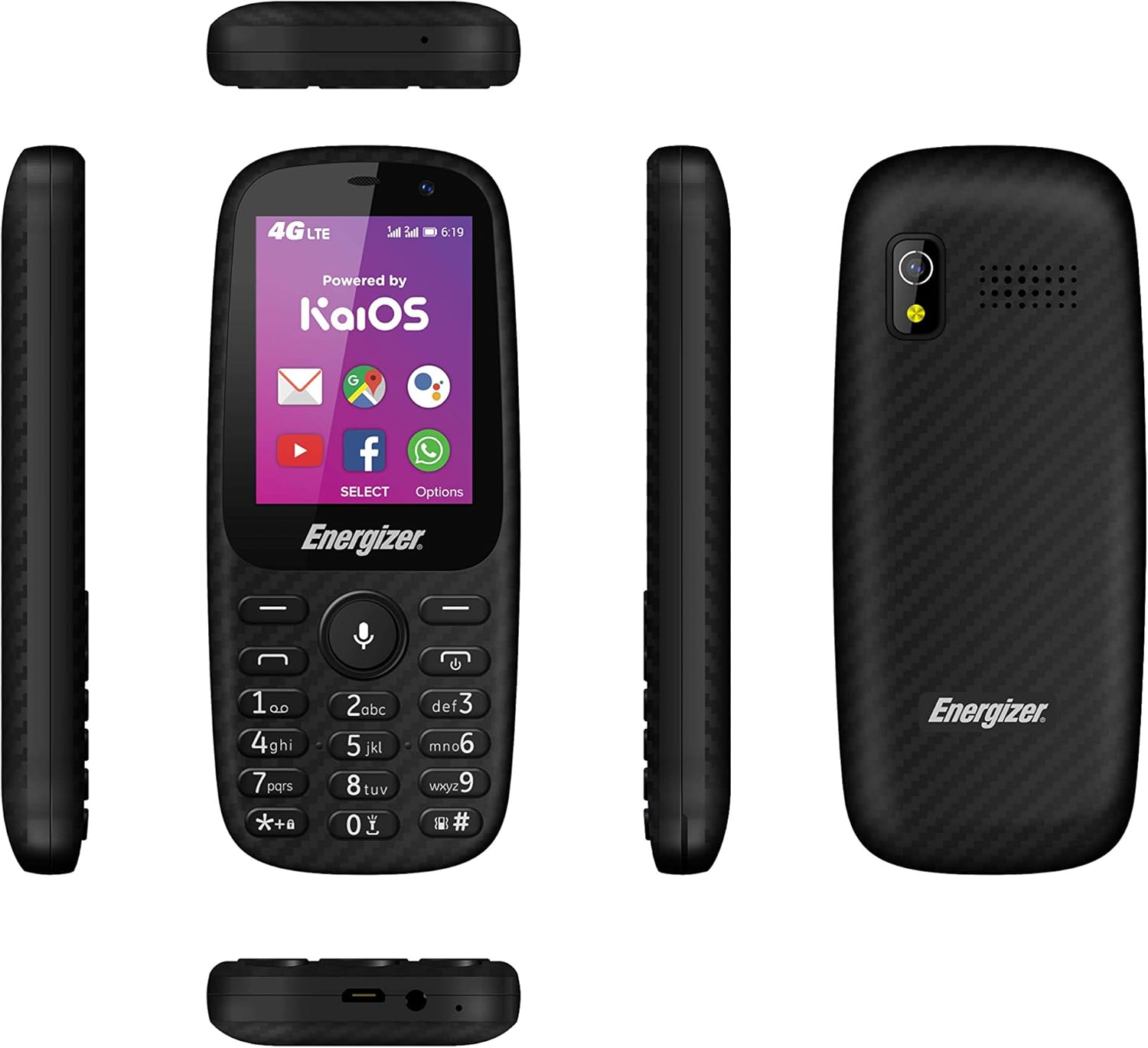
Image 3.2: Various side views of the Energizer E241S+ phone, illustrating the slim profile, top-mounted ports, and bottom-mounted ports.
4. Setup
4.1. Installing the SIM Card(s) and MicroSD Card
- Carefully remove the back cover of the phone.
- Insert your Mini SIM card(s) into the designated SIM slots. The E241S+ supports dual SIM functionality.
- If desired, insert a MicroSD card (up to 128GB) into the memory card slot for expanded storage.
- Ensure all cards are seated correctly.
4.2. Installing the Battery
- Align the battery contacts with the terminals inside the phone's battery compartment.
- Gently press the battery into place.
- Replace the back cover, ensuring it clicks securely.
4.3. Charging the Phone
- Connect the Micro USB end of the charger cable to the phone's charging port.
- Plug the other end of the charger into a power outlet.
- Allow the phone to charge fully before initial use. The battery indicator on the screen will show charging status.
5. Operating Instructions
5.1. Power On/Off
- To power on: Press and hold the Power button until the screen lights up.
- To power off: Press and hold the Power button, then select 'Power Off' from the options on the screen.
5.2. Making Calls
- From the home screen, use the keypad to dial the desired phone number.
- Press the Call button (usually green) to initiate the call.
- To end a call, press the End Call button (usually red).
5.3. Sending Messages
- Navigate to the 'Messages' application from the main menu.
- Select 'New Message' or 'Create Message'.
- Enter the recipient's phone number or select from your contacts.
- Type your message using the keypad.
- Press 'Send'.
5.4. Internet and Applications (KaiOS)
Your E241S+ runs on KaiOS, providing access to essential smartphone features:
- 4G Connectivity: Access high-speed internet for browsing and app usage.
- Wi-Fi: Connect to available Wi-Fi networks for internet access.
- KaiStore: Download and install various applications, including popular social media and communication tools.
- GPS: Utilize the built-in GPS for navigation and location services.
5.5. Camera Functions
The phone is equipped with both front and rear cameras, each with a flash, allowing you to capture photos and videos.
- Navigate to the 'Camera' application.
- Use the navigation keys to switch between front and rear cameras.
- Press the center key to capture a photo or start/stop video recording.
6. Maintenance
- Keep the device dry. Moisture can damage electronic circuits.
- Avoid extreme temperatures. High temperatures can shorten the life of electronic devices and warp or melt certain plastics.
- Do not use harsh chemicals, cleaning solvents, or strong detergents to clean the phone. Wipe it with a soft, dry cloth.
- Handle the phone with care. Dropping, knocking, or shaking the device can damage internal circuit boards.
- The phone is water-resistant; however, avoid prolonged submersion or exposure to high-pressure water.
7. Troubleshooting
| Problem | Possible Solution |
|---|---|
| Phone does not turn on | Ensure the battery is correctly installed and charged. Connect the charger and try again. |
| Cannot make or receive calls | Check if the SIM card is properly inserted and activated. Verify network signal strength. |
| Poor battery life | Reduce screen brightness, close unused applications, or disable Wi-Fi/Bluetooth when not in use. |
| Phone freezes or is unresponsive | Remove and reinsert the battery to perform a soft reset. If the issue persists, consider a factory reset (backup data first). |
| Cannot connect to the internet | Check 4G/Wi-Fi settings. Ensure data plan is active or Wi-Fi password is correct. |
8. Specifications
| Feature | Detail |
|---|---|
| Brand | Energizer |
| Model Name | E241S |
| Operating System | KaiOS |
| RAM | 512 MB |
| Internal Storage | 1 GB |
| Expandable Storage | Up to 128 GB (MicroSD) |
| Screen Size | 2.4 inches |
| Display Resolution | 320 x 240 (LCD) |
| Cellular Technology | 4G LTE |
| Connectivity | USB, Bluetooth, Wi-Fi |
| SIM Card Slots | Dual SIM (Mini SIM) |
| Battery Capacity | 1900 mAh (Lithium Ion) |
| Talk Time | Up to 28 hours |
| Headphone Jack | 3.5 mm |
| Cameras | Front and Rear with Flash |
| GPS | Yes |
| Water Resistance | Yes |
| Dimensions | 14 x 50 x 116 mm |
9. Warranty and Support
For warranty information, customer service, and additional resources, please visit the official Energizer website or contact your retailer.
You can also find information regarding free applications and services at: energizeyourdevice.com/customer-services/free-apps/


