
Introduction
The Bosch MUM5 Scale MUM5XW20 Stand Mixer is a powerful and versatile kitchen appliance designed to simplify your food preparation tasks. Featuring a robust 1000W motor and 3D planetary mixing action, it ensures thorough and consistent results for various recipes, from light creams to heavy doughs. This appliance includes an integrated scale and timer for precise measurements and controlled processing, along with a comprehensive set of accessories to expand its functionality. This manual provides essential information for the safe and effective use of your Bosch MUM5XW20.
Safety Instructions
Please read these safety instructions carefully before using your appliance and keep them for future reference. Incorrect use can lead to personal injury and property damage.
- Always disconnect the appliance from the power supply before assembly, disassembly, cleaning, or if left unattended.
- Do not immerse the motor unit in water or other liquids. Clean with a damp cloth only.
- Keep hands, hair, clothing, and utensils away from moving parts during operation to prevent injury.
- Never operate the appliance with a damaged cord or plug, or if it has malfunctioned or been dropped.
- Ensure all attachments are correctly fitted and secured before operating the appliance.
- Do not exceed the maximum fill levels indicated for the bowl or blender.
- Use only original Bosch accessories and spare parts.
- This appliance is intended for household use only.
Package Contents
Your Bosch MUM5XW20 Stand Mixer comes with the following components and accessories:
- Bosch MUM5XW20 Motor Unit
- Stainless Steel Mixing Bowl (3.9 L capacity)
- Dough Hook (stainless steel)
- Beating Whisk (stainless steel)
- Stirring Whisk (stainless steel)
- Accessory Bag for small tools
- Food Processor Attachment with lid and pusher
- Blender Attachment (plastic)
- Reversible Slicing Disc (thin/thick)
- Reversible Shredding Disc (fine/coarse)
- Fine Grating Disc
- Coarse Grating Disc
- Splash Guard Lid

Image: The Bosch MUM5XW20 Stand Mixer displayed with its full range of accessories, including the stainless steel bowl, dough hook, whisks, food processor attachment, blender, and various slicing/shredding discs.
Getting Started (Setup)
1. Unpacking and Placement
Carefully remove all components from the packaging. Place the motor unit on a clean, stable, and level surface. Ensure there is sufficient space around the appliance for operation and ventilation.

Image: The Bosch MUM5XW20 Stand Mixer positioned on a kitchen counter, ready for use.
2. Attaching the Mixing Bowl
- Ensure the appliance is unplugged.
- Place the stainless steel mixing bowl into the designated recess on the motor unit.
- Turn the bowl clockwise until it locks securely into place.
3. Attaching Mixing Tools (Dough Hook, Beating Whisk, Stirring Whisk)
- Press the 'Easy Arm Lift' button to raise the multi-function arm.
- Select the appropriate mixing tool for your recipe.
- Insert the mixing tool into the drive shaft until it clicks into place.
- Lower the multi-function arm until it locks into position.
- Place the splash guard lid over the bowl, aligning the opening with the mixing tool.
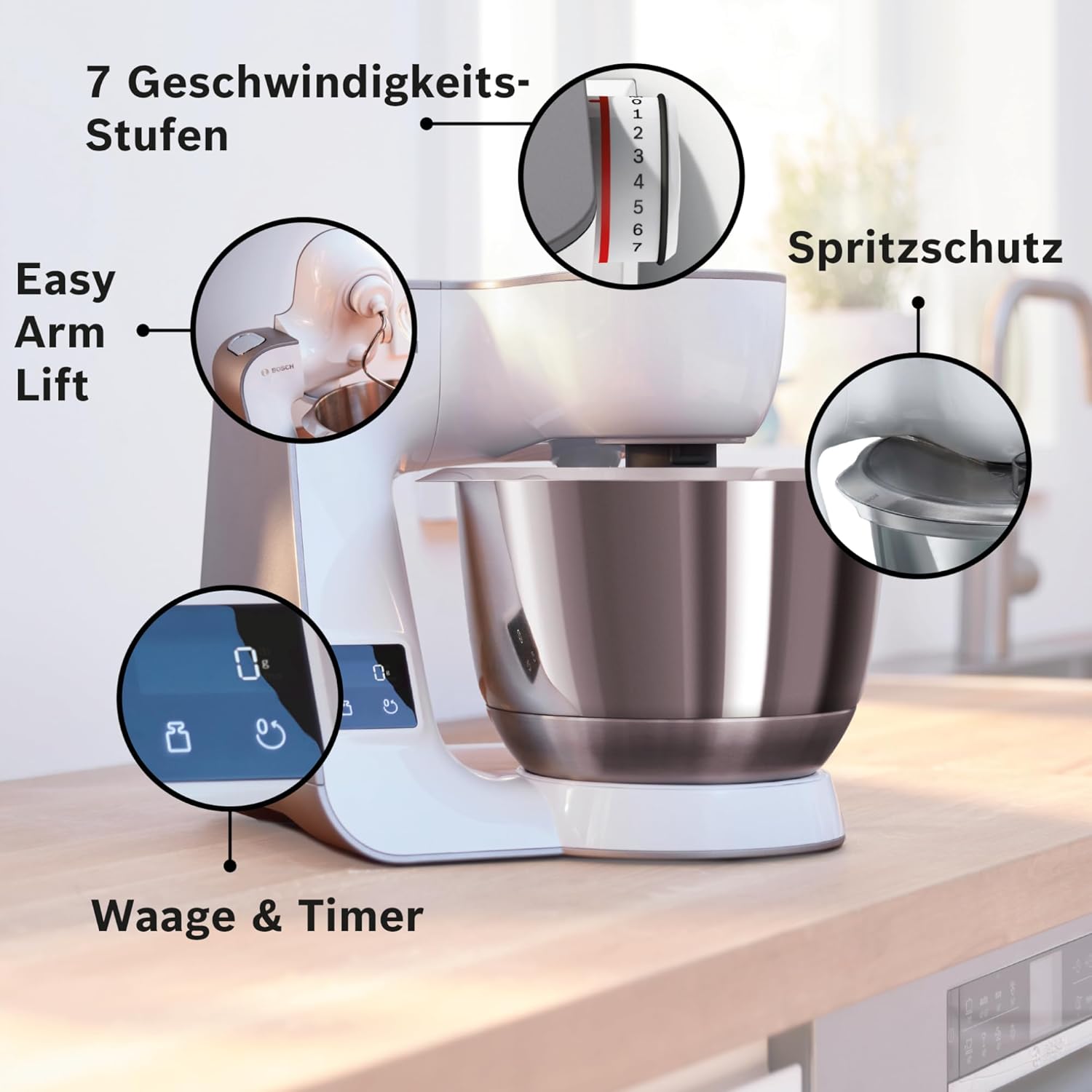
Image: Close-up of the Bosch MUM5XW20 control panel, highlighting the Easy Arm Lift function, 7-speed settings, and the integrated scale and timer display.
Operation
1. Powering On and Speed Settings
- Plug the appliance into a suitable power outlet.
- Turn the speed selector dial to the desired speed (1-7). The appliance will start operating.
- For a short burst of maximum power, use the 'Turbo' setting.
- To stop the appliance, turn the speed selector dial to '0'.
2. Using the Integrated Scale
The integrated scale allows for direct weighing of ingredients in the mixing bowl.
- With the bowl attached, press the scale button on the control panel. The display will show '0g'.
- Add your ingredients. The weight will be displayed.
- To tare (reset to zero) for adding more ingredients, press the scale button again.

Image: The integrated scale in operation, showing a digital display of '220g' as an ingredient is added to the mixing bowl.
3. Using the Integrated Timer
The integrated timer helps you monitor mixing times for precise recipe execution.
- After starting the appliance, press the timer button. The display will show '00:00'.
- The timer will count up, indicating the elapsed mixing time.
- To reset the timer, press the timer button again.

Image: The integrated timer display showing '04:19', indicating four minutes and nineteen seconds of operation.
4. Using Mixing Tools for Different Preparations
- Dough Hook: Ideal for heavy doughs such as bread dough or yeast dough.
- Beating Whisk: Perfect for light batters, creams, and egg whites.
- Stirring Whisk: Suitable for stirring and mixing ingredients for cakes and pastries.

Image: The three primary mixing tools (whisk, beater, dough hook) are shown, illustrating their suitability for various preparations like creams, batters, and heavy doughs.
5. Using the Food Processor Attachment
The food processor attachment allows for quick and easy slicing and shredding of vegetables and other ingredients.
- Attach the food processor unit to the front accessory drive.
- Insert the desired slicing or shredding disc.
- Secure the lid with the pusher.
- Turn on the appliance and feed ingredients through the chute using the pusher.

Image: The food processor attachment in use, demonstrating its ability to quickly slice and shred ingredients like carrots.
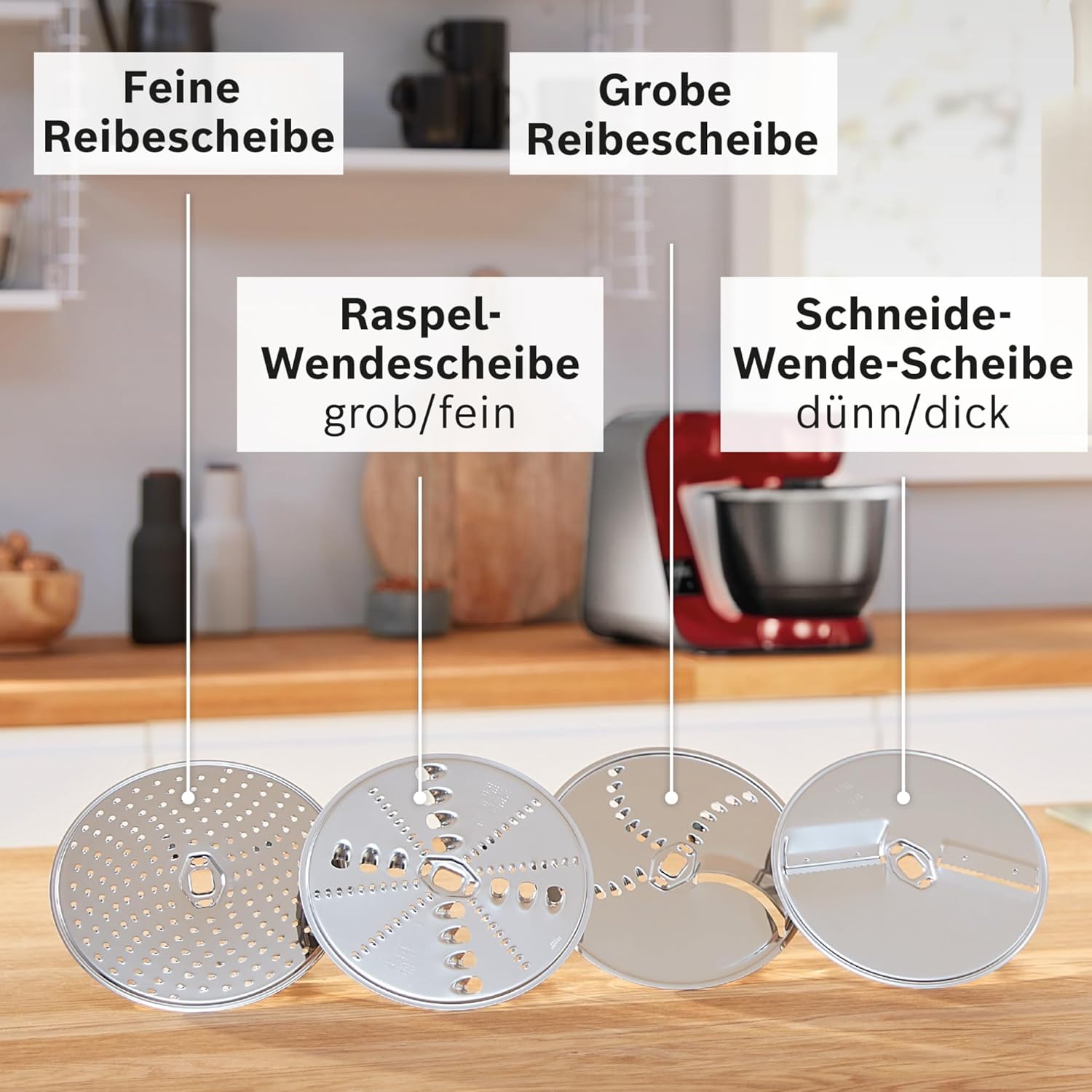
Image: A selection of slicing and shredding discs, including fine grating, coarse grating, reversible shredding (coarse/fine), and reversible slicing (thin/thick) discs.
6. Using the Blender Attachment
The blender attachment is perfect for preparing healthy smoothies, soups, and sauces.
- Attach the blender unit to the top accessory drive.
- Add ingredients to the blender jug.
- Secure the lid.
- Turn on the appliance to blend.

Image: The blender attachment in use, preparing a healthy smoothie, demonstrating its function for liquid preparations.
Cleaning and Maintenance
Regular cleaning ensures the longevity and optimal performance of your Bosch MUM5XW20.
- Always unplug the appliance before cleaning.
- Wipe the motor unit with a damp cloth. Do not use abrasive cleaners.
- The stainless steel mixing bowl, mixing tools (dough hook, whisks), and most food processor discs are dishwasher-safe.
- The blender jug and its lid should be hand-washed with warm, soapy water. Ensure all parts are thoroughly dried before storage.
- Store accessories in the provided accessory bag to keep them organized and protected.

Image: Illustration showing the mixing tools and stainless steel bowl being placed into a dishwasher, indicating their dishwasher-safe design.
Troubleshooting
If you encounter issues with your Bosch MUM5XW20, please refer to the following common solutions:
- Appliance does not start: Ensure the power cord is securely plugged in and the speed selector is not at '0'. Check if the multi-function arm is fully lowered and locked.
- Uneven mixing: Ensure the correct mixing tool is used for the consistency of the ingredients. For very small quantities, the planetary mixing action may not reach all ingredients at the very bottom; scrape down the sides of the bowl if necessary.
- Blender leakage: Check that the blender base and blade assembly are securely tightened to the jug. Ensure the lid is properly sealed during operation.
- Motor sounds strained: This can occur with very heavy doughs. Reduce the quantity of ingredients or increase the speed gradually. If the motor continues to strain or overheats, switch off the appliance and allow it to cool down.
If the problem persists after attempting these solutions, please contact Bosch customer support.
Technical Specifications
| Feature | Specification |
|---|---|
| Brand | Bosch |
| Model Number | MUM5XW20 |
| Color | White/Champagne |
| Dimensions (L x W x H) | 27.1 x 28 x 28.2 cm |
| Weight | 1 Kilogram (Net: 5.338 kg from description) |
| Bowl Capacity | 3.9 Liters |
| Power | 1000 Watts |
| Voltage | 240.0 V |
| Number of Speeds | 7 + Turbo |
| Material | Metal (housing), Stainless Steel (bowl, mixing tools) |
| Special Features | Integrated Scale, Integrated Timer, 3D Planetary Mixing, Easy Arm Lift |
| Noise Level | 44 Decibels |
| Country of Origin | Slovenia |

Image: The Bosch MUM5XW20 Stand Mixer with key dimensions (height, width, depth) and bowl capacity (3.9L) indicated.
Warranty and Customer Support
For detailed warranty information, please refer to the warranty card included with your product or visit the official Bosch website. If you require technical assistance, spare parts, or have any questions regarding your Bosch MUM5XW20 Stand Mixer, please contact Bosch customer support in your region. Contact details can typically be found on the Bosch website or in your purchase documentation.