
1. Introduction
This user manual provides comprehensive instructions for the LG 75UN7070PUC 75-inch 4K Smart LED TV. Please read this manual thoroughly before operating your TV to ensure safe and proper use. Keep this manual for future reference.
2. Key Features
- Real 4K IPS Display: Enjoy stunning visuals with a wide viewing angle and 4K Ultra HD resolution (3,840 x 2,160).
- Quad Core Processor 4K: Enhances color, contrast, clarity, and detail for an optimized viewing experience.
- webOS Smart Platform: Access a world of entertainment with popular streaming services and LG Channels.
- Active HDR (HDR10, HLG): Supports a wide range of formats for scene-by-scene picture adjustment.
- Voice Assistants: Built-in compatibility with Google Assistant and Amazon Alexa for convenient voice control.
- Apple Airplay 2 & Homekit: Seamlessly integrate with your Apple devices.
- Ultra Surround Sound: Experience immersive audio with virtual surround sound.
- Sports Alert: Receive updates on your favorite teams and game scores.
- Filmmaker Mode™: Preserves the director's original vision for cinematic content.
3. Setup
3.1 Unpacking and Placement
Carefully remove the TV and all accessories from the packaging. Ensure the TV is placed on a stable, level surface or securely mounted to a wall. Maintain adequate ventilation around the TV.
3.2 Stand Installation
If using the included stand, attach the stand components to the TV according to the instructions in the Quick Start Guide. Ensure all screws are tightened securely.
3.3 Connecting External Devices
Connect your external devices such as cable boxes, Blu-ray players, or gaming consoles to the TV's input ports.

Rear view of the LG 75UN7070PUC TV, illustrating the location of various input ports for connecting external devices.
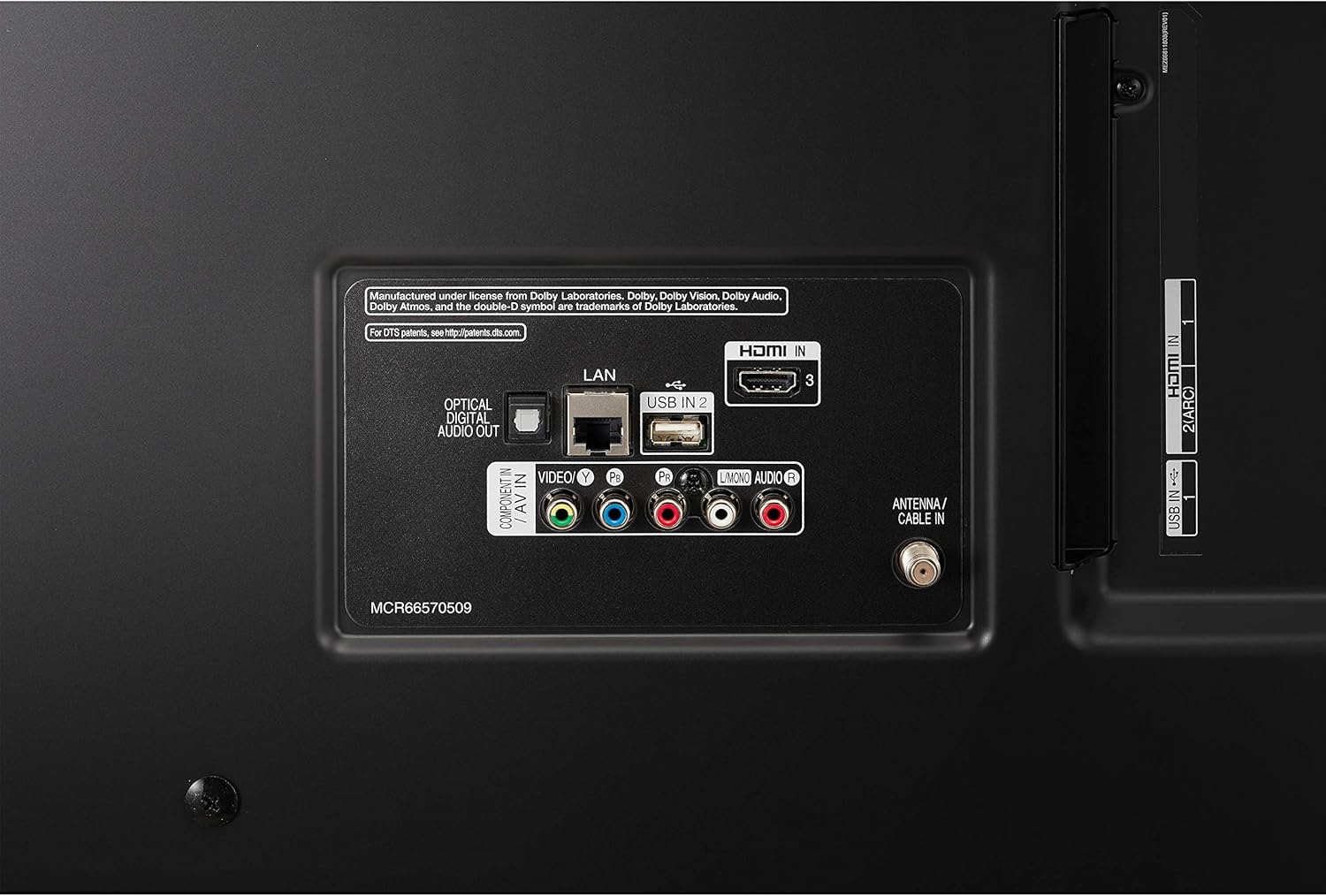
A detailed close-up of the rear input ports, including LAN, USB, HDMI, Optical Digital Audio Out, Composite, and RF connections.

A close-up of the side input ports, showing additional HDMI and USB connections for easy access.
- HDMI Inputs: The TV features 3 HDMI inputs (1 rear, 2 side) for high-definition audio and video. HDMI 2 supports Audio Return Channel (ARC).
- USB Ports: Two USB 2.0 ports (1 rear, 1 side) are available for connecting USB storage devices.
- Ethernet Input: Connect an Ethernet cable for a wired network connection.
- Digital Audio Output (Optical): For connecting to an external audio system.
- RF Connection Input: For connecting an antenna or cable.
- Composite Input (AV): For connecting older devices using RCA cables.
4. Operating Your TV
4.1 Power On/Off
Press the Power button on the Magic Remote or the TV to turn the TV on or off.
4.2 Magic Remote Control
The Magic Remote provides intuitive control over your TV. It features a pointer, scroll wheel, and voice command capabilities.

The LG Magic Remote control, featuring a power button, number pad, volume and channel controls, navigation buttons, and dedicated app buttons.
- Voice Commands: Use the built-in microphone to give commands to Google Assistant or Amazon Alexa.
- Pointer Function: Point and click on screen elements for easy navigation.
- Universal Control: Control other connected devices like cable set-top boxes, Blu-ray players, or soundbars.
4.3 webOS Smart Platform
webOS is the intuitive operating system for your LG Smart TV, offering quick access to a wide range of content and features.
Official LG video demonstrating the features and user interface of the webOS Smart TV platform, including app navigation and content access.

The webOS interface showing the app launcher bar at the bottom of the screen, providing access to various streaming services and features.
- Launcher Bar: Access your favorite apps, recent content, and the Home Dashboard directly from the customizable launcher bar.
- LG Channels: Enjoy over 180 free streaming channels across various categories like news, sports, and comedy.
- LG Content Store: Download new apps, games, and other content.
- AI Preview: Get a glimpse of recently watched content without opening the app.
- Intelligent Edit: Automatically organizes your apps based on usage frequency for easier access.
4.4 Smart Features
- Sports Alert: Select your favorite sports teams to receive alerts before games start or when your team scores. You can set alerts for up to 20 teams.
- Gallery Mode: Transform your TV into an art display when not in use, showcasing paintings, photographs, and other beautiful images.
- Who Where What: Get real-time information about content you are watching, such as actors, locations, or music.
- LG ThinQ AI Home Dashboard: Conveniently control your smart LG home appliances and other connected IoT devices directly from your TV.

The LG TV screen showing the 'Sports Alert' feature, providing real-time updates during a game.
5. Picture and Sound Settings
Your LG TV offers various settings to optimize picture and sound quality.
- Picture Modes: Select from predefined picture modes (e.g., Standard, Vivid, Cinema, Filmmaker Mode™) or customize settings like brightness, contrast, and color.
- Active HDR: Automatically adjusts picture settings for optimal HDR content viewing (HDR10, HLG).
- Sound Modes: Choose from various sound modes (e.g., Standard, Cinema, Sports) or adjust equalizer settings.
- Ultra Surround: Enhances the audio experience by creating a virtual surround sound effect.

The LG UHD TV showcasing a clear 4K image of a stadium, highlighting the display's high resolution and wide viewing angles.

The LG TV screen illustrating the benefits of the Quad-Core Processor 4K, including Noise Reduction, Dynamic Color, and Upscaling.
6. Maintenance
6.1 Cleaning Your TV
- Always unplug the TV before cleaning.
- Use a soft, dry cloth to wipe the screen and exterior surfaces.
- For stubborn marks, lightly dampen the cloth with water or a mild screen cleaner. Do not spray cleaner directly onto the screen.
- Avoid using abrasive cleaners, waxes, or solvents.
6.2 General Care
- Do not block ventilation openings.
- Avoid exposing the TV to direct sunlight, high temperatures, or high humidity.
- Protect the power cord from being walked on or pinched.
7. Troubleshooting
If you encounter issues with your TV, refer to the following common solutions. For more detailed troubleshooting, consult the E-Manual available on your TV or the LG support website.
- No Power: Ensure the power cord is securely plugged into both the TV and a working electrical outlet. Try a different outlet.
- No Picture/Sound: Check all cable connections to external devices. Ensure the correct input source is selected on the TV.
- Remote Control Not Working: Replace the batteries in the Magic Remote. Ensure there are no obstructions between the remote and the TV.
- Network Connection Issues: Verify your Wi-Fi password or Ethernet cable connection. Restart your router and modem.
- Smart Features Not Responding: Try restarting the TV by unplugging it from the power outlet for a few minutes, then plugging it back in.
8. Specifications
| Feature | Specification |
|---|---|
| Brand | LG |
| Model Number | 75UN7070PUC |
| Screen Size | 75 Inches |
| Display Type | Real 4K IPS Display |
| Display Resolution | 4K Ultra HD (3,840 x 2,160) |
| Backlight Type | Direct |
| Picture Processor | Quad Core Processor 4K |
| Refresh Rate | TruMotion 120 (Native 60Hz) |
| HDR (High Dynamic Range) | Active HDR (HDR10, HLG) |
| Operating System | webOS |
| Voice Assistants | Works with Google Assistant, Works with Alexa |
| Speaker System | 2.0 Channel |
| Output Power | 20W |
| Wi-Fi Standard | Wi-Fi Certified 802.11ac |
| HDMI Inputs | 3 (1 rear, 2 side) |
| USB Ports | 2 (1 rear, 1 side) |
| Ethernet Input | 1 (rear) |
| Digital Audio Output (Optical) | 1 (rear) |
| TV Dimensions with Stand (WxHxD) | 66.7" x 41.3" x 13.6" |
| TV Weight with Stand | 78 lbs |
| VESA Mounting (W x H) | 600 x 400 |
| Typical Power Consumption | 110W |
| Model Year | 2020 |
| Country of Origin | Mexico |
9. Warranty and Support
For detailed warranty information, please refer to the limited warranty statement included with your product or visit the official LG support website. For technical assistance, product registration, or service inquiries, please contact LG Customer Support.
You can also find the E-Manual directly on your TV for further guidance and support.