
1. Introduction
Welcome to your new Havit I96 TWS V5.0 HD Stereo Wireless Earbuds. These earbuds are designed to provide a high-quality audio experience with the convenience of wireless connectivity. This manual will guide you through the features and functions of your device, ensuring optimal performance and longevity.
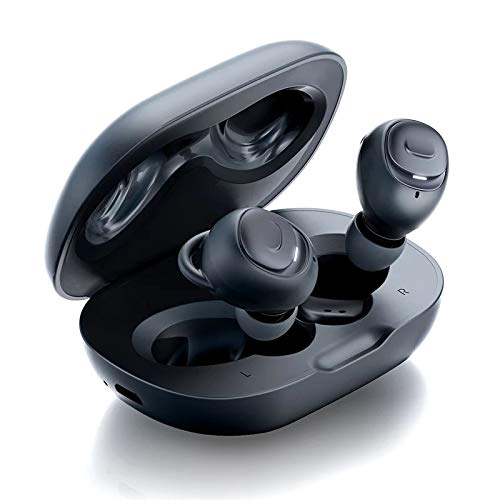
Image 1.1: Havit I96 TWS Earbuds in their charging case.
2. Package Contents
Please check the package for the following items:
- Havit I96 TWS Earbuds (Left and Right)
- Charging Case
- USB Charging Cable
- User Manual
- Eartips (various sizes)
3. Product Overview
Familiarize yourself with the components of your Havit I96 earbuds and charging case.

Image 3.1: The Havit I96 earbuds shown inside and outside their charging case, highlighting their compact design.
Earbud Components:
- Touch Control Area: For managing music playback, calls, and voice assistant.
- LED Indicator: Displays pairing status, battery level, and charging status.
- Microphone: For hands-free calls.
- Eartip: Ensures a comfortable and secure fit, and optimizes sound quality.
Charging Case Components:
- Charging Port: For connecting the USB charging cable.
- LED Indicators: Shows the charging status of the case and earbuds.
4. Setup
4.1 Charging
Before first use, fully charge the earbuds and the charging case. This ensures maximum battery life and optimal performance.
- Connect the provided USB charging cable to the charging port on the case and to a compatible USB power source (e.g., wall adapter, computer USB port).
- The LED indicators on the charging case will illuminate to show the charging status. Once fully charged, the indicators may change or turn off.
- Place the earbuds into their respective slots in the charging case. The earbud indicators will show that they are charging.
4.2 Pairing
The Havit I96 earbuds offer flexible pairing options, including stereo mode, mono mode, and separate pairing.

Image 4.1: Illustration of Stereo Mode, Mono Mode, and Separately Paired modes for the Havit I96 earbuds.
Initial Pairing (Stereo Mode):
- Open the charging case. The earbuds will automatically power on and enter pairing mode. The LED indicators on the earbuds will flash.
- Enable Bluetooth on your device (smartphone, tablet, computer, etc.).
- Search for "Havit I96" in the list of available Bluetooth devices and select it to connect.
- Once connected, a voice prompt will confirm successful pairing, and the earbud LEDs will stop flashing.
Mono Mode (Single Earbud Use):
- Take one earbud (either left or right) out of the charging case. It will automatically power on and enter pairing mode.
- Enable Bluetooth on your device and search for "Havit I96" to connect.
- To switch back to stereo mode, simply take the other earbud out of the case. The two earbuds will automatically connect to each other and then to your device.
Pairing Separately:
Each earbud can be paired to a different device independently. Follow the mono mode pairing steps for each earbud with its respective device.
5. Operating Instructions
The Havit I96 earbuds feature intuitive touch controls for easy management of your audio and calls.

Image 5.1: A user wearing the Havit I96 earbuds, demonstrating their ergonomic and lightweight design.
5.1 Power On/Off
- Power On: Open the charging case, and the earbuds will automatically power on. Alternatively, press and hold the touch control area on both earbuds for 3 seconds.
- Power Off: Place the earbuds back into the charging case and close the lid. Alternatively, press and hold the touch control area on both earbuds for 5 seconds.
5.2 Music Control
- Play/Pause: Single tap on the touch control area of either earbud.
- Next Track: Double tap on the touch control area of the right earbud.
- Previous Track: Double tap on the touch control area of the left earbud.
5.3 Call Control
- Answer/End Call: Single tap on the touch control area of either earbud.
- Reject Call: Press and hold the touch control area of either earbud for 2 seconds.
5.4 Voice Assistant
- Activate Voice Assistant: Triple tap on the touch control area of either earbud to activate your device's voice assistant (e.g., Siri, Google Assistant).
6. Maintenance
Proper maintenance ensures the longevity and optimal performance of your Havit I96 earbuds.

Image 6.1: The Havit I96 earbuds are shown with water droplets, illustrating their IPX5 water-resistant rating.
- Cleaning: Use a soft, dry, lint-free cloth to clean the earbuds and charging case. Do not use harsh chemicals, abrasive materials, or liquids directly on the device.
- Storage: Always store the earbuds in their charging case when not in use. This protects them from damage and keeps them charged. Avoid storing them in extreme temperatures (hot or cold) or in areas with high humidity.
- Water Resistance: The Havit I96 earbuds are rated IPX5 water-resistant, meaning they are protected against splashing water from any direction. They are suitable for workouts and light rain but are not designed for submersion in water. Ensure the earbuds are completely dry before placing them back into the charging case to prevent damage to the charging contacts.
7. Troubleshooting
If you encounter any issues with your Havit I96 earbuds, refer to the following common problems and solutions:
| Problem | Solution |
|---|---|
| Earbuds not pairing with each other | Place both earbuds back into the charging case, close the lid, then open it again. This will reset their connection. Re-attempt pairing with your device. |
| Earbuds not connecting to device | Ensure Bluetooth is enabled on your device. Go to your device's Bluetooth settings, "forget" or "unpair" "Havit I96", then re-attempt the initial pairing process. Ensure earbuds are charged. |
| No sound from one earbud | Ensure both earbuds are charged. Place both earbuds back into the charging case, close the lid, and then open it again to force a re-sync. Check if the earbud is properly seated in your ear. |
| Charging case not charging | Verify that the USB charging cable is securely connected to both the case and the power source. Try a different USB cable or power adapter. Ensure the charging port is clean and free of debris. |
| Low audio quality or intermittent connection | Ensure your device is within the effective Bluetooth range (typically 10 meters/33 feet) and there are no significant obstacles between the earbuds and your device. Avoid environments with strong Wi-Fi or other wireless interference. |
8. Specifications
Detailed technical specifications for the Havit I96 TWS V5.0 HD Stereo Wireless Earbuds.

Image 8.1: An illustration highlighting the Hi-Fi Premium Sound driver technology within the Havit I96 earbuds.
- Brand: Havit
- Model: I96
- Connectivity: Bluetooth V5.0
- Form Factor: In-Ear
- Color: Black
- Noise Control: Active Noise Cancellation
- Control Method: Touch
- Water Resistance: IPX5 (Splash-proof)
- Playtime: Up to 3.5 hours per earbud charge
- Total Playtime (with charging case): Up to 10 hours
- Charging Case Battery: 500 mAh (approximate, based on description)
- Microphone: Included
- Included Components: Wireless Charging Case

Image 8.2: A user enjoying music with Havit I96 earbuds, illustrating the 10 hours of total playing time with the charging case.
9. Safety Information
Please read and follow these safety guidelines to prevent damage to your device or injury to yourself:
- Do not disassemble, repair, or modify the product. This may cause fire, electric shock, or complete damage to the product.
- Keep the earbuds and charging case away from extreme temperatures (above 45°C or below 0°C), direct sunlight, and high humidity.
- Avoid using the earbuds at high volume for extended periods to prevent hearing damage.
- Do not use the earbuds in situations where inability to hear ambient sounds could be dangerous, such as while driving, cycling, or walking in traffic.
- Dispose of batteries and electronic components responsibly, following local regulations.
- Keep out of reach of children and pets.
10. Warranty and Support
10.1 Warranty Information
Your Havit I96 TWS V5.0 HD Stereo Wireless Earbuds come with a standard manufacturer's warranty. Please refer to the warranty card included in your product package for specific terms, conditions, and duration of the warranty.
10.2 Customer Support
For technical assistance, troubleshooting, or any other customer service inquiries, please visit the official Havit website or contact their customer support team through the contact information provided on their website or in your product documentation.
Website: www.havit.com (Example link, please refer to actual product documentation for correct URL)
Email: support@havit.com (Example email, please refer to actual product documentation for correct contact)
