
Introduction
This manual provides detailed instructions for the setup, operation, and maintenance of your Manfrotto MVH504XAH 504X Fluid Video Head. Please read this manual thoroughly before use to ensure optimal performance and longevity of your equipment. This fluid video head is designed for professional video shooting, offering precise control and stability for various camera setups.
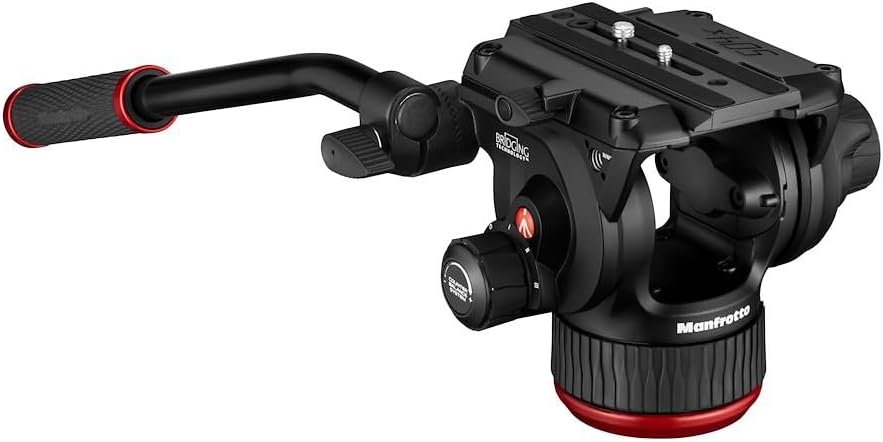
Image: The Manfrotto MVH504XAH 504X Fluid Video Head, showcasing its main components including the pan bar, quick release plate, and control knobs.
Product Overview
The Manfrotto MVH504XAH features a flat base design, a 4-stage counter balance system, and a stepless variable fluid drag system for smooth pan and tilt movements. It includes a sliding quick release plate with a side lock mechanism for secure camera attachment and an illuminated bubble level for precise leveling.
- Fluid Drag System: Provides smooth, controlled pan and tilt movements.
- Counter Balance System: 4-stage adjustment to support various camera weights.
- Sliding Quick Release Plate: Allows for quick and secure camera mounting and balancing.
- Illuminated Bubble Level: Assists in achieving a perfectly level setup, even in low light.
- Easy Link Connector: For attaching external accessories.
Setup
1. Attaching the Video Head to a Support
- Ensure your tripod or slider has a flat base mounting option.
- Align the base of the MVH504XAH with the mounting screw on your support.
- Securely tighten the head onto the support. Ensure it is firmly attached to prevent movement during operation.
2. Mounting the Camera (Sliding Quick Release Plate)
- Press the side lock mechanism to release the quick release plate.
- Attach the quick release plate (model 504PLONGR-1) to the bottom of your camera. Ensure the screws are tight.
- Slide the camera with the attached plate into the head's receiver until it clicks securely into place. The side lock mechanism should engage automatically.
- For additional security, ensure the plate is fully seated and the lock is engaged.

Image: The 504PLONGR-1 Sliding Quick Release Plate, which attaches to the camera base.

Image: The Manfrotto MVH504XAH head with the quick release plate mechanism open, ready to accept a camera.
3. Balancing the Camera (Counter Balance System)
The 4-stage counter balance system helps balance the camera's weight, preventing accidental tilting and ensuring smooth movements. Adjust the counter balance knob to match your camera's weight and center of gravity.
- With the camera mounted, unlock the tilt brake.
- Adjust the counter balance knob (located on the side of the head) to one of the four settings (2.2, 4.4, 6.5 kg) until the camera remains stable at any tilt angle without assistance.
- Fine-tune the camera's position on the sliding plate to achieve perfect balance.

Image: Side view of the Manfrotto MVH504XAH, highlighting the Counter Balance System knob for weight adjustment.
4. Leveling the Head
Use the illuminated bubble level to ensure your shots are perfectly horizontal.
- Locate the bubble level on the side of the head.
- Press the 'LIGHT ON-OFF' button to illuminate the bubble level in dark environments.
- Adjust your tripod legs or the head's leveling base until the bubble is centered within the circle.

Image: A detailed view of the Manfrotto MVH504XAH controls, showing the 'FLUIDITY' adjustment, 'LIGHT ON-OFF' button for the bubble level, and the 'PAN LOCK' knob.
5. Attaching the Pan Bar
The pan bar can be attached to either the left or right side of the head for comfortable operation.
- Insert the pan bar into the designated socket on either side of the head.
- Tighten the pan bar locking knob until it is secure.
Operating the Video Head
1. Fluid Drag System
The MVH504XAH features a stepless variable fluid drag system for both pan and tilt axes, allowing for precise control over movement resistance.
- Pan Drag: Rotate the pan drag knob (often labeled 'FLUIDITY' or similar, near the pan lock) to increase or decrease resistance for horizontal movements.
- Tilt Drag: Rotate the tilt drag knob (located on the opposite side of the head from the pan bar attachment) to adjust resistance for vertical movements.
- Adjust the drag to achieve the desired smoothness for your specific shot requirements.
2. Brake System
Independent brake systems for pan and tilt allow you to lock the head in position.
- Pan Lock: Rotate the 'PAN LOCK' knob clockwise to lock the head's horizontal movement. Rotate counter-clockwise to unlock.
- Tilt Lock: Rotate the tilt lock knob (usually a larger knob on the side) clockwise to lock the head's vertical movement. Rotate counter-clockwise to unlock.
- Always ensure brakes are engaged when not actively panning or tilting, especially with heavy camera setups.
3. Easy Link Connector
The new Easy Link connector with anti-rotation mechanism allows for secure attachment of external accessories like monitors or lights.
- Unscrew the protective cap from the Easy Link port.
- Attach your accessory arm or other compatible accessory. The anti-rotation mechanism prevents unwanted twisting.
- Tighten the accessory securely.

Image: A close-up view of the Easy Link Connector on the Manfrotto MVH504XAH, designed for attaching accessories.
Maintenance
Proper maintenance ensures the longevity and optimal performance of your fluid video head.
- Cleaning: Use a soft, dry cloth to wipe down the head after each use. For stubborn dirt, a slightly damp cloth can be used, followed by immediate drying. Avoid harsh chemicals or abrasive materials.
- Storage: Store the head in a clean, dry environment, away from extreme temperatures and humidity.
- Inspection: Periodically check all screws and knobs for tightness. Do not overtighten.
- Lubrication: The fluid system is sealed and does not require user lubrication. Do not attempt to open or lubricate internal components.
Troubleshooting
- Head feels unstable or wobbly:
- Ensure the head is securely mounted to the tripod/slider.
- Verify the quick release plate is fully engaged and locked with the camera.
- Check that the red part of the head is firmly secured. Some users have noted a specific tightening point beneath the ball joint, accessible with a flat-head screwdriver, which ensures stability and smooth panning.
- Pan or tilt movements are not smooth (lack fluidity):
- Adjust the fluid drag knobs for both pan and tilt. Ensure they are not set to minimum resistance if you desire more control.
- Confirm that the pan and tilt brakes are fully disengaged.
- Ensure the camera is properly balanced using the counter balance system. An unbalanced camera can affect perceived fluidity.
- Bubble level light not working:
- Check if the 12V battery (if applicable) needs replacement.
- Ensure the 'LIGHT ON-OFF' button is pressed correctly.
Specifications
| Feature | Detail |
|---|---|
| Item Weight | 2 Kilograms (4.4 pounds) |
| Item Model Number | MVH504XAH |
| Batteries Required | 1 x 12V battery (for bubble level light) |
| Brand | Manfrotto |
| Compatible Devices | Camera |
| Counter Balance System | 4-stage (2.2, 4.4, 6.5 kg) |
| Maximum Load Capacity | 12 kg (26.5 lbs) |
| Height | 14.9 cm (5.9 inches) |
| Pan Range | 360° |
| Tilt Angle | -70° to +60° |
| Included Plate | 504PLONGR-1 |
| Country of Origin | Italy |
Warranty and Support
Manfrotto products are manufactured to high-quality standards and come with a limited warranty. For specific warranty details, registration, and technical support, please visit the official Manfrotto website or contact their customer service department. Keep your proof of purchase for warranty claims.
For further assistance or to find authorized service centers, please refer to the contact information provided on the Manfrotto Store on Amazon or the official Manfrotto global website.