
ATC H-AF020A
ATC Air Fryer Digital 5.5 Liter H-AF020A Instruction Manual
Model: H-AF020A
Important Safeguards
When using electrical appliances, basic safety precautions should always be followed to reduce the risk of fire, electric shock, and injury to persons. Read all instructions carefully before operating the appliance.
- Do not touch hot surfaces. Use handles or knobs.
- To protect against electric shock, do not immerse cord, plugs, or the appliance in water or other liquid.
- Close supervision is necessary when any appliance is used by or near children.
- Unplug from outlet when not in use and before cleaning. Allow to cool before putting on or taking off parts.
- Do not operate any appliance with a damaged cord or plug, or after the appliance malfunctions or has been damaged in any manner.
- The use of accessory attachments not recommended by the appliance manufacturer may cause injuries.
- Do not use outdoors.
- Do not let cord hang over edge of table or counter, or touch hot surfaces.
- Do not place on or near a hot gas or electric burner, or in a heated oven.
- Extreme caution must be used when moving an appliance containing hot oil or other hot liquids.
- Always attach plug to appliance first, then plug cord into the wall outlet. To disconnect, turn any control to "off", then remove plug from wall outlet.
- Do not use appliance for other than intended use.
Product Overview
The ATC Digital Air Fryer H-AF020A is designed for healthy cooking with rapid air circulation technology. Familiarize yourself with its components for optimal use.
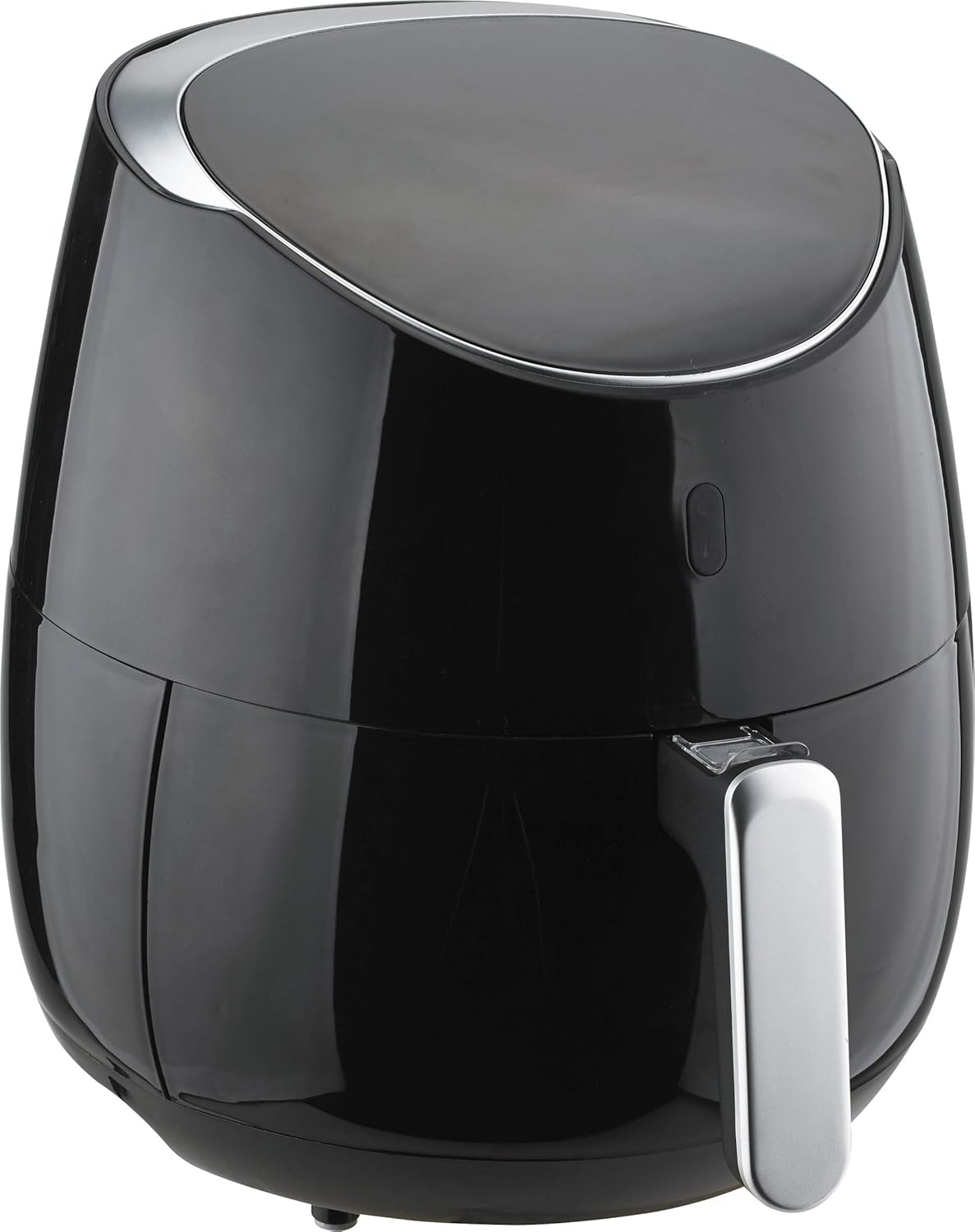
Figure 1: Front-side view of the ATC Digital Air Fryer H-AF020A. This image shows the sleek black exterior with silver accents and the handle for the frying basket.
Components:
- Main Unit: Houses the heating element and fan.
- Control Panel: Digital LED display with touch controls for temperature and timer.
- Frying Basket: Non-stick, removable basket for holding food.
- Frying Pan/Drawer: Holds the frying basket and collects excess oil.
- Handle: Ergonomic handle for safely pulling out the frying pan.
- Air Inlet/Outlet: For proper air circulation during operation.
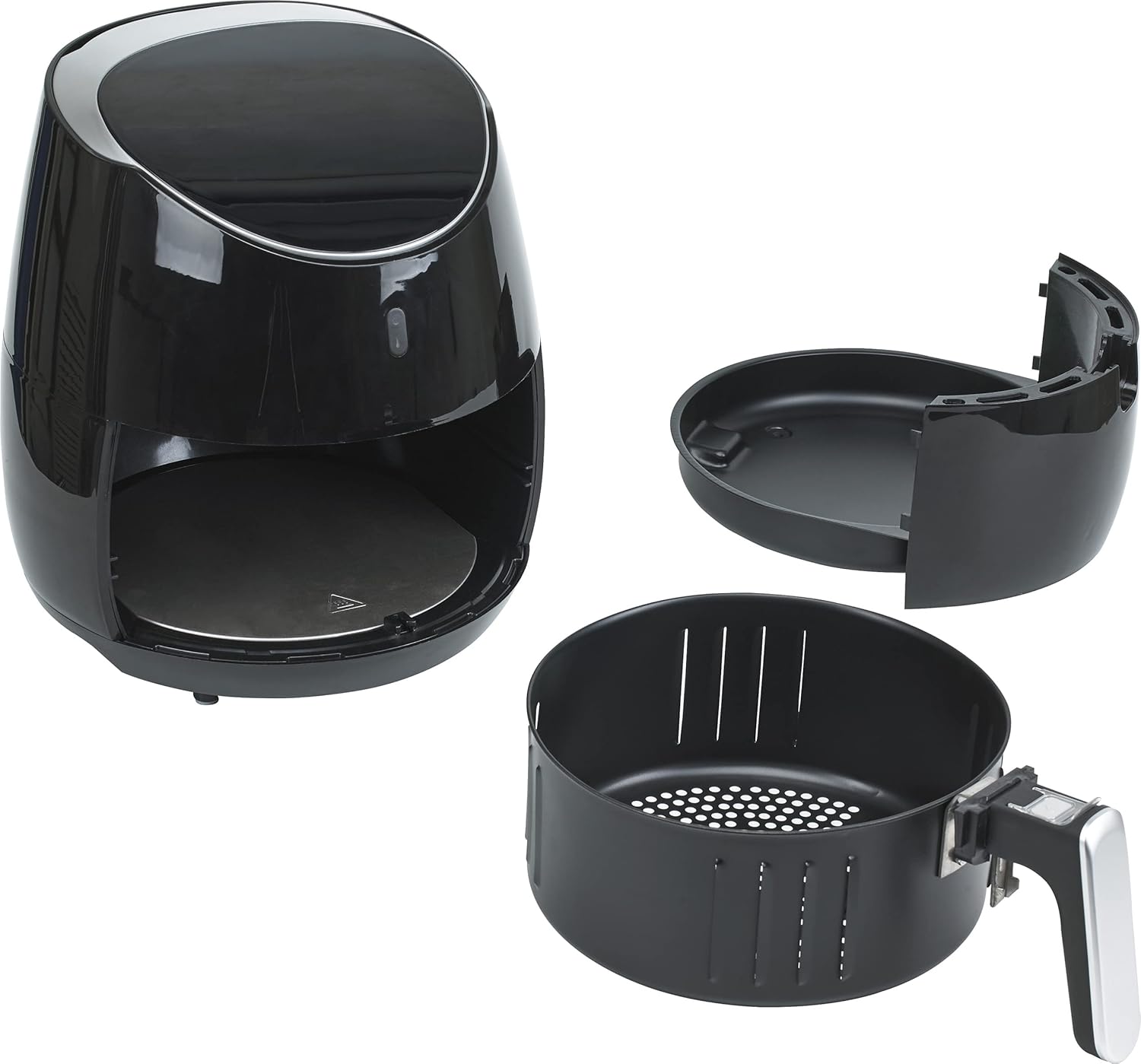
Figure 2: Disassembled view of the ATC Digital Air Fryer, showing the main unit, the frying pan, and the removable frying basket with its handle. This illustrates how the components separate for cleaning and loading.
Setup and First Use
- Unpacking: Carefully remove all packaging materials from the air fryer. Ensure all components are present and undamaged.
- Cleaning: Before first use, clean the frying basket and pan with hot water, dish soap, and a non-abrasive sponge. Wipe the inside and outside of the main unit with a damp cloth. Ensure all parts are completely dry before assembly.
- Placement: Place the air fryer on a stable, heat-resistant surface, away from walls or other appliances to allow for proper air circulation. Ensure there is at least 10 cm of free space on the back and sides, and 10 cm above the appliance.
- Power Connection: Plug the power cord into a grounded wall outlet.
- Pre-heating (Optional): For the first use, it is recommended to run the air fryer empty for about 10 minutes at 180°C (350°F) to eliminate any manufacturing odors. A slight smell or smoke may occur, which is normal.
Operating Instructions
Control Panel:
The ATC Digital Air Fryer features an intuitive LED touch screen for easy operation.

Figure 3: Close-up view of the digital LED touch screen control panel. It displays temperature (e.g., 200) and features touch icons for adjusting settings.
- Power Button: Turns the appliance on/off.
- Temperature Control: Use the + and - icons to adjust the temperature between 80°C and 200°C.
- Timer Control: Use the + and - icons to set the cooking time from 0 to 30 minutes.
- Pre-set Programs: (If applicable, not explicitly mentioned but common for digital fryers) Some models may have pre-set cooking programs for common foods. Refer to the specific icons on your display.
Basic Operation:
- Prepare Food: Place the food you wish to air fry into the frying basket. Do not overfill the basket to ensure even cooking.
- Insert Basket: Slide the frying pan with the basket back into the main unit until it clicks into place.
- Power On: Press the power button to turn on the air fryer.
- Set Temperature and Time: Use the temperature and timer controls to set your desired cooking parameters.
- Start Cooking: The air fryer will automatically start heating once the settings are confirmed.
- Shake Basket (Optional): For some foods, it is recommended to shake the basket halfway through the cooking time to ensure even browning. Carefully pull out the frying pan, shake the basket, and then slide it back in. The appliance will resume cooking.
- Cooking End: The air fryer will emit a signal when the cooking time is complete. Carefully pull out the frying pan and remove the food.
- Power Off: Press the power button to turn off the appliance and unplug it from the wall outlet.

Figure 4: The air fryer with its frying pan and basket pulled out, demonstrating how to access the cooking area for loading food or shaking the contents.
Maintenance and Cleaning
Regular cleaning ensures optimal performance and extends the lifespan of your air fryer.
- Unplug and Cool: Always unplug the air fryer and allow it to cool completely before cleaning.
- Clean Frying Basket and Pan:
- Remove the frying basket from the pan.
- Wash both parts with hot water, dish soap, and a non-abrasive sponge. For stubborn residue, soak them in hot water for about 10 minutes.
- The frying basket and pan are generally dishwasher safe, but hand washing is recommended to preserve the non-stick coating.
- Rinse thoroughly and dry completely before reassembling.
- Clean Interior: Wipe the inside of the appliance with a damp cloth. If necessary, use a mild detergent. Avoid abrasive cleaners or metal scouring pads.
- Clean Exterior: Wipe the exterior of the air fryer with a damp cloth.
- Storage: Ensure all parts are clean and dry before storing the air fryer in a cool, dry place.
Troubleshooting
Refer to this section for common issues and their solutions.
| Problem | Possible Cause | Solution |
|---|---|---|
| Air fryer does not turn on. | Appliance is not plugged in. Power outlet is not working. | Ensure the power cord is securely plugged into a working outlet. Check the circuit breaker. |
| Food is not cooked evenly. | Basket is overfilled. Food pieces are too large. | Do not overfill the basket. Shake the basket halfway through cooking. Cut food into smaller, more uniform pieces. |
| White smoke comes from the appliance. | Fat residue from previous use. Excess oil from fatty foods. | Clean the frying pan and basket thoroughly after each use. Remove excess oil from food before air frying. |
| Air fryer smells during first use. | New appliance odor. | This is normal. Run the air fryer empty for 10 minutes at 180°C (350°F) before first use. Ensure good ventilation. |
Specifications
Technical details for the ATC Digital Air Fryer H-AF020A.
| Feature | Detail |
|---|---|
| Brand | ATC |
| Model Number | H-AF020A |
| Capacity | 5.5 Liters |
| Power / Wattage | 2000 Watts |
| Voltage | 220-240V, 50/60HZ |
| Temperature Control | 80-200°C |
| Timer | 0-30 minutes |
| Material | Plastic (housing), Teflon coated metal (pan) |
| Special Features | Digital control, Rapid air circulation, LED display with touch screen, Cool touch housing, Cooking end signal, Double protection circuits, Overheat protection |
| Dimensions (Product) | 35.8D x 37W x 35.2H centimeters (approx.) |
| Item Weight | 6.11 Kilograms |
Warranty and Support
This ATC Air Fryer is covered by a manufacturer's warranty. Please refer to the warranty card included in your product packaging for specific terms and conditions, including the warranty period and coverage details.
For technical support, service, or warranty claims, please contact ATC customer service through their official channels. Keep your purchase receipt as proof of purchase for warranty validation.
Note: The product was first available on 15 January 2020. Warranty periods typically start from the date of purchase.
Related documentsH-AF020A

Ask a question about this manual
Ask about setup, troubleshooting, compatibility, parts, safety, or missing instructions. Manuals+ will review the question and use this page’s manual context to help answer it.