
Joyroom JR-T07
Contents
Joyroom JR-T07 TWS Metal Touch Control Bluetooth Earphones User Manual
Introduction
Thank you for choosing the Joyroom JR-T07 TWS Metal Touch Control Bluetooth Earphones. This manual provides essential information for the proper setup, operation, and maintenance of your device. Please read it carefully before use to ensure optimal performance and longevity of your earphones.
Package Contents
Ensure all items are present in your package:
- Joyroom JR-T07 TWS Earphones (Left and Right)
- Charging Case
- USB Charging Cable
- Ear Cushions (various sizes)
- User Manual
Product Overview
The Joyroom JR-T07 earphones feature a sleek metal design and touch controls for intuitive operation. The included charging case not only protects your earphones but also provides extended battery life and can function as an emergency power supply for other devices.

Image: Joyroom JR-T07 TWS Earphones securely placed within their red charging case.

Image: The earphones are shown inside the charging case, illustrating the magnetic charging connection.

Image: A close-up of an earphone highlighting its aluminum alloy shell and long standby capability.
Setup
1. Charging the Earphones and Charging Case
Before first use, fully charge both the earphones and the charging case.
- Place the earphones into the charging case. Ensure they are correctly seated to initiate charging.
- Connect the charging case to a 5V power source using the provided USB cable.
- The charging time for the earphones is approximately 0.5 hours. The charging bin requires approximately 1.5 hours for a full charge.
- The charging case has a capacity of 2500mAh and can also serve as an emergency power supply for other devices.

Image: The charging case connected via a cable to a smartphone, demonstrating its emergency power supply function.
2. Pairing with a Bluetooth Device
Follow these steps to pair your earphones with a smartphone or other Bluetooth-enabled device:
- Ensure the earphones are fully charged.
- Open the charging case. The earphones will automatically power on and enter pairing mode.
- On your device, enable Bluetooth and search for available devices.
- Select "JR-T07" from the list of found devices.
- Once connected, a voice prompt will confirm successful pairing.
- The earphones will automatically reconnect to the last paired device when removed from the case, if Bluetooth is enabled on the device.
Operating Instructions
The JR-T07 earphones feature intuitive touch controls for various functions.
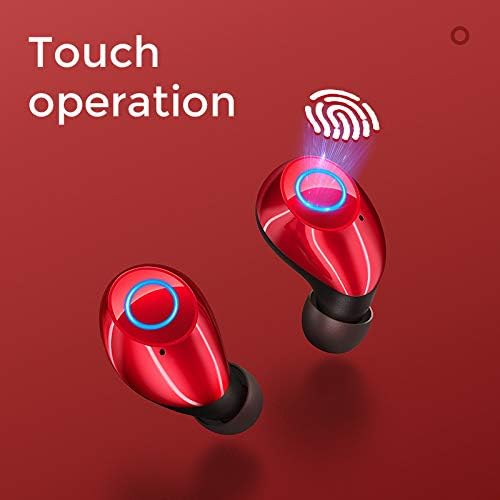
Image: An illustration of the touch-sensitive area on the earphones for control.
Power On/Off
- Power On: Remove earphones from the charging case. They will power on automatically.
- Power Off: Place earphones back into the charging case. They will power off automatically and begin charging.
Music Playback
- Play/Pause: Single tap on either earphone.
- Next Track: Double tap the right earphone.
- Previous Track: Double tap the left earphone.
Call Management
- Answer/End Call: Single tap on either earphone.
- Reject Call: Press and hold either earphone for 2 seconds.
Voice Assistant
- Activate Voice Assistant: Triple tap on either earphone (functionality depends on your connected device).
Maintenance
Proper care ensures the longevity and performance of your earphones.
- Cleaning: Use a soft, dry, lint-free cloth to clean the earphones and charging case. Do not use harsh chemicals or abrasive materials.
- Ear Cushions: Regularly remove and clean the ear cushions with a damp cloth. Ensure they are completely dry before reattaching.
- Storage: When not in use, store the earphones in their charging case to protect them from dust and damage.
- Avoid Water: The earphones are not waterproof. Avoid exposure to water or excessive moisture.
Troubleshooting
If you encounter issues, refer to the following common solutions:
- Earphones not pairing:
- Ensure both earphones are fully charged.
- Turn off Bluetooth on your device and turn it back on.
- Forget the "JR-T07" device in your device's Bluetooth settings and attempt to pair again.
- Ensure no other Bluetooth devices are interfering.
- No sound from one or both earphones:
- Check the volume level on both your earphones and the connected device.
- Ensure earphones are properly paired.
- Try resetting the earphones by placing them in the case, closing it, and then reopening.
- Charging case not charging earphones:
- Ensure the charging case itself is charged.
- Verify the earphones are correctly seated in the charging slots.
- Clean the charging contacts on both the earphones and the case with a dry cotton swab.
- Charging case not charging:
- Ensure the USB charging cable is securely connected to both the case and the power source.
- Try using a different USB cable or power adapter.
If issues persist, please contact Joyroom customer support or your retailer for further assistance.
Specifications
| Bluetooth Version | Bluetooth V5.0 |
| Material | Aluminum and ABS |
| Headphone Capacity | 50mAh x 2 |
| Charging Bin Capacity | 2500mAh |
| Play Time | 3-4 hours |
| Charging Voltage | 5V |
| Headset Charging Time | 0.5 hours |
| Charging Bin Charging Time | 1.5 hours |
| Standby Time | 30 hours (earphones), 100 hours (with case) |
| Frequency Response | 20HZ-20KHZ |
| Signal to Noise Ratio | 106DB±2DB |
| Connectivity Technology | Wireless |
| Headphones Ear Placement | In Ear |
Warranty and Support
For warranty information and customer support, please refer to the documentation provided at the time of purchase or contact your retailer. Joyroom offers support for its products, and details can typically be found on their official website or through authorized service centers.
Documents and downloads
Ask a question about this manual
Ask about setup, troubleshooting, compatibility, parts, safety, or missing instructions. Manuals+ will review the question and use this page’s manual context to help answer it.