
1. Product Overview
The atolla 60M Laser Rangefinder (Model T201) is a high-precision measuring device designed for both indoor and outdoor construction work. It offers various measurement modes, ensuring accuracy and ease of use for professionals and DIY enthusiasts.

Image: atolla 60M Laser Rangefinder with features such as high precision, AAA battery, dustproof, multiple modes, waterproof, 4-line display, 20 data records, and mute button.
Key Features:
- Multiple Measurement Modes: Includes single measurement, continuous measurement (with min/max function), area, volume, and indirect measurement (Pythagorean function with 2 or 3 points). Measurement range from 0.15m to 60m.
- High Precision: Achieves a measurement accuracy of +/- 2mm with advanced laser technology.
- Clear LCD Display: Four-line backlit LCD for easy reading, even in dark environments.
- Integrated Bubble Levels: Two bubble levels for vertical and horizontal laser alignment.
- Extensive Functions: Unit adjustment (meter/inch/foot), 20 data record storage, addition, subtraction, auto-calibration, and mute function.
- Durable Design: High-quality PC and ABS plastic casing provides IP54 dust and splash protection.
- Energy Saving: Automatic shutdown after 3 minutes of inactivity.
- Compact and Portable: Easy to carry in a bag or jacket pocket, includes a hand strap for secure handling.
2. Setup
2.1 Battery Installation
The atolla T201 Laser Rangefinder requires 2 AAA batteries (included). To install or replace batteries:
- Locate the battery compartment cover on the back of the device.
- Slide the cover open.
- Insert two AAA batteries, ensuring correct polarity (+/-).
- Close the battery compartment cover securely.
2.2 Attaching the Hand Strap
For secure handling and to prevent accidental drops, attach the included hand strap:
- Thread the thin loop of the hand strap through the designated slot on the side of the device.
- Pass the larger end of the strap through the loop you just created and pull tight to secure it.
Video: Demonstrates the features and usage of a digital laser meter, including USB charging and multiple measurement modes. (Duration: 0:41)
3. Operating Instructions
3.1 Device Layout and Buttons
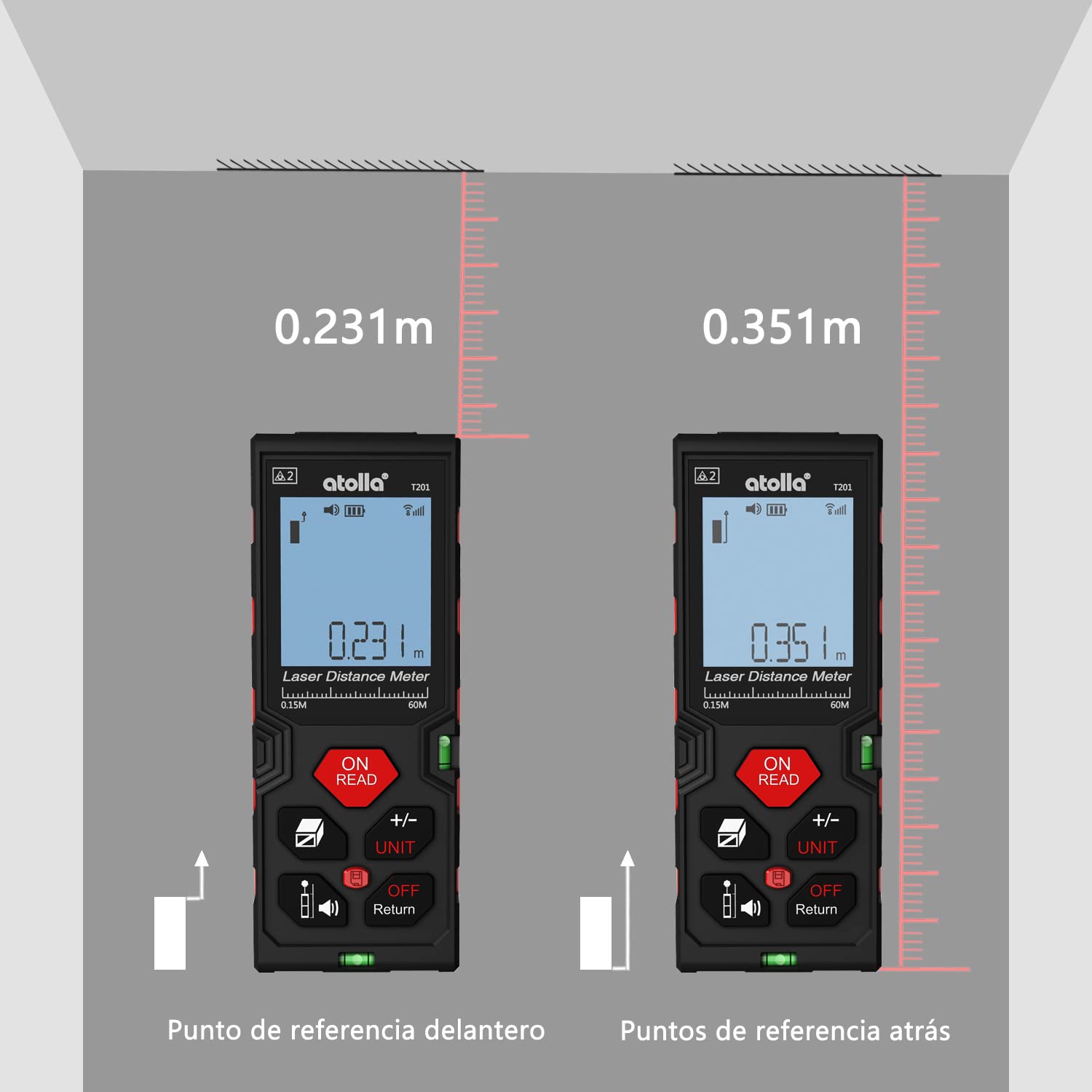
Image: Detailed diagram showing the function of each button on the atolla laser rangefinder, including Power/Read, Area/Volume/Indirect Measurement, Reference/Mute, Add/Subtract/Unit, History, and Off/Return.
- ON/READ Button: Powers on the device and initiates a measurement.
- +/- UNIT Button: Switches between measurement units (meters, inches, feet) and performs addition/subtraction.
- Area/Volume/Indirect Measurement Button: Cycles through area, volume, and Pythagorean measurement modes.
- Reference/Mute Button: Changes the measurement reference point (front or rear edge) and toggles the sound.
- History Button: Accesses stored measurement records.
- OFF/Return Button: Powers off the device or returns to the previous screen/mode.
3.2 Basic Measurement (Single Distance)
- Press the ON/READ button to power on the device.
- Point the laser at the target surface.
- Press the ON/READ button again to take a single measurement. The result will be displayed on the screen.
3.3 Continuous Measurement (Min/Max)
This mode is useful for finding the shortest or longest distance to a moving target or for scanning a room.
- Press the ON/READ button to power on.
- Press the ON/READ button and hold it for a few seconds until "MIN/MAX" appears on the display.
- Move the device slowly across the desired area. The display will continuously update with the current, minimum, and maximum measurements.
- Press the ON/READ button again to stop continuous measurement.
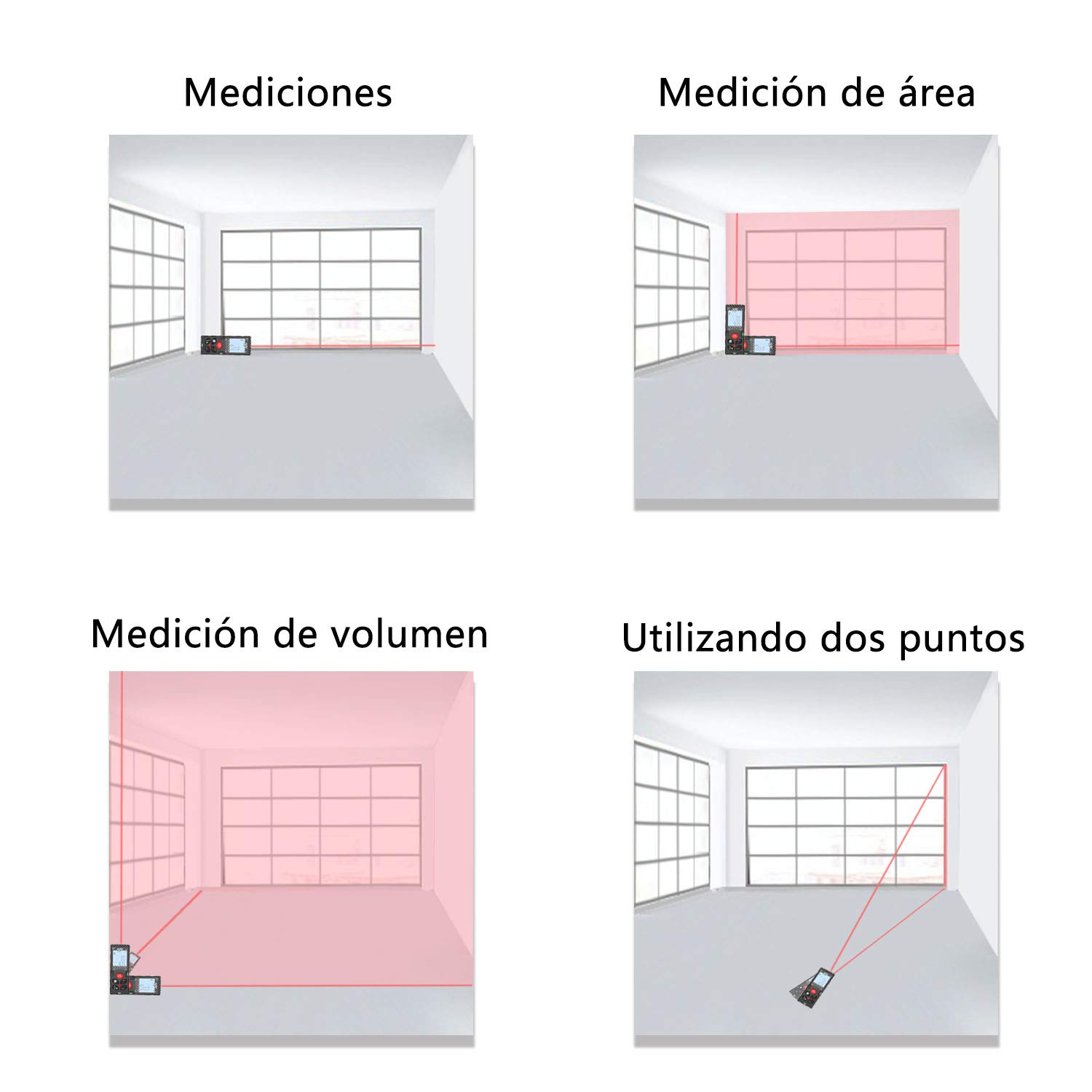
Image: The laser rangefinder displaying continuous measurement results, showing current, minimum, and maximum values.
3.4 Area and Volume Measurement
To measure area or volume:
- Press the Area/Volume/Indirect Measurement button once for area measurement (square icon) or twice for volume measurement (cube icon).
- Follow the on-screen prompts to measure the required dimensions (length, width, height). The device will automatically calculate and display the area or volume.
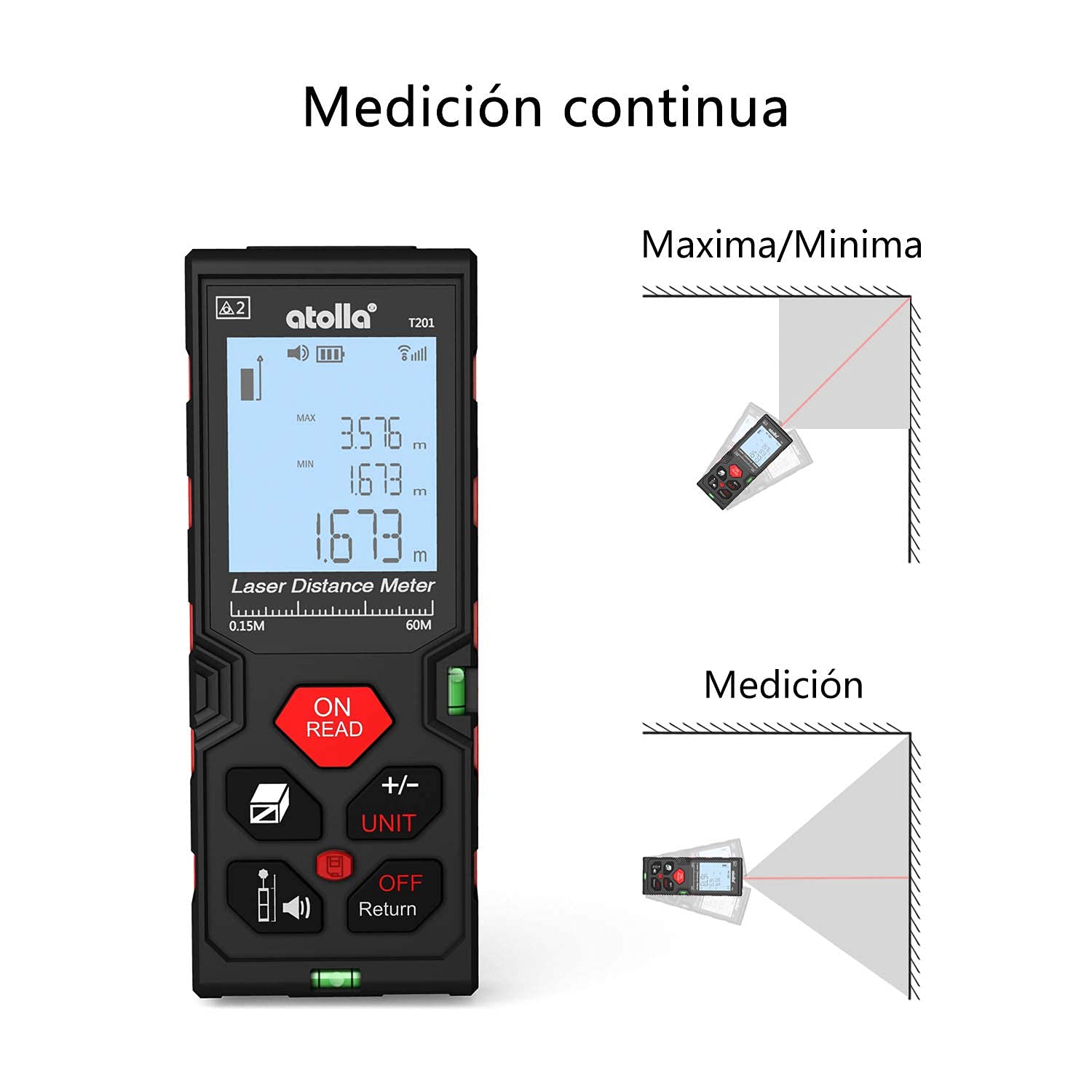
Image: The device screen illustrating how to change measurement units between meters, inches, and feet.
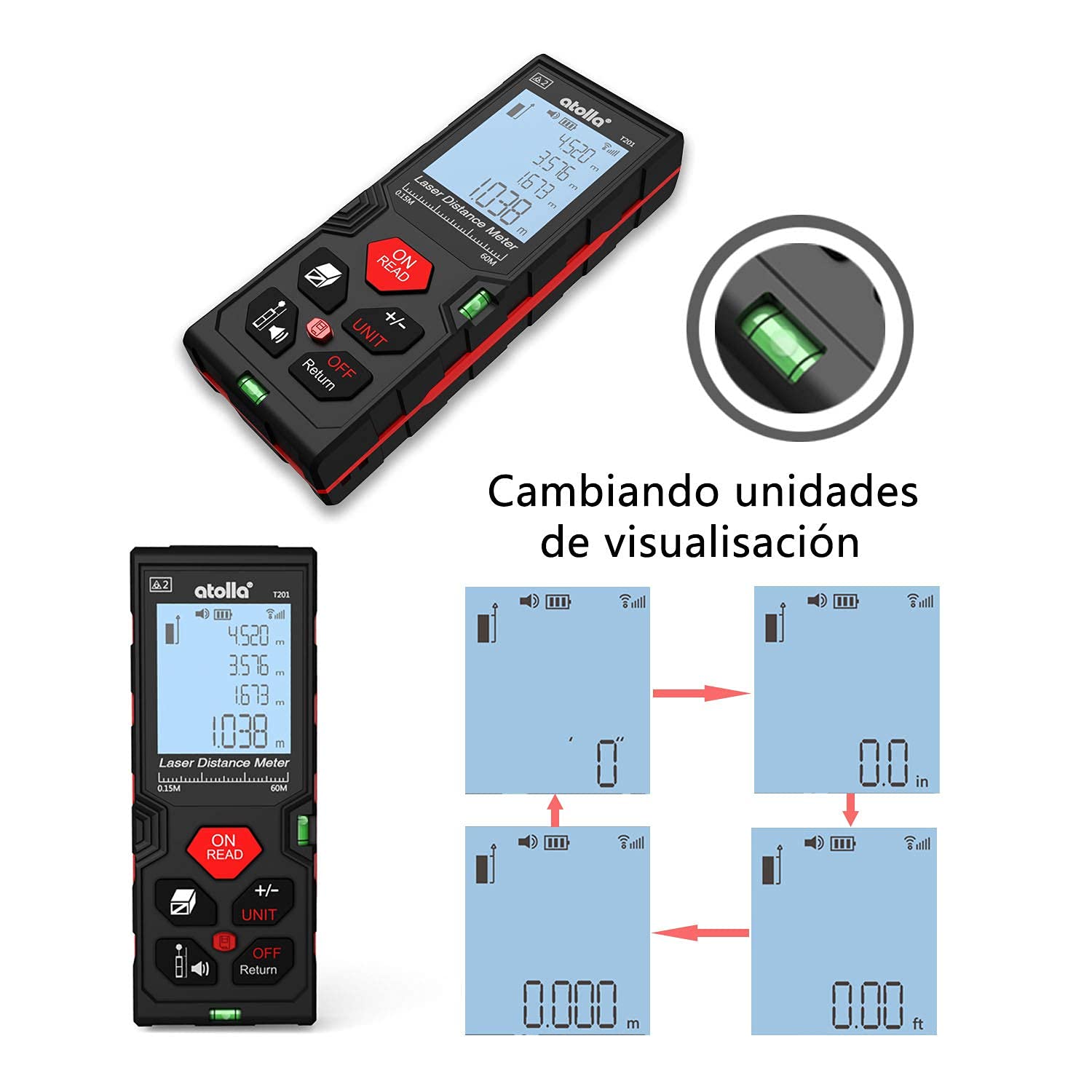
Image: Comparison of measurements taken from the front reference point and the rear reference point of the device.
Video: Demonstrates various measurement functions of the laser distance meter, including area and volume calculations. (Duration: 0:47)
3.5 Pythagorean Indirect Measurement
This mode allows for indirect height or distance measurements using the Pythagorean theorem.
- Press the Area/Volume/Indirect Measurement button until the desired Pythagorean mode icon appears (e.g., triangle with two or three points).
- Follow the on-screen instructions to take the necessary measurements (e.g., hypotenuse, base). The device will calculate the unknown dimension.

Image: Visual examples of single distance measurement, area measurement, volume measurement, and indirect measurement using two points.
3.6 Unit Conversion
To change the measurement unit (meter, inch, foot):
- While the device is on, press the +/- UNIT button repeatedly to cycle through the available units.
- The selected unit will be displayed on the screen.
3.7 Data Storage and Recall
The device can store up to 20 measurement records.
- After a measurement, the result is automatically stored.
- Press the History button to view stored records.
- Use the arrow buttons (if available, or +/- UNIT) to navigate through the records.

Image: A hand holding the laser rangefinder, demonstrating the data storage feature on the display.
3.8 Mute Function
To mute the device's sound:
- Press the Reference/Mute button to toggle the sound on or off.
- A mute icon will appear on the screen when the sound is off.

Image: The laser rangefinder being used in a library-like setting, with the mute function active, indicated by a speaker-off icon.
4. Maintenance
4.1 Cleaning
- Wipe the device with a soft, damp cloth. Do not use abrasive cleaners or solvents.
- Keep the laser lens clean to ensure accurate measurements. Use a soft, lint-free cloth specifically designed for optical lenses.
4.2 Storage
- Store the device in a cool, dry place away from direct sunlight and extreme temperatures.
- If storing for an extended period, remove the batteries to prevent leakage.
4.3 IP54 Protection
The atolla T201 is rated IP54, meaning it is dust-protected and protected against splashing water from any direction. While durable, avoid submerging the device in water or exposing it to heavy rain.

Image: The laser rangefinder demonstrating its IP54 rating, showing resistance to dust and water splashes.
5. Troubleshooting
If you encounter issues with your atolla Laser Rangefinder, please refer to the following common problems and solutions:
- Device does not turn on:
- Check if the batteries are correctly inserted with the right polarity.
- Replace with new AAA batteries.
- Inaccurate measurements:
- Ensure the laser lens is clean and free from obstructions.
- Verify the measurement reference point (front or rear) is correctly set for your application.
- Perform auto-calibration if necessary (refer to the device's on-screen menu or specific instructions for auto-calibration).
- Avoid measuring through glass or highly reflective surfaces, which can cause errors.
- Display is dim or unreadable:
- Check battery level and replace if low.
- Ensure the backlight is enabled.
- Device beeps continuously:
- The device might be in continuous measurement mode. Press the ON/READ button to stop.
- If an error code appears, consult the full manual or contact customer support.
For further assistance, please contact atolla customer support.
6. Specifications
| Feature | Detail |
|---|---|
| Model Number | T201 |
| Measurement Range | 0.15m to 60m |
| Accuracy | ±2mm |
| Units of Measurement | Meter, Inch, Foot |
| Measurement Modes | Single, Continuous (Min/Max), Area, Volume, Pythagorean (2-point, 3-point) |
| Data Storage | Up to 20 records |
| Display | 4-line Backlit LCD |
| Power Source | 2 x AAA Alkaline Batteries (included) |
| Automatic Shutdown | After 3 minutes of inactivity |
| Material | PC and ABS Plastic |
| Ingress Protection (IP) Rating | IP54 (Dust-protected, Splash-proof) |
| Product Dimensions | 12.2 x 4.7 x 2.5 cm |
| Product Weight | 111 Grams |
| Color | Black and Red |
7. Warranty and Support
7.1 Return Policy
This product is typically eligible for a 30-day return policy from the date of purchase. Please refer to your retailer's specific return policy for detailed terms and conditions.
7.2 Customer Support
For any questions, technical support, or warranty claims, please contact atolla customer service through the retailer's platform or the official atolla website. Ensure you have your purchase details and product model number (T201) ready when contacting support.

