
Introduction
Thank you for choosing the MOUNTO DH95 LGR Industrial Dehumidifier. This unit is designed for high-efficiency moisture removal in various large spaces, including basements, garages, warehouses, and job sites. It features a robust design, a built-in pump for continuous drainage, and an advanced control panel for precise environmental management. Please read this manual thoroughly before operation to ensure proper use, maintenance, and safety.
Safety Information
Always follow basic safety precautions when using electrical appliances to reduce the risk of fire, electric shock, and injury.
- Ensure the power supply matches the voltage requirements of the dehumidifier (115V, 60Hz).
- Do not operate the unit with a damaged power cord or plug.
- Keep the dehumidifier on a stable, level surface to prevent tipping.
- Maintain adequate clearance around the unit for proper airflow (at least 12 inches from walls or objects).
- Do not insert objects into the air inlet or outlet.
- Unplug the unit before cleaning or performing any maintenance.
- This appliance is not intended for use by persons with reduced physical, sensory, or mental capabilities unless supervised.
Product Overview and Components
The MOUNTO DH95 is engineered for durability and performance, featuring a heavy-duty construction and essential components for effective dehumidification.

Figure 1: MOUNTO DH95 dehumidifier with built-in pump and drain hose.

Figure 2: Key specifications and features of the MOUNTO DH95.
Key Features:
- High Capacity: Removes up to 180 pints of moisture per day.
- Wide Coverage: Effective for areas up to 3000 sq. ft.
- Built-in Pump: Features a 15ft lift head and 25ft drain hose for continuous drainage.
- Durable Construction: Roto-molded housing with a high-efficiency Panasonic compressor and 100% copper coil pipe.
- Advanced Control Panel: Digital display for real-time monitoring of temperature, humidity, and grain depression.
- Automatic Restart: Resumes operation after power interruptions.
- Portability: Equipped with sturdy wheels and a handle for easy transport.
- Washable Filter: Easy to clean and maintain for optimal performance.
Setup
1. Unpacking and Placement:
- Carefully remove the dehumidifier from its packaging.
- Place the unit on a firm, level surface.
- Ensure there is at least 12 inches (30 cm) of clear space around all sides of the unit to allow for proper airflow.
- Avoid placing the unit near heat sources or in direct sunlight.

Figure 3: Moving the MOUNTO DH95 dehumidifier.
2. Power Connection:
- Plug the power cord into a grounded 115V, 60Hz electrical outlet.
- Do not use extension cords or adapter plugs.
3. Drainage Setup:
The MOUNTO DH95 features a built-in pump for automatic and continuous drainage.
- Locate the drain hose connection point on the unit.
- Connect the provided 25ft drain hose to the unit. Ensure a secure connection to prevent leaks.
- Direct the other end of the drain hose to a suitable drainage point, such as a sink, floor drain, or outside. The built-in pump can lift water up to 15 feet vertically.
- Ensure the drain hose is not kinked or obstructed.

Figure 4: Power cord and drain hose storage.
Operating Instructions
The MOUNTO DH95 is equipped with an intuitive digital control panel.
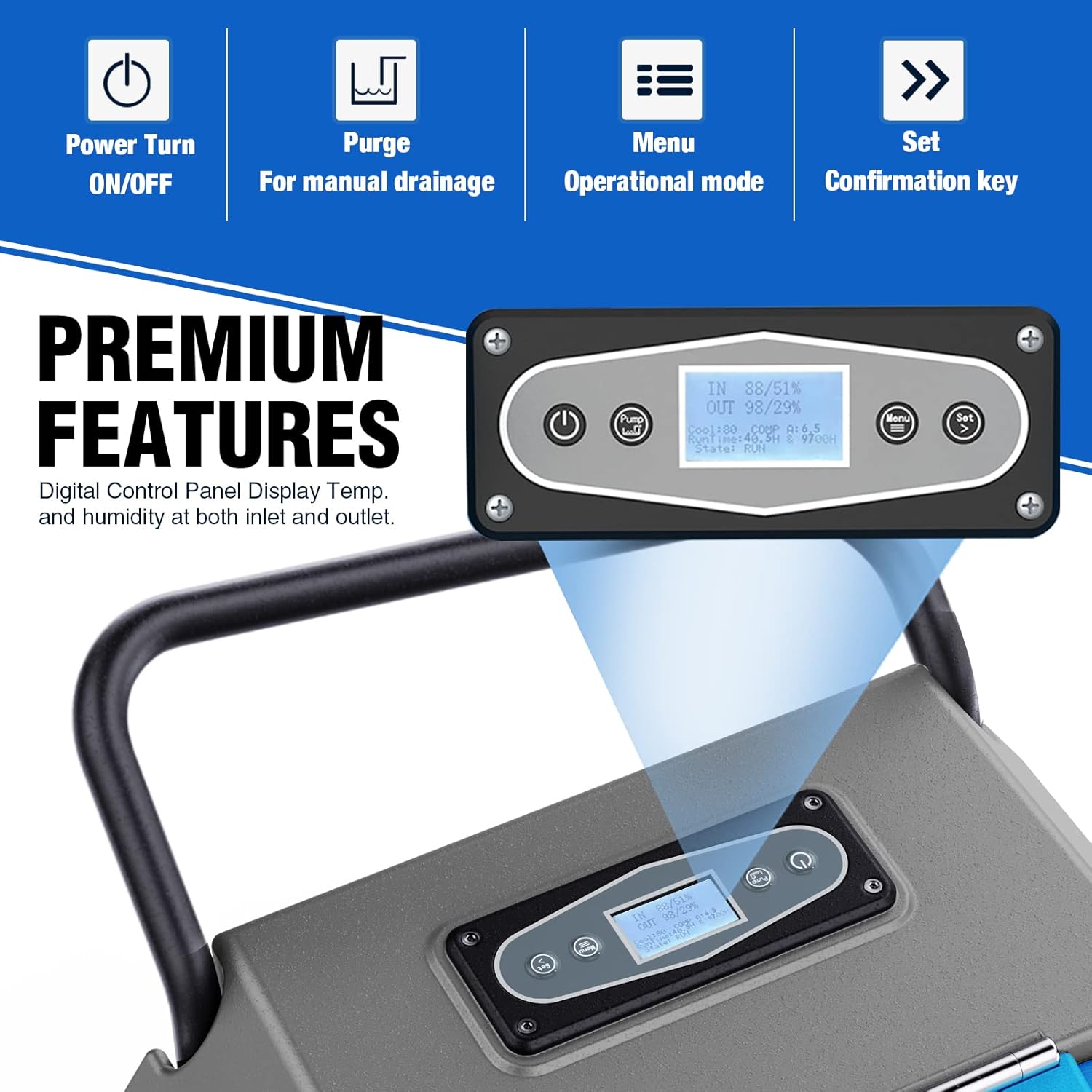
Figure 5: Digital Control Panel.
Control Panel Functions:
- Power (ON/OFF): Press to turn the unit on or off.
- Purge: Initiates manual drainage of the internal pump reservoir.
- Menu: Accesses various operational modes and settings.
- Set (Confirmation Key): Confirms selections and adjusts settings.
Setting Desired Humidity:
- Turn on the unit using the Power button.
- Press the 'Menu' button to navigate to the humidity setting.
- Use the 'Set' button (or arrow keys if available) to adjust the desired humidity level (ranging from 20% to 80% Relative Humidity).
- The unit will operate until the set humidity level is reached, then cycle off. It will restart automatically if the humidity rises above the set point.
Continuous Operation:
For continuous operation, set the desired humidity level to the lowest possible setting (e.g., 20%). The unit will then run continuously, removing moisture as long as the power is on and the drain hose is properly connected.
Automatic Restart:
In the event of a power outage, the unit will automatically restart with the previously selected settings once power is restored.
Maintenance
Regular maintenance ensures optimal performance and extends the lifespan of your dehumidifier.
1. Filter Cleaning:
- The MOUNTO DH95 is equipped with a washable filter.
- It is recommended to clean the filter every 2-4 weeks, or more frequently in dusty environments.
- To clean, turn off and unplug the unit. Remove the filter.
- Wash the filter with warm, soapy water. Rinse thoroughly and allow it to air dry completely before reinstalling.
- Do not operate the unit without the filter or with a wet filter.
2. Exterior Cleaning:
- Wipe the exterior of the unit with a soft, damp cloth.
- Do not use abrasive cleaners or solvents.
3. Storage:
- If storing the unit for an extended period, ensure it is clean and dry.
- Drain any remaining water from the pump reservoir using the 'Purge' function.
- Coil the power cord and drain hose neatly and secure them.
- Store the unit in a cool, dry place, protected from dust and extreme temperatures.

Figure 6: Internal components of the dehumidifier.
Troubleshooting
If you encounter issues with your MOUNTO DH95 dehumidifier, refer to the following common problems and solutions:
| Problem | Possible Cause | Solution |
|---|---|---|
| Unit does not turn on | No power; Power cord loose; Unit is off. | Check power outlet; Ensure power cord is securely plugged in; Press the Power button. |
| Unit is running but not dehumidifying | Humidity setting too high; Filter clogged; Room temperature too low. | Lower the desired humidity setting; Clean the air filter; Ensure room temperature is above 41°F (5°C). |
| Water is not draining | Drain hose kinked or blocked; Pump malfunction. | Check and clear the drain hose; Press the 'Purge' button for manual drainage; Contact customer support if pump issue persists. |
| Unit is noisy | Unit not on a level surface; Obstruction in fan. | Place unit on a level surface; Check for and remove any obstructions. |
If the problem persists after attempting these solutions, please contact MOUNTO customer support.
Specifications
Detailed technical specifications for the MOUNTO DH95 LGR Industrial Dehumidifier:
| Specification | Value |
|---|---|
| Brand | MOUNTO |
| Model Name | DH95 |
| Dehumidification Capacity (AHAM) | 180 Pints/Day (95°F, 90% RH) / 22.5 Gallons/Day |
| Coverage Area | Up to 3000 sq. ft. |
| Air Flow Capacity | 350 CFM |
| Voltage | 120V AC |
| Wattage | 650 Watts |
| Operation Mode | Continuous |
| Humidity Control Range | 20% - 80% RH |
| Built-in Pump Lift Head | 15 ft |
| Drain Hose Length | 25 ft |
| Product Dimensions (D x W x H) | 20" x 22" x 35" |
| Item Weight | 95 lbs |
| Material | Copper Coils, Polyethylene (PE), Stainless Steel |
| Special Features | Adjustable Humidity Control, Automatic Restart, Built-In Pump, Digital Display, Washable Filter |
Warranty Information
MOUNTO products are manufactured to high-quality standards and are backed by a manufacturer's warranty. For specific warranty terms and conditions, please refer to the warranty card included with your product or visit the official MOUNTO website. MOUNTO is committed to providing excellent customer service and support for its products.
Support
For technical assistance, troubleshooting, or any questions regarding your MOUNTO DH95 dehumidifier, please contact our customer support team:
- Website: www.mounto.com (placeholder)
- Email: support@mounto.com (placeholder)
- Phone: 1-800-XXX-XXXX (placeholder)
Please have your model number (DH95) and purchase date available when contacting support.