
1. Product Overview
The LaluceNatz 40-inch 100W 3-in-1 RGB LED Stage Wash Light Bar is designed to provide versatile lighting effects for various events and settings. It features 12 LED stage wash lights with premium 5050 RGB 3-in-1 LEDs, offering colorful lighting effects, strobe, and beam functionalities. The unit supports multiple control modes including Automatic, Sound Activated, Master-Slave, and DMX512.

Figure 1: LaluceNatz 40-inch 100W 3-in-1 RGB LED Stage Wash Light Bar.
2. Package Contents
- 1 x LED Stage Wash Light Bar
- 1 x Power Cable (3.4ft)
- 1 x User Manual
- Mounting Brackets and Screws
3. Safety Information
- Ensure the working voltage is within 110V-240V.
- The aluminum shell provides heat dissipation; ensure adequate ventilation.
- This product is suitable for indoor/outdoor use.
- Always disconnect power before cleaning or maintenance.
- Avoid direct eye exposure to the light source.
4. Setup and Installation
4.1 Mounting
The light bar comes with an aluminum alloy bracket for stable and secure operation. It can be mounted on a bar, wall, or placed on a flat surface. Use the provided tools and screws for secure installation.
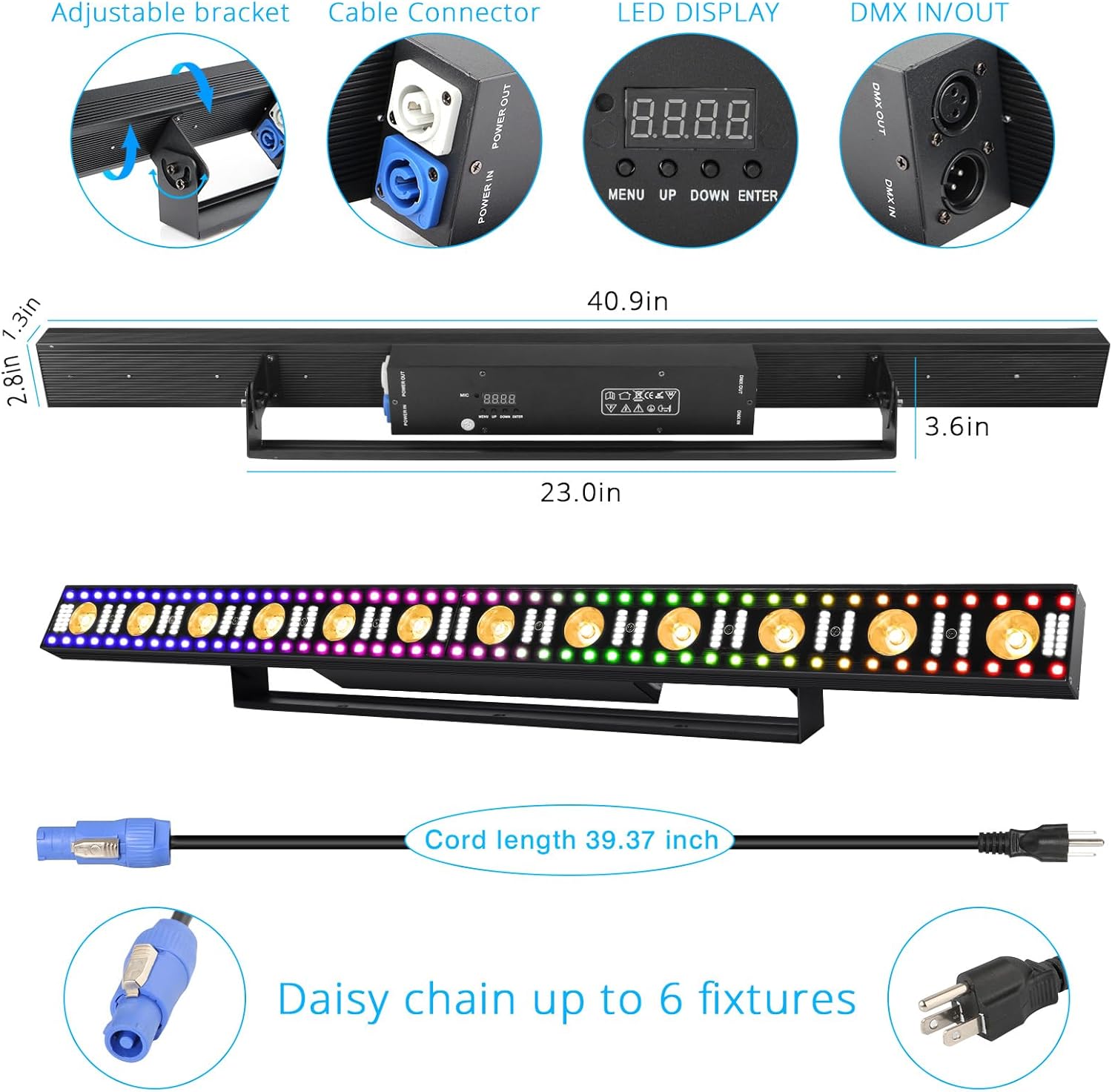
Figure 2: Adjustable bracket and connection ports.
4.2 Power Connection
Connect the provided 3.4ft power cable to the "POWER IN" port on the light bar and then to a standard 110V-240V power outlet. The light bar is designed for plug-and-play operation.
4.3 Daisy Chaining Multiple Units
Multiple light bars can be daisy-chained together for synchronized control. Connect the "POWER OUT" of one unit to the "POWER IN" of the next. Up to 5 units can be linked at 120V, or 10 units at 230V.

Figure 3: Power linking diagram for multiple units.
4.4 DMX Connection
The light bar is compatible with DMX512 signals and features RDM functionality. Use 3-pin XLR cables to connect the DMX OUT of your controller to the DMX IN of the first light bar, and then daisy-chain subsequent units using DMX OUT to DMX IN connections. Ensure your DMX controller is compatible with DMX512 for efficient operation.
5. Operating Modes and Controls
The light bar offers various operating modes and can be controlled via the on-device LED display and buttons, or through a DMX controller.

Figure 4: Overview of available lighting modes and features.
5.1 On-Device Control Panel
The rear of the unit features an LED display and four buttons (MENU, UP, DOWN, ENTER) for navigating and selecting modes and settings. Refer to the user manual for detailed instructions on specific menu options and parameter adjustments.
Video 1: Demonstration of light bar effects and sound activation. This video shows the light bar cycling through various colors and patterns, reacting to sound, and highlighting its brightness.
5.2 Available Modes
- Automatic Mode: Cycles through pre-programmed light shows.
- Sound Activated Mode: Lights react to ambient sound or music.
- Master-Slave Mode: Connect multiple units, and one acts as the master controlling the others.
- DMX512 Control: For professional control over individual light parameters, colors, and effects using an external DMX controller.
- Strobe Effects: Creates flashing light patterns.
- LED Beam Lights: Produces focused light beams.
- Wash Wall Effect: Provides broad color washes across surfaces.

Figure 5: 3-in-1 Multi-Effect Wall Wash Light with RGBW Color Mixing.

Figure 6: Pixel mapping to generate strobe chases.
Video 2: A short demonstration of the light bar's wash effects and color changes.
6. Maintenance
- Keep the device clean and free from dust to ensure optimal performance and heat dissipation.
- Use a soft, dry cloth for cleaning. Do not use abrasive cleaners or solvents.
- Regularly check all connections for secure fit.
7. Troubleshooting
- No Power: Ensure the power cable is securely connected to both the unit and a working power outlet. Verify the outlet has power.
- Lights Not Responding: Check the selected operating mode. If using DMX, ensure the DMX controller is properly configured and connected.
- Inconsistent Lighting: If individual LEDs appear dimmer or misaligned, this may indicate a manufacturing defect. Contact customer support for assistance.
- DMX Issues: Confirm your DMX controller is compatible with DMX512. Check DMX cable connections for proper seating and integrity.
8. Specifications

Figure 7: Detailed product parameters.
| Feature | Detail |
|---|---|
| Brand | LaluceNatz |
| Model Number | LA-Effect Light Bar |
| Product Dimensions | 40.9"L x 2.8"W x 3.6"H (100x12.5x7cm) |
| Item Weight | 6.6 pounds (3 Kilograms) |
| Light Source Type | Light Emitting Diode (LED) |
| Light Source Details | 12pcs 5W warm white lamp beads + 156 LED 0.5W 5730 white lamp beads + 96 LED 0.2W 5050 RGB lamp beads |
| Color | RGB (Red, Green, Blue) |
| Wattage | 100 Watts |
| Brightness | 1440 Lumens |
| Beam Angle | 6-120 Degrees (Warm white: 6°, 5730 white & 5050 RGB: 120°) |
| Voltage | 110V-240V |
| Material | Aluminum Alloy |
| Control Modes | Automatic, Sound Activated, Master-Slave, DMX512 |
| DMX Channels | 5/12/14/75CH |
| Cooling System | Convection (no fan inside) |
| Certificates | CE |
9. Warranty and Support
LaluceNatz products are designed for quality and performance. For any questions, technical support, or assistance with the product, please contact LaluceNatz customer service. Refer to the product packaging or the official LaluceNatz website for the most current warranty information and contact details.