
eKids EK-140Wv0
eKids Wired Kids Headphones EK-140Wv0 Instruction Manual
1. Introduction
Thank you for choosing the eKids Wired Kids Headphones, model EK-140Wv0. This manual provides essential information for the safe and effective use of your headphones. Please read it thoroughly before use and retain it for future reference.
2. Safety Information
2.1 Volume Limiting Feature
These headphones are equipped with a built-in adjustable volume limiter designed to protect hearing. The volume limiting switch allows you to select between High (H), Medium (M), and Low (L) settings to ensure safe listening levels for children. Always supervise children when adjusting volume settings.
2.2 General Safety Guidelines
- Do not expose the headphones to extreme temperatures, moisture, or direct sunlight.
- Avoid dropping or subjecting the headphones to strong impacts.
- Keep the headphones away from water and other liquids.
- Do not attempt to disassemble or modify the headphones. This will void the warranty.
- Ensure the 3.5mm audio jack is securely connected to prevent intermittent sound or damage.
3. Product Overview
3.1 Components
- eKids Wired Kids Headphones (EK-140Wv0)
- Integrated 3.5mm Audio Cable
3.2 Key Features
- Adjustable Headband for a comfortable fit.
- Soft, Pivoting Ear Cushions for enhanced comfort during extended use.
- Built-in Volume Limiting Switch for hearing protection.
- Tangle-Free Cord for ease of use and storage.
- Universal 3.5mm Jack for broad compatibility with audio devices.
3.3 Product Visuals

Figure 1: Front view of the eKids Wired Kids Headphones, showcasing the white over-ear design and the integrated 3.5mm audio cable.
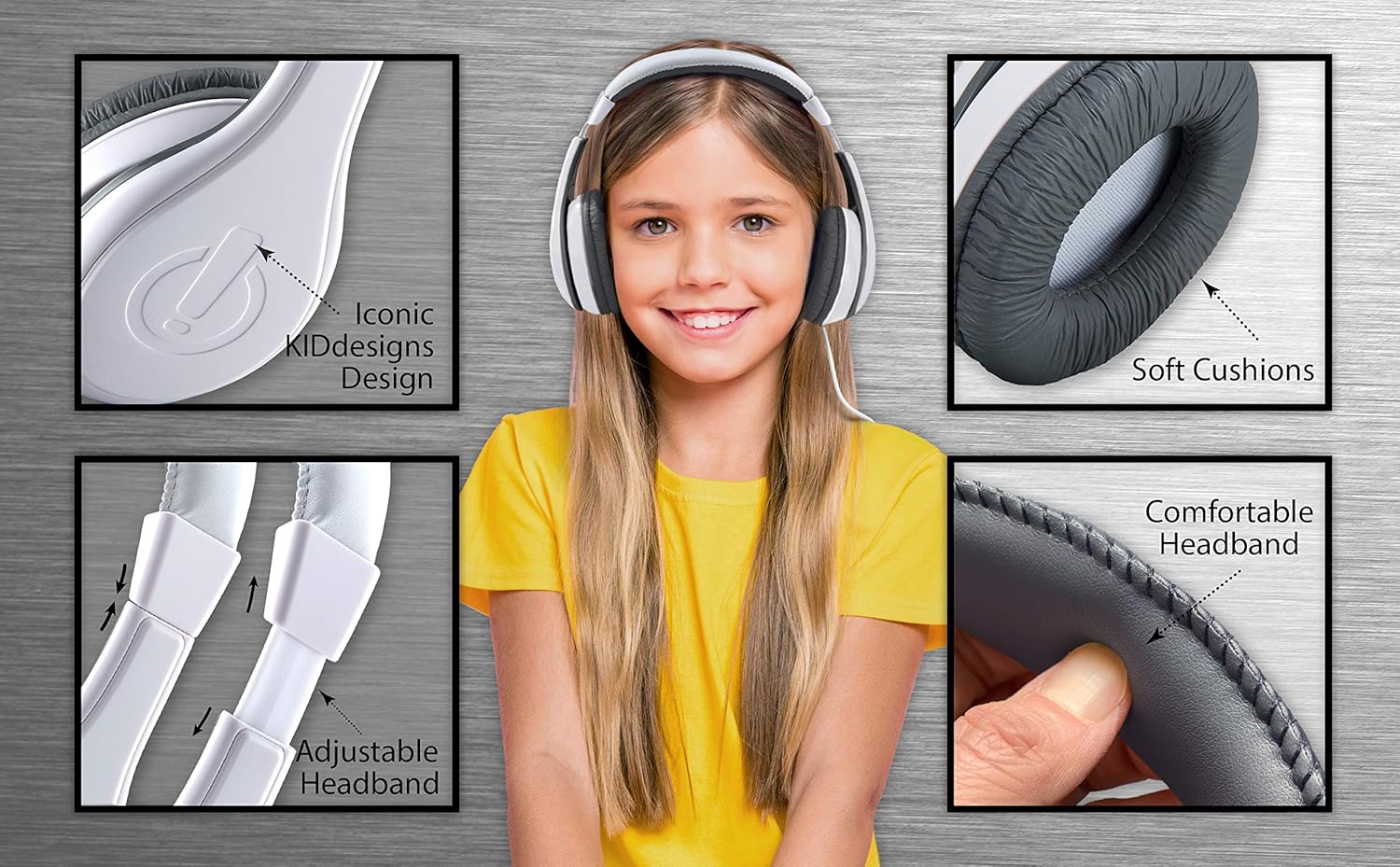
Figure 2: Detailed views highlighting the soft ear cushions, the adjustable headband mechanism, and the KIDdesigns logo on the earcups.

Figure 3: Illustration of the headphones in use with a tablet, demonstrating compatibility with various devices including smartphones, laptops, and desktop computers.

Figure 4: Example of headphones being used during travel, showing a child wearing them while using a smartphone in a car.

Figure 5: Diagram illustrating the physical dimensions of the headphones and the location of the parental volume control switch, with guidance on recommended volume levels for iOS and Android devices.
4. Setup
4.1 Connecting to an Audio Device
- Locate the 3.5mm audio jack on your audio device (e.g., smartphone, tablet, laptop).
- Insert the 3.5mm plug from the headphone cable firmly into the audio jack of your device.
- Ensure the connection is secure to prevent sound interruptions.
5. Operating Instructions
5.1 Adjusting Volume
The eKids headphones feature a parental volume limiting switch located on one of the earcups. This switch has three settings: High (H), Medium (M), and Low (L).
- High (H): Provides the loudest safe listening level.
- Medium (M): Offers a balanced, moderate listening level.
- Low (L): Delivers the quietest recommended listening level, ideal for very young children or quiet environments.
Select the appropriate volume level using the switch. Further volume adjustments can be made directly on your connected audio device.
5.2 Wearing the Headphones
- Gently extend the adjustable headband to fit over the head.
- Position the ear cushions over the ears, ensuring they are comfortable and fully cover the ears. The pivoting ear cushions will adapt to the shape of the head.
- Adjust the headband length as needed for a secure yet comfortable fit.
6. Maintenance
6.1 Cleaning
- Wipe the headphones with a soft, dry cloth.
- Do not use abrasive cleaners, solvents, or harsh chemicals.
- Avoid getting moisture into any openings.
6.2 Storage
- Store the headphones in a cool, dry place when not in use.
- Avoid wrapping the cable too tightly to prevent damage. The tangle-free design helps with neat storage.
7. Troubleshooting
| Problem | Possible Cause | Solution |
|---|---|---|
| No sound or intermittent sound |
|
|
| Sound is too quiet |
|
|
| Headphones are uncomfortable | Incorrect fit. | Adjust the headband length and position the ear cushions for optimal comfort. |
8. Specifications
| Feature | Detail |
|---|---|
| Model Name | eKids Wired Headphones |
| Model Number | EK-140Wv0 |
| Connectivity Technology | Wired |
| Headphones Jack | 3.5 mm Jack |
| Age Range (Description) | Kid |
| Material | Plastic |
| Control Type | Volume Control (Parental Limiter) |
| Cable Feature | Tangle Free |
| Frequency Range | 20 Hz - 20,000 Hz |
| Item Weight | 8.4 ounces (0.24 Kilograms) |
| Product Dimensions | 5 x 2.5 x 6 inches |
| Color | White |
| Ear Placement | Over Ear |
| UPC | 092298949727 |
9. Warranty and Support
eKids products are designed for quality and reliability. For information regarding warranty coverage, please refer to the warranty card included with your purchase or visit the official eKids website.
If you encounter any issues or have questions not covered in this manual, please contact eKids Customer Support:
- Website: www.ekids.com/support (Example link, actual link may vary)
- Email: support@ekids.com (Example email, actual email may vary)
- Phone: 1-800-XXX-XXXX (Example number, actual number may vary)
Related documentsEK-140Wv0


Ask a question about this manual
Ask about setup, troubleshooting, compatibility, parts, safety, or missing instructions. Manuals+ will review the question and use this page’s manual context to help answer it.