1. Introduction
This manual provides essential information for setting up, operating, maintaining, and troubleshooting your Sony X800H 65-inch 4K Ultra HD Smart LED TV. Please read this manual thoroughly before using your television to ensure proper and safe operation.

Image 1.1: Front view of the Sony X800H 65-inch 4K Ultra HD Smart LED TV.
2. What's in the Box
Upon unpacking your Sony X800H TV, ensure all the following items are present:
- Sony X800H 65-inch 4K Ultra HD Smart LED TV
- Remote Control
- Power Cord
- Table-Top Stand (if not wall-mounting)
- Operating Instructions / Quick Setup Guide
- Batteries for Remote Control
3. Setup
3.1 Attaching the Table-Top Stand
- Carefully place the TV screen-down on a soft, flat surface to prevent damage.
- Align the stand brackets with the screw holes on the bottom of the TV.
- Secure the stand using the provided screws. Ensure all screws are tightened firmly.
3.2 Wall Mounting (Optional)
If you choose to wall-mount your TV, please refer to the instructions provided with your wall-mount bracket. Ensure the bracket is compatible with VESA mounting standards for your TV size and weight. Professional installation is recommended.

Image 3.1: Example of a Sony TV mounted on a wall.
3.3 Connecting External Devices
Connect your external devices (e.g., cable box, Blu-ray player, gaming console) to the HDMI ports on the back of the TV. The Sony X800H features multiple HDMI inputs for your convenience.

Image 3.2: Rear view showing various input ports including HDMI, USB, and Ethernet.
3.4 Power Connection and Initial Setup
- Plug the power cord into the TV and then into a wall outlet.
- Press the Power button on the remote control or on the TV.
- Follow the on-screen instructions to complete the initial setup, including network connection, language selection, and channel scanning.
4. Operating the TV
4.1 Basic Remote Control Functions
The included remote control allows you to navigate menus, change channels, adjust volume, and access smart features. Familiarize yourself with the button layout for optimal use.
4.2 Smart Android TV Features
Your Sony X800H is an Android TV, providing access to a wide range of apps, streaming services, and smart home integration. Use the Google Assistant for voice control and content search.
- Google Assistant: Press the Google Assistant button on your remote and speak your commands to search for movies, shows, control smart home devices, or get answers.
- App Access: Navigate to the 'Apps' section to download and manage your favorite streaming applications like Netflix, Hulu, Disney+, and more.
- Alexa Compatibility: Connect your TV with an Alexa-enabled device to control your TV with voice commands, stream smart camera feeds, play music, and launch video apps.
- Apple AirPlay 2 & HomeKit: Seamlessly integrate your iPhone and Siri devices for content streaming and smart home management.
Video 4.1: Official overview of the Sony X800H 4K HDR LED Android Smart TV features, including smart functionality and picture quality enhancements.
5. Key Features
The Sony X800H TV is equipped with advanced technologies to enhance your viewing experience:
- 4K HDR Processor X1: Experience premium 4K pictures with rich detail and texture. Content is upscaled to near-4K resolution using 4K X-Reality PRO.
- TRILUMINOS Display: Enjoy expanded, vivid colors for a more true-to-life picture, as intended by the creator.
- Game Mode: Optimized settings for a smoother, more responsive gaming experience, ideal for PlayStation.
- HDR and Dolby Vision: Brings scenes to life with striking highlights, deeper darks, and vibrant colors.
- Motionflow XR: Reduces blur in fast-moving scenes, making content appear with lifelike motion.
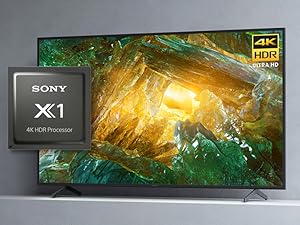
Image 5.1: The Sony X1 4K HDR Processor, central to enhanced picture quality.
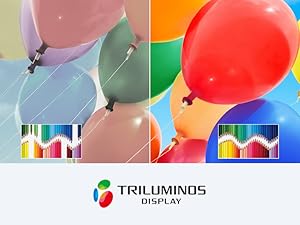
Image 5.2: Visual representation of the wide color gamut provided by the TRILUMINOS Display.
6. Maintenance
6.1 Cleaning the TV
- Screen: Gently wipe the screen with a soft, dry microfiber cloth. For stubborn smudges, lightly dampen the cloth with water or a screen-specific cleaning solution (never spray directly onto the screen).
- Frame and Stand: Use a soft, dry cloth to wipe dust from the TV frame and stand.
- Important: Always unplug the TV before cleaning. Avoid using harsh chemicals, abrasive cleaners, or solvents.
6.2 Software Updates
Your TV may receive automatic software updates to improve performance and add new features. Ensure your TV is connected to the internet to receive these updates. You can also manually check for updates in the TV's settings menu.
7. Troubleshooting
If you encounter issues with your TV, try the following basic troubleshooting steps:
- No Power: Ensure the power cord is securely plugged into both the TV and the wall outlet. Try a different outlet.
- No Picture/Sound: Check that the correct input source is selected. Verify all cable connections to external devices are secure.
- Remote Not Working: Replace the batteries in the remote control. Ensure there are no obstructions between the remote and the TV's IR sensor.
- Network Connection Issues: Restart your router and modem. Check the TV's network settings to ensure it's connected to the correct Wi-Fi network or Ethernet cable.
- Picture Quality Issues: Adjust picture settings (brightness, contrast, color) in the TV menu. Ensure the content source is high quality.
For more detailed troubleshooting, refer to the comprehensive help guide accessible through your TV's settings menu or visit the Sony support website.
8. Specifications
| Feature | Specification |
|---|---|
| Brand | Sony |
| Model Number | XBR65X800H |
| Screen Size | 64.5 Inches (Diagonal) |
| Display Technology | LED |
| Resolution | 4K Ultra HD (3840 x 2160) |
| Refresh Rate | 60 Hz |
| Processor | 4K HDR Processor X1 |
| Operating System | Android TV with Google Assistant |
| Connectivity | HDMI, USB, Wi-Fi, Ethernet, Bluetooth |
| Dimensions (W x D x H) | 57.63 x 13.5 x 35.38 inches (with stand) |
| Item Weight | 49.81 Pounds (with stand) |
9. Warranty and Support
Your Sony X800H TV comes with a manufacturer's warranty. For specific warranty details, please refer to the warranty card included with your product or visit the official Sony support website. For technical assistance, product registration, or to find service centers, please visit www.sony.com/electronics/support.


