
oneisall X2
Contents
oneisall Dog Clippers User Manual
Model: X2 | Brand: oneisall
Introduction
This manual provides comprehensive instructions for the safe and effective use, maintenance, and troubleshooting of your oneisall Dog Clippers. Designed for low noise and efficient grooming, these clippers are suitable for various pet hair types and sizes.
What's Included
Your oneisall Dog Grooming Kit includes the following components:
- Oneisall Dog Grooming Clipper (Gold)
- 6 Guide Guards (3 mm, 6 mm, 9 mm, 12 mm, 15 mm, 18 mm)
- Cleaning Brush
- Comb
- Scissor
- Charging Cable
- Lubricating Oil
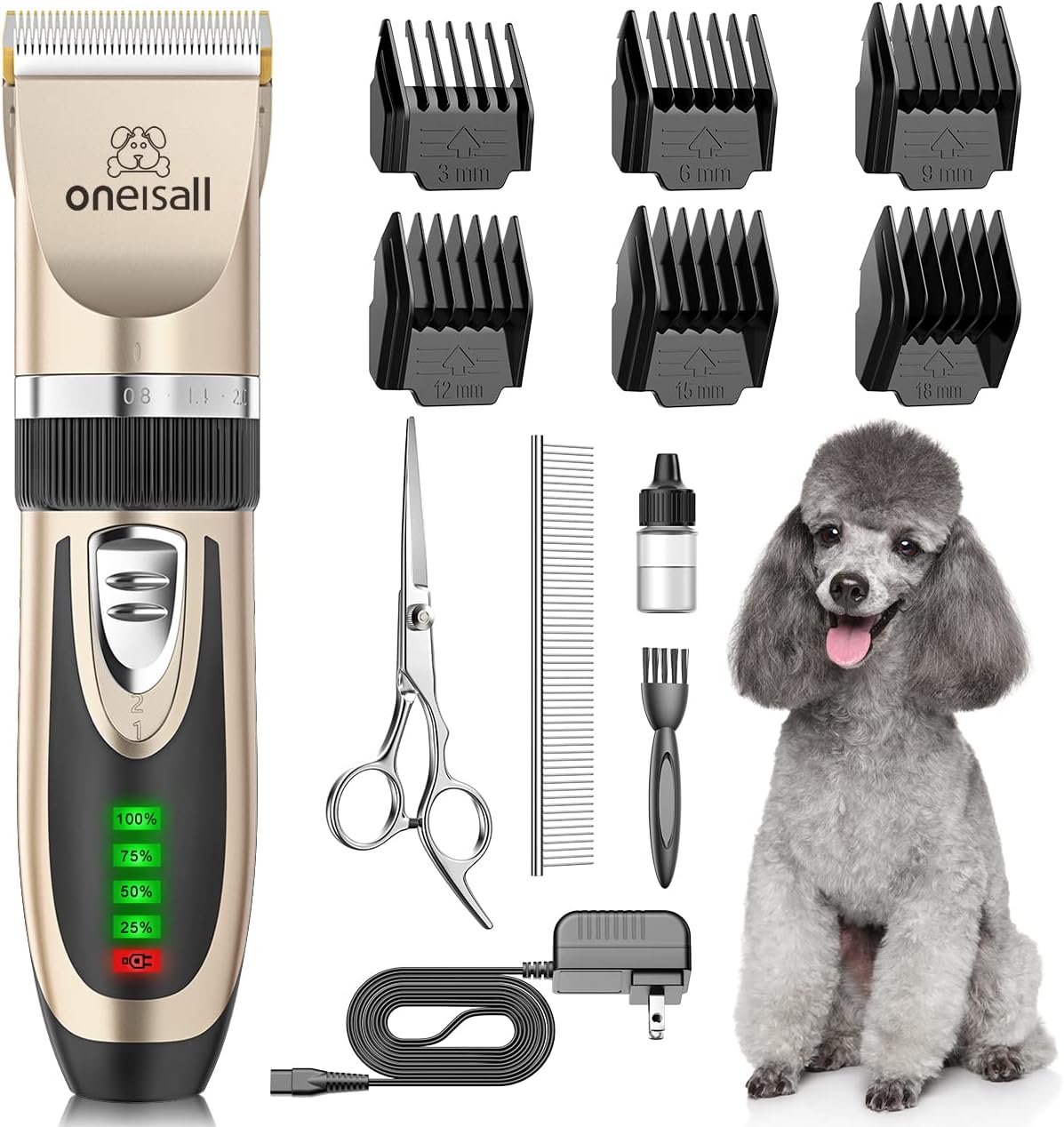
Figure 1: Complete Oneisall Dog Grooming Kit contents.
Setup
Charging the Clipper
Before first use, fully charge the clipper. Connect the charging cable to the clipper's charging port and plug it into a power outlet. The built-in LCD display will show the battery life percentage. A full charge takes approximately 3 hours and provides 3-4 hours of runtime.

Figure 2: LCD display showing battery life during charging or operation.
Attaching Guide Guards
Select the desired guide guard (3mm, 6mm, 9mm, 12mm, 15mm, or 18mm) based on the desired hair length. Align the guard with the clipper blade and push it firmly until it clicks into place. Ensure it is securely attached before use.

Figure 3: Various guide guards for different hair lengths.
Operating Instructions
Pre-Grooming Preparation
For best results, ensure your pet's coat is clean, dry, and free of tangles. For pets with long and thick hair, a preliminary trim with the included scissors can enhance the grooming experience and prevent clogging.
Powering On and Speed Selection
Press the power button to turn on the clipper. It features a 2-speed setting. Speed 1 is ideal for small dogs or general trimming, while Speed 2 provides more power for dogs with thick coats or matted fur.

Figure 4: Speed settings for optimal grooming based on pet size and coat thickness.
Grooming Technique
Hold the clipper firmly and move it in the direction of hair growth. Apply gentle, even pressure. The ultra-quiet and low vibration design (below 50 dB) helps keep pets calm during grooming.

Figure 5: The clipper's low noise level helps prevent startling pets during grooming.
Video 1: Demonstration of the oneisall Dog Clippers in action, highlighting its quiet operation and ease of use.
Maintenance
Cleaning the Blade
The ceramic blade is detachable and waterproof for easy cleaning. After each use, remove the blade by adjusting the gear to 0.8mm and pushing the blade down. Use the provided cleaning brush to remove any trapped hair. The blade can be rinsed directly under running water.

Figure 6: Step-by-step guide for detaching and reattaching the clipper blade for cleaning.
Lubricating the Blade
Apply a few drops of the provided lubricating oil to the blade before or after each use to ensure smooth operation and prolong blade life.
Troubleshooting
| Problem | Possible Cause | Solution |
|---|---|---|
| Clipper not turning on | Low battery; Power button not pressed firmly. | Charge the clipper fully; Press the power button firmly. |
| Clipper pulling hair | Dull blade; Hair is tangled or matted; Blade not oiled. | Clean and oil the blade; Pre-trim matted hair with scissors; Ensure hair is clean and dry. |
| Clipper getting warm | Extended use; Blade needs lubrication. | Allow clipper to cool down; Apply lubricating oil to the blade. |
Specifications
- Model: X2
- Item Weight: 7.2 ounces (205 Grams)
- Product Dimensions: 3.94 x 3.15 x 0.79 inches
- Material: Ceramic, Plastic
- Battery: 1 Lithium Polymer battery (included)
- Charging Time: Approximately 3 hours)
- Operating Time: 3-4 hours on a full charge
- Noise Level: Below 50 dB
- Adjustable Blade Settings: 0.8mm, 1.1mm, 1.4mm, 1.7mm, 2.0mm
- Guide Guard Lengths: 3mm, 6mm, 9mm, 12mm, 15mm, 18mm
Safety Information
WARNING:
- Keep away from face and eyes.
- Do not ingest or inhale small parts.
- Clean with a damp cloth.
- Not suitable for children; use under adult supervision.
Warranty and Support
Oneisall offers a 2-year warranty on this product. For any issues or support, please contact oneisall customer service. Many users have reported excellent warranty support and quick resolutions for product concerns.
For more information or to contact support, please visit the official oneisall Store on Amazon.
Ask a question about this manual
Ask about setup, troubleshooting, compatibility, parts, safety, or missing instructions. Manuals+ will review the question and use this page’s manual context to help answer it.