1. Introduction
Thank you for purchasing the EuropAce ETF 1129 Slim Tower Fan. This manual provides important information regarding the safe operation, installation, maintenance, and troubleshooting of your new appliance. Please read this manual thoroughly before use and retain it for future reference.
2. Safety Information
To reduce the risk of fire, electric shock, or injury, always observe the following basic safety precautions:
- Read all instructions before using this appliance.
- Ensure the power supply voltage matches the rating label on the fan.
- Do not immerse the fan, plug, or cord in water or other liquids.
- Unplug the fan from the power outlet when not in use, when moving it, and before cleaning.
- Do not operate the fan with a damaged cord or plug, or after the fan malfunctions or has been dropped or damaged in any manner.
- Keep the fan out of reach of children and pets.
- Do not insert fingers or any objects into the grille when the fan is operating.
- Place the fan on a stable, flat surface to prevent it from tipping over.
- Do not use the fan in areas with high humidity, such as bathrooms, or near water sources.
- Ensure adequate ventilation around the fan. Do not cover the fan.
3. Product Overview
3.1 Components
The EuropAce ETF 1129 is a slim tower fan designed for efficient air circulation. It features a sleek black finish and a stable base.
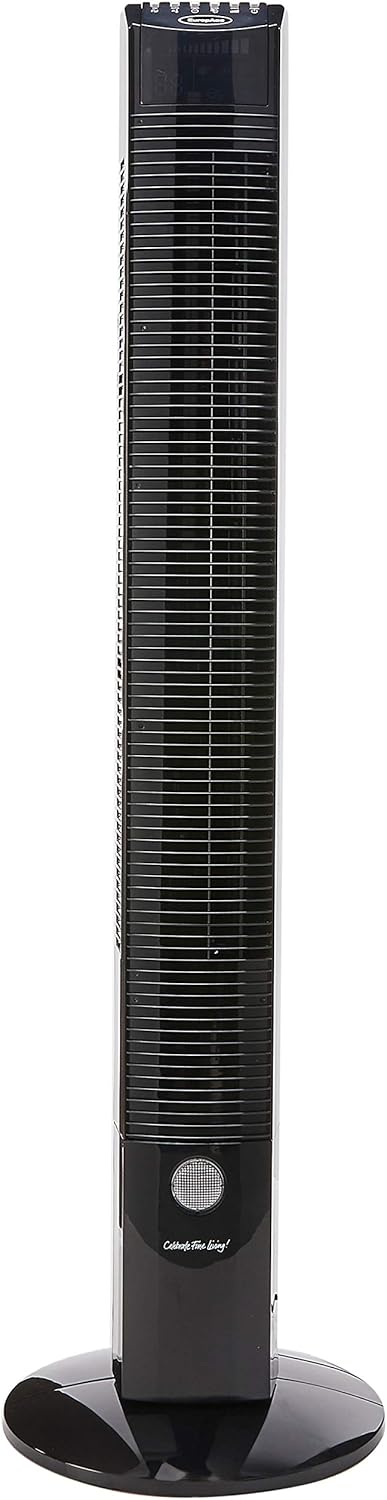
Figure 1: Front view of the EuropAce ETF 1129 Slim Tower Fan, showcasing its tall, slender design and integrated base.
3.2 Key Features
- Energy Efficient: Equipped with a 55W motor for optimized performance and energy saving.
- Wide Air Coverage: Features 70-degree oscillation for broad area cooling.
- Intelligent Display: Large LED display shows ambient room temperature.
- Multiple Speed Selection: 3 fan speed settings (Low, Medium, High).
- Operating Modes: Normal, Natural, and Sleep modes for varied comfort.
- Timer Function: Up to 8 hours timer for automatic shut-off.
- Ionizer Function: Helps to purify the air.
- Night Light Control: Integrated night light feature.
- No Blade Design: Safe and easy to clean.
4. Setup
The EuropAce ETF 1129 Tower Fan requires minimal assembly. Follow these steps to prepare your fan for use:
- Unpack: Carefully remove all components from the packaging.
- Base Assembly: The fan base typically comes in two parts. Align these two parts and secure them together. Then, attach the assembled base to the bottom of the tower fan using the provided screws. Ensure the base is firmly attached and stable.
- Placement: Place the fan on a firm, level surface, ensuring there is adequate space around it for optimal airflow and oscillation.
- Power Connection: Insert the power plug into a suitable electrical outlet.
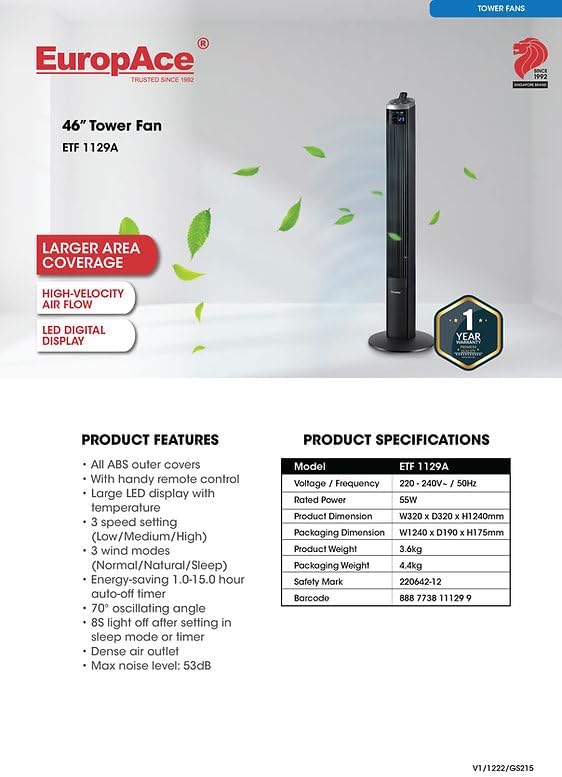
Figure 2: The tower fan fully assembled and ready for operation.
5. Operating Instructions
Your EuropAce ETF 1129 Tower Fan can be operated using the control panel on top of the unit or the included remote control.
5.1 Control Panel
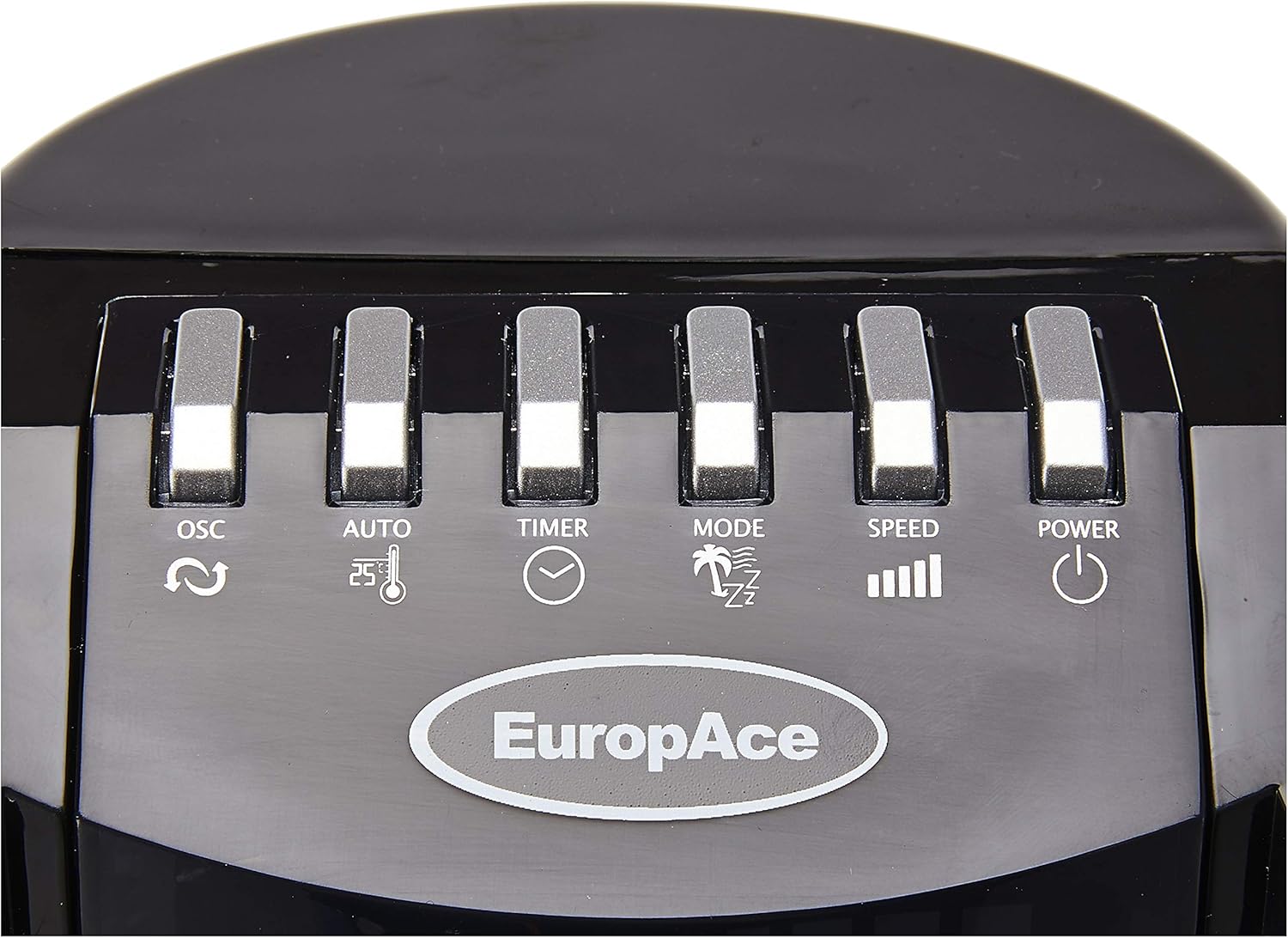
Figure 3: Control panel with buttons for Oscillation, Auto, Timer, Mode, Speed, and Power.
- POWER (⏻): Turns the fan On or Off.
- SPEED (▁▂▃▄): Adjusts the fan speed (Low, Medium, High).
- MODE (🌴⏰⏰): Cycles through Normal, Natural, and Sleep modes.
- TIMER (⏱): Sets the operating time from 1 to 8 hours.
- AUTO (⏰🌡): Activates the auto mode, which may adjust speed based on ambient temperature.
- OSC (↻): Turns the oscillation function On or Off.
5.2 Remote Control

Figure 4: Remote control with buttons for Power/Speed, Auto, Oscillation, Timer, Mode, Ion, and Light.
- POWER/SPEED (Green button with power symbol and bars): Turns the fan On/Off and cycles through speed settings.
- AUTO (⏰🌡): Activates the auto mode.
- OSC (↻): Turns oscillation On/Off.
- TIMER (⏱): Sets the operating time.
- MODE (🌴⏰⏰): Cycles through Normal, Natural, and Sleep modes.
- ION (⚡): Activates or deactivates the ionizer function.
- LIGHT (💡): Controls the night light feature.
5.3 Functions Explained
- Speed Selection: Press the SPEED button to cycle between Low, Medium, and High fan speeds.
- Oscillation: Press the OSC button to start or stop the fan's 70-degree oscillation, distributing air across a wider area.
- Timer: Press the TIMER button repeatedly to set the desired operating duration from 1 to 8 hours. The fan will automatically turn off after the set time.
- Operating Modes:
- Normal Mode: Provides a constant airflow at the selected speed.
- Natural Mode: Simulates natural breeze by varying fan speed intermittently.
- Sleep Mode: Operates silently with reduced fan speed and automatically turns off the LED display after 8 seconds for a peaceful night's rest.
- Ionizer: The ION button (on remote) activates the ionizer, which releases negative ions to help purify the air.
- Night Light: The LIGHT button (on remote) controls the integrated night light.
6. Maintenance and Cleaning
Regular cleaning and maintenance will ensure the longevity and optimal performance of your fan.
- Always unplug the fan from the power outlet before cleaning.
- Exterior Cleaning: Wipe the exterior surfaces of the fan with a soft, damp cloth. Do not use abrasive cleaners, waxes, or polishes as they may damage the finish.
- Dust Removal: Use a vacuum cleaner with a brush attachment to remove dust from the air intake and outlet grilles.
- Storage: If storing the fan for an extended period, cover it to protect it from dust and store it in a cool, dry place.
- Do not attempt to open the fan casing or modify the appliance. Refer all servicing to qualified personnel.
7. Troubleshooting
If you encounter issues with your fan, please consult the following table before contacting customer support.
| Problem | Possible Cause | Solution |
|---|---|---|
| Fan does not turn on. | No power supply. Power button not pressed. | Ensure the fan is plugged into a working outlet. Press the POWER button on the control panel or remote. |
| Weak or no airflow. | Fan speed set too low. Air inlets/outlets blocked. | Increase the fan speed. Check for and remove any obstructions from the grilles. |
| Oscillation not working. | Oscillation function is off. | Press the OSC button to activate oscillation. |
| Remote control not working. | Batteries are dead or incorrectly inserted. Obstruction between remote and fan. | Replace batteries with new ones, ensuring correct polarity. Remove any objects blocking the signal path. |
| Fan is unstable. | Base not properly assembled or secured. Fan placed on an uneven surface. | Ensure the base is correctly assembled and all screws are tightened. Place the fan on a flat, stable surface. |
8. Specifications
Detailed technical specifications for the EuropAce ETF 1129 Slim Tower Fan:
| Feature | Specification |
|---|---|
| Model | ETF 1129 |
| Brand | EuropAce |
| Power Consumption | 55W |
| Item Weight | 3.6 Kilograms |
| Product Dimensions (D x W x H) | 4.4D x 7.5W x 7.6H centimetres |
| Colour | Black |
| Electric Fan Design | Floor Fan |
| Power Source | Corded Electric |
| Special Features | Oscillating, Ionizer, Night Light, LED Display, Timer |
| Included Components | 1 x Tower Fan |
| Assembly Required | No (minimal base assembly may be required) |
| Type of Guarantee | 1 Year Warranty |
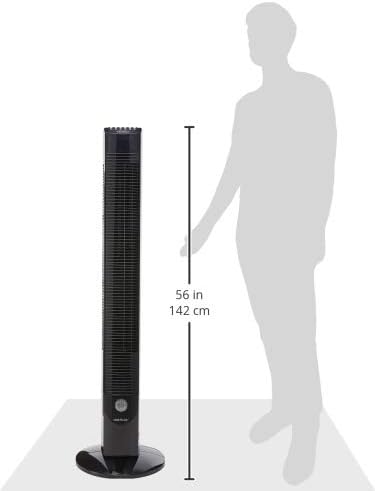
Figure 5: Approximate dimensions of the tower fan, showing a height of 142 cm (56 inches).
9. Warranty and Support
9.1 Warranty Information
The EuropAce ETF 1129 Slim Tower Fan comes with a 1 Year Warranty from the date of purchase. This warranty covers manufacturing defects under normal use. Please retain your proof of purchase for warranty claims.

Figure 6: EuropAce product information, confirming a 1-year warranty.
9.2 Customer Support
For technical assistance, warranty claims, or any inquiries regarding your EuropAce product, please contact EuropAce customer service through their official website or authorized service centers. Refer to your product packaging or the official EuropAce website for the most current contact information.


