
Miroir M29
Miroir M29 Portable Projector User Manual
Model: M29
1. Introduction
Thank you for choosing the Miroir M29 Portable Projector. This compact and versatile projector is designed for both home and outdoor entertainment, offering a convenient way to display content from various sources. With its built-in rechargeable battery and robust connectivity options, the M29 provides a portable cinematic experience wherever you go. This manual provides essential information for setting up, operating, maintaining, and troubleshooting your projector to ensure optimal performance and longevity.
Safety Information
- Do not block the ventilation openings. Ensure adequate airflow around the projector.
- Do not expose the projector to rain or moisture to prevent fire or electric shock.
- Use only the power adapter supplied with the projector.
- Avoid looking directly into the projector lens when the lamp is on.
- Keep the projector away from heat sources and direct sunlight.
- Do not attempt to disassemble or modify the projector. Refer all servicing to qualified personnel.
2. What's in the Box
Upon opening your Miroir M29 Portable Projector package, please verify that all the following items are included:
- Miroir M29 Portable Projector
- Power Cord
- HDMI Cable
- User Manual (this document)
3. Product Overview
The Miroir M29 is a compact and lightweight projector designed for portability and ease of use. Below are key visual references and descriptions of its components and features.

Figure 3.1: Front view of the Miroir M29 Portable Projector, showing the projection lens and integrated speaker grille.

Figure 3.2: Side view of the Miroir M29 Portable Projector, highlighting the connectivity ports: Audio Out, HDMI Input, USB 5V Out, and Micro USB for power/charging.

Figure 3.3: The Miroir M29 Portable Projector easily fits into a small bag, emphasizing its compact design and high portability for on-the-go use.
Key Features:
- Portable Design: Compact and lightweight, ideal for travel and outdoor use.
- Rechargeable Battery: Provides power for use without a constant power source.
- HDMI Connectivity: Connects to a wide range of devices including laptops, gaming consoles, and streaming sticks.
- Built-in Speakers: Two 1W speakers for integrated audio.
- Audio Out: 3.5mm audio jack for connecting external speakers or headphones.
- USB 5V Out: Can power certain external devices.
- Texas Instruments Advanced Chip Technology: For cinema-quality streaming.
- LED Lamp: Long-lasting LED lamp with up to 20,000 hours of projection time.
4. Setup
4.1 Charging the Projector
Before initial use, fully charge the projector. Connect the supplied power cord to the Micro USB port on the projector and plug the other end into a power outlet. The charging indicator light will illuminate. A full charge typically takes approximately 2-3 hours and provides up to 2 hours of battery life.
4.2 Connecting to a Source Device
The Miroir M29 connects to source devices primarily via HDMI.
- HDMI Connection:
- Connect one end of the provided HDMI cable to the HDMI port on the Miroir M29.
- Connect the other end of the HDMI cable to the HDMI output port on your source device (e.g., laptop, gaming console, streaming stick).
- Note for Apple Devices: Some Apple devices may require an Apple Digital AV Adapter (sold separately) to convert their output to HDMI.
- Note for Android Devices: Android devices with a USB-C video connector may require a USB-C to HDMI cable (must support Thunderbolt 3 or DisplayPort Alt Mode).
- Audio Output:
- The projector has two built-in 1W speakers.
- For enhanced audio, connect external speakers or headphones to the 3.5mm Audio Out port on the projector.
4.3 Projector Placement and Screen Size
The projection size varies depending on the distance between the projector and the projection surface. Ensure the surface is flat and light-colored for best results.
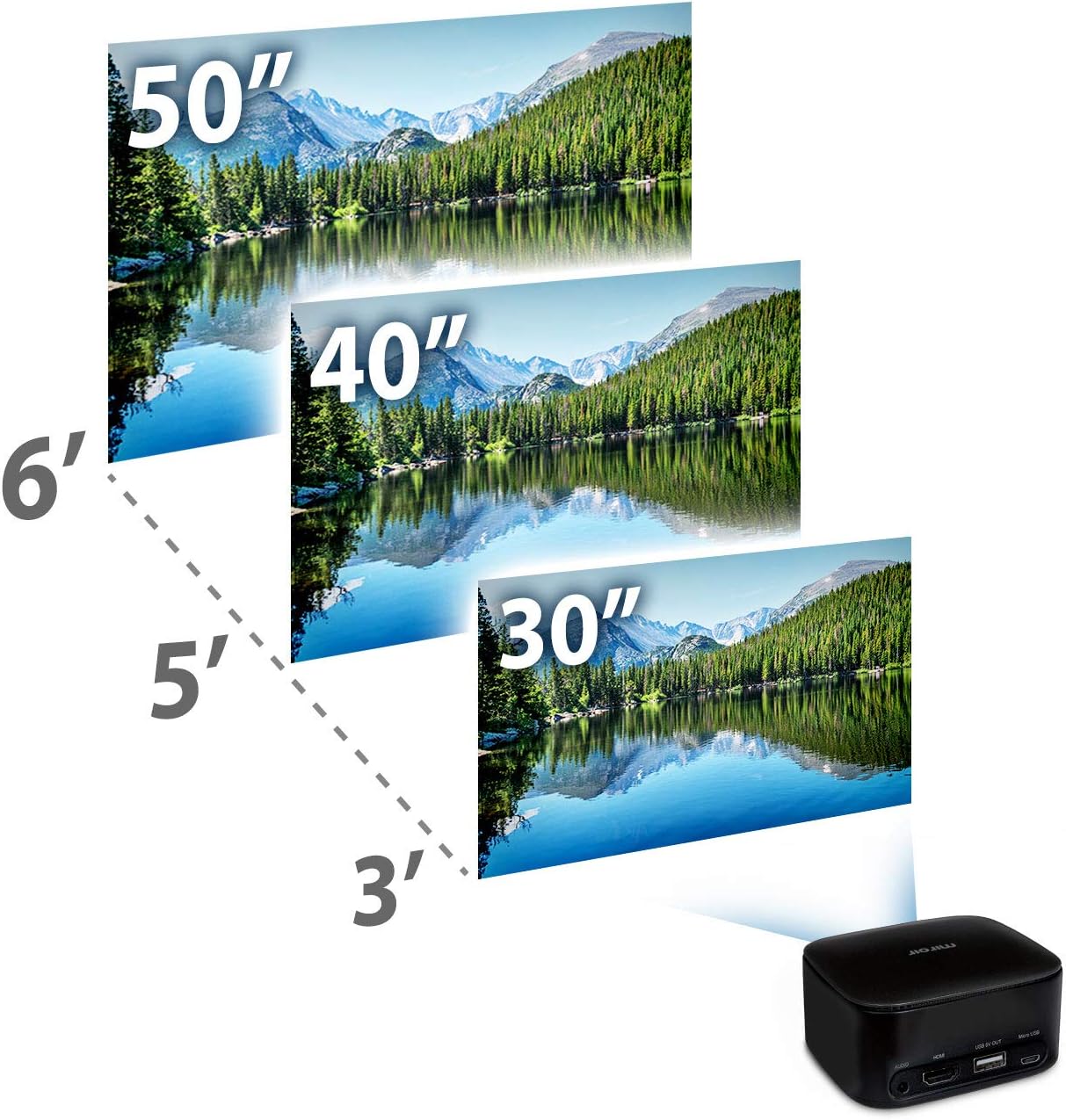
Figure 4.1: Recommended projection distances and corresponding screen sizes for the Miroir M29 Portable Projector.
| Projection Distance | Screen Size (Diagonal) |
|---|---|
| 3 feet (approx. 0.9 meters) | 30 inches (approx. 76 cm) |
| 5 feet (approx. 1.5 meters) | 40 inches (approx. 102 cm) |
| 6 feet (approx. 1.8 meters) | 50 inches (approx. 127 cm) |
The projector also features a screw area at the bottom, allowing it to be mounted on a standard camera tripod for easier adjustment of position and tilt.
5. Operating Instructions
5.1 Powering On/Off
- To Power On: Press and hold the power button located on the side of the projector until the projection lamp illuminates.
- To Power Off: Press and hold the power button again until the projection lamp turns off.
5.2 Adjusting Focus
The Miroir M29 features a manual focus wheel, typically located near the lens. Rotate this wheel until the projected image appears sharp and clear on your screen or surface.
5.3 Using with Various Devices
The M29 projector is compatible with a wide array of devices, making it suitable for various entertainment and presentation needs.

Mobile Devices
(Requires adapter)

Laptops
(Via HDMI)

Gaming Consoles
(Via HDMI)

Streaming Devices
(Via HDMI)
Simply connect your desired device to the projector's HDMI input. Ensure your device's display settings are configured to output to an external display if necessary.
5.4 Example Usage Scenarios
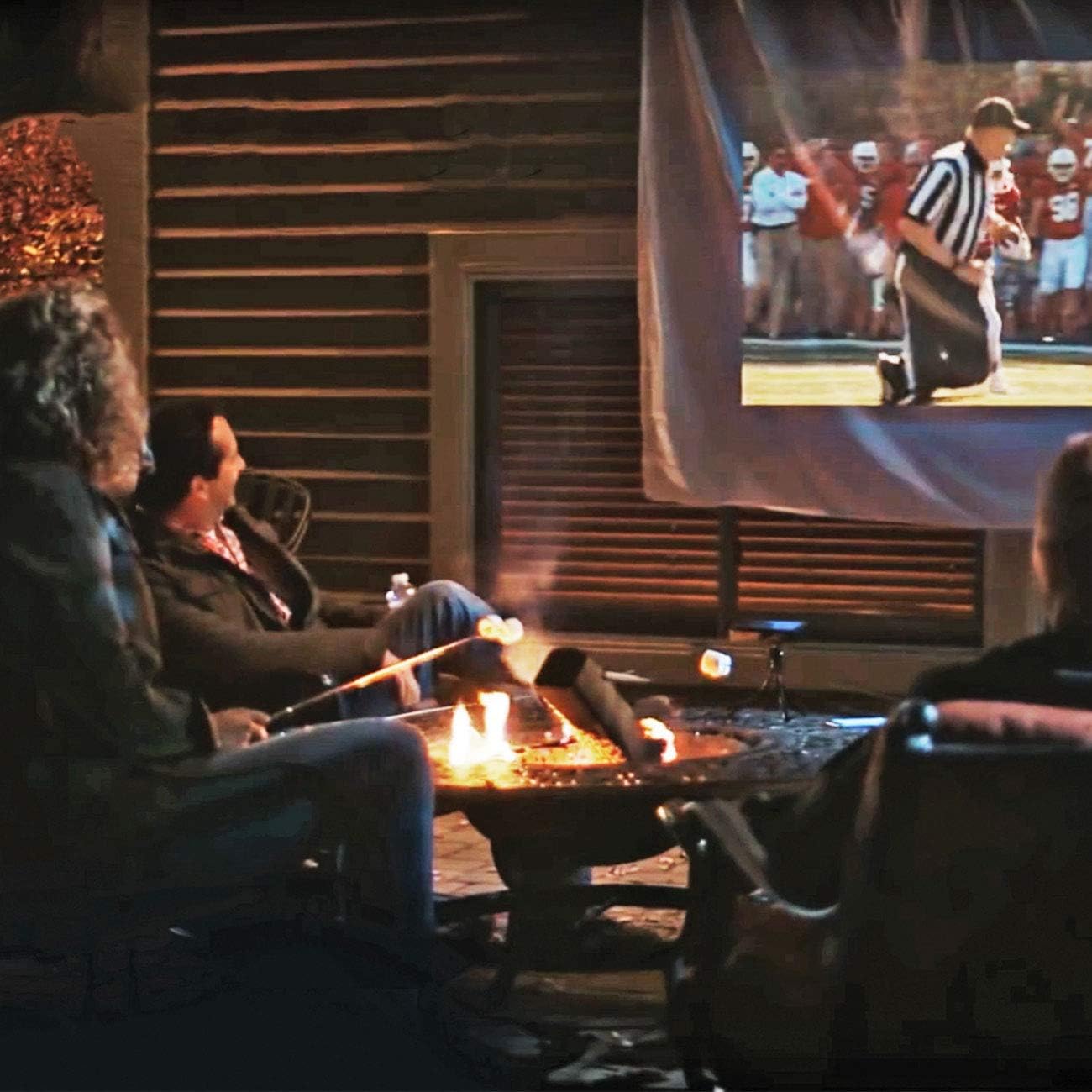
Figure 5.1: The Miroir M29 is ideal for outdoor entertainment, allowing you to project movies or sports events in a backyard setting.

Figure 5.2: Enjoy a cinematic experience indoors by projecting content onto any suitable wall or screen.
6. Maintenance
6.1 Cleaning the Projector
- Lens: Use a soft, lint-free cloth specifically designed for optical lenses. Gently wipe the lens to remove dust or smudges. Do not use abrasive cleaners or excessive force.
- Exterior: Wipe the projector's exterior with a soft, dry cloth. For stubborn marks, slightly dampen the cloth with water. Avoid using harsh chemicals or solvents.
- Ventilation Openings: Periodically check the ventilation openings for dust accumulation. Use a soft brush or compressed air (held at a distance) to clear any blockages.
6.2 Storage
When not in use, store the projector in a cool, dry place, away from direct sunlight and extreme temperatures. If storing for an extended period, ensure the battery is partially charged (around 50%) to help preserve battery health.
7. Troubleshooting
If you encounter issues with your Miroir M29 Portable Projector, please refer to the following common problems and their solutions.
| Problem | Possible Cause | Solution |
|---|---|---|
| Projector does not turn on. | Low battery or no power. | Ensure the projector is fully charged or connected to a power source. Press and hold the power button for a few seconds. |
| No image projected. | Incorrect input source, loose cable, or source device issue. | Verify the HDMI cable is securely connected to both the projector and the source device. Check if the source device is powered on and outputting video. Ensure necessary adapters are used for mobile devices. |
| Image is blurry or out of focus. | Focus not adjusted, or projector too close/far from surface. | Rotate the manual focus wheel until the image is clear. Adjust the distance of the projector from the projection surface. |
| No sound from projector. | Volume too low, external speakers connected, or source device audio issue. | Increase the volume on both the projector and the source device. Disconnect any external audio devices from the 3.5mm audio jack if you wish to use the built-in speakers. |
| Short battery life. | Battery degradation or high power consumption. | Ensure the projector is fully charged before use. Battery life can vary based on usage and age. For extended use, operate while connected to power. |
If the problem persists after trying these solutions, please contact customer support for further assistance.
8. Specifications
Detailed technical specifications for the Miroir M29 Portable Projector:
| Feature | Detail |
|---|---|
| Model Number | M29 |
| Product Dimensions | 3.46 x 3.46 x 1.69 inches (8.79 x 8.79 x 4.29 cm) |
| Item Weight | 10 ounces (approx. 283 grams) |
| Display Resolution | 640 x 360 pixels (360p) |
| Aspect Ratio | 16:9 |
| Connectivity Technology | HDMI |
| Special Feature | Portable |
| Recommended Uses | Home Cinema, Gaming |
| Brand | Miroir |
| Manufacturer | Miroir USA |
| Country of Origin | Vietnam |
| Batteries | 1 Lithium Ion battery (included) |
| LED Lamp Life | Up to 20,000 hours |
| Built-in Speakers | Two 1W speakers |
9. Warranty & Support
9.1 Product Condition and Returns
This product is sold as "Renewed Premium." Renewed Premium products are inspected and tested to work and look like new by Amazon-qualified suppliers. They come with a 365-day return policy from Amazon, ensuring your satisfaction.
9.2 Additional Resources
For further assistance or to download the official PDF user manual, please visit the following link:
For customer service inquiries, please contact Miroir USA or refer to the support channels provided by your retailer.
Related documentsM29


Ask a question about this manual
Ask about setup, troubleshooting, compatibility, parts, safety, or missing instructions. Manuals+ will review the question and use this page’s manual context to help answer it.