
Makita DTD156Z
Makita DTD156Z 18V Li-ion LXT Impact Driver User Manual
Model: DTD156Z
1. Introduction
This manual provides essential information for the safe and effective operation, maintenance, and troubleshooting of your Makita DTD156Z 18V Li-ion LXT Impact Driver. Please read this manual thoroughly before using the tool to ensure proper handling and to maximize its lifespan.
The Makita DTD156Z is a compact and lightweight impact driver designed for a wide range of fastening applications, delivering high torque and speed. It is powered by an 18V Li-ion LXT slide-type battery (not included).
2. Safety Information
WARNING: Always read and understand all safety warnings, instructions, illustrations, and specifications provided with this power tool. Failure to follow all instructions listed below may result in electric shock, fire, and/or serious injury.
General Power Tool Safety Warnings
- Work Area Safety: Keep work area clean and well lit. Cluttered or dark areas invite accidents.
- Electrical Safety: Do not expose power tools to rain or wet conditions. Water entering a power tool will increase the risk of electric shock.
- Personal Safety: Stay alert, watch what you are doing, and use common sense when operating a power tool. Do not use a power tool while you are tired or under the influence of drugs, alcohol, or medication.
- Tool Use and Care: Do not force the power tool. Use the correct power tool for your application. The correct power tool will do the job better and safer at the rate for which it was designed.
- Battery Use: This tool is designed for use with Makita 18V Li-ion LXT slide-type batteries. The DTD156Z is not compatible with G-Series batteries. Use of non-genuine or compatible batteries and chargers will invalidate the Makita guarantee.
3. Package Contents
Upon opening the package, ensure all items listed below are present and undamaged:
- 1 x Makita DTD156Z 18V Li-ion LXT Impact Driver
- 1 x Belt clip
- Instruction Manual (this document)
Note: Batteries and charger are not included and must be purchased separately.
4. Setup
4.1 Battery Installation and Removal
The Makita DTD156Z operates with 18V Li-ion LXT slide-type batteries. Ensure the battery is fully charged before use.

Figure 4.1: Makita DTD156Z Impact Driver. The battery (not included) slides into the base.
- To Install: Align the battery with the grooves in the tool's housing and slide it in until it locks into place with a slight click.
- To Remove: Press the release button on the battery pack and slide the battery out of the tool.
Important: Always ensure the battery is securely latched before operation. Do not force the battery.
4.2 Bit Installation
This impact driver uses 1/4" hex shank bits.

Figure 4.2: Close-up view of the impact driver's chuck for bit insertion.
- Pull the sleeve of the chuck forward.
- Insert the bit into the chuck as far as it will go.
- Release the sleeve to lock the bit in place. Pull on the bit to ensure it is securely fastened.
5. Operating Instructions
The Makita DTD156Z is designed for efficient fastening with its powerful impact mechanism.

Figure 5.1: The Makita DTD156Z in action, demonstrating its use for driving screws.
5.1 Power Switch and Variable Speed Control
The tool is equipped with a trigger switch for power control and variable speed. The speed increases with the pressure applied to the trigger.
- To start the tool, pull the trigger switch.
- To stop the tool, release the trigger switch.
- The built-in LED job light illuminates the work area when the trigger is pulled.
5.2 Forward and Reverse Rotation
A lever switch located above the trigger controls the direction of rotation.

Figure 5.2: Detail of the forward/reverse rotation switch on the Makita DTD156Z.
- For forward rotation (tightening), push the lever from the right side.
- For reverse rotation (loosening), push the lever from the left side.
- When the lever is in the center position, the trigger switch is locked, preventing accidental startup.
5.3 Electronic Brake
The tool features an electronic brake for increased operator safety. The chuck stops quickly when the trigger is released.
5.4 Belt Clip
The included belt clip can be attached to either side of the tool for convenient carrying.
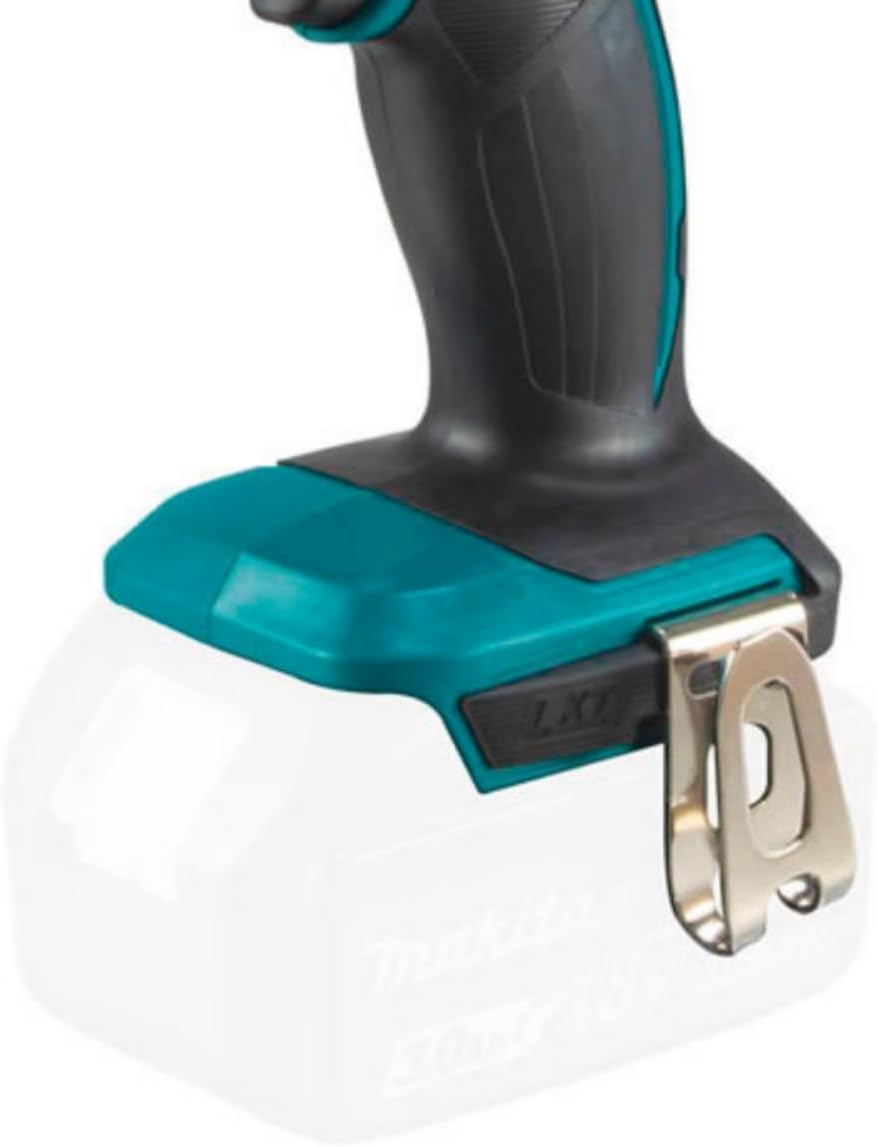
Figure 5.3: The belt clip attachment point on the base of the Makita DTD156Z.
6. Maintenance
Regular maintenance ensures optimal performance and extends the life of your tool.
- Cleaning: Keep the tool's ventilation openings clean to prevent overheating. Wipe the tool body with a dry cloth. Do not use gasoline, thinners, or alcohol.
- Inspection: Periodically check the tool for any damage, loose screws, or worn parts.
- Carbon Brushes: The motor utilizes carbon brushes. Have them inspected and replaced by a Makita authorized service center when they are worn.
- Storage: Store the tool in a dry, secure place out of reach of children. Remove the battery pack when storing for extended periods.
Note: For any repairs or detailed maintenance not covered here, contact a Makita authorized service center.
7. Troubleshooting
| Problem | Possible Cause | Solution |
|---|---|---|
| Tool does not start. | Battery not inserted correctly or discharged. Forward/reverse lever in center (locked) position. | Ensure battery is fully charged and properly inserted. Move the forward/reverse lever to either forward or reverse position. |
| Reduced power or performance. | Battery charge is low. Worn carbon brushes. | Recharge the battery. Have carbon brushes inspected and replaced by a service center. |
| Bit not holding securely. | Bit not fully inserted. Chuck mechanism is dirty or damaged. | Clean the chuck mechanism. If problem persists, seek professional service. |
8. Specifications
| Feature | Detail |
|---|---|
| Model Number | DTD156Z |
| Voltage | 18 Volts |
| Power Source | Battery Powered (Li-ion LXT) |
| Maximum Tightening Torque | 155 Nm (Newton Meters) |
| No Load Speed | Up to 2,500 RPM |
| Impacts Per Minute (IPM) | Up to 3,000 IPM |
| Machine Screw Capacity | M4 to M8 |
| Standard Bolt Capacity | M5 to M14 |
| High Strength Bolt Capacity | M5 to M12 |
| Coarse Thread Screw Capacity | 22mm to 125mm |
| Chuck Size | 22 Millimeters (1/4" Hex) |
| Material | Aluminium (hammer case) |
| Item Weight | Approximately 1 Grams (tool only, without battery) |
| Product Dimensions | 0.16"L x 0.16"W x 0.16"H |
| Special Features | Reverse Rotation, Variable Speed, Electronic Brake, LED Job Light |
9. Warranty and Support
9.1 Manufacturer's Warranty
Makita offers a 1-year manufacturer warranty on this product. An additional 2 years of warranty can be obtained by registering the product within 30 days of purchase. Please refer to the official Makita website for registration details.
Important: This guarantee does not apply where non-genuine or recommended parts or accessories are fitted to the tool. The use of non-genuine or compatible batteries and chargers with Makita tools will invalidate the Makita guarantee for our tools.
9.2 Customer Support
For technical assistance, service, or warranty claims, please contact Makita customer support or visit their official website. You can find contact information and service center locations on the Makita Store on Amazon or the official Makita website.
Related documentsDTD156Z


Ask a question about this manual
Ask about setup, troubleshooting, compatibility, parts, safety, or missing instructions. Manuals+ will review the question and use this page’s manual context to help answer it.